
Comparison Seagate SkyHawk +Rescue ST2000VX017 2 TB vs WD Blue WD20EZAZ 2 TB 256/5400
Add to comparison | 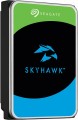 | 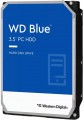 |
|---|---|---|
| Seagate SkyHawk +Rescue ST2000VX017 2 TB | WD Blue WD20EZAZ 2 TB 256/5400 | |
| Compare prices 1 | Compare prices 3 | |
| User reviews | ||
| TOP sellers | ||
| Placement | built-in | built-in |
| Type | HDD | HDD |
| Features | for PC | for PC |
| Volume | 2 TB | 2 TB |
| Form factor | 3.5 " | 3.5 " |
| Connection | SATA3 | SATA3 |
| Manufacturer's warranty | 2 years | |
Technical specs | ||
| Cache memory | 256 MB | 256 MB |
| Record technology | CMR | SMR |
| RPM | 5400 rpm | 5400 rpm |
| Data transfer rate | 180 MB/s | 180 MB/s |
Features | ||
| Features | for video surveillance | |
General | ||
| Size | 147x102x20 mm | 147x102x26 mm |
| Weight | 415 g | |
| Added to E-Catalog | may 2023 | july 2020 |


Compare Seagate SkyHawk +Rescue ST2000VX017 and WD Blue WD20EZAZ
You may be interested in
My comparisons
Seagate SkyHawk +Rescue often compared


WD Blue often compared


Glossary
Manufacturer's warranty
Manufacturer's warranty provided for this model.
In fact, this is the minimum service life promised by the manufacturer, subject to the rules of operation. Most often, the actual service life of the device is much longer than the guaranteed one.
In fact, this is the minimum service life promised by the manufacturer, subject to the rules of operation. Most often, the actual service life of the device is much longer than the guaranteed one.
Record technology
— CMR(Conventional Magnetic Recording) is a classic method of magnetic recording, characterized by high data access speed. CMR hard drives are used in systems where it is important to provide high (as far as possible) data read/write speed. These are user computers, security video surveillance systems, etc. The main disadvantage of CMR hard drives is the high complexity of creating volume drives, which is reflected in their price. Additionally, HDDs with CMR technology are quite “gluttonous” in terms of power supply.
— SMR(Shingled Magnetic Recording) — a promising technology for magnetic recording, which is called "tiled". SMR allows to achieve high data density, which in turn increases the capacity of memory drives and lowers their market value. SMR hard drives have slow rewriting speed, which makes such memory drives poorly suited for use in client computer systems. But they have proven themselves well when working as part of data processing centers, archives and similar systems for which low write / rewrite speed is not critical. However, some companies still produce SMR solutions for personal and even mobile systems. These HDDs use an optimized write/rewrite technology called Drive-Managed SMR (DM-SMR).
Features
— Wi-Fi module. The hard drive has its own Wi-Fi module. The Wi-Fi standard was originally created for building wireless computer networks, but can also be used for direct connection to various devices. Disks with this function can be used as network drives — data storages that can be accessed by every network user. They are also useful for smartphones and tablets: the built-in memory of such devices rarely exceeds a couple of tens of gigabytes, and external storage can come in handy. Many Wi-Fi drives are initially optimized for use with portable electronics (and some are even designed for specific popular models), but anyway, you should make sure that the drive and gadget are compatible in advance.
— Shock-resistant body. A housing that protects the hardware of the hard drive from shock and shock. It is undesirable to specifically drop such media, but anyway, they endure falls better than unprotected counterparts. The specific degree of impact protection should be specified separately; the traditional indicator is resistance to falls from a height of 1 – 1.5 m.
— Data encryption. Ensures the security of storing information on the disk: access to encrypted information can only be obtained by someone who knows the password. The encryption module is an integral part of the drive and does not depend on the computer to which it is connected. The ability to encrypt data is critical if you pl...an to write confidential information to discs; this feature is especially useful for portable drives and laptop drives, which are more at risk of theft than fixed systems and their components.
— Built-in USB connector. USB plug provided in the design of the drive itself. Thus, no additional cables, adapters, etc. are required to connect such a disk to the computer's USB port.
— Backup button. A separate button for starting the file backup procedure, located on the case of an external hard drive. When pressed, the important information for the user contained on the disc is automatically copied to a predefined folder. It is worth considering that the backup settings must be manually configured beforehand.
— Energy saving mode. Drives with power save mode, other things being equal, consume less electricity than conventional drives — both during operation and in standby mode. They usually have a low rotational speed (see Spindle speed (rpm)). Reduced power consumption is especially important for laptop drives, as it allows longer battery life.
— Shock-resistant body. A housing that protects the hardware of the hard drive from shock and shock. It is undesirable to specifically drop such media, but anyway, they endure falls better than unprotected counterparts. The specific degree of impact protection should be specified separately; the traditional indicator is resistance to falls from a height of 1 – 1.5 m.
— Data encryption. Ensures the security of storing information on the disk: access to encrypted information can only be obtained by someone who knows the password. The encryption module is an integral part of the drive and does not depend on the computer to which it is connected. The ability to encrypt data is critical if you pl...an to write confidential information to discs; this feature is especially useful for portable drives and laptop drives, which are more at risk of theft than fixed systems and their components.
— Built-in USB connector. USB plug provided in the design of the drive itself. Thus, no additional cables, adapters, etc. are required to connect such a disk to the computer's USB port.
— Backup button. A separate button for starting the file backup procedure, located on the case of an external hard drive. When pressed, the important information for the user contained on the disc is automatically copied to a predefined folder. It is worth considering that the backup settings must be manually configured beforehand.
— Energy saving mode. Drives with power save mode, other things being equal, consume less electricity than conventional drives — both during operation and in standby mode. They usually have a low rotational speed (see Spindle speed (rpm)). Reduced power consumption is especially important for laptop drives, as it allows longer battery life.