
Comparison ASRock B550M Pro4 vs ASRock B550 Pro4
Add to comparison | 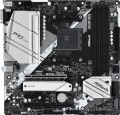 | 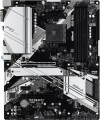 |
|---|---|---|
| ASRock B550M Pro4 | ASRock B550 Pro4 | |
| Compare prices 14 | Compare prices 5 | |
| User reviews | ||
| TOP sellers | ||
Supports Ryzen 3000 and 4000-series processors. Ultra-fast PCIe 4.0 bus. Overclocking RAM to 4733 MHz. Two M.2 slots for SSD and one M.2 for Wi-Fi. USB 3.2 Gen 2 ports. | ||
| Features | gaming | gaming |
| Socket | AM4 | AM4 |
| Form factor | micro-ATX | ATX |
| Power phases | 8 | 8 |
| VRM heatsink |  | |
| LED lighting |  | |
| Lighting sync | ASRock Polychrome Sync | |
| Size (HxW) | 244x244 mm | 305x244 mm |
Chipset | ||
| Chipset | AMD B550 | AMD B550 |
| BIOS | Ami | Ami |
| UEFI BIOS | | |
RAM | ||
| DDR4 | 4 slot(s) | 4 slot(s) |
| Memory module | DIMM | DIMM |
| Operation mode | 2 channel | 2 channel |
| Max. clock frequency | 4733 MHz | 4733 MHz |
| Max. memory | 128 GB | 128 GB |
| XMP | | |
Drive interface | ||
| SATA 3 (6Gbps) | 6 | 6 |
| M.2 connector | 2 | 2 |
| M.2 | 1xSATA/PCIe 2x, 1xPCIe 4x | 1xSATA/PCIe 2x, 1xPCIe 4x |
| M.2 SSD cooling | | |
| Integrated RAID controller | | |
Expansion slots | ||
| 1x PCIe slots | 1 pcs | 3 pcs |
| PCIe 16x slots | 2 pcs | 2 pcs |
| PCIe modes | 16x/4x | 16x/4x |
| PCIe support | 4.0 | 4.0 |
| CrossFire (AMD) | | |
| Steel PCIe connectors | | |
Internal connections | ||
| TPM connector | | |
| USB-A 2.0 | 2 pcs | 2 pcs |
| USB-A 5Gbps | 2 pcs | 1 pcs |
| ARGB LED strip | 2 | |
| RGB LED strip | 2 | |
Video outputs | ||
| D-Sub output (VGA) | | |
| HDMI output | | |
| HDMI version | v2.1 | v2.1 |
| DisplayPort | | |
| DisplayPort version | v.1.4 | |
Integrated audio | ||
| Audiochip | Realtek ALC1200 | Realtek ALC1200 |
| Sound (channels) | 7.1 | 7.1 |
Network interfaces | ||
| LAN (RJ-45) | 1 Gbps | 1 Gbps |
| LAN ports | 1 | 1 |
| LAN controller | Realtek RTL8111H | Realtek RTL8111H |
External connections | ||
| USB-A 2.0 | 2 pcs | |
| USB-A 5Gbps | 4 pcs | 4 pcs |
| USB-A 10Gbps | 1 pcs | 1 pcs |
| USB-C 10Gbps | 1 pcs | 1 pcs |
| PS/2 | 1 | 1 |
Power connectors | ||
| Main power socket | 24-pin | 24-pin |
| CPU power | 8-pin | 8+4-pin |
| Fan power connectors | 6 | 6 |
| CPU Fan 4-pin | 1 | |
| CPU/Water Pump Fan 4-pin | 1 | |
| Chassis/Water Pump Fan 4-pin | 4 | |
| Added to E-Catalog | may 2020 | may 2020 |




Compare ASRock B550M Pro4 and B550 Pro4
Price comparison
You may be interested in
My comparisons
ASRock B550M Pro4 often compared


ASRock B550 Pro4 often compared


Glossary
Form factor
The form factor of the motherboard determines, first of all, its physical dimensions, and, accordingly, a number of parameters directly related to them: type of computer case, installation method, type of power connector, number of slots for additional boards (expansion slots), etc. At the moment, there are such main form factors of motherboards:
— ATX. One of the most common form factors for PC motherboards. The standard size of such a board is 30.5x24.4 cm, it has up to 7 expansion slots and a 24-pin or (less often, in older models) 20-pin power connector.
— Micro-ATX. A slightly reduced version of the ATX form factor, with more compact dimensions (usually 24.4x24.4 cm) and, accordingly, fewer places for peripherals — there are usually only two slots for "RAM", expansion slots — from two to four. Nevertheless, despite the limited size, such boards can be intended for quite powerful systems.
— Mini-ITX. Motherboards of compact dimensions (17x17 cm). Designed for use primarily in small form factor computers (small form factor, SFF), in other words, compact PCs. According to the mounting specifications and the location of connectors and slots, they are compatible with ATX standard cases. They usually have one expansion slot.
— mini-STX. Another representative of compact form factors, assuming a boar...d size of 140x147 mm. Thus, the overall size is almost a third smaller than mini-ITX. At the same time, such motherboards often have seats for fairly powerful processors (for example, the LGA 1151 socket for Intel Core chips) and are made based on the corresponding TDP values. But expansion slots, usually, are absent.
— micro DTX. A relatively new compact form factor, which is not common, mainly among rather specific motherboards — in particular, models designed for cases in the PIO form factor. This form factor is characterized by a very small size and weight and allows you to mount the case directly behind the monitor, on a standard VESA mount. One of the features of "motherboards" for such systems is that the graphics card is installed along the board, and not perpendicularly — accordingly, the PCIe 16x connector (see below) has a non-standard location. At the same time, micro-DTX boards are similar in terms of fasteners to microATX and can be used in cases of the corresponding form factor (except that additional equipment may be required for the correct installation of a graphics card). The standard size of such a board is 170 x 170 mm, similar to mini-ITX.
— mini DTX. An intermediate format between the microDTX described above and the original DTX; sometimes also described as an extended mini-ITX version. It has a standard size of 170 x 203 mm and can be equipped with two expansion slots (mini-ITX and mini-DTX have one such slot); it is completely similar in application — it is intended mainly for compact cases, in particular, HTPC computers.
— XL-ATX. Larger version of the ATX form factor. While not yet a common standard, size options include 32.5x24.4cm with 8 expansion slots and 34.3x26.2cm with up to 9 expansion slots.
— Thin mini-ITX. A “thin” version of the reduced mini-ITX form factor described above: according to the official specification, the total thickness of the thin mini-ITX board should not exceed 25 mm. Also designed for the most miniature computers — in particular, HTPC.
— E-ATX. The letter E in the name of this form factor stands for "Extended" — extended. True to its name, E-ATX is another enlarged version of ATX using 30.5x33cm boards.
— EEB. Full name SSI EEB. The form factor used in server systems (see “By direction”) provides a board size of 30.5x33 cm.
— CEB. The full name is SSI CEB. Another form factor of "server" motherboards. In fact, it is a narrower version of the EEB described above, with a width reduced to 25.9 cm (with the same height of 30.5 cm).
— flex-ATX. One of the compact variations of ATX, which provides board dimensions of less than 229x191 mm, as well as less than 3 expansion slots. At the same time, in terms of the location of the mounting holes, this standard is identical to microATX; in fact, it was developed as a potential replacement for the latter, but for a number of reasons it did not receive much distribution, although it continues to be produced.
— Non-standard (Custom). The name Proprietary is also used. Motherboards that do not conform to standard form factors and are designed for cases of special sizes (usually branded ones).
— ATX. One of the most common form factors for PC motherboards. The standard size of such a board is 30.5x24.4 cm, it has up to 7 expansion slots and a 24-pin or (less often, in older models) 20-pin power connector.
— Micro-ATX. A slightly reduced version of the ATX form factor, with more compact dimensions (usually 24.4x24.4 cm) and, accordingly, fewer places for peripherals — there are usually only two slots for "RAM", expansion slots — from two to four. Nevertheless, despite the limited size, such boards can be intended for quite powerful systems.
— Mini-ITX. Motherboards of compact dimensions (17x17 cm). Designed for use primarily in small form factor computers (small form factor, SFF), in other words, compact PCs. According to the mounting specifications and the location of connectors and slots, they are compatible with ATX standard cases. They usually have one expansion slot.
— mini-STX. Another representative of compact form factors, assuming a boar...d size of 140x147 mm. Thus, the overall size is almost a third smaller than mini-ITX. At the same time, such motherboards often have seats for fairly powerful processors (for example, the LGA 1151 socket for Intel Core chips) and are made based on the corresponding TDP values. But expansion slots, usually, are absent.
— micro DTX. A relatively new compact form factor, which is not common, mainly among rather specific motherboards — in particular, models designed for cases in the PIO form factor. This form factor is characterized by a very small size and weight and allows you to mount the case directly behind the monitor, on a standard VESA mount. One of the features of "motherboards" for such systems is that the graphics card is installed along the board, and not perpendicularly — accordingly, the PCIe 16x connector (see below) has a non-standard location. At the same time, micro-DTX boards are similar in terms of fasteners to microATX and can be used in cases of the corresponding form factor (except that additional equipment may be required for the correct installation of a graphics card). The standard size of such a board is 170 x 170 mm, similar to mini-ITX.
— mini DTX. An intermediate format between the microDTX described above and the original DTX; sometimes also described as an extended mini-ITX version. It has a standard size of 170 x 203 mm and can be equipped with two expansion slots (mini-ITX and mini-DTX have one such slot); it is completely similar in application — it is intended mainly for compact cases, in particular, HTPC computers.
— XL-ATX. Larger version of the ATX form factor. While not yet a common standard, size options include 32.5x24.4cm with 8 expansion slots and 34.3x26.2cm with up to 9 expansion slots.
— Thin mini-ITX. A “thin” version of the reduced mini-ITX form factor described above: according to the official specification, the total thickness of the thin mini-ITX board should not exceed 25 mm. Also designed for the most miniature computers — in particular, HTPC.
— E-ATX. The letter E in the name of this form factor stands for "Extended" — extended. True to its name, E-ATX is another enlarged version of ATX using 30.5x33cm boards.
— EEB. Full name SSI EEB. The form factor used in server systems (see “By direction”) provides a board size of 30.5x33 cm.
— CEB. The full name is SSI CEB. Another form factor of "server" motherboards. In fact, it is a narrower version of the EEB described above, with a width reduced to 25.9 cm (with the same height of 30.5 cm).
— flex-ATX. One of the compact variations of ATX, which provides board dimensions of less than 229x191 mm, as well as less than 3 expansion slots. At the same time, in terms of the location of the mounting holes, this standard is identical to microATX; in fact, it was developed as a potential replacement for the latter, but for a number of reasons it did not receive much distribution, although it continues to be produced.
— Non-standard (Custom). The name Proprietary is also used. Motherboards that do not conform to standard form factors and are designed for cases of special sizes (usually branded ones).
LED lighting
The presence of its own LED backlight on the motherboard. This feature does not affect the functionality of the "motherboard", but gives it an unusual appearance. Therefore, it hardly makes sense for an ordinary user to specifically look for such a model (a motherboard without backlighting is enough for him), but for modding lovers, backlighting can be very useful.
LED backlighting can take the form of individual lights or LED strips, come in different colours (sometimes with a choice of colours) and support additional effects — flashing, flickering, synchronization with other components (see "Lightning synchronization"), etc. Specific features depend on the motherboard model.
LED backlighting can take the form of individual lights or LED strips, come in different colours (sometimes with a choice of colours) and support additional effects — flashing, flickering, synchronization with other components (see "Lightning synchronization"), etc. Specific features depend on the motherboard model.
Lighting sync
Synchronization technology provided in the board with LED backlight (see above).
Synchronization itself allows you to "match" the backlight of the motherboard with the backlight of other system components — cases, video cards, keyboards, mice, etc. Thanks to this matching, all components can change colour synchronously, turn on / off at the same time, etc. Specific features the operation of such backlighting depends on the synchronization technology used, and, usually, each manufacturer has its own (Mystic Light Sync for MSI, RGB Fusion for Gigabyte, etc.). The compatibility of the components also depends on this: they must all support the same technology. So the easiest way to achieve backlight compatibility is to collect components from the same manufacturer.
Synchronization itself allows you to "match" the backlight of the motherboard with the backlight of other system components — cases, video cards, keyboards, mice, etc. Thanks to this matching, all components can change colour synchronously, turn on / off at the same time, etc. Specific features the operation of such backlighting depends on the synchronization technology used, and, usually, each manufacturer has its own (Mystic Light Sync for MSI, RGB Fusion for Gigabyte, etc.). The compatibility of the components also depends on this: they must all support the same technology. So the easiest way to achieve backlight compatibility is to collect components from the same manufacturer.
Size (HxW)
Motherboard dimensions in height and width. It is assumed that the traditional placement of motherboards is vertical, so in this case one of the dimensions is called not the length, but the height.
Motherboard sizes are largely determined by their form factors (see above), however, the size of a particular motherboard may differ slightly from the standard adopted for this form factor. In addition, it is usually easier to clarify the dimensions according to the characteristics of a particular motherboard than to look for or remember general information on the form factor. Therefore, size data can be given even for models that fully comply with the standard.
The third dimension — thickness — is considered less important for a number of reasons, so it is often omitted.
Motherboard sizes are largely determined by their form factors (see above), however, the size of a particular motherboard may differ slightly from the standard adopted for this form factor. In addition, it is usually easier to clarify the dimensions according to the characteristics of a particular motherboard than to look for or remember general information on the form factor. Therefore, size data can be given even for models that fully comply with the standard.
The third dimension — thickness — is considered less important for a number of reasons, so it is often omitted.
1x PCIe slots
The number of PCIe (PCI Express) 1x slots installed on the motherboard. There are motherboards with 1 PCIe 1x slot, 2 PCIe 1x connectors, 3 PCIe 1x ports, and even more.
The PCI Express bus is used to connect various expansion cards—network and sound cards, video adapters, TV tuners, and even SSDs. The number in the name indicates the number of PCIe lanes (data transmission channels) supported by this slot; the more lanes, the higher the bandwidth. Accordingly, PCIe 1x is the basic, slowest variety of this interface. The data transfer rate for such slots depends on the PCIe version (see "PCI Express Support"): specifically, it's just under 1 GB/s for version 3.0 and just under 2 GB/s for version 4.0.
It is worth noting that the general rule for PCIe is this: the card should be connected to a slot with the same or greater number of lanes. Thus, only single-lane cards will be guaranteed to be compatible with PCIe 1x.
The PCI Express bus is used to connect various expansion cards—network and sound cards, video adapters, TV tuners, and even SSDs. The number in the name indicates the number of PCIe lanes (data transmission channels) supported by this slot; the more lanes, the higher the bandwidth. Accordingly, PCIe 1x is the basic, slowest variety of this interface. The data transfer rate for such slots depends on the PCIe version (see "PCI Express Support"): specifically, it's just under 1 GB/s for version 3.0 and just under 2 GB/s for version 4.0.
It is worth noting that the general rule for PCIe is this: the card should be connected to a slot with the same or greater number of lanes. Thus, only single-lane cards will be guaranteed to be compatible with PCIe 1x.
CrossFire (AMD)
Motherboard support for AMD's Crossfire technology.
This technology allows you to connect several separate AMD graphics cards to a PC at once and combine their computing power, respectively increasing the system's graphics performance in specific tasks. Accordingly, this feature means that the "motherboard" is equipped with at least two slots for video cards — PCIe 16x; in general, Crossfire allows up to 4 separate adapters to be connected.
Such functionality is especially important for demanding games and "heavy" tasks like 3D rendering. However, note that in order to use several video cards, this possibility must also be provided in the application running on the computer. So in some cases, one powerful video adapter is more preferable than several relatively simple ones with the same total amount of VRAM.
A similar technology from NVIDIA is called SLI (see below). Crossfire differs from it mainly in three points: the ability to combine video adapters with different models of graphics processors (the main thing is that they are built on the same architecture), no need for additional cables or bridges (video cards interact directly via the PCIe bus) and somewhat lower cost (allowing the use of this technology even in low-cost "motherboards"). Thanks to the latter, almost all motherboards with SLI also support Crossfire, but not vice versa.
This technology allows you to connect several separate AMD graphics cards to a PC at once and combine their computing power, respectively increasing the system's graphics performance in specific tasks. Accordingly, this feature means that the "motherboard" is equipped with at least two slots for video cards — PCIe 16x; in general, Crossfire allows up to 4 separate adapters to be connected.
Such functionality is especially important for demanding games and "heavy" tasks like 3D rendering. However, note that in order to use several video cards, this possibility must also be provided in the application running on the computer. So in some cases, one powerful video adapter is more preferable than several relatively simple ones with the same total amount of VRAM.
A similar technology from NVIDIA is called SLI (see below). Crossfire differs from it mainly in three points: the ability to combine video adapters with different models of graphics processors (the main thing is that they are built on the same architecture), no need for additional cables or bridges (video cards interact directly via the PCIe bus) and somewhat lower cost (allowing the use of this technology even in low-cost "motherboards"). Thanks to the latter, almost all motherboards with SLI also support Crossfire, but not vice versa.
TPM connector
Specialized TPM connector for connecting the encryption module.
TPM (Trusted Platform Module) allows you to encrypt the data stored on your computer using a unique key that is practically unbreakable (it is extremely difficult to do this). The keys are stored in the module itself and are not accessible from the outside, and data can be protected in such a way that their normal decryption is possible only on the same computer where they were encrypted (and with the same software). Thus, if information is illegally copied, an attacker will not be able to access it, even if the original TPM module with encryption keys is stolen: TPM will recognize the system change and will not allow decryption.
Technically, encryption modules can be built directly into motherboards, but it is still more justified to make them separate devices: it is more convenient for the user to purchase a TPM if necessary, and not overpay for an initially built-in function that may not be needed. Because of this, there are motherboards without a TPM connector at all.
TPM (Trusted Platform Module) allows you to encrypt the data stored on your computer using a unique key that is practically unbreakable (it is extremely difficult to do this). The keys are stored in the module itself and are not accessible from the outside, and data can be protected in such a way that their normal decryption is possible only on the same computer where they were encrypted (and with the same software). Thus, if information is illegally copied, an attacker will not be able to access it, even if the original TPM module with encryption keys is stolen: TPM will recognize the system change and will not allow decryption.
Technically, encryption modules can be built directly into motherboards, but it is still more justified to make them separate devices: it is more convenient for the user to purchase a TPM if necessary, and not overpay for an initially built-in function that may not be needed. Because of this, there are motherboards without a TPM connector at all.
USB-A 5Gbps
The number of USB-A 5Gbps connectors provided on the motherboard.
USB connectors (of all versions) are used to connect USB ports located on the external side of the case (usually on the front panel, less often on the top or side) to the "motherboard." Such a port is connected to the connector via a special cable, with one connector typically working with only one port. In other words, the number of connectors on the motherboard corresponds to the maximum number of USB slots that can be used with it. Note that in this case, we are talking about traditional USB-A sockets; connectors for newer USB-C are mentioned separately in the specifications.
As for the specific version of USB-A 5Gbps (formerly known as USB 3.2 gen1 and USB 3.0), it provides data transfer speeds of up to 4.8 Gbps and higher power supply than the earlier USB-A 2.0 standard. At the same time, USB Power Delivery technology, enabling power supply up to 100W, is generally not supported by connectors of this version for USB-A (though can be implemented in USB-C connectors).
USB connectors (of all versions) are used to connect USB ports located on the external side of the case (usually on the front panel, less often on the top or side) to the "motherboard." Such a port is connected to the connector via a special cable, with one connector typically working with only one port. In other words, the number of connectors on the motherboard corresponds to the maximum number of USB slots that can be used with it. Note that in this case, we are talking about traditional USB-A sockets; connectors for newer USB-C are mentioned separately in the specifications.
As for the specific version of USB-A 5Gbps (formerly known as USB 3.2 gen1 and USB 3.0), it provides data transfer speeds of up to 4.8 Gbps and higher power supply than the earlier USB-A 2.0 standard. At the same time, USB Power Delivery technology, enabling power supply up to 100W, is generally not supported by connectors of this version for USB-A (though can be implemented in USB-C connectors).
ARGB LED strip
Connector for connecting an ARGB LED strip as a decorative lighting for a computer case. This type of "smart" tape is based on special LEDs, each of which consists of an LED light and a built-in controller, which allows you to flexibly control the luminosity using a special digital protocol and create amazing effects.