
Comparison Cougar 700K Evo vs Cougar 700K
Add to comparison | 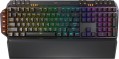 | 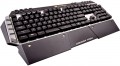 |
|---|---|---|
| Cougar 700K Evo | Cougar 700K | |
from $295.72 | Compare prices 4 | |
| TOP sellers | ||
| Connection | wired | wired |
| Cable length | 1.8 m | 1.8 m |
| Type | for game | for game |
| Form factor | 100% (full size) | 100% (full size) |
| Layout | ANSI | ANSI |
Keyboard | ||
| Key profile | high | high |
| Key type | classic type | classic type |
| Switch technology | mechanical | mechanical |
| Switches | Cherry MX Red (Linear) | |
| Additional keys | 15 | 18 |
| Programmable keys | 5 | 6 |
| Anti-Ghosting |  | |
| #KRO | N-KRO | N-KRO |
| Fn key | | |
Features | ||
| Cyrillic colour | white | white |
| Volume control | add. keys | add. keys |
| Palm rest | removable | removable |
| Built-in memory | | |
| Game mode | | |
| USB hub | 1xUSB-A | 1xUSB-A |
| Audio jack | mini-Jack (2x3.5mm) | mini-Jack (2x3.5mm) |
| Lighting | RGB | red |
| Lighting effects | + | + |
Connection and power supply | ||
| Cable | USB-A braided | USB-A braided |
General | ||
| Skeleton keyboard | | |
| Metal top panel | |  |
| Size | 487x250x40 mm | 487x230x40 mm |
| Weight | 1300 g | 1200 g |
| Color | ||
| Added to E-Catalog | october 2020 | may 2016 |



Compare Cougar 700K Evo and 700K
Keyboards Cougar 700K Evo and Cougar 700K have many similar characteristics, but there are also key differences. Both devices are wired gaming keyboards with Cherry MX mechanical switches, but the 700K Evo offers 15 additional buttons and 5 programmable keys, while the 700K has 18 additional and 6 programmable buttons. The backlighting of the 700K Evo is RGB, while the 700K features a red backlight, which may be important for users who prefer a certain lighting style. Both devices have similar construction and additional features, such as a detachable wrist rest and built-in memory, but the choice between them may depend on preferences for backlighting and the number of additional keys.
Price comparison
You may be interested in
Cougar 700K often compared

Glossary
Switches
The model of switches (switches) used in the keyboard - switching mechanisms installed under each individual key. These details are given if the design uses advanced mechanics, positioned as a better option than traditional switches. Mostly gaming keyboards are equipped with such mechanics.
The most popular switch brands in our time are Cherry MX, considered the "classic of the genre" for high-quality mechanics; Gateron, practically not inferior to him; not so advanced, but also cheaper Kailh and Keychron, as well as ultra-budget Outemu. For all these brands, different types of switches have a different stem color, which can be used to determine the features of the keyboard. It is also worth saying that modern mechanical switches are divided into three main varieties: linear, tactile and clicky.
- Linear. Such solutions are closest to conventional membrane keyboards: the key travel is uniform along the entire length, with minimal resistance and the absence of a clear actuation point. There is an opinion that the linear "mechanics" is best suited for games where you have to deal with fast and frequent clicks; however, in practice, this moment largely depends on the personal tastes of th...e user, nothing prevents the use of such keyboards for working with texts.
- Tactile. Switches with a clearly defined actuation point - a kind of barrier to the path of the key. Such a "barrier" allows you to clearly determine by touch whether the key has worked or not. Tactile keyboards are valued primarily by tech who have to type large volumes of texts.
- Tactile-auditory (Clicky). In such switches, the actuation point is felt not only by touch, but also by ear: the actuation of the key is accompanied by a clearly audible click, which is often compared to the sound of the keys of a typewriter. Due to this, this option is also very popular among users dealing with texts. Some people consider switches of this type not very suitable for games, since they are supposedly not very convenient for frequent, fast pressing; however, a quality Clicky switch is as good as a linear switch in this regard, and the choice depends solely on personal preference. But the unequivocal disadvantages of such keyboards include a rather loud click sound, which in some situations may be superfluous.
As for specific colors, here are their features:
- Red (red). Linear type switches with minimum resistance. They are popular, in particular, among professional gamers who deal with dynamic games and try by all means to speed up their reaction to gaming events. On the other hand, a low force increases the likelihood of accidentally pressing an unnecessary button.
— Black. Another type of linear switches. They have a tighter move compared to Red, which, on the one hand, requires a little more effort, on the other hand, minimizes the chance of accidentally pressing the wrong key.
Blue. Switches in clicky format, with tactile feedback and a click.
— Brown. Switches with tactile feedback, but no "click". The Brown action is great for when you want a keyboard with tactile feedback and at the same time you want to avoid unnecessary noise (although the sound is still louder than on a membrane keyboard). In addition, it is considered a good option for tech who are just starting to get acquainted with mechanical keyboards.
— Silver. Linear switches designed for maximum operating speed. They have a very low stroke - about 1 - 1.2 mm - as well as a very small pressing force, which contributes to high speed. At the same time, the use of such a keyboard requires a certain skill, since even a small effort from an accidental touch usually leads to the operation of a key.
The most popular switch brands in our time are Cherry MX, considered the "classic of the genre" for high-quality mechanics; Gateron, practically not inferior to him; not so advanced, but also cheaper Kailh and Keychron, as well as ultra-budget Outemu. For all these brands, different types of switches have a different stem color, which can be used to determine the features of the keyboard. It is also worth saying that modern mechanical switches are divided into three main varieties: linear, tactile and clicky.
- Linear. Such solutions are closest to conventional membrane keyboards: the key travel is uniform along the entire length, with minimal resistance and the absence of a clear actuation point. There is an opinion that the linear "mechanics" is best suited for games where you have to deal with fast and frequent clicks; however, in practice, this moment largely depends on the personal tastes of th...e user, nothing prevents the use of such keyboards for working with texts.
- Tactile. Switches with a clearly defined actuation point - a kind of barrier to the path of the key. Such a "barrier" allows you to clearly determine by touch whether the key has worked or not. Tactile keyboards are valued primarily by tech who have to type large volumes of texts.
- Tactile-auditory (Clicky). In such switches, the actuation point is felt not only by touch, but also by ear: the actuation of the key is accompanied by a clearly audible click, which is often compared to the sound of the keys of a typewriter. Due to this, this option is also very popular among users dealing with texts. Some people consider switches of this type not very suitable for games, since they are supposedly not very convenient for frequent, fast pressing; however, a quality Clicky switch is as good as a linear switch in this regard, and the choice depends solely on personal preference. But the unequivocal disadvantages of such keyboards include a rather loud click sound, which in some situations may be superfluous.
As for specific colors, here are their features:
- Red (red). Linear type switches with minimum resistance. They are popular, in particular, among professional gamers who deal with dynamic games and try by all means to speed up their reaction to gaming events. On the other hand, a low force increases the likelihood of accidentally pressing an unnecessary button.
— Black. Another type of linear switches. They have a tighter move compared to Red, which, on the one hand, requires a little more effort, on the other hand, minimizes the chance of accidentally pressing the wrong key.
Blue. Switches in clicky format, with tactile feedback and a click.
— Brown. Switches with tactile feedback, but no "click". The Brown action is great for when you want a keyboard with tactile feedback and at the same time you want to avoid unnecessary noise (although the sound is still louder than on a membrane keyboard). In addition, it is considered a good option for tech who are just starting to get acquainted with mechanical keyboards.
— Silver. Linear switches designed for maximum operating speed. They have a very low stroke - about 1 - 1.2 mm - as well as a very small pressing force, which contributes to high speed. At the same time, the use of such a keyboard requires a certain skill, since even a small effort from an accidental touch usually leads to the operation of a key.
Additional keys
The number of additional keys provided in the design of the keyboard.
Such keys do not belong to the standard layout and are intended for quick access to specific functions or individual applications — for example, to control the media player or open mail with one click. This function is convenient because commands from additional keys are usually recognized by the system regardless of what is on the screen — thanks to this, for example, you do not have to close the text editor to switch tracks in the player.
Note that in this case we are talking about individual keys that have a strictly defined purpose and corresponding markings. Programmable buttons, the Fn key (see below) and the functions of the main keys implemented through Fn are not taken into account in this paragraph.
Such keys do not belong to the standard layout and are intended for quick access to specific functions or individual applications — for example, to control the media player or open mail with one click. This function is convenient because commands from additional keys are usually recognized by the system regardless of what is on the screen — thanks to this, for example, you do not have to close the text editor to switch tracks in the player.
Note that in this case we are talking about individual keys that have a strictly defined purpose and corresponding markings. Programmable buttons, the Fn key (see below) and the functions of the main keys implemented through Fn are not taken into account in this paragraph.
Programmable keys
The number of programmable keys provided in the design of the keyboard. Like the additional ones described above, such keys are located outside the standard layout. At the same time, they do not have a rigidly defined purpose — each individual function can be set by the user himself, hence the name. Some manufacturers, however, can initially programme these keys, but this programme can still be changed if desired.
The advantage of such equipment is obvious: additional features of the keyboard can be easily customized. Gamers especially appreciate this feature, so programmable keys are often found in gaming models. On the other hand, the keys themselves usually have neutral markings (for example, P1, P2 ...), and the user has to remember which function is “linked” to where; this can cause confusion.
The advantage of such equipment is obvious: additional features of the keyboard can be easily customized. Gamers especially appreciate this feature, so programmable keys are often found in gaming models. On the other hand, the keys themselves usually have neutral markings (for example, P1, P2 ...), and the user has to remember which function is “linked” to where; this can cause confusion.
Lighting
The colour of the backlight provided in the design of the keyboard.
In general, the backlight performs two functions: practical (makes the keys more visible in low light) and aesthetic (gives the keyboard a beautiful appearance). However, it cannot be said that non-backlit keyboards will be unusable in the dark, the light from the monitor will still illuminate the buttons. The simplest version of the backlight is one-colour. In this case, specific colours can be different: for example, white is well suited for general-purpose keyboards (work or home), but other shades can be found in gaming or design models, for example, red, green, blue, purple or orange. If two or three colours are indicated for the keyboard, this may mean either the ability to switch between these colours, or that this model comes in several versions that differ in the shade of the backlight; these nuances should be clarified separately.
The most advanced options are multi-colour and RGB backlighting. Multi-colour systems are called systems in which more than three colour options are provided, sometimes with intermediate shades. And RGB-backlight all...ows you to choose almost any shade at the request of the user; in addition, the possibility of synchronization (see "Illumination with effects") is found mainly in such systems, although single-colour keyboards can also be equipped with other effects.
In general, the backlight performs two functions: practical (makes the keys more visible in low light) and aesthetic (gives the keyboard a beautiful appearance). However, it cannot be said that non-backlit keyboards will be unusable in the dark, the light from the monitor will still illuminate the buttons. The simplest version of the backlight is one-colour. In this case, specific colours can be different: for example, white is well suited for general-purpose keyboards (work or home), but other shades can be found in gaming or design models, for example, red, green, blue, purple or orange. If two or three colours are indicated for the keyboard, this may mean either the ability to switch between these colours, or that this model comes in several versions that differ in the shade of the backlight; these nuances should be clarified separately.
The most advanced options are multi-colour and RGB backlighting. Multi-colour systems are called systems in which more than three colour options are provided, sometimes with intermediate shades. And RGB-backlight all...ows you to choose almost any shade at the request of the user; in addition, the possibility of synchronization (see "Illumination with effects") is found mainly in such systems, although single-colour keyboards can also be equipped with other effects.
Metal top panel
Metal Top Panel in a keyboard primarily affects the rigidness of the body and the typing feel: the work area flexes less, the body is less likely to start creaking, and the appearance is generally perceived as more premium. In manufacturer specifications, this part is often referred to as the aluminum top plate or top case, but in pre-built assemblies, there are instances where the metal serves as a thin decorative cover—it's better to check actual model photos and the device's weight, not just an appealing description in the product card. In practice, this option is often chosen for ready-made gaming PC kits and office setups where the keyboard is used actively every day and users want it to maintain its "integrity" for longer.