
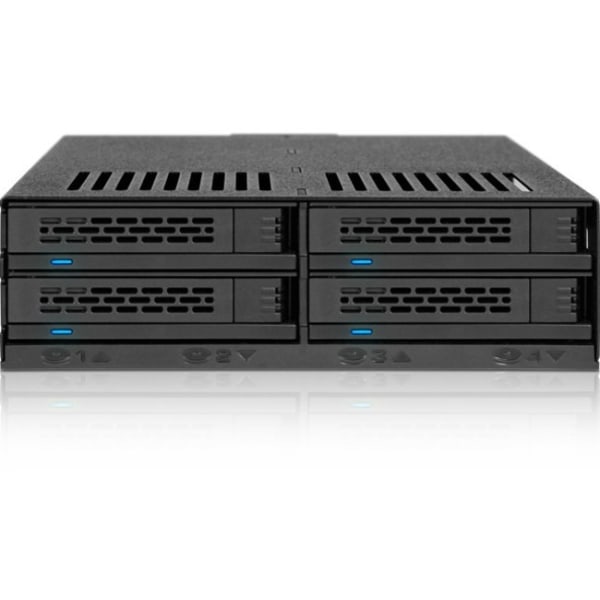
ICY DOCK ExpressCage MB324SP-B Drive Enclosure for 5.25" - Serial ATA/600 Host Interface Internal - Black - 4 x Total Bay
 | When you make a purchase through links on our site, we may receive a affiliate commission. Buy! Icy Dock ExpressCage MB324SP-B Drive Enclosure for 5.25" - Serial ATA/600 Host Interface Internal - Black - 4 x Total Bay -Officedepot.comDelivery: in USA Report |
Buy ICY DOCK ExpressCage MB324SP-B Drive Enclosure for 5.25" - Serial ATA/600 Host Interface Internal - Black - 4 x Total Bay
When you make a purchase through links on our site, we may receive a affiliate commission.
Icy Dock ExpressCage MB324SP-B Drive Enclosure for 5.25" - Serial ATA/600 Host Interface Internal - Black - 4 x Total Bay - | $86.70 | | |||
As one of our most exciting releases to date, the ExpressCage MB324SP-B brings to you our highly consumer-friendly enclosure made for anyone that requires affordable storage density. Fit up to 4 x 2.5" SATA/SAS HDD/SSD (7mm-12.5mm) into a single 5.25" bay with the ability to hot swap for easy drive replacement and single channel SAS support (SAS host required). Tool-less drive installation makes installing your drive more simple than ever and optional bottom tray screw holes are provided for extra protection and added stability. With a strategically placed 40mm cooling fan placed behind the unit and all around ventilation, your drives will stay cooler than the Arctic. An adjustable fan speed jumper lets you choose between HIGH, LOW, or AUTO smart cooling so you can set it based on your preference. Power users and system builders alike will enjoy the space saving, tool-less and hot-swap features provided by the ExpressCage MB324SP-B. ExpressTray design. The magic of ExpressTray simplifies the drive installation process to provide a complete tool-less process so you can install hard drives or SSDs as quickly as a cage with tray-less features. Attach a drive within seconds to the ExpressTray and remove it just as easily - the process is easy! Simply place the front end of the drive (the side without the connectors) down into the built in screws and ensure that end sits flush with the base of the tray. Now push the rear end (the side with the connectors) downwards onto the drive and ensure that there's no space between the drive and the tray. To remove the drive, you simply need to reverse the process. Pull on the rear tab of the tray to free up the drive and then remove the drive. Utilize the standard 5.25" bay. The MB324SP-B utilizes the 5.25" standard bay and converts it into 4 x 2.5" hot-swappable bays with support of 2.5" SATA and SAS HDD/SSD between 7mm to 12.5mm in height. The versatile enclosure supports SATA III 6Gb/s and single channel SAS (Requires SAS Controller Card). Extremely power efficient, the ExpressCage MB324SP-B can power all 4 drives with a single 15pin SATA power connector which can free up cable clutter and simplify your system build.
The product description is generated based on data from online stores. Before purchasing be sure to verify all information directly with the seller.
New USB Labels: How to Avoid Confusion in Speeds, Cables, and ConnectorsThe USB-IF organization has finally updated the USB port labels. Let's figure out what has changed.
How to Choose the Right Cable for Your Smartphone, Tablet, and LaptopConnectors, power, bandwidth and other criteria for choosing a cable for gadgets
How to place an order?How to add store?
Remember that the online store is responsible for the accuracy of information regarding price, warranty, and delivery!
You may be interested in