
IOGEAR GCS1964 4-Port 4K Triple Monitor DisplayPort KVMP Switch with Cables - KVM / audio / USB switch - 4 x DisplayPort / a
 | Compare prices 4 → When you make a purchase through links on our site, we may receive a affiliate commission.
|
Buy IOGEAR GCS1964 4-Port 4K Triple Monitor DisplayPort KVMP Switch with Cables - KVM / audio / USB switch - 4 x DisplayPort / a
When you make a purchase through links on our site, we may receive a affiliate commission.
IOGEAR GCS1964 4-Port 4K Triple Monitor DisplayPort KVMP Switch with Cables - KVM / audio / USB switch - 4 x DisplayPort / a | $813.99 |  | |||
IOGEAR GCS1964 4-Port 4K Triple View DisplayPort KVMP Switch with USB 3.0 Hub (TAA) | $765.46 |  | |||
Iogear GCS1964 IOGEAR 4-Port 4K Triple View DisplayPort KVMP Switch with USB 3.0 Hub Refurbished GCS1964 | $1,037.63 |  | |||
IOGEAR GCS1964 | 4-Port 4K Triple View DisplayPort KVMP Switch with USB 3.0 Hub Refurbished GCS1964 | $1,065.41 |  | |||
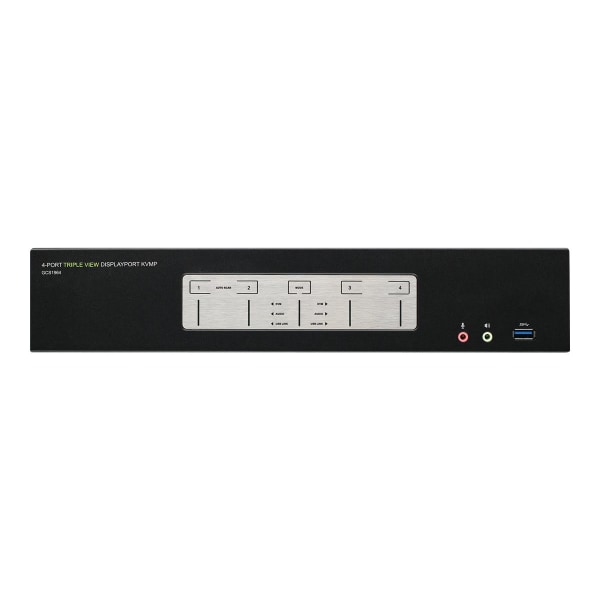
Maximize your high-end triple DisplayPort workstations by connecting them to the 4-Port 4K Triple View Display Port KVMP. Experience 4K Cinema resolutions along with rich bass and 7.1 surround sound while switching between both computers and sharing two USB 3.0 peripherals with the push of a button. Now with Video DynaSync support, switching between computers will be faster than generic DisplayPort KVMs, optimizing workflow and efficiency. Join three Cinema 4K HDMI monitors to your premium desktop or laptop to experience superior screen, image, and video quality. The Triple View DisplayPort KVMP delivers a Cinema 4K resolution standard of 4096 x 2160 at a frame rate of 60Hz. Designed for healthcare imaging, engineering and finance industries, this 4-Port KVMP supports environments requiring cinematic graphics resolution. Superior quality is also ideal for applications in architecture, video production and media design. Switch and access four DisplayPort computers from the push-button front panel or hotkey combination on your keyboard. Utilize the latest in mouse port-switching functionality to change ports by merely clicking the wheel button on your 3-button USB mouse. Tackle large projects and double your desktop viewing space by adding a second 4-Port KVMP (GCS1964). Expand your workstations to accommodate up to six 4K HDMI monitors. The Triple View is the perfect solution for clinical diagnostic imaging where each workstation involves various diagnostic equipment used together and where diagnostic displays can be spread among multiple Cinema 4K monitors for clearer, more precise readings. This function also serves engineers who need to see a complete construction life cycle shown across multiple 4K monitors for improved detail viewing; thus, optimizing workflow. Additional smart connectivity features turn your workstation into a convenient, easy-to-use powerhouse. The Power-on Detection ensures automatic connection to the next powered-on computer. With Daisy-Chain Connection (DCC) support, double your desktop viewing space by cascading two GCS1964 together, accommodating up to six 4K HDMI monitors. The built-in USB 3.0 ports provide connectivity speeds up to 5 Gbps and compatibility with legacy USB 2.0 and 1.1 devices, allowing for maximum efficiency when testing source codes of various imaging software. ? Supports cinema 4K HDMI monitors with resolutions up to 4096 x 2160 @60Hz ? Control/share USB 3.0 peripherals between 4 computers; eliminate duplicate devices ? Select computer via front panel push-buttons, hotkeys, or mouse1 ? Work on computer "A" without interrupting USB peripheral connectivity on computer "B" ? Converts the DisplayPort signal for output to HDMI monitors Maximize & expand your high-end multi-monitor workstation superior video resolutions ? Operate 4 DisplayPort computers with 1 keyboard, mouse, and 3 HDMI monitors ? Allows independent switching of the KVM, USB, and audio devices ? Add a second GCS1964 to expand
The product description is generated based on data from online stores. Before purchasing be sure to verify all information directly with the seller.
New USB Labels: How to Avoid Confusion in Speeds, Cables, and ConnectorsThe USB-IF organization has finally updated the USB port labels. Let's figure out what has changed.
How to Choose the Right Cable for Your Smartphone, Tablet, and LaptopConnectors, power, bandwidth and other criteria for choosing a cable for gadgets
How to place an order?How to add store?
Remember that the online store is responsible for the accuracy of information regarding price, warranty, and delivery!
You may be interested in