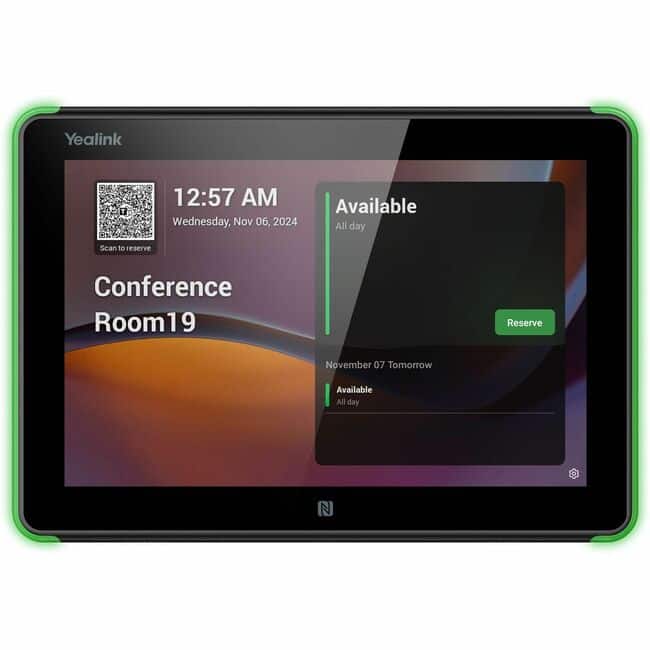
Yealink RoomPanel E2 Meeting Room Scheduler - For Meeting Space, Meeting Room - 1280 x 800 Video - WXGA - USB - Whi (Live)
 | Compare prices 2 → When you make a purchase through links on our site, we may receive a affiliate commission.
|
Buy Yealink RoomPanel E2 Meeting Room Scheduler - For Meeting Space, Meeting Room - 1280 x 800 Video - WXGA - USB - Whi (Live)
When you make a purchase through links on our site, we may receive a affiliate commission.
Yealink - RoomPanel E2 Meeting Room Scheduler - For Meeting Space, Meeting Room - 1280 x 800 Video (Live) - WXGA - USB - Whi | $691.83 |  | |||
| $849.00 |  | ||||
A compact touch screen ideal for mounting outside of meeting spaces, the Yealink RoomPanel E2 displays meeting details and enables on-the-spot reservations via Teams or Microsoft 365 calendaring applications. Elaborate features for advanced meeting room managementMore than a touchable display, Yealink RoomPanel E2 also combine a quantity of advanced features including the full RGB programmable LED light bar, Wi-Fi, Bluetooth, ambient light/human presence sensors, enhanced microphone arrays and speakers to meet all modern workspace demands. Room scheduling with a native Teams experienceFeaturing an interactive touch screen with an anti-fingerprint surface and an integrated colored LED light bar, Yealink RoomPanel E2 for Teams offers premium visual presence and an interactive experience with a native Teams UI. It helps users book or check the status of a specific conference room with ease and efficiency. Various installations, simple and elegantWith provided brackets and tape, the panel can be easily mounted on optional tilt angles and on any surfaces. Supporting both PoE and DC power, deployment can be also freed from cable clutter. Managing multiple devices is simplified for administrators and IT staff via Microsoft Teams Admin Center or Yealink Management Cloud Service, enabling easy monitoring, management, and diagnostics.
The product description is generated based on data from online stores. Before purchasing be sure to verify all information directly with the seller.

PC Build for Halo: Campaign EvolvedThree PCs of varying performance levels that will let you feel 100% like you’re in Master Chief’s shoes.

Best Last-Gen Flagship Smartphones That Beat New Mid-Range ModelsThese former flagship models still leave no chance for new mid-range releases.
How to place an order?How to add store?
Remember that the online store is responsible for the accuracy of information regarding price, warranty, and delivery!
We recommendCompare using chart →