
Juice Plugable USB-A Data Blocker, Protects Against Jacking 78810613
 | When you make a purchase through links on our site, we may receive a affiliate commission. Buy! Plugable USB-A Data Blocker, Protects Against Juice Jacking 78810613Lenovo.comDelivery: in USA Report |
Buy Juice Plugable USB-A Data Blocker, Protects Against Jacking 78810613
When you make a purchase through links on our site, we may receive a affiliate commission.
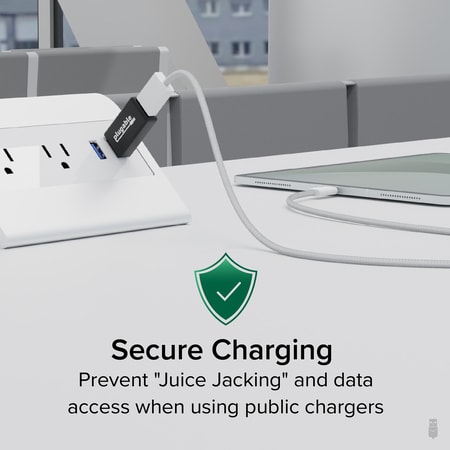
Plugable USB-A Data Blocker, Protects Against Juice Jacking 78810613 | $14.99 | | |||
USB Charging Information Most devices can't/won't charge from normal powered USB hubs if the computer is turned off/not connected. That includes most Android, Apple iOS, and Windows devices. The phone/tablet must negotiate how much power to pull, to do so by the original USB specification, devices are supposed to only draw 100mA at first and then they can then negotiate up to 500mA. This negotiation requires a PC that's attached and on. Unfortunately even at 500mA, charging most devices will take a very long time to charge.
For example, the iPhone and most other non-tablets will charge on a standard port this way but they can also charge faster (up to 1A) if the USB port sends a special, non-standard signal to say "I'm an Apple 1A charger". The Plugable MC1 adapter simulates that Apple 1A signal, turning any powered USB port with at least 1A power available into a charging port. Even though it's not standard, it's how Apple pioneered faster charging, and fortunately, nearly all phones and tablets on the market today recognize this signal. For larger devices such as tablets like the iPad, this adapter is even more important because their batteries are larger and charging at 500mA would be too slow.
How many of these adapters can be safely used on a powered hub or PC at once? The AC adapter of your powered hub needs to be rated for at least 1A per USB charging adapter connected. If it is not, USB over-current protection may be triggered (causing all power to the hub to shut off), or the hub circuit or power supply may heat up from too much current being pulled through by the device. If this happens, remove devices until you're back within the rated amperage. Charging rates will be determined by the maximum charging speed your device supports, the quality of the USB cable you use, and if the USB port has enough power available.
For example, the iPhone and most other non-tablets will charge on a standard port this way but they can also charge faster (up to 1A) if the USB port sends a special, non-standard signal to say "I'm an Apple 1A charger". The Plugable MC1 adapter simulates that Apple 1A signal, turning any powered USB port with at least 1A power available into a charging port. Even though it's not standard, it's how Apple pioneered faster charging, and fortunately, nearly all phones and tablets on the market today recognize this signal. For larger devices such as tablets like the iPad, this adapter is even more important because their batteries are larger and charging at 500mA would be too slow.
How many of these adapters can be safely used on a powered hub or PC at once? The AC adapter of your powered hub needs to be rated for at least 1A per USB charging adapter connected. If it is not, USB over-current protection may be triggered (causing all power to the hub to shut off), or the hub circuit or power supply may heat up from too much current being pulled through by the device. If this happens, remove devices until you're back within the rated amperage. Charging rates will be determined by the maximum charging speed your device supports, the quality of the USB cable you use, and if the USB port has enough power available.
The product description is generated based on data from online stores. Before purchasing be sure to verify all information directly with the seller.
New USB Labels: How to Avoid Confusion in Speeds, Cables, and ConnectorsThe USB-IF organization has finally updated the USB port labels. Let's figure out what has changed.
How to Choose the Right Cable for Your Smartphone, Tablet, and LaptopConnectors, power, bandwidth and other criteria for choosing a cable for gadgets
How to place an order?How to add store?
Remember that the online store is responsible for the accuracy of information regarding price, warranty, and delivery!
You may be interested in