
Startech.com USB Crash Cart Adapter with File Transfer & Video Capture at 1920 x1200 60Hz - Compact portable KVM crash cart
 | Compare prices 4 → When you make a purchase through links on our site, we may receive a affiliate commission.
|
Buy Startech.com USB Crash Cart Adapter with File Transfer & Video Capture at 1920 x1200 60Hz - Compact portable KVM crash cart
When you make a purchase through links on our site, we may receive a affiliate commission.
StarTech.com USB Crash Cart Adapter with File Transfer & Video Capture at 1920 x1200 60Hz - Compact portable KVM crash cart | $468.99 |  | |||
Startech NOTECONS02 StarTech KVM Console to Laptop USB 2.0 Portable Crash Cart Adapter with File Transfer & Video Capture Re | $514.77 |  | |||
StarTech NOTECONS02 | KVM Console to Laptop USB 2.0 Portable Crash Cart Adapter with File Transfer & Video Capture Refurbish | $529.62 |  | |||
StarTech. com NOTECONS02 KVM Console to Laptop USB 2.0 Portable Crash Cart Adapter with File Transfer & Video Capture - Port | $573.23 |  | |||
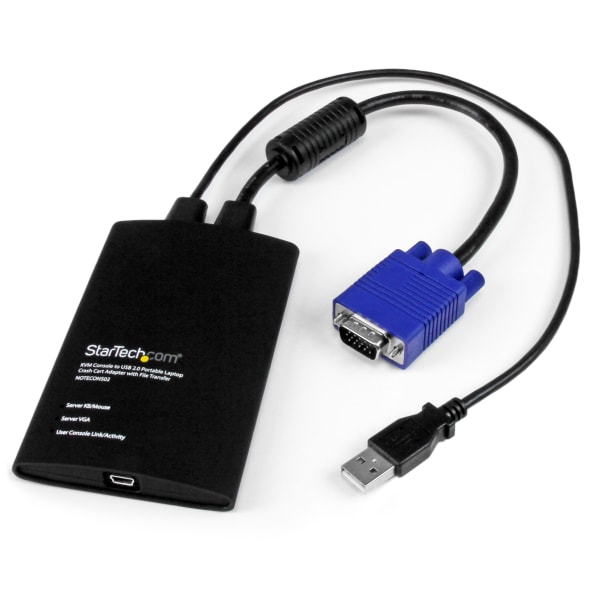
The USB crash cart adapter gives you control of a headless system, turning your laptop into a portable crash cart for rack servers, PCs, ATMs, kiosks, and more. Simply connect the laptop crash cart adapter to your computer using the included USB cable, then connect the integrated USB and VGA cables to your server for instant BIOS-level control. With no server-side software required, you can be up and running instantly. With the flexible software interface, you can transfer files from your laptop to the server, capture videos for records or instructional purposes, take screenshots and scale the display window to full screen mode or smaller, with no scroll bars helping you to troubleshoot faster. Powered from the server-side USB connection, the KVM adapter doesn't require an AC outlet so you can connect to any PC or device that has a VGA and USB port, even if there's no power outlet available. This pocket-sized adapter features a compact design that easily fits inside your laptop bag and requires no additional accessories to connect, eliminating the need to lug around a large, awkward traditional crash cart to troubleshoot and service your systems. StarTech.com offers a wide selection of high-quality KVM-related products to help you access your systems more efficiently without the expense and clutter of extra keyboards, mice and monitors. Easily troubleshoot systems with bi-directional file transfers between local and remote computer Set up quickly with included cables and instant BIOS-level control Share troubleshooting information and display errors with video capture at 1920 x 1200 60Hz Simple self-powered portability with no external power adapter necessary Access any VGA and USB system directly from your laptop via the KVM console adapter
The product description is generated based on data from online stores. Before purchasing be sure to verify all information directly with the seller.
New USB Labels: How to Avoid Confusion in Speeds, Cables, and ConnectorsThe USB-IF organization has finally updated the USB port labels. Let's figure out what has changed.
How to Choose the Right Cable for Your Smartphone, Tablet, and LaptopConnectors, power, bandwidth and other criteria for choosing a cable for gadgets
How to place an order?How to add store?
Remember that the online store is responsible for the accuracy of information regarding price, warranty, and delivery!
You may be interested in