
Comparison STLab U-1340 vs STLab U-1120
Add to comparison | 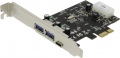 | 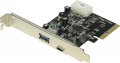 |
|---|---|---|
| STLab U-1340 | STLab U-1120 | |
| Outdated Product | Outdated Product | |
| TOP sellers | ||
| Interface | PCIe 1x | PCIe 4x |
Rear panel connectors | ||
| USB-A 5Gbps | 2 pcs | |
| USB-A 10Gbps | 1 pcs | |
| USB-C 5Gbps | 1 pcs | 1 pcs |
General | ||
| Additional power | Molex | Molex |
| Low profile |  | |
| Added to E-Catalog | march 2018 | march 2018 |


Compare STLab U-1340 and U-1120
You may be interested in
My comparisons
STLab U-1340 often compared

Glossary
Interface
Interface through which the PCI controller connects to the motherboard.
— PCIe (PCI Express). An interface that is effectively the modern standard for motherboards and the peripherals connected to them, including PCI controllers. It is a successor to PCIe and significantly surpasses it in both data transfer speed and additional functionality. Note that "motherboards" and peripherals for them can use a different number of PCIe lanes — for controllers, in particular, the options 1x, 2x, 4x and 8x are relevant. The first three values are found among expansion cards, while 8 PCIe lanes are mainly used in RAID controllers (see "Type"). Note also that a greater number of lanes not only means higher speed but also a larger connector size. As a result, a card with fewer lanes can be connected to a slot with more channels (for example, a 1x card in a 4x slot), but not vice versa. Regarding bandwidth, it depends on the PCIe version and is slightly less than 1 GB/s per lane for PCIe 3.0 and slightly less than 2 GB/s per lane for PCIe 4.0.
— PCI. With the emergence of the more advanced PCIe standard, this interface is now considered outdated. Nevertheless, it provides a data transfer speed of up to 533 MB/s, which is sufficient for tasks not related to the need to quickly transfer large volumes of information. Another advantage...is that connecting to such a connector leaves faster PCIe slots free, which can be useful for other system components. As a result, PCI slots are still used in modern motherboards, and controllers with such a connection can also be found for sale.
— PCIe (PCI Express). An interface that is effectively the modern standard for motherboards and the peripherals connected to them, including PCI controllers. It is a successor to PCIe and significantly surpasses it in both data transfer speed and additional functionality. Note that "motherboards" and peripherals for them can use a different number of PCIe lanes — for controllers, in particular, the options 1x, 2x, 4x and 8x are relevant. The first three values are found among expansion cards, while 8 PCIe lanes are mainly used in RAID controllers (see "Type"). Note also that a greater number of lanes not only means higher speed but also a larger connector size. As a result, a card with fewer lanes can be connected to a slot with more channels (for example, a 1x card in a 4x slot), but not vice versa. Regarding bandwidth, it depends on the PCIe version and is slightly less than 1 GB/s per lane for PCIe 3.0 and slightly less than 2 GB/s per lane for PCIe 4.0.
— PCI. With the emergence of the more advanced PCIe standard, this interface is now considered outdated. Nevertheless, it provides a data transfer speed of up to 533 MB/s, which is sufficient for tasks not related to the need to quickly transfer large volumes of information. Another advantage...is that connecting to such a connector leaves faster PCIe slots free, which can be useful for other system components. As a result, PCI slots are still used in modern motherboards, and controllers with such a connection can also be found for sale.
USB-A 5Gbps
Number of ports USB-A 5Gbps on the external panel of the controller.
USB (of all versions) is the most popular modern interface for connecting external peripherals. USB-A 5Gbps (previously known as USB 3.2 Gen1 and USB 3.0) is the successor to the popular USB-A 2.0 standard, introducing data transfer speeds 10 times greater (up to 4.8 Gbps), as well as increased power supply for peripheral devices. Individual ports may even provide support for USB Power Delivery technology, which allows for a power supply output of up to 100W per port (although the presence of Power Delivery is not strictly mandatory and should be checked separately). In any case, the USB-A 5Gbps interface is extremely popular in modern computers and peripheral devices.
USB (of all versions) is the most popular modern interface for connecting external peripherals. USB-A 5Gbps (previously known as USB 3.2 Gen1 and USB 3.0) is the successor to the popular USB-A 2.0 standard, introducing data transfer speeds 10 times greater (up to 4.8 Gbps), as well as increased power supply for peripheral devices. Individual ports may even provide support for USB Power Delivery technology, which allows for a power supply output of up to 100W per port (although the presence of Power Delivery is not strictly mandatory and should be checked separately). In any case, the USB-A 5Gbps interface is extremely popular in modern computers and peripheral devices.
USB-A 10Gbps
Number of USB-A 10Gbps ports on the external panel of the controller.
USB (of all versions) is the most popular modern interface for connecting external peripherals. The USB-A 10Gbps (formerly known as USB 3.2 Gen 2 and USB 3.1) is a further development of this interface after USB-A 5Gbps. In this version, the maximum data transfer speed has increased to 10 Gbps; additionally, connectors of this type may support USB Power Delivery technology, allowing power delivery up to 100W to the connector. (However, the presence of Power Delivery is not strictly necessary and is better verified separately).
USB (of all versions) is the most popular modern interface for connecting external peripherals. The USB-A 10Gbps (formerly known as USB 3.2 Gen 2 and USB 3.1) is a further development of this interface after USB-A 5Gbps. In this version, the maximum data transfer speed has increased to 10 Gbps; additionally, connectors of this type may support USB Power Delivery technology, allowing power delivery up to 100W to the connector. (However, the presence of Power Delivery is not strictly necessary and is better verified separately).