
Comparison ARNY AVD-7120 vs Slinex SL-07M
Add to comparison | 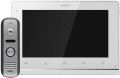 | 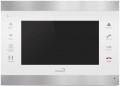 |
|---|---|---|
| ARNY AVD-7120 | Slinex SL-07M | |
| Outdated Product | from $156.68 up to $252.40 | |
| TOP sellers | ||
Main specs | ||
| Type | set (panel + intercom) | internal panel (intercom) |
| Connection | wired | |
Internal panel (intercom) | ||
| Display size | 7 " | 7 " |
| Screen resolution | 800x480 px | 800x480 px |
| Touch buttons |  | |
| Pluggable outdoor panels | 2 | 2 |
| Additional internal panels | 3 pcs | |
| Connectable surveillance cameras | 2 pcs | 2 pcs |
| Features | event recording support motion sensor recording internal communication (intercom) built-in memory card reader up to 32 GB | internal communication (intercom) picture in picture card reader |
| Consumption (during operation) | 13.8 W | |
| Size | 192x132x18 mm | 170x265x25 mm |
Call panel | ||
| Number of subscribers | 1 | |
| Mount | wall | |
| Material | metal (anti-vandal) | |
| Operating temperature | -30 °C ~ +50 °C | |
| Dimensions | 130x40x30 mm | |
Camera | ||
| IR illumination (night shooting) | |  |
| Motion detector | | |
| Color | ||
| Added to E-Catalog | may 2019 | april 2016 |


Compare ARNY AVD-7120 and Slinex SL-07M
You may be interested in
My comparisons
ARNY AVD-7120 often compared


Glossary
Type
— Internal Panel (Intercom). A device installed indoors to communicate with visitors through an intercom system. It is designed to ensure security by allowing you to communicate with guests and control access to the building or apartment without needing to open the door.
— Call Panel. An outdoor device of the intercom system, installed at the entrance to a building or apartment. The call panel is designed to allow a visitor to summon the hosts or owners of the premises, and, with a camera, to provide an external image, enhancing security and access control.
— Video Doorbell. A simplified and "light" version of the call panel: a doorbell with a built-in camera and Wi-Fi module. These devices differ from video panels in two key aspects. Firstly, they do not include the ability to control a magnetic lock—simply put, you cannot remotely open the door through a video doorbell. On the other hand, a video doorbell doesn't require an intercom or other special equipment—the video and audio from such a device is transmitted via Wi-Fi to a smartphone, tablet, or computer with a special application installed. Thus, video doorbells are extremely easy to install and set up.
— Kit (Panel + Intercom). Having both devices in a set allows for a complete communication and access control system out of the box. This solution can b...e advantageous at the initial installation stage, as the devices are highly compatible with each other. However, when upgrading or due to specific preferences in certain functions, it is easier to choose a call panel separately from the intercom.
— Call Panel. An outdoor device of the intercom system, installed at the entrance to a building or apartment. The call panel is designed to allow a visitor to summon the hosts or owners of the premises, and, with a camera, to provide an external image, enhancing security and access control.
— Video Doorbell. A simplified and "light" version of the call panel: a doorbell with a built-in camera and Wi-Fi module. These devices differ from video panels in two key aspects. Firstly, they do not include the ability to control a magnetic lock—simply put, you cannot remotely open the door through a video doorbell. On the other hand, a video doorbell doesn't require an intercom or other special equipment—the video and audio from such a device is transmitted via Wi-Fi to a smartphone, tablet, or computer with a special application installed. Thus, video doorbells are extremely easy to install and set up.
— Kit (Panel + Intercom). Having both devices in a set allows for a complete communication and access control system out of the box. This solution can b...e advantageous at the initial installation stage, as the devices are highly compatible with each other. However, when upgrading or due to specific preferences in certain functions, it is easier to choose a call panel separately from the intercom.
Connection
— Wired. A classic setup where the signal is transmitted directly via cable without digitization, typically using a 4-core or coaxial cable. This type of connection is simple, stable, and does not require network infrastructure, making it a reliable solution for basic systems. It ensures the transmission of video, audio, and control signal (lock opening) with minimal delay, but is limited in functionality—lacking remote access, integration into IP systems, and high-resolution transmission. Suitable for inexpensive or existing analog installations.
— LAN (RJ-45). The LAN port (RJ-45) in intercom systems and call panels is designed for wired connection to a local network and provides stable data transmission, which is especially important for IP models. It allows the device to be integrated into a surveillance system, connected to a network video recorder, transmit video and sound without delays, and also provides remote access via an app or cloud service. Compared to Wi-Fi, LAN connection is more reliable, protected from interference, and better suited for systems where constant communication and quick response are crucial.
— Wi-Fi. Wi-Fi in intercom systems and call panels provides a wireless connection to the network, allowing the transmission of video and audio signals, device management via an app, and notifications on a smartphone. This option simpli...fies installation, especially in places where cable routing is difficult, and provides access to remote management and cloud storage functions. However, Wi-Fi is more susceptible to interference and signal loss, especially with weak coverage or an overloaded network, so it requires a stable connection for proper operation, particularly during video calls and recording.
— LAN (RJ-45). The LAN port (RJ-45) in intercom systems and call panels is designed for wired connection to a local network and provides stable data transmission, which is especially important for IP models. It allows the device to be integrated into a surveillance system, connected to a network video recorder, transmit video and sound without delays, and also provides remote access via an app or cloud service. Compared to Wi-Fi, LAN connection is more reliable, protected from interference, and better suited for systems where constant communication and quick response are crucial.
— Wi-Fi. Wi-Fi in intercom systems and call panels provides a wireless connection to the network, allowing the transmission of video and audio signals, device management via an app, and notifications on a smartphone. This option simpli...fies installation, especially in places where cable routing is difficult, and provides access to remote management and cloud storage functions. However, Wi-Fi is more susceptible to interference and signal loss, especially with weak coverage or an overloaded network, so it requires a stable connection for proper operation, particularly during video calls and recording.
Additional internal panels
The number of additional monitors that can be connected to the intercom at the same time.
This function is relevant only for video-enabled models — video intercoms and IP intercoms (see “Device type”). In such models, the intercom itself is called a monitor — an indoor unit with a screen. This paragraph indicates how many additional indoor units can be connected to this model. The need for such a connection arises in cases where access to the security system must be provided from several points at once — for example, in a private house on several floors, where it would be inconvenient to run from floor to floor to the intercom. In this case, intercoms with access to 3 monitors, 4 monitors or more are appropriate.
Note that the format of multiple monitors working together may be different, see "Connection Type" for more details.
This function is relevant only for video-enabled models — video intercoms and IP intercoms (see “Device type”). In such models, the intercom itself is called a monitor — an indoor unit with a screen. This paragraph indicates how many additional indoor units can be connected to this model. The need for such a connection arises in cases where access to the security system must be provided from several points at once — for example, in a private house on several floors, where it would be inconvenient to run from floor to floor to the intercom. In this case, intercoms with access to 3 monitors, 4 monitors or more are appropriate.
Note that the format of multiple monitors working together may be different, see "Connection Type" for more details.
Features
— Android OS. The advantages of the Android OS include flexibility, which allows you to install third-party applications, thereby increasing the functionality of the device. Such applications may include SIP phones, programs that allow video surveillance, and others. But it is worth noting that such devices are not very suitable for the role of using a full-fledged tablet; firstly, most have a stationary location, and secondly, as a rule, the power of intercoms is not so high. Also, various restrictions may be set separately by the manufacturer; this must be clarified separately.
— Wi-Fi module. The Wi-Fi wireless communication module is found only in IP intercoms(see “Device type”). This function allows the device to connect to the network wirelessly - this is much more convenient than pulling cables, and the quality of communication is usually indistinguishable from a wired one. Another option for using Wi-Fi is a direct communication to a smartphone or tablet and using such a gadget as a remote control with an external screen; however, such an opportunity is provided relatively rarely.
- Mobile app. This feature means that the device can be operated via a smartphone or tablet with a special application installed on it. Such applications are usually released immediately for both of the most popular mobile operating systems today - Android and iOS; ho...wever, it would not hurt to clarify this point separately. In any case, control from a mobile device can have very extensive functionality (including even the ability to work via the Internet, in some models); and interacting with a device through a gadget that you can always keep with you is definitely more convenient than going to an intercom or other stationary equipment every time.
— SIP protocol. The intercom's support for the SIP protocol allows the intercom to redirect the signal from the calling panel through the telephone network to a mobile device, a stationary PBX or a computer with the appropriate software. Such a function may be useful, for example, in an office where there are a lot of visitors, and going up to the intercom every time to answer is inconvenient. Additional SIP capabilities in different models may vary significantly; they should be clarified separately.
- DVR support. The ability to operate the intercom in video recording mode from calling panels or from separate surveillance cameras. In most of these models, recording is not carried out constantly, but only when the call button is pressed or another event occurs - for example, a motion detector is triggered (see below). Video is most often saved to a memory card (see “Card Reader” below). In any case, this function allows you to find out who called the intercom at “inopportune hours”; it can also be useful in other situations - even to restore the picture of an emergency that came into view of the cameras.
— Internal communication (Intercom). This function allows you to make calls between intercoms on the same network. Depending on the implementation and settings, there is an addressable intercom, when you enter the number (identifier) of the device on the network to which you want to make a call, as well as options for setting up a general call, when the call goes to all devices on the network. In any case, this function will be useful if there are several intercoms in the network, so you can call, for example, a neighbor.
- Speakerphone. A hands-free function similar to that found in telephones. In this mode, a loud speaker and a sensitive microphone are used for conversation, located in the intercom body and allowing you to communicate comfortably at some distance from the device (up to a meter, or even more). This function is especially important for models with a handset (see “Execution”) - it allows you to talk without holding the handset. But devices without a handset, by definition, operate in a hands-free format.
- A voice message. An analogue of the answering machine function in phones, when the subscriber can leave a message if the owner of the intercom does not respond to the call. The function can be implemented in different ways, but in any case it is similar to the one with the usual expression: “Leave your message after the sound signal...”.
— Picture in picture. The ability to display a second image on the intercom screen, in addition to the main image. In this way, you can, for example, check the situation in the visibility range of a surveillance camera without interrupting communication with the visitor via the main video panel. The additional picture is small in size and is usually displayed in one of the corners of the screen.
- Motion Detector. A function that allows the intercom to detect movement in the visibility range of connected cameras and respond to it. The specific method of such a reaction may be different in different models: turning on recording, sending a notification to a user-specified device, sending a signal to an alarm output, etc.; These details should be clarified separately. In any case, the motion detector reduces the likelihood of missing significant events in the field of view of the cameras.
— Built-in memory. Built-in memory is found in video and IP intercoms (see “Device type”) and is usually intended for storing data from surveillance cameras. However, the volume of such memory is usually small, and it is usually used only for photographs (for example, to capture the faces of visitors); Video recording, if provided, is carried out on a memory card (see below). In any case, it would not hurt to clarify the operating features of the built-in memory separately.
- Frame. The ability to operate the intercom in digital photo frame mode - when photographs stored in the device’s memory (or stored on a memory card) are displayed on the screen (usually in slideshow mode). A mandatory feature of models with this function is a fairly large color screen - only on it photos will be normally visible; The intercoms themselves are usually video or IP models. The main purpose of the photo frame mode is aesthetic: showing beautiful pictures, the intercom plays the role of additional decor for the number.
— Wi-Fi module. The Wi-Fi wireless communication module is found only in IP intercoms(see “Device type”). This function allows the device to connect to the network wirelessly - this is much more convenient than pulling cables, and the quality of communication is usually indistinguishable from a wired one. Another option for using Wi-Fi is a direct communication to a smartphone or tablet and using such a gadget as a remote control with an external screen; however, such an opportunity is provided relatively rarely.
- Mobile app. This feature means that the device can be operated via a smartphone or tablet with a special application installed on it. Such applications are usually released immediately for both of the most popular mobile operating systems today - Android and iOS; ho...wever, it would not hurt to clarify this point separately. In any case, control from a mobile device can have very extensive functionality (including even the ability to work via the Internet, in some models); and interacting with a device through a gadget that you can always keep with you is definitely more convenient than going to an intercom or other stationary equipment every time.
— SIP protocol. The intercom's support for the SIP protocol allows the intercom to redirect the signal from the calling panel through the telephone network to a mobile device, a stationary PBX or a computer with the appropriate software. Such a function may be useful, for example, in an office where there are a lot of visitors, and going up to the intercom every time to answer is inconvenient. Additional SIP capabilities in different models may vary significantly; they should be clarified separately.
- DVR support. The ability to operate the intercom in video recording mode from calling panels or from separate surveillance cameras. In most of these models, recording is not carried out constantly, but only when the call button is pressed or another event occurs - for example, a motion detector is triggered (see below). Video is most often saved to a memory card (see “Card Reader” below). In any case, this function allows you to find out who called the intercom at “inopportune hours”; it can also be useful in other situations - even to restore the picture of an emergency that came into view of the cameras.
— Internal communication (Intercom). This function allows you to make calls between intercoms on the same network. Depending on the implementation and settings, there is an addressable intercom, when you enter the number (identifier) of the device on the network to which you want to make a call, as well as options for setting up a general call, when the call goes to all devices on the network. In any case, this function will be useful if there are several intercoms in the network, so you can call, for example, a neighbor.
- Speakerphone. A hands-free function similar to that found in telephones. In this mode, a loud speaker and a sensitive microphone are used for conversation, located in the intercom body and allowing you to communicate comfortably at some distance from the device (up to a meter, or even more). This function is especially important for models with a handset (see “Execution”) - it allows you to talk without holding the handset. But devices without a handset, by definition, operate in a hands-free format.
- A voice message. An analogue of the answering machine function in phones, when the subscriber can leave a message if the owner of the intercom does not respond to the call. The function can be implemented in different ways, but in any case it is similar to the one with the usual expression: “Leave your message after the sound signal...”.
— Picture in picture. The ability to display a second image on the intercom screen, in addition to the main image. In this way, you can, for example, check the situation in the visibility range of a surveillance camera without interrupting communication with the visitor via the main video panel. The additional picture is small in size and is usually displayed in one of the corners of the screen.
- Motion Detector. A function that allows the intercom to detect movement in the visibility range of connected cameras and respond to it. The specific method of such a reaction may be different in different models: turning on recording, sending a notification to a user-specified device, sending a signal to an alarm output, etc.; These details should be clarified separately. In any case, the motion detector reduces the likelihood of missing significant events in the field of view of the cameras.
— Built-in memory. Built-in memory is found in video and IP intercoms (see “Device type”) and is usually intended for storing data from surveillance cameras. However, the volume of such memory is usually small, and it is usually used only for photographs (for example, to capture the faces of visitors); Video recording, if provided, is carried out on a memory card (see below). In any case, it would not hurt to clarify the operating features of the built-in memory separately.
- Frame. The ability to operate the intercom in digital photo frame mode - when photographs stored in the device’s memory (or stored on a memory card) are displayed on the screen (usually in slideshow mode). A mandatory feature of models with this function is a fairly large color screen - only on it photos will be normally visible; The intercoms themselves are usually video or IP models. The main purpose of the photo frame mode is aesthetic: showing beautiful pictures, the intercom plays the role of additional decor for the number.
Consumption (during operation)
Power consumption of the intercom in the operating mode. Usually, this item indicates the value for situations where the device's functions are used to the fullest — in particular, when the display is on and the speakerphone is on (if any, see above). Note that the consumption in the operating mode rarely exceeds 20 W, so in most cases it is more of a reference, and not a practically significant parameter.
Number of subscribers
The number of subscribers that can be connected to the intercom panel simultaneously. Please note that in our catalog, this parameter is indicated only for so-called low-subscriber models (most often for 1 subscriber), in which a separate call button is allocated for each subscriber (usually, these buttons can be labeled), and their total number usually does not exceed 10 (optimal for townhouses). If the intercom panel has a digital keypad and is intended for apartment buildings — it is considered multi-subscriber, and in this case, the maximum number of subscribers depends on the internal design (in any case, it is at least several dozens).
Mount
Call panel installation method.
— Mounted. Installation by hanging from fixtures placed on a wall, door frame, or other suitable location. This method is quite simple, besides, it allows you to relatively easily change the location of the device. On the other hand, it is less reliable than embedding, and it is easier for hooligans or thieves to rip such a panel from its attachment point.
— Embedded. Installation in a niche in a wall or other surface — in such a way that only the front side of the device is outside. and any movement of the device is also fraught with serious difficulties. Nevertheless, it also has advantages: it is almost impossible to remove the call panel from a niche without a special tool, and even with tools, this task takes time and effort.
— Mounted / built-in. This category includes outdoor panels that allow both of the installation options described above. Thus, the user can independently choose a method, depending on what is more important in this case: ease of installation or its reliability.
— Mounted. Installation by hanging from fixtures placed on a wall, door frame, or other suitable location. This method is quite simple, besides, it allows you to relatively easily change the location of the device. On the other hand, it is less reliable than embedding, and it is easier for hooligans or thieves to rip such a panel from its attachment point.
— Embedded. Installation in a niche in a wall or other surface — in such a way that only the front side of the device is outside. and any movement of the device is also fraught with serious difficulties. Nevertheless, it also has advantages: it is almost impossible to remove the call panel from a niche without a special tool, and even with tools, this task takes time and effort.
— Mounted / built-in. This category includes outdoor panels that allow both of the installation options described above. Thus, the user can independently choose a method, depending on what is more important in this case: ease of installation or its reliability.
Material
— Plastic. Plastic is characterized by low cost with good performance; besides, it can take on almost any colour. On the other hand, its strength is relatively low: it is enough for most everyday situations, but plastic resists hooliganism and vandalism poorly. Therefore, this material has not received wide popularity in calling panels.
— Metal (anti-vandal). The main advantage of the metal is its high strength, and, accordingly, resistance to damage, which made it possible to call this material "anti-vandal"; in addition, it is resistant to temperature extremes and ultraviolet, and it looks solid. The only drawback of metal in the case of outdoor panels is a higher cost than plastic; however, the price difference is small and most often completely offset by the advantages of metal cases.
— Metal (anti-vandal). The main advantage of the metal is its high strength, and, accordingly, resistance to damage, which made it possible to call this material "anti-vandal"; in addition, it is resistant to temperature extremes and ultraviolet, and it looks solid. The only drawback of metal in the case of outdoor panels is a higher cost than plastic; however, the price difference is small and most often completely offset by the advantages of metal cases.
Operating temperature
The range of air temperatures in which the call panel maintains normal performance.
Outdoor panels installed outdoors and in unheated rooms are subject to the greatest temperature fluctuations, therefore, it is with this installation that this parameter should be paid special attention. At the same time, we note that even the most “heat-resistant” models must be protected from sunlight. If the conditions in the room are comfortable for people all year round, then they will be quite normal for the call panel, in such cases you can not look at the operating temperature at all.
Outdoor panels installed outdoors and in unheated rooms are subject to the greatest temperature fluctuations, therefore, it is with this installation that this parameter should be paid special attention. At the same time, we note that even the most “heat-resistant” models must be protected from sunlight. If the conditions in the room are comfortable for people all year round, then they will be quite normal for the call panel, in such cases you can not look at the operating temperature at all.