
Comparison Deepcool Assassin III vs Deepcool Assassin II
Add to comparison | 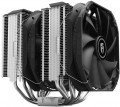 | 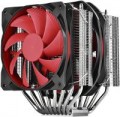 |
|---|---|---|
| Deepcool Assassin III | Deepcool Assassin II | |
from $69.99 | from $39.99 | |
| User reviews | ||
| TOP sellers | ||
Main specs | ||
| Features | for CPU | for CPU |
| Product type | air cooler | air cooler |
| Air flow direction | sideways (dispersion) | sideways (dispersion) |
| Double-tower |  |  |
| Max. TDP | 280 W | 220 W |
Fan | ||
| Number of fans | 2 | 2 |
| Fan size | 140 mm | 140 mm |
| Bearing | hydrodynamic | hydrodynamic |
| Min. RPM | 400 rpm | 300 rpm |
| Max. RPM | 1400 rpm | 1400 rpm |
| Speed controller | auto (PWM) | auto (PWM) |
| Max. air flow | 90.37 CFM | 70.08 CFM |
| Static pressure | 1.79 mm H2O | |
| replaceable | | |
| Min noise level | 18 dB | |
| Noise level | 34 dB | 27 dB |
| Power source | 4-pin | 4-pin |
Radiator | ||
| Heat pipes | 7 | 8 |
| Heatpipe contact | indirect | indirect |
| Heatsink material | aluminium / copper | aluminium / copper |
| Plate material | nickel-plated copper | nickel-plated copper |
| RAM space | 54 mm | |
| Socket | AMD AM2/AM3/FM1/FM2 AMD AM4 Intel 1150 Intel 1155/1156 Intel 1366 Intel 2011 / 2011 v3 Intel 2066 Intel 1151 / 1151 v2 Intel 1200 | AMD AM2/AM3/FM1/FM2 Intel 775 Intel 1150 Intel 1155/1156 Intel 1366 Intel 2011 / 2011 v3 Intel 2066 Intel 1151 / 1151 v2 Intel 1200 |
General | ||
| Mount type | bilateral (backplate) | bilateral (backplate) |
| Dimensions | 161x140x165 mm | 167x143x158 mm |
| Height | 165 mm | 167 mm |
| Weight | 1464 g | 1479 g |
| Added to E-Catalog | august 2019 | may 2015 |


Compare Deepcool Assassin III and Assassin II
You may be interested in
My comparisons
Deepcool Assassin III often compared


Deepcool Assassin II often compared


Glossary
Double-tower
A feature found in some active CPU coolers (see "Intended Use").
For tower arrangements in general, see Airflow Blowing below. And the double-tower design means that the cooler has two working blocks — that is, two fans and two radiators. Accordingly, there are more heat pipes in the design than in single-tower models — at least 4 of them, and more often 5 – 6 or even more. Such an arrangement can significantly increase the cooling efficiency; on the other hand, it also significantly affects the dimensions, weight and price.
For tower arrangements in general, see Airflow Blowing below. And the double-tower design means that the cooler has two working blocks — that is, two fans and two radiators. Accordingly, there are more heat pipes in the design than in single-tower models — at least 4 of them, and more often 5 – 6 or even more. Such an arrangement can significantly increase the cooling efficiency; on the other hand, it also significantly affects the dimensions, weight and price.
Max. TDP
The maximum TDP provided by the cooling system. Note that this parameter is indicated only for solutions equipped with heatsinks (see "Type"); for separately made fans, the efficiency is determined by other parameters, primarily by the air flow values (see above).
TDP can be described as the amount of heat that a cooling system is able to remove from a serviced component. Accordingly, for the normal operation of the entire system, it is necessary that the TDP of the cooling system is not lower than the heat dissipation of this component (heat dissipation data is usually indicated in the detailed characteristics of the components). And it is best to select coolers with a power margin of at least 20 – 25% — this will give an additional guarantee in case of forced operation modes and emergency situations (including clogging of the case and reduced air exchange efficiency).
As for specific numbers, the most modest modern cooling systems provide TDP up to 100 W, the most advanced — up to 250 W and even higher.
TDP can be described as the amount of heat that a cooling system is able to remove from a serviced component. Accordingly, for the normal operation of the entire system, it is necessary that the TDP of the cooling system is not lower than the heat dissipation of this component (heat dissipation data is usually indicated in the detailed characteristics of the components). And it is best to select coolers with a power margin of at least 20 – 25% — this will give an additional guarantee in case of forced operation modes and emergency situations (including clogging of the case and reduced air exchange efficiency).
As for specific numbers, the most modest modern cooling systems provide TDP up to 100 W, the most advanced — up to 250 W and even higher.
Min. RPM
The lowest speed at which the cooling fan is capable of operating. Specified only for models with speed control (see below).
The lower the minimum speed (with the same maximum) — the wider the speed control range and the more you can slow down the fan when high performance is not needed (such a slowdown allows you to reduce energy consumption and noise level). On the other hand, an extensive range affects the cost accordingly.
The lower the minimum speed (with the same maximum) — the wider the speed control range and the more you can slow down the fan when high performance is not needed (such a slowdown allows you to reduce energy consumption and noise level). On the other hand, an extensive range affects the cost accordingly.
Max. air flow
The maximum airflow that a cooling fan can create; measured in CFM — cubic feet per minute.
The higher the CFM number, the more efficient the fan. On the other hand, high performance requires either a large diameter (which affects the size and cost) or high speed (which increases the noise and vibration levels). Therefore, when choosing, it makes sense not to chase the maximum air flow, but to use special formulas that allow you to calculate the required number of CFM depending on the type and power of the cooled component and other parameters. Such formulas can be found in special sources. As for specific numbers, in the most modest systems, the performance does not exceed 30 CFM, and in the most powerful systems it can be up to 80 CFM and even more.
It is also worth considering that the actual value of the air flow at the highest speed is usually lower than the claimed maximum; see Static Pressure for details.
The higher the CFM number, the more efficient the fan. On the other hand, high performance requires either a large diameter (which affects the size and cost) or high speed (which increases the noise and vibration levels). Therefore, when choosing, it makes sense not to chase the maximum air flow, but to use special formulas that allow you to calculate the required number of CFM depending on the type and power of the cooled component and other parameters. Such formulas can be found in special sources. As for specific numbers, in the most modest systems, the performance does not exceed 30 CFM, and in the most powerful systems it can be up to 80 CFM and even more.
It is also worth considering that the actual value of the air flow at the highest speed is usually lower than the claimed maximum; see Static Pressure for details.
Static pressure
The maximum static air pressure generated by the fan during operation.
This parameter is measured as follows: if the fan is installed on a blind pipe, from which there is no air outlet, and turned on for blowing, then the pressure reached in the pipe will correspond to the static one. In fact, this parameter determines the overall efficiency of the fan: the higher the static pressure (ceteris paribus), the easier it is for the fan to “push” the required amount of air through a space with high resistance, for example, through narrow slots of a radiator or through a case full of components.
Also, this parameter is used for some specific calculations, however, these calculations are quite complex and, usually, are not necessary for an ordinary user — they are associated with nuances that are relevant mainly for computer enthusiasts. You can read more about this in special sources.
This parameter is measured as follows: if the fan is installed on a blind pipe, from which there is no air outlet, and turned on for blowing, then the pressure reached in the pipe will correspond to the static one. In fact, this parameter determines the overall efficiency of the fan: the higher the static pressure (ceteris paribus), the easier it is for the fan to “push” the required amount of air through a space with high resistance, for example, through narrow slots of a radiator or through a case full of components.
Also, this parameter is used for some specific calculations, however, these calculations are quite complex and, usually, are not necessary for an ordinary user — they are associated with nuances that are relevant mainly for computer enthusiasts. You can read more about this in special sources.
Min noise level
The lowest noise level produced by the cooling system during operation.
This parameter is indicated only for those models that have capacity control and can operate at reduced power. Accordingly, the minimum noise level is the noise level in the most “quiet” mode, the volume of work, which this model cannot be less than.
These data will be useful, first of all, to those who are trying to reduce the noise level as much as possible and, as they say, “fight for every decibel”. However, it is worth noting here that in many models the minimum values are about 15 dB, and in the quietest — only 10 – 11 dB. This volume is comparable to the rustling of leaves and is practically lost against the background of ambient noise even in a residential area at night, not to mention louder conditions, and the difference between 11 and 18 dB in this case is not significant for human perception. A comparison table for sound starting from 20 dB is given in the "Noise level" section below.
This parameter is indicated only for those models that have capacity control and can operate at reduced power. Accordingly, the minimum noise level is the noise level in the most “quiet” mode, the volume of work, which this model cannot be less than.
These data will be useful, first of all, to those who are trying to reduce the noise level as much as possible and, as they say, “fight for every decibel”. However, it is worth noting here that in many models the minimum values are about 15 dB, and in the quietest — only 10 – 11 dB. This volume is comparable to the rustling of leaves and is practically lost against the background of ambient noise even in a residential area at night, not to mention louder conditions, and the difference between 11 and 18 dB in this case is not significant for human perception. A comparison table for sound starting from 20 dB is given in the "Noise level" section below.
Noise level
The standard noise level generated by the cooling system during operation. Usually, this paragraph indicates the maximum noise during normal operation, without overloads and other "extreme".
Note that the noise level is indicated in decibels, and this is a non-linear value. So it is easiest to evaluate the actual loudness using comparative tables. Here is a table for values found in modern cooling systems:
20 dB — barely audible sound (quiet whisper of a person at a distance of about 1 m, sound background in an open field outside the city in calm weather);
25 dB — very quiet (normal whisper at a distance of 1 m);
30 dB — quiet (wall clock). It is this noise that, according to sanitary standards, is the maximum allowable for constant sound sources at night (from 23.00 to 07.00). This means that if the computer is planned to sit at night, it is desirable that the volume of the cooling system does not exceed this value.
35 dB — conversation in an undertone, sound background in a quiet library;
40 dB — conversation, relatively quiet, but already in full voice. The maximum permissible noise level for residential premises in the daytime, from 7.00 to 23.00, according to sanitary standards. However, even the noisiest cooling systems usually do not reach this indicator, the maximum for such equipment is about 38 – 39 dB.
Note that the noise level is indicated in decibels, and this is a non-linear value. So it is easiest to evaluate the actual loudness using comparative tables. Here is a table for values found in modern cooling systems:
20 dB — barely audible sound (quiet whisper of a person at a distance of about 1 m, sound background in an open field outside the city in calm weather);
25 dB — very quiet (normal whisper at a distance of 1 m);
30 dB — quiet (wall clock). It is this noise that, according to sanitary standards, is the maximum allowable for constant sound sources at night (from 23.00 to 07.00). This means that if the computer is planned to sit at night, it is desirable that the volume of the cooling system does not exceed this value.
35 dB — conversation in an undertone, sound background in a quiet library;
40 dB — conversation, relatively quiet, but already in full voice. The maximum permissible noise level for residential premises in the daytime, from 7.00 to 23.00, according to sanitary standards. However, even the noisiest cooling systems usually do not reach this indicator, the maximum for such equipment is about 38 – 39 dB.
Heat pipes
Number of heat pipes in the cooling system
The heat pipe is a hermetically sealed structure containing a low-boiling liquid. When one end of the tube is heated, this liquid evaporates and condenses at the other end, thus removing heat from the heating source and transferring it to the cooler. Nowadays, such devices are widely used mainly in processor cooling systems (see "Intended use") — they connect the substrate that is in direct contact with the CPU and the heatsink of the active cooler. Manufacturers select the number of tubes based on the overall performance of the cooler (see "Maximum TDP"); however, models with similar TDPs can still differ markedly in this parameter. In such cases, it is worth considering the following: increasing the number of heat pipes increases the efficiency of heat transfer, but also increases the dimensions, weight and cost of the entire structure.
As for the number, the simplest models provide 1 – 2 heat pipes, and in the most advanced and powerful processor systems, this number can be 7 or more.
The heat pipe is a hermetically sealed structure containing a low-boiling liquid. When one end of the tube is heated, this liquid evaporates and condenses at the other end, thus removing heat from the heating source and transferring it to the cooler. Nowadays, such devices are widely used mainly in processor cooling systems (see "Intended use") — they connect the substrate that is in direct contact with the CPU and the heatsink of the active cooler. Manufacturers select the number of tubes based on the overall performance of the cooler (see "Maximum TDP"); however, models with similar TDPs can still differ markedly in this parameter. In such cases, it is worth considering the following: increasing the number of heat pipes increases the efficiency of heat transfer, but also increases the dimensions, weight and cost of the entire structure.
As for the number, the simplest models provide 1 – 2 heat pipes, and in the most advanced and powerful processor systems, this number can be 7 or more.
RAM space
The height of the space for RAM (random access memory) provided by the design of the cooling system.
Such a space is found predominantly in processor systems (see "Purpose"). Modern CPU coolers can be very large, and when installed, they often cover the RAM slots closest to the processor. This can be avoided by making the design narrow enough — however, this, in turn, negatively affects efficiency. That's why many manufacturers use another option — they don't limit the width of the cooler, but place its components at a high height, allowing you to place RAM bars of a certain height under them. Sometimes a special cutout is even made at the bottom of the radiator, which further increases the available space. And in this paragraph, the maximum height of the bar that can be placed under the cooling system is indicated.
Such a space is found predominantly in processor systems (see "Purpose"). Modern CPU coolers can be very large, and when installed, they often cover the RAM slots closest to the processor. This can be avoided by making the design narrow enough — however, this, in turn, negatively affects efficiency. That's why many manufacturers use another option — they don't limit the width of the cooler, but place its components at a high height, allowing you to place RAM bars of a certain height under them. Sometimes a special cutout is even made at the bottom of the radiator, which further increases the available space. And in this paragraph, the maximum height of the bar that can be placed under the cooling system is indicated.