
Comparison Optoma UHD380X vs Optoma UHD370X
Add to comparison | 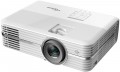 | 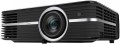 |
|---|---|---|
| Optoma UHD380X | Optoma UHD370X | |
| Outdated Product | Outdated Product | |
| TOP sellers | ||
| Main function | home | home |
Lamp and image | ||
| Service life | 4000 h | 4000 h |
| Service life (energy-saving) | 10000 h | |
| Lamp power | 240 W | 240 W |
| Brightness | 3500 lm | 3500 lm |
| Dynamic contrast | 500 000:1 | 500 000:1 |
| Horizontal frequency | 31 – 135 kHz | 31 – 135 kHz |
| Frame rate | 24 – 120 Hz | 24 – 120 Hz |
Projection system | ||
| Technology | DLP | DLP |
| Real resolution | 3840x2160 px | 3840x2160 px |
| Image format support | 4:3, 16:9, 16:10 | 4:3, 16:9 |
| HDR support | + | |
Projecting | ||
| Rear projection |  | |
| Throw distance, min | 1.2 m | 1.2 m |
| Throw distance, max | 8.1 m | 8.1 m |
| Image size | 34 – 302.5 " | 34 – 302.5 " |
| Throw ratio | 1.21:1 – 1.59:1 | |
| Optical zoom | 1.3 x | 1.3 x |
| Zoom and focus | manual | manual |
| Lens shift | | |
Features | ||
| Features | PJ-Link protocol 3D support | PJ-Link protocol interactive pen |
| Wi-Fi | Wi-Fi ready | |
Hardware | ||
| USB-A 2.0 | 4 pcs | 4 pcs |
| Number of speakers | 2 | 2 |
| Sound power | 10 W | 10 W |
| Video connectors | VGA | VGA |
| HDMI inputs | 2 | 2 |
| HDMI version | v 2.0 | v 2.0 |
| Audio connectors | 3.5 mm input (mini-Jack) 3.5 mm output (mini-Jack) optical | 3.5 mm input (mini-Jack) 3.5 mm output (mini-Jack) |
| Service connectors | COM port (RS-232) LAN (RJ-45) | COM port (RS-232) LAN (RJ-45) |
General | ||
| Noise level (nominal) | 25 dB | 25 dB |
| Power source | mains | mains |
| Power consumption | 249 W | 305 W |
| Size (HxWxD) | 118x392x281 mm | 118x392x281 mm |
| Weight | 5.22 kg | 5.22 kg |
| Color | ||
| Added to E-Catalog | march 2020 | april 2019 |


Compare Optoma UHD380X and UHD370X
The Optoma UHD380X and UHD370X projectors are designed for home theater and have similar features, such as 3500 lm brightness and a dynamic contrast ratio of 500,000:1. However, the UHD370X supports HDR and an interactive pen, which can be useful for educational purposes. At the same time, the UHD380X offers a wider range of image formats (including 16:10) and slightly lower power consumption in eco mode. Both projectors have the same dimensions and weight, but the UHD370X has two offers in stores, while the UHD380X is available in just one. Users note the high image quality and brightness of both models, but the UHD370X may be preferable for those looking for additional features.
You may be interested in
My comparisons
Optoma UHD370X often compared

Glossary
Service life (energy-saving)
When working in economy mode, the brightness of the backlight is noticeably reduced, on average by 30-50%. With a decrease in brightness, heat dissipation also decreases, which saves the working life of the illuminator, thereby increasing the lamp life. Thus, the ECO mode allows you to extend the lamp life by an average of 30%. If the typical projector lamp life is 4000 hours, regular use of the ECO mode will extend the backlight life to approximately 5500 hours.
Image format support
Image formats supported by the projector.
In this case, format means the aspect ratio of the image. The general rule in this case is that the projector must support the same format in which the original content is recorded. Otherwise, the image will either be stretched in height or width, or with black stripes on the sides or top-bottom. Specifically, the formats can be divided into three main categories:
— Traditional, or rectangular. Classic formats in which the height of the picture is not much less than the width. The most popular options are 4:3, widely used in analogue TV, and 5:4, common in computer technology. Traditional formats are well suited for presentations, working with documents and graphics, and other similar tasks.
— Widescreen — formats in which the frame width is significantly (more than 1.5 times) greater than the height. The most popular of these standards are 16:9 and 16:10. These aspect ratios are well suited for games and movies; in particular, most high-definition content (HD 720p and above) is recorded in widescreen format.
— Extra wide. The formats are even wider than the widescreen ones described above — for example, 21:9. Mainly used in cinematography.
It is worth noting that many modern projectors are able to work with several types of formats at once — for example, with classic 4:3 and...wide-angle 16:9.
In this case, format means the aspect ratio of the image. The general rule in this case is that the projector must support the same format in which the original content is recorded. Otherwise, the image will either be stretched in height or width, or with black stripes on the sides or top-bottom. Specifically, the formats can be divided into three main categories:
— Traditional, or rectangular. Classic formats in which the height of the picture is not much less than the width. The most popular options are 4:3, widely used in analogue TV, and 5:4, common in computer technology. Traditional formats are well suited for presentations, working with documents and graphics, and other similar tasks.
— Widescreen — formats in which the frame width is significantly (more than 1.5 times) greater than the height. The most popular of these standards are 16:9 and 16:10. These aspect ratios are well suited for games and movies; in particular, most high-definition content (HD 720p and above) is recorded in widescreen format.
— Extra wide. The formats are even wider than the widescreen ones described above — for example, 21:9. Mainly used in cinematography.
It is worth noting that many modern projectors are able to work with several types of formats at once — for example, with classic 4:3 and...wide-angle 16:9.
HDR support
Support for HDR technology — expanded dynamic range — by the projector.
This technology allows for extending the brightness range displayed within a single frame — in simpler terms, it enables displaying both very bright and very dark colors on screen simultaneously. This significantly improves color reproduction; furthermore, small details on very bright or very dark parts of the frame that would be invisible on a regular image remain visible. However, it's worth noting that all the advantages of HDR become noticeable only on a high-quality screen with maximum dimming. Additionally, this function significantly affects the cost of the projector, and the content being played back must initially be recorded in HDR — using exactly the technology supported by the projector (this detail can be clarified in the manual). In light of this, HDR support is mainly found among high-end models for home theaters. It should also be noted that there are several different HDR technologies that are not compatible with each other. Therefore, when purchasing a projector with this function, it's crucial to clarify which exact version of HDR it supports. The following are available:
— HDR10. Historically the first of the consumer HDR formats, less advanced than the options described below but extremely widespread. In particular, HDR10 is supported by virtually all streaming services that provide HDR content at all, and it's also standard for...Blu-ray discs. It allows for working with a color depth of 10 bits (hence the name). At the same time, devices with this format are compatible with HDR10+ content, although its quality will be limited by the capabilities of the original HDR10.
— HDR10+. An enhanced version of HDR10. With the same color depth (10 bits), it uses so-called dynamic metadata, which allows transmitting information about color depth not only for groups of several frames but also for individual frames. This leads to further improvement in color reproduction.
— Dolby Vision. An advanced standard used, for example, in professional filmmaking. It achieves a color depth of 12 bits, uses the aforementioned dynamic metadata, and also allows transmitting two image variants simultaneously in one video stream — HDR and regular (SDR). Dolby Vision is based on the same technology as HDR10, so in modern video equipment, this format is usually combined with HDR10 or HDR10+.
— HLG. An HDR format initially designed for TV broadcasting and live transmissions; hence, it is designed for "working without metadata" and is easier to transfer between different sources. Unlike HDR10, which uses static metadata, and particularly HDR10+ / Dolby Vision, which can dynamically adjust the picture frame by frame, HLG often provides a more universal and predictable HDR signal, although not as precisely tuned for a specific display. However, HLG has a strong point — excellent compatibility: the same stream can appear acceptable even on devices that are not fully HDR-capable, which is crucial for broadcast/satellite content. An example of use is viewing HDR broadcasts and TV content from a set-top box/tuner or streaming where HLG is encountered: the projector will correctly receive the signal and display the extended brightness range and more vibrant colors without manual tweaking of settings.
This technology allows for extending the brightness range displayed within a single frame — in simpler terms, it enables displaying both very bright and very dark colors on screen simultaneously. This significantly improves color reproduction; furthermore, small details on very bright or very dark parts of the frame that would be invisible on a regular image remain visible. However, it's worth noting that all the advantages of HDR become noticeable only on a high-quality screen with maximum dimming. Additionally, this function significantly affects the cost of the projector, and the content being played back must initially be recorded in HDR — using exactly the technology supported by the projector (this detail can be clarified in the manual). In light of this, HDR support is mainly found among high-end models for home theaters. It should also be noted that there are several different HDR technologies that are not compatible with each other. Therefore, when purchasing a projector with this function, it's crucial to clarify which exact version of HDR it supports. The following are available:
— HDR10. Historically the first of the consumer HDR formats, less advanced than the options described below but extremely widespread. In particular, HDR10 is supported by virtually all streaming services that provide HDR content at all, and it's also standard for...Blu-ray discs. It allows for working with a color depth of 10 bits (hence the name). At the same time, devices with this format are compatible with HDR10+ content, although its quality will be limited by the capabilities of the original HDR10.
— HDR10+. An enhanced version of HDR10. With the same color depth (10 bits), it uses so-called dynamic metadata, which allows transmitting information about color depth not only for groups of several frames but also for individual frames. This leads to further improvement in color reproduction.
— Dolby Vision. An advanced standard used, for example, in professional filmmaking. It achieves a color depth of 12 bits, uses the aforementioned dynamic metadata, and also allows transmitting two image variants simultaneously in one video stream — HDR and regular (SDR). Dolby Vision is based on the same technology as HDR10, so in modern video equipment, this format is usually combined with HDR10 or HDR10+.
— HLG. An HDR format initially designed for TV broadcasting and live transmissions; hence, it is designed for "working without metadata" and is easier to transfer between different sources. Unlike HDR10, which uses static metadata, and particularly HDR10+ / Dolby Vision, which can dynamically adjust the picture frame by frame, HLG often provides a more universal and predictable HDR signal, although not as precisely tuned for a specific display. However, HLG has a strong point — excellent compatibility: the same stream can appear acceptable even on devices that are not fully HDR-capable, which is crucial for broadcast/satellite content. An example of use is viewing HDR broadcasts and TV content from a set-top box/tuner or streaming where HLG is encountered: the projector will correctly receive the signal and display the extended brightness range and more vibrant colors without manual tweaking of settings.
Throw ratio
The projector's throw distance is vital in determining what size projection screen to use and how far away it should be from the projector. Most projectors have a variable throw ratio. In the extreme positions, these are wide-angle mode (smallest value) and telephoto lens mode (largest value). Knowing these values, you will be able to determine the range of throw distances within which the projector must be placed in order for the projected image to match the specified dimensions of the projection screen.
According to these values, you need to check or set the optical zoom. We divide the larger value by the smaller value, and we get a figure, for example 1.33-2.16: 1.
If we want to calculate whether this projector is suitable for a certain image size, we do this: 1.33*3 (image width)=the distance at which the projector should hang.
According to these values, you need to check or set the optical zoom. We divide the larger value by the smaller value, and we get a figure, for example 1.33-2.16: 1.
If we want to calculate whether this projector is suitable for a certain image size, we do this: 1.33*3 (image width)=the distance at which the projector should hang.
Features
— Light sensor. A sensor that detects the level of ambient light. Most commonly used to automatically adjust the brightness of the projector to suit current conditions. So, in a darkened room, high brightness is not needed, but in daylight, on the contrary, you cannot do without it. You can also adjust the operating mode manually, but it is more convenient when the projector does it automatically.
— DLNA support. DLNA technology is designed to connect home electronics into a single network and exchange content in real time. One of its advantages is that DLNA devices are guaranteed to be compatible with each other regardless of model and manufacturer. In a projector, this feature can be used, for example, to view a movie on a large screen from a computer hard drive, or to display an Internet broadcast on this screen that was originally opened on a tablet. DLNA works on the basis of a standard local network, with a connection via LAN (see "Management ports") or Wi-Fi (see below).
— MHL support. The projector has HDMI inputs that support the MHL standard. This standard is used to transfer video and audio from mobile gadgets (via microUSB) to external devices. Accordingly, this feature is useful for those who plan to connect smartphones and other portable equipment to the projector. At the same time, an MHL gadget connected t...o a compatible HDMI port can also be charged in the process. Note that you can also output the MHL signal to a regular HDMI port, but this will require an adapter, and the charging function will not be available.
— Picture-in-picture. Ability to play two channels simultaneously on one screen: main and additional (in a separate small window). The sound is played only for the main channel. This mode allows, for example, to skip a break in a football match and not be late for the second half. Note that for this function to work, images must come from different sources — for example, from two different tuners, or from a tuner and an external device (DVD player, media centre, etc.).
— PJ-Link protocol. The projector supports the PJ-Link protocol. This is a service standard designed to control projectors over local networks (usually LAN or HDBaseT, see "Management port"). All PJ-Link-enabled equipment (projectors, controllers) is fully interoperable regardless of brand and manufacturer, making it much easier to build networks of multiple projectors and replace individual components in such networks.
— 3D support. Support for 3D implies the ability to reproduce three-dimensional stereoscopic images. A 3D image can be based on various technologies. Traditionally, active (see the relevant paragraph), passive (see the relevant paragraph) and hybrid 3D technologies are distinguished. Special glasses are required to view the three-dimensional image. In the case of active 3D, special shutters are built into the glasses, which operate from an independent power source. For passive and hybrid 3D, regular 3D glasses without battery power are sufficient. — Active 3D. Active 3D technology is based on the principle of alternating flickering of the image. The flickering of the image on the screen is synchronized with the flickering of the lenses in the glasses, as a result, each eye receives a separate image, which makes the picture three-dimensional. The main advantage of active 3D is the ability to view images without reducing the original picture quality. You can look at the screen from any angle and from any position, while the image will still be three-dimensional. Among the shortcomings, there is the presence of some discomfort for the eyes, which occurs due to the regular flickering of lenses in glasses. Also, active 3D glasses may darken the original brightness of the image somewhat. Additionally, glasses of this type are very expensive. — Passive 3D. Passive 3D provides the display of a double image. Passive 3D glasses use special lenses that cut off the duplicate image in such a way that each eye sees only the image intended for it, which creates the illusion of a three-dimensional image. The main advantage of passive 3D is that it does not tyre the eyes, which is typical for active flickering 3D. Passive 3D glasses are inexpensive.
— Interactive pen. The projector supports interactive pen technology. This technology allows you to actually turn the projected image into an interactive whiteboard: with a pen, you can draw, write and make notes directly on the projected image, which is especially useful during presentations and educational events. It is worth taking into account that the pens themselves and additional equipment for their work may not be included in the set.
— Multimedia (air mouse remote). Air mouse remote are devices that have a gyroscope, which allows you not only to switch menu items with the “↑”, “↓” buttons, but to use the remote control as a mouse. By directing it to the screen, a cursor will appear that moves in the direction of the remote control. This makes management easier and faster.
— Voice control. The projector's support for voice control allows you to dictate certain commands through the remote control. However, voice control does not cover all functions and recognition accuracy may require re-entering the command. If you need a more extensive range of functions, then pay attention to the voice assistant.
— Voice assistant. For a long time now, device control has been shifting to voice commands. For this, certain interfaces and systems are used. The most popular are Amazon Alexa and Google Assistant. For "apple" devices, this is Apple Siri, but this technique is not presented in projectors. At the same time, unlike the voice control function, the voice assistant does not just turn on this or that function, mode, makes it louder, quieter, but allows you to perform certain operations in applications, whether it is to launch the desired clip on Youtube or display the weather in the browser.
— DLNA support. DLNA technology is designed to connect home electronics into a single network and exchange content in real time. One of its advantages is that DLNA devices are guaranteed to be compatible with each other regardless of model and manufacturer. In a projector, this feature can be used, for example, to view a movie on a large screen from a computer hard drive, or to display an Internet broadcast on this screen that was originally opened on a tablet. DLNA works on the basis of a standard local network, with a connection via LAN (see "Management ports") or Wi-Fi (see below).
— MHL support. The projector has HDMI inputs that support the MHL standard. This standard is used to transfer video and audio from mobile gadgets (via microUSB) to external devices. Accordingly, this feature is useful for those who plan to connect smartphones and other portable equipment to the projector. At the same time, an MHL gadget connected t...o a compatible HDMI port can also be charged in the process. Note that you can also output the MHL signal to a regular HDMI port, but this will require an adapter, and the charging function will not be available.
— Picture-in-picture. Ability to play two channels simultaneously on one screen: main and additional (in a separate small window). The sound is played only for the main channel. This mode allows, for example, to skip a break in a football match and not be late for the second half. Note that for this function to work, images must come from different sources — for example, from two different tuners, or from a tuner and an external device (DVD player, media centre, etc.).
— PJ-Link protocol. The projector supports the PJ-Link protocol. This is a service standard designed to control projectors over local networks (usually LAN or HDBaseT, see "Management port"). All PJ-Link-enabled equipment (projectors, controllers) is fully interoperable regardless of brand and manufacturer, making it much easier to build networks of multiple projectors and replace individual components in such networks.
— 3D support. Support for 3D implies the ability to reproduce three-dimensional stereoscopic images. A 3D image can be based on various technologies. Traditionally, active (see the relevant paragraph), passive (see the relevant paragraph) and hybrid 3D technologies are distinguished. Special glasses are required to view the three-dimensional image. In the case of active 3D, special shutters are built into the glasses, which operate from an independent power source. For passive and hybrid 3D, regular 3D glasses without battery power are sufficient. — Active 3D. Active 3D technology is based on the principle of alternating flickering of the image. The flickering of the image on the screen is synchronized with the flickering of the lenses in the glasses, as a result, each eye receives a separate image, which makes the picture three-dimensional. The main advantage of active 3D is the ability to view images without reducing the original picture quality. You can look at the screen from any angle and from any position, while the image will still be three-dimensional. Among the shortcomings, there is the presence of some discomfort for the eyes, which occurs due to the regular flickering of lenses in glasses. Also, active 3D glasses may darken the original brightness of the image somewhat. Additionally, glasses of this type are very expensive. — Passive 3D. Passive 3D provides the display of a double image. Passive 3D glasses use special lenses that cut off the duplicate image in such a way that each eye sees only the image intended for it, which creates the illusion of a three-dimensional image. The main advantage of passive 3D is that it does not tyre the eyes, which is typical for active flickering 3D. Passive 3D glasses are inexpensive.
— Interactive pen. The projector supports interactive pen technology. This technology allows you to actually turn the projected image into an interactive whiteboard: with a pen, you can draw, write and make notes directly on the projected image, which is especially useful during presentations and educational events. It is worth taking into account that the pens themselves and additional equipment for their work may not be included in the set.
— Multimedia (air mouse remote). Air mouse remote are devices that have a gyroscope, which allows you not only to switch menu items with the “↑”, “↓” buttons, but to use the remote control as a mouse. By directing it to the screen, a cursor will appear that moves in the direction of the remote control. This makes management easier and faster.
— Voice control. The projector's support for voice control allows you to dictate certain commands through the remote control. However, voice control does not cover all functions and recognition accuracy may require re-entering the command. If you need a more extensive range of functions, then pay attention to the voice assistant.
— Voice assistant. For a long time now, device control has been shifting to voice commands. For this, certain interfaces and systems are used. The most popular are Amazon Alexa and Google Assistant. For "apple" devices, this is Apple Siri, but this technique is not presented in projectors. At the same time, unlike the voice control function, the voice assistant does not just turn on this or that function, mode, makes it louder, quieter, but allows you to perform certain operations in applications, whether it is to launch the desired clip on Youtube or display the weather in the browser.
Wi-Fi
Wi-Fi standard supported by the projector.
Wi-Fi is known mainly as a way to connect wirelessly to the Internet and local networks. In addition, since relatively recently, this technology has also been used for direct connection between wireless devices. Accordingly, the methods of using Wi-Fi in projectors can also be different. Thus, some models are able to connect to local networks to work with content via DLNA (see above); in others, such a connection is used for control from a computer or other network device; in others, a “remote control” such as a smartphone or tablet can connect directly via Wi-Fi.
As for Wi-Fi versions, the most popular options in modern technology - Wi-Fi 6 (802.11ax), Wi-Fi 5 (802.11ac) - are quite compatible with each other, and the difference between them in this case is not critical. Therefore, you can not pay special attention to these details when choosing.
There are also Wi-Fi ready projectors, which do not have Wi-Fi out of the box, but when connected to the appropriate adapter (purchased separately) are capable of wireless connection.
Wi-Fi is known mainly as a way to connect wirelessly to the Internet and local networks. In addition, since relatively recently, this technology has also been used for direct connection between wireless devices. Accordingly, the methods of using Wi-Fi in projectors can also be different. Thus, some models are able to connect to local networks to work with content via DLNA (see above); in others, such a connection is used for control from a computer or other network device; in others, a “remote control” such as a smartphone or tablet can connect directly via Wi-Fi.
As for Wi-Fi versions, the most popular options in modern technology - Wi-Fi 6 (802.11ax), Wi-Fi 5 (802.11ac) - are quite compatible with each other, and the difference between them in this case is not critical. Therefore, you can not pay special attention to these details when choosing.
There are also Wi-Fi ready projectors, which do not have Wi-Fi out of the box, but when connected to the appropriate adapter (purchased separately) are capable of wireless connection.
Audio connectors
— RCA (audio). Analogue audio interface using RCA jacks. Depending on the model of the projector, it can serve as both an input (for example, in addition to the component video input) and an output for connecting external audio devices. We only note that in this case only one channel of sound is transmitted through one RCA connector, and a pair of “tulips” (for the left and right channel) is considered an input or output.
— 3.5 mm input (mini-Jack). This connector is more compact than RCA, in addition, it allows to work with two stereo channels through one jack. On the other hand, a 3.5 mm connection is less reliable and more prone to interference. Therefore, such an input is designed mainly for simple tasks — such as transmitting sound from the audio output of a PC or laptop.
— 3.5 mm output (mini-Jack). This in any case is an analogue output, however, its specific purpose may be different. So, in some projectors it plays the role of a linear interface and is used to output an audio signal to active sound system or an external amplifier. In other devices, the mini-Jack works as a headphone output. There are models where these functions are combined in one connector.
— Optical output. An output for transmission of a digital audio signal by a fibre optic cable; allows the transmission of multi-channel audio. Not...able for its complete insensitivity to electromagnetic interference. On the other hand, fibre optic cable is quite fragile, it must be protected from bending and strong pressure.
— Microphone input. Input for connecting an external microphone to the projector. Using it, you can stream sound from a microphone using the projector's own amplifier — for example, comment on a presentation through the same speakers through which the main sound goes.
— 3.5 mm input (mini-Jack). This connector is more compact than RCA, in addition, it allows to work with two stereo channels through one jack. On the other hand, a 3.5 mm connection is less reliable and more prone to interference. Therefore, such an input is designed mainly for simple tasks — such as transmitting sound from the audio output of a PC or laptop.
— 3.5 mm output (mini-Jack). This in any case is an analogue output, however, its specific purpose may be different. So, in some projectors it plays the role of a linear interface and is used to output an audio signal to active sound system or an external amplifier. In other devices, the mini-Jack works as a headphone output. There are models where these functions are combined in one connector.
— Optical output. An output for transmission of a digital audio signal by a fibre optic cable; allows the transmission of multi-channel audio. Not...able for its complete insensitivity to electromagnetic interference. On the other hand, fibre optic cable is quite fragile, it must be protected from bending and strong pressure.
— Microphone input. Input for connecting an external microphone to the projector. Using it, you can stream sound from a microphone using the projector's own amplifier — for example, comment on a presentation through the same speakers through which the main sound goes.
Power consumption
The power consumed by the projector during normal operation. Both the high consumption of the device and the requirements for power supply providing depend on this indicator: for example, heavy professional projectors of 3500 W and above cannot be plugged into standard sockets, they require a special connection format.
Keep in mind that when using traditional mercury or gas discharge lamps, high brightness inevitably requires high power. Energy efficient LED projectors do not have this disadvantage, but they are still relatively uncommon, and LED is not always a suitable type of lamp.
Keep in mind that when using traditional mercury or gas discharge lamps, high brightness inevitably requires high power. Energy efficient LED projectors do not have this disadvantage, but they are still relatively uncommon, and LED is not always a suitable type of lamp.