
Comparison Viewsonic PX700HD vs Optoma DH350
Add to comparison | 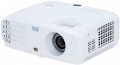 | 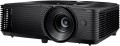 |
|---|---|---|
| Viewsonic PX700HD | Optoma DH350 | |
from $895.00 | from $157.84 | |
| TOP sellers | ||
| Main function | universal | universal |
Lamp and image | ||
| Lamp model | RLC-116 | |
| Service life | 5000 h | 3500 h |
| Service life (energy-saving) | 10000 h | |
| Lamp power | 203 W | 240 W |
| Brightness | 3500 lm | 3200 lm |
| Dynamic contrast | 12 000:1 | 22 000:1 |
| Colour rendering | 1.07 billion colours | 1.07 billion colours |
| Horizontal frequency | 15 – 102 kHz | |
| Frame rate | 23 – 120 Hz | |
Projection system | ||
| Technology | DLP | DLP |
| Real resolution | 1920x1080 px | 1920x1080 px |
| Image format support | 4:3 | 4:3, 16:9 |
Projecting | ||
| Rear projection |  | |
| Throw distance, min | 1 m | 1 m |
| Throw distance, max | 10.96 m | 9.8 m |
| Image size | 30 – 300 " | 28 – 301 " |
| Throw ratio | 1.47:1 – 1.62:1 | |
| Optical zoom | 1.1 x | 1.1 x |
| Zoom and focus | manual | manual |
| Keystone correction (vert), ± | 40 ° | |
Features | ||
| Features | 3D support | MHL support 3D support |
Hardware | ||
| USB-A 2.0 | 1 pcs | 1 pcs |
| Number of speakers | 1 | 1 |
| Sound power | 2 W | 10 W |
| Video connectors | VGA | |
| HDMI inputs | 2 | 2 |
| HDMI version | v 1.4 | |
| Audio connectors | 3.5 mm input (mini-Jack) 3.5 mm output (mini-Jack) | 3.5 mm output (mini-Jack) |
| Service connectors | COM port (RS-232) USB (slave) | 3D Sync |
General | ||
| Noise level (nominal) | 27 dB | 25 dB |
| Power source | mains | mains |
| Power consumption | 290 W | 295 W |
| Size (HxWxD) | 135x332x261 mm | 108x316x244 mm |
| Weight | 3.7 kg | 2.87 kg |
| Added to E-Catalog | july 2018 | may 2018 |


Compare Viewsonic PX700HD and Optoma DH350
Projectors Viewsonic PX700HD and Optoma DH350 have similar characteristics but differ in some key aspects. The PX700HD offers a brightness of 3500 lm and a dynamic contrast ratio of 12000:1, providing bright and clear images; however, the lamp life is 5000 hours (15000 in eco mode). Meanwhile, the DH350 has a brightness of 3200 lm but a higher dynamic contrast ratio of 22000:1, which can enhance image quality in dark scenes. The lamp life of the DH350 is shorter—3500 hours, but in eco mode, it reaches 10000 hours. Both projectors support 3D and have similar dimensions and weight, but the DH350 is slightly lighter (2.87 kg compared to 3.7 kg for the PX700HD). In terms of sound, the DH350 offers a speaker power of 10 W, which is significantly higher than the 2 W of the PX700HD. The choice between them depends on preferences for brightness, contrast, and sound characteristics.
You may be interested in
My comparisons
Viewsonic PX700HD often compared

Optoma DH350 often compared


Glossary
Lamp model
The lamp model that the projector is designed for. Most projectors come with lamps included, so this information is not needed for normal use. But when looking for a spare lamp or replacement, information about model can be very useful: finding a spare part by the exact name is much easier than by general data like the brand of the projector.
Service life
Minimum projector lamp life as stated by the manufacturer. Specified by the total time of continuous operation. Note that if the projector was operated without violations, then upon reaching this time, the lamp will not necessarily fail — on the contrary, it can work for quite a long time. However, when evaluating durability, it is best to focus on the claimed service life.
Service life (energy-saving)
When working in economy mode, the brightness of the backlight is noticeably reduced, on average by 30-50%. With a decrease in brightness, heat dissipation also decreases, which saves the working life of the illuminator, thereby increasing the lamp life. Thus, the ECO mode allows you to extend the lamp life by an average of 30%. If the typical projector lamp life is 4000 hours, regular use of the ECO mode will extend the backlight life to approximately 5500 hours.
Lamp power
The power consumption of the backlight lamp installed in the projector.
Theoretically, the more powerful the lamp, the brighter it is. However, this is only true when comparing lamps of the same type (see above); and even in this case, the brightness may also depend on the nuances of the design. Therefore, when evaluating the capabilities of a lamp, it is worth focus not so much on power, but on the directly claimed brightness in lumens (see below).
But what this parameter directly affects is the total power consumption of the projector: the lamp is the most “greedy” component of the device, compared to it, the power consumption of the rest of the electronics is very small. Also note that many powerful lamps have high heat dissipation and require cooling systems, which affects the size and weight of the projector.
Theoretically, the more powerful the lamp, the brighter it is. However, this is only true when comparing lamps of the same type (see above); and even in this case, the brightness may also depend on the nuances of the design. Therefore, when evaluating the capabilities of a lamp, it is worth focus not so much on power, but on the directly claimed brightness in lumens (see below).
But what this parameter directly affects is the total power consumption of the projector: the lamp is the most “greedy” component of the device, compared to it, the power consumption of the rest of the electronics is very small. Also note that many powerful lamps have high heat dissipation and require cooling systems, which affects the size and weight of the projector.
Brightness
The brightness of the image produced by the projector at maximum backlight brightness. Usually, the average brightness of the screen, derived from a special formula, is indicated. The higher it is, the less the image depends on ambient light: a bright projector can provide a clearly visible image even in daylight, but a dim one will require dimming. On the other hand, increasing brightness reduces contrast and accuracy of colour reproduction.
Accordingly, when choosing this parameter, you need to consider the conditions in which you plan to use the projector. So, for office or school/university use, a brightness of at least 3000 lm is desirable — this allows you to get normal visibility without obscuring the room. In turn, among the top models a very low brightness can be found, because. such projectors are usually installed in rooms specially designed for them with good darkness level. And in ultra-compact devices it is impossible to achieve high brightness for technical reasons.
Detailed recommendations on the optimal brightness for certain conditions can be found in special sources. Here we note that anyway, it is worth choosing according to this indicator with some margin. As mentioned above, as brightness increases, contrast and colour quality decrease, and you may need to use the projector at a reduced brightness to achieve the desired picture quality.
Accordingly, when choosing this parameter, you need to consider the conditions in which you plan to use the projector. So, for office or school/university use, a brightness of at least 3000 lm is desirable — this allows you to get normal visibility without obscuring the room. In turn, among the top models a very low brightness can be found, because. such projectors are usually installed in rooms specially designed for them with good darkness level. And in ultra-compact devices it is impossible to achieve high brightness for technical reasons.
Detailed recommendations on the optimal brightness for certain conditions can be found in special sources. Here we note that anyway, it is worth choosing according to this indicator with some margin. As mentioned above, as brightness increases, contrast and colour quality decrease, and you may need to use the projector at a reduced brightness to achieve the desired picture quality.
Dynamic contrast
The dynamic image contrast provided by the projector.
Dynamic contrast ratio is the ratio between the brightest white and darkest black colour that a projector can produce. Recall that the quality of colour reproduction and detailing depend on contrast, the higher this indicator, the lower the likelihood that details will be indistinguishable in bright or dark areas. However, dynamic contrast is a rather specific parameter. The fact is that when it is calculated, the brightest white at the maximum brightness settings and the darkest black at the minimum are taken into account. As a result, the figures in this column can be very impressive, but it is impossible to achieve such a contrast within one frame.
By introducing this parameter, the manufacturers went to a certain trick. However, this is not to say that dynamic contrast has nothing to do with image quality at all. Projectors can use automatic brightness control, in which the overall brightness, depending on the "picture" on the screen, can increase or decrease. This format of work is based on the fact that the human eye does not need too bright areas on a general dark background and very dark areas on a bright one, the image is normally perceived even without it. The maximum brightness difference achievable in this mode of operation is exactly what described by dynamic contrast.
Dynamic contrast ratio is the ratio between the brightest white and darkest black colour that a projector can produce. Recall that the quality of colour reproduction and detailing depend on contrast, the higher this indicator, the lower the likelihood that details will be indistinguishable in bright or dark areas. However, dynamic contrast is a rather specific parameter. The fact is that when it is calculated, the brightest white at the maximum brightness settings and the darkest black at the minimum are taken into account. As a result, the figures in this column can be very impressive, but it is impossible to achieve such a contrast within one frame.
By introducing this parameter, the manufacturers went to a certain trick. However, this is not to say that dynamic contrast has nothing to do with image quality at all. Projectors can use automatic brightness control, in which the overall brightness, depending on the "picture" on the screen, can increase or decrease. This format of work is based on the fact that the human eye does not need too bright areas on a general dark background and very dark areas on a bright one, the image is normally perceived even without it. The maximum brightness difference achievable in this mode of operation is exactly what described by dynamic contrast.
Horizontal frequency
Horizontal frequency supported by the projector.
This parameter is relevant when working with analogue video signal. In such a video, the image is formed line by line: each pixel in the line is highlighted in turn, then the next line is highlighted, and so on. The horizontal frequency describes how many times per second the backlight beam runs from edge to edge of the screen. For normal playback, the projector must support the same refresh rate as the input signal was recorded. However, most models support a fairly wide range of frequencies, and there are no problems with support. Also note that if you are not a professional, then when choosing a projector, it is quite possible to focus on the frame rate (see below) — this parameter is simpler and more intuitive, and support for a certain frame rate automatically means support for the corresponding line rate.
This parameter is relevant when working with analogue video signal. In such a video, the image is formed line by line: each pixel in the line is highlighted in turn, then the next line is highlighted, and so on. The horizontal frequency describes how many times per second the backlight beam runs from edge to edge of the screen. For normal playback, the projector must support the same refresh rate as the input signal was recorded. However, most models support a fairly wide range of frequencies, and there are no problems with support. Also note that if you are not a professional, then when choosing a projector, it is quite possible to focus on the frame rate (see below) — this parameter is simpler and more intuitive, and support for a certain frame rate automatically means support for the corresponding line rate.
Frame rate
Frame rate, simply put, is the frame rate supported by the projector.
For normal playback, it is highly desirable that the frame rate of the projector match the original frame rate of the video signal. However, most modern models do not support a specific frame rate, but a whole range of frequencies, and quite an extensive one at that.
Note that for viewing most video materials, the range from 24 to 60 fps is quite enough. The exception is 3D content, which may require double the frame rate, up to 120Hz (see " 3D Support " for details).
For normal playback, it is highly desirable that the frame rate of the projector match the original frame rate of the video signal. However, most modern models do not support a specific frame rate, but a whole range of frequencies, and quite an extensive one at that.
Note that for viewing most video materials, the range from 24 to 60 fps is quite enough. The exception is 3D content, which may require double the frame rate, up to 120Hz (see " 3D Support " for details).
Image format support
Image formats supported by the projector.
In this case, format means the aspect ratio of the image. The general rule in this case is that the projector must support the same format in which the original content is recorded. Otherwise, the image will either be stretched in height or width, or with black stripes on the sides or top-bottom. Specifically, the formats can be divided into three main categories:
— Traditional, or rectangular. Classic formats in which the height of the picture is not much less than the width. The most popular options are 4:3, widely used in analogue TV, and 5:4, common in computer technology. Traditional formats are well suited for presentations, working with documents and graphics, and other similar tasks.
— Widescreen — formats in which the frame width is significantly (more than 1.5 times) greater than the height. The most popular of these standards are 16:9 and 16:10. These aspect ratios are well suited for games and movies; in particular, most high-definition content (HD 720p and above) is recorded in widescreen format.
— Extra wide. The formats are even wider than the widescreen ones described above — for example, 21:9. Mainly used in cinematography.
It is worth noting that many modern projectors are able to work with several types of formats at once — for example, with classic 4:3 and...wide-angle 16:9.
In this case, format means the aspect ratio of the image. The general rule in this case is that the projector must support the same format in which the original content is recorded. Otherwise, the image will either be stretched in height or width, or with black stripes on the sides or top-bottom. Specifically, the formats can be divided into three main categories:
— Traditional, or rectangular. Classic formats in which the height of the picture is not much less than the width. The most popular options are 4:3, widely used in analogue TV, and 5:4, common in computer technology. Traditional formats are well suited for presentations, working with documents and graphics, and other similar tasks.
— Widescreen — formats in which the frame width is significantly (more than 1.5 times) greater than the height. The most popular of these standards are 16:9 and 16:10. These aspect ratios are well suited for games and movies; in particular, most high-definition content (HD 720p and above) is recorded in widescreen format.
— Extra wide. The formats are even wider than the widescreen ones described above — for example, 21:9. Mainly used in cinematography.
It is worth noting that many modern projectors are able to work with several types of formats at once — for example, with classic 4:3 and...wide-angle 16:9.