
Comparison ThrustMaster T150 Force Feedback vs ThrustMaster TMX Force Feedback Pro
Add to comparison | 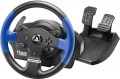 | 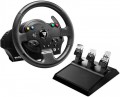 |
|---|---|---|
| ThrustMaster T150 Force Feedback | ThrustMaster TMX Force Feedback Pro | |
| Compare prices 1 | Outdated Product | |
| User reviews | ||
| TOP sellers | ||
| Device type (configuration) | steering wheel and pedals | steering wheel and pedals |
| Compatibility | PC (Windows) PlayStation 3 PlayStation 4 PlayStation 5 | PC (Windows) Xbox |
| Connection | wired | wired |
| Cable | USB-A | USB-A |
Technical specifications | ||
| Total number of buttons | 12 | 15 |
| Feedback | power | power |
| Drive type | hybrid | hybrid |
| Max. torque | 2 Nm | 2 Nm |
| D-pad controller |  | |
| Steering wheel turn | 270° – 1080° | 270° – 900° |
| Paddle shifters | 2 pcs | 2 pcs |
| Pedals | accelerator brake | accelerator brake clutch |
General information | ||
| Mounting | clamps | clamps |
| Power source | network | network |
| Weight | 5367 g | |
| Color | ||
| Added to E-Catalog | december 2017 | december 2016 |



Compare ThrustMaster T150 Force Feedback and TMX Force Feedback Pro
Comparing the ThrustMaster T150 Force Feedback and ThrustMaster TMX Force Feedback Pro, one can note several key differences. The T150 supports rotation up to 1080°, while the TMX is limited to 900°. The TMX offers three pedals (gas, brake, and clutch), whereas the T150 has only two. Users note that the T150 provides excellent feedback, but some complain about the build quality and materials. Meanwhile, the TMX receives positive feedback for ease of use and reliability, although there are mentions of issues with the pedals after several months of use. The choice between these models depends on preferences in the number of pedals and rotation range.
You may be interested in
My comparisons
ThrustMaster T150 Force Feedback often compared


ThrustMaster TMX Force Feedback Pro often compared
Glossary
Compatibility
Compatibility shows which devices a gaming wheel can work with: PC, PlayStation, Xbox, Nintendo Switch or specific console generations. It is important to check this parameter before purchasing because a PC wheel does not always fit a console, and models for PlayStation and Xbox often have different versions (PS3, PS4, PS5) due to the proprietary license and electronics inside the base.
Special attention should be given to steering wheels that have specific compatibility with bases. In most cases, all bases from the brand are suitable, but it is better to confirm this additionally.
Special attention should be given to steering wheels that have specific compatibility with bases. In most cases, all bases from the brand are suitable, but it is better to confirm this additionally.
Total number of buttons
The total number of buttons provided in the manipulator's design.
The more buttons, the more additional functions can be "assigned" to the manipulator, reducing the likelihood of having to use other control devices (e.g., a PC keyboard) during gameplay. However, many gaming consoles (see "Platform Compatibility") require a certain minimum number of buttons for a compatible gamepad — having fewer buttons would simply not allow full use of all the console functions. For instance, the standard controller for the PlayStation 4 has 11 buttons.
Note that the D-Pad manipulator (see below) is not counted in this calculation: it is considered a specific control device, although it is based on buttons.
The more buttons, the more additional functions can be "assigned" to the manipulator, reducing the likelihood of having to use other control devices (e.g., a PC keyboard) during gameplay. However, many gaming consoles (see "Platform Compatibility") require a certain minimum number of buttons for a compatible gamepad — having fewer buttons would simply not allow full use of all the console functions. For instance, the standard controller for the PlayStation 4 has 11 buttons.
Note that the D-Pad manipulator (see below) is not counted in this calculation: it is considered a specific control device, although it is based on buttons.
Steering wheel turn
The steering wheel rotation angle in the control wheel (see "Device Type"). This parameter is measured by the total range — from one extreme point to the other; accordingly, the rotation angle from the mid position will be half of the total. For instance, an indicator of 180° means the wheel can turn both right and left by 90°.
This parameter directly affects both the overall level and the purpose of the wheel. Models with a rotation angle up to 270° are predominantly entry-level and are mainly intended for arcade racing enthusiasts without a significant emphasis on realism, as well as for children and beginner gamers. More advanced wheels have a rotation angle of 900°, or even 1080°. These figures are not arbitrary — they correspond to the steering wheel rotation ranges in most production cars (900°) and some racing supercars (1080°). Thus, such features make using the wheel as realistic as possible — on the other hand, they significantly impact the cost.
The range of steering wheel rotation can be adjusted by the steering angle adjustment function (if this feature is implemented in the game controller). The option is set either directly in the game or through the software that manages the wheel's operation.
This parameter directly affects both the overall level and the purpose of the wheel. Models with a rotation angle up to 270° are predominantly entry-level and are mainly intended for arcade racing enthusiasts without a significant emphasis on realism, as well as for children and beginner gamers. More advanced wheels have a rotation angle of 900°, or even 1080°. These figures are not arbitrary — they correspond to the steering wheel rotation ranges in most production cars (900°) and some racing supercars (1080°). Thus, such features make using the wheel as realistic as possible — on the other hand, they significantly impact the cost.
The range of steering wheel rotation can be adjusted by the steering angle adjustment function (if this feature is implemented in the game controller). The option is set either directly in the game or through the software that manages the wheel's operation.
Pedals
Types of pedals included in the manipulator package.
This parameter is specified only in controllers designed for auto racing (in flight simulators, pedals have only one specialization — rudder control — and specifying it further is unnecessary). Most of these "racing" controllers are wheels (see "Device Type"), however, pedals can also be released completely separately. In any case, the minimum necessary for more or less effective car control is two pedals, gas and brake. Meanwhile, for enthusiasts of maximum realism, more expensive three-pedal controllers are produced, which also include a clutch; this complicates control but provides many additional possibilities unavailable with two pedals.
This parameter is specified only in controllers designed for auto racing (in flight simulators, pedals have only one specialization — rudder control — and specifying it further is unnecessary). Most of these "racing" controllers are wheels (see "Device Type"), however, pedals can also be released completely separately. In any case, the minimum necessary for more or less effective car control is two pedals, gas and brake. Meanwhile, for enthusiasts of maximum realism, more expensive three-pedal controllers are produced, which also include a clutch; this complicates control but provides many additional possibilities unavailable with two pedals.