
Comparison Epson EcoTank L7180 vs Epson EcoTank L850
Add to comparison | 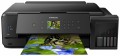 | 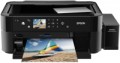 |
|---|---|---|
| Epson EcoTank L7180 | Epson EcoTank L850 | |
| Outdated Product | from $355.00 up to $440.00 | |
| User reviews | ||
| TOP sellers | ||
| Paper size | A3 | A4 |
| Print Type | inkjet | inkjet |
| Output Type | colour | colour |
| Number of colors | 6 | |
Printing and copying | ||
| Max resolution | 5760x1440 dpi | 5760x1440 dpi |
| B/W printing | 28 ppm | 37 ppm |
| Colour printing | 28 ppm | 38 ppm |
| Photo printing | 20 sec/page | 12 sec/page |
| Double-side printing |  |  |
Printing Supplies | ||
| Black Ink Page Yield | 8000 pages | 1800 pages |
| Colour Ink Page Yield | 5000 pages | 1800 pages |
| Built-in CISS | | |
| Ink Type | pigmented / water soluble | water soluble |
Features | ||
| Data transfer | PC connection (USB) network connection (LAN) Wi-Fi 4 (802.11n) USB (for flash drives) card reader Wi-Fi Direct AirPrint | PC connection (USB) USB (for flash drives) card reader |
| Cloud printing | Mopria, Epson iPrint, Epson Email Print | |
| Display | colour | colour |
| Diagonal | 2.7 " | 2.7 " |
| More Features | disc label printing | disc label printing |
Hardware | ||
| Grammage (min) | 64 g/m² | 64 g/m² |
| Grammage (max) | 300 g/m² | 300 g/m² |
| Drive capacity | 100 GB | |
| Scan resolution | 1200х2400 dpi | 1200х2400 dpi |
General | ||
| Feed tray | 100 sheets | 100 sheets |
| Output Tray | 50 sheets | |
| Noise level | 37 dB | 37 dB |
| Power consumption | 13 W | 12 W |
| Dimensions (WxDxH) | 526x415x168 mm | 542x386x196 mm |
| Weight | 10.5 kg | 9.1 kg |
| Color | ||
| Added to E-Catalog | october 2018 | january 2015 |


Compare Epson EcoTank L7180 and L850
You may be interested in
My comparisons
Epson EcoTank L7180 often compared


Epson EcoTank L850 often compared


Glossary
Paper size
The largest paper size that the MFP can work with. Most often, the formats are marked from A0 to A10; it is from here that the famous “A4” is taken, denoting a standard landscape sheet. The main formats used in modern MFPs:
A3 — 297x420 mm (2 times larger than the landscape sheet). They are commonly used in offices for printing large forms, brochures, announcements, posters, copying large-format printed materials, etc.
A4 — 210x297 mm, standard landscape sheet. The most common paper size for home and office use — usually this size is sufficient for non-specialized printing.
A separate category are the large-size models for A0 format. The standard size of such a sheet is 1189x841, however, MFPs of this format, usually, are industrial-grade devices that work with media on rolls.
A3 — 297x420 mm (2 times larger than the landscape sheet). They are commonly used in offices for printing large forms, brochures, announcements, posters, copying large-format printed materials, etc.
A4 — 210x297 mm, standard landscape sheet. The most common paper size for home and office use — usually this size is sufficient for non-specialized printing.
A separate category are the large-size models for A0 format. The standard size of such a sheet is 1189x841, however, MFPs of this format, usually, are industrial-grade devices that work with media on rolls.
Number of colors
The color palette that a printer or MFP can print. A large number of colors is required for high-quality photo printing and obtaining color prints with many shades. As a standard, for a color MFP, 4 colors are provided.
B/W printing
The number of pages the printer can produce per minute in black and white mode. Typically indicated for low print quality, higher print quality takes longer. This setting is important if you need to frequently print text documents.
Colour printing
The number of pages the printer can proceed per minute in colour mode. As like b/w printing, the print speed is usually indicated in the worst quality (at maximum speed), in higher quality the print speed is lower. This setting is worth paying attention to if you need to print colour graphic materials frequently.
Photo printing
Printer's print rate in photographic (highest) quality. Unlike other similar parameters, in this case the speed is usually indicated for a 10x15 sheet (A6 as the most popular format for photos). In addition, photo printing speed is not expressed in pages per minute, but in seconds per page, because such printing takes a lot of time. This option is worth paying attention to if you plan to print photos frequently.
Double-side printing
Feature of a double-sided printing function. This mode implies that after printing on one side, a special gear turns over a sheet of paper and feeds it for printing on the other side. This not only saves the user from manual paper turn-overs, but also exclude the risk of printing the second side upside down.
Black Ink Page Yield
Approximate number of pages that the MFP can print in black and white mode without replacing the cartridge. In fact, this greatly depends on the specs of the images to print, so the actual resource may greatly differ from the claimed one in one way or another. Nevertheless, according to this indicator, it is quite possible to evaluate the capabilities of the MFP and compare it with other models.
Colour Ink Page Yield
Approximate number of pages that the MFP can print in colour mode without replacing the cartridge. In fact, this greatly depends on the specs of the images to print, so the actual resource may greatly differ from the claimed one in one way or another. Nevertheless, according to this indicator, it is quite possible to evaluate the capabilities of the MFP and compare it with other models.
Ink Type
— Pigment. Ink based on pigments — solid dyes, which are diluted in the form of microparticles in a liquid filler to a state of suspension. Compared to more popular water-based inks, these inks are noticeably more expensive, and the finished image may turn out to be somewhat less bright (compared to printing with water-based dye on the same MFP). On the other hand, pigment ink gives higher detail, which is especially important for photo printing. In addition, finished images resist humidity better and do not fade as quickly in bright light — this resistance is not enough for outdoor use, but indoors such prints can be stored for a very long time.
— Water soluble. Inks based on water-soluble dyes allow achieving high realism of colour reproduction in colour printing, they are well absorbed into the deep layers of paper and are cheaper than pigment inks. Also, water-soluble ink does not dry as quickly in the cartridge or print head of the MFP. They are recommended for use with inkjet paper — ordinary thin paper strongly absorbs dropsy, which can cause ink to show through on the back of the sheet. At the same time, water-soluble ink is afraid of moisture and direct exposure to ultraviolet light — when water gets on, the paint on paper “floats”, and it fades under the sun light.
— Pigmented / water soluble. Some MFPs have a print head that allows you to print with two types of ink at once. A common case is when their black cartridge is filled with pigment...ink, and the colour one is filled with water-soluble ink.
— Water soluble. Inks based on water-soluble dyes allow achieving high realism of colour reproduction in colour printing, they are well absorbed into the deep layers of paper and are cheaper than pigment inks. Also, water-soluble ink does not dry as quickly in the cartridge or print head of the MFP. They are recommended for use with inkjet paper — ordinary thin paper strongly absorbs dropsy, which can cause ink to show through on the back of the sheet. At the same time, water-soluble ink is afraid of moisture and direct exposure to ultraviolet light — when water gets on, the paint on paper “floats”, and it fades under the sun light.
— Pigmented / water soluble. Some MFPs have a print head that allows you to print with two types of ink at once. A common case is when their black cartridge is filled with pigment...ink, and the colour one is filled with water-soluble ink.