
Comparison Apple MacBook Pro 13 2017 Touch Bar [MPXX2] vs Apple MacBook Pro 13 2017 [MPXU2]
Add to comparison | 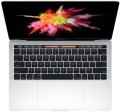 | 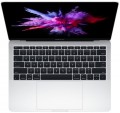 |
|---|---|---|
| Apple MacBook Pro 13 2017 Touch Bar [MPXX2] | Apple MacBook Pro 13 2017 [MPXU2] | |
from $349.99 | from $319.99 | |
| User reviews | ||
| TOP sellers | ||
Lack of useful connectors including MagSafe. | ||
| Type | ultrabook | ultrabook |
Screen | ||
| Screen size | 13.3 " | 13.3 " |
| Screen type | IPS | IPS |
| Surface treatment | glossy | glossy |
| Screen resolution | 2560x1600 (16:10) | 2560x1600 (16:10) |
| Refresh rate | 60 Hz | 60 Hz |
| Brightness | 510 nt | 510 nt |
| Contrast | 1140 :1 | 1140 :1 |
CPU | ||
| Series | Core i5 | Core i5 |
| Model | 7267U | 7360U |
| Processor cores | 2 | 2 |
| Total threads | 4 | 4 |
| CPU speed | 3.1 GHz | 2.3 GHz |
| TurboBoost / TurboCore frequency | 3.5 GHz | 3.6 GHz |
| Test 3DMark06 | 4378 points | |
| Test Passmark CPU Mark | 5175 points | 6080 points |
| SuperPI 1M | 12.1 с | 10 с |
RAM | ||
| RAM | 8 GB | 8 GB |
| RAM type | DDR3 | DDR3 |
| RAM memory frequency | 2133 MHz | 2133 MHz |
| Amount of RAM slots | built-in | built-in |
Graphics card | ||
| Graphics card type | integrated | integrated |
| Graphics card series | Intel Iris Graphics | Intel Iris Graphics |
| Graphics card model | Iris Plus Graphics 650 | Iris Plus Graphics 640 |
| Test 3DMark06 | 15175 points | 14117 points |
Storage | ||
| Drive type | SSD | SSD |
| Drive capacity | 256 GB | 256 GB |
Connections | ||
| Card reader |  | |
| USB-C 10Gbps | 4 pcs | 2 pcs |
| Thunderbolt interface | x4 v3 | x2 v3 |
| Alternate Mode |  | |
| Wi-Fi | Wi-Fi 5 (802.11ac) | Wi-Fi 5 (802.11ac) |
Multimedia | ||
| Webcam | 1280x720 (HD) | 1280x720 (HD) |
| Camera shutter | | |
| Speakers | 2 pcs | 2 pcs |
| Security | fingerprint scanner | |
Keyboard | ||
| Backlight | white | white |
| Key design | island type | island type |
| Num block | | |
| Input device | touchpad | touchpad |
| Touch Bar | | |
Battery | ||
| Battery capacity | 49 W*h | 55 W*h |
| Operating time | 10 h | 10 h |
| Power Delivery via USB-C | | |
| Fast charge | | |
General | ||
| Preinstalled OS | MacOS | MacOS |
| Material | aluminum | aluminum |
| Dimensions (WxDxT) | 304.1x212.4x14.9 mm | 304.1x212.4x14.9 mm |
| Weight | 1.37 kg | 1.37 kg |
| Color | ||
| Added to E-Catalog | june 2017 | june 2017 |


Compare Apple MacBook Pro 13 (2017) Touch Bar and MacBook Pro 13 (2017)
You may be interested in
My comparisons
Apple MacBook Pro 13 (2017) Touch Bar often compared


Apple MacBook Pro 13 (2017) often compared


Glossary
Model
The specific model of the processor installed in the laptop, or rather, the processor index within its series (see above). Knowing the full name of the processor (series and model), you can find detailed information on it (up to practical reviews) and clarify its capabilities.
CPU speed
The clock speed of the processor installed in the laptop (for multi-core processors, the frequency of each individual core).
Theoretically, a higher clock speed has a positive effect on performance, as it allows the processor to perform more operations per unit of time. However, in fact, the capabilities of the CPU depend on a number of other characteristics — primarily on the series to which it belongs (see above). It even happens that of the two chips, the more performant in the overall result is the slower one. With this in mind, it makes sense to compare by clock frequency only processors of the same series, and ideally, also of the same generation; and the laptop as a whole should be judged by the complex characteristics of the system, as well as by the results of tests (see below).
Theoretically, a higher clock speed has a positive effect on performance, as it allows the processor to perform more operations per unit of time. However, in fact, the capabilities of the CPU depend on a number of other characteristics — primarily on the series to which it belongs (see above). It even happens that of the two chips, the more performant in the overall result is the slower one. With this in mind, it makes sense to compare by clock frequency only processors of the same series, and ideally, also of the same generation; and the laptop as a whole should be judged by the complex characteristics of the system, as well as by the results of tests (see below).
TurboBoost / TurboCore frequency
Processor clock speed achieved in TurboBoost or TurboCore "overclocking" mode.
Turbo Boost and Turbo Core technologies are used by different manufacturers (Intel and AMD, respectively), but they have the same principle of operation: load distribution from more loaded processor cores to less loaded ones to improve performance. The "overclocking" mode is characterized by an increased clock frequency, and it is indicated in this case.
For more information about clock speed in general, see the relevant paragraph above.
Turbo Boost and Turbo Core technologies are used by different manufacturers (Intel and AMD, respectively), but they have the same principle of operation: load distribution from more loaded processor cores to less loaded ones to improve performance. The "overclocking" mode is characterized by an increased clock frequency, and it is indicated in this case.
For more information about clock speed in general, see the relevant paragraph above.
Test 3DMark06
The result shown by the laptop processor in 3DMark06.
This test is primarily focused on testing performance in games — in particular, the ability of the processor to process advanced graphics and artificial intelligence elements. Test scores are reported as scores; the higher this number, the higher the performance of the tested chip. Good 3DMark06 results are especially important for gaming laptops.
This test is primarily focused on testing performance in games — in particular, the ability of the processor to process advanced graphics and artificial intelligence elements. Test scores are reported as scores; the higher this number, the higher the performance of the tested chip. Good 3DMark06 results are especially important for gaming laptops.
Test Passmark CPU Mark
The result shown by the laptop processor in the Passmark CPU Mark test.
Passmark CPU Mark is a comprehensive test that is more detailed and reliable than the popular 3DMark06 (see above). It checks not only the gaming capabilities of the CPU, but also its performance in other modes, based on which it displays the overall score; this score can be used to fairly reliably evaluate the processor as a whole (the more points, the higher the performance).
Passmark CPU Mark is a comprehensive test that is more detailed and reliable than the popular 3DMark06 (see above). It checks not only the gaming capabilities of the CPU, but also its performance in other modes, based on which it displays the overall score; this score can be used to fairly reliably evaluate the processor as a whole (the more points, the higher the performance).
SuperPI 1M
The result shown by the laptop processor in the SuperPI 1M test.
The essence of this test is to calculate the number "pi" to the millionth decimal place. The time spent on this calculation is the final result. Accordingly, the more powerful the processor, the smaller the result will be (this SuperPI 1M is fundamentally different from many other tests).
The essence of this test is to calculate the number "pi" to the millionth decimal place. The time spent on this calculation is the final result. Accordingly, the more powerful the processor, the smaller the result will be (this SuperPI 1M is fundamentally different from many other tests).
Graphics card model
GeForce graphics cards from NVIDIA: RTX including RTX 2060, RTX 2060 Max-Q, RTX 2070, RTX 2070 Max-Q, RTX 2070 Super, RTX 2070 Super Max-Q, RTX 2080, RTX 2080 Max-Q, RTX 2080 Super, RTX 2080 Super Max-Q, RTX 3050, RTX 3050 Ti, RTX 3060, RTX 3060 Max-Q, RTX 3070, RTX 3070 Max-Q, RTX 3070 Ti, RTX 3080, RTX 3080 Ti, RTX 4050, RTX 4060, RTX 4070, RTX 4080, RTX 4090, RTX 5050, RTX 5060, RTX 5070, RTX 5070 Ti, RTX 5080, RTX 5090; MX1xx...including MX110, MX130, and MX150, MX2xx (MX230 and MX250), MX3xx (MX330 and MX350), MX450, GTX which includes GTX 1050, GTX 1060, GTX 1060 Max-Q, GTX 1070, GTX 1070 Max-Q, GTX 1080, GTX 1080 Max-Q, GTX 1650, GTX 1650 Max-Q, GTX 1650 Ti, GTX 1660 Ti, GTX 1660 Ti Max-Q and more. AMD offers graphics cards Radeon 520, Radeon 530 (535), Radeon 540X, Radeon 610 (625, 630), Radeon RX 550 (550X, 560), Radeon RX 640, Radeon RX 5500M, Radeon RX 6800M and Radeon Pro.
It should be noted that all the models mentioned above are discrete. Indeed, for a configuration with discrete graphics, the specific model of the separate video adapter is indicated; if it is supplemented by an integrated module, the name of this module can be clarified by the official processor specifications.
It is also worth mentioning that this section provides not the full name of the model, but only its name within the series (with the series itself mentioned separately—see above). Nevertheless, knowing the series and model, one can easily find detailed information about the graphics card.
It should be noted that all the models mentioned above are discrete. Indeed, for a configuration with discrete graphics, the specific model of the separate video adapter is indicated; if it is supplemented by an integrated module, the name of this module can be clarified by the official processor specifications.
It is also worth mentioning that this section provides not the full name of the model, but only its name within the series (with the series itself mentioned separately—see above). Nevertheless, knowing the series and model, one can easily find detailed information about the graphics card.
Test 3DMark06
The result shown by the laptop's graphics card in the 3DMark06 test.
This test primarily determines how well the graphics card handles intensive loads, particularly with detailed 3D graphics. The test result is indicated in points; the more points, the higher the performance of the video adapter. High results in 3DMark06 are especially important for gaming laptops and advanced workstations. However, their reliability is questionable because measurements are taken on graphics cards with different TDP and an averaged score is given. Thus, your laptop may have a higher or lower result than indicated — it all depends on the TDP of the installed graphics card.
This test primarily determines how well the graphics card handles intensive loads, particularly with detailed 3D graphics. The test result is indicated in points; the more points, the higher the performance of the video adapter. High results in 3DMark06 are especially important for gaming laptops and advanced workstations. However, their reliability is questionable because measurements are taken on graphics cards with different TDP and an averaged score is given. Thus, your laptop may have a higher or lower result than indicated — it all depends on the TDP of the installed graphics card.
USB-C 10Gbps
The number of USB-C 3.2 gen2 ports provided in the laptop (previously, these ports were marked as USB-C 3.1 gen2 and USB-C 3.1).
USB-C is a universal connector that was developed relatively recently and is designed for use in both desktop and portable computers. It is slightly larger than microUSB, has a convenient reversible design (it doesn't matter which way the plug is inserted), and allows for increased power delivery and a range of special functions. Moreover, this connector is used natively in the Thunderbolt version v3 interface and can technically be used for other interfaces; therefore, in some laptops, USB-C has a combined purpose — for more details see "Alternate Mode." In some laptops (mainly the most compact ones), USB-C may also be used for charging the device's own battery.
Specifically, the USB-C 3.2 gen2 version allows for connection speeds up to 10 Gbps. As for the number of such ports, it is usually small — typically 1 to 2. This is because there is noticeably less peripheral equipment released under USB-C compared to full-sized USB. However, in some configurations, the number of these types of connectors can reach 4.
USB-C is a universal connector that was developed relatively recently and is designed for use in both desktop and portable computers. It is slightly larger than microUSB, has a convenient reversible design (it doesn't matter which way the plug is inserted), and allows for increased power delivery and a range of special functions. Moreover, this connector is used natively in the Thunderbolt version v3 interface and can technically be used for other interfaces; therefore, in some laptops, USB-C has a combined purpose — for more details see "Alternate Mode." In some laptops (mainly the most compact ones), USB-C may also be used for charging the device's own battery.
Specifically, the USB-C 3.2 gen2 version allows for connection speeds up to 10 Gbps. As for the number of such ports, it is usually small — typically 1 to 2. This is because there is noticeably less peripheral equipment released under USB-C compared to full-sized USB. However, in some configurations, the number of these types of connectors can reach 4.