
Comparison A4Tech F7 vs A4Tech F5
Add to comparison | 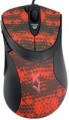 | 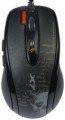 |
|---|---|---|
| A4Tech F7 | A4Tech F5 | |
from $20.20 up to $28.00 | from $42.99 | |
| User reviews | ||
| TOP sellers | ||
| Product type | mouse | mouse |
| Connection | wired | wired |
| Sensor | laser, V-Track | laser, V-Track |
| Type | for game | for game |
Sensor and control | ||
| Sensor resolution | 400 – 3000 DPI | 400 – 3000 DPI |
| Max. acceleration | 30 G | 30 G |
| Number of buttons | 6 | 6 |
| Double/triple click |  | |
| Side buttons | | |
| DPI-button | | |
| Scroll wheels | 1 | 1 |
Additional features | ||
| DPI level indicator | |  |
| Programmable buttons | | |
| Built-in memory | | |
Connection and power supply | ||
| Cable | USB-A braided | USB-A braided |
| Cable length | 1.8 m | 1.8 m |
General | ||
| Suitable for left-handers | | |
| Size (LxWxH) | 120x68x37 mm | 123x68x40 mm |
| Weight | 140 g | 145 g |
| Weight adjustment | | |
| Color | ||
| Added to E-Catalog | june 2012 | june 2012 |


Compare A4Tech F7 and F5
You may be interested in
A4Tech F7 often compared


A4Tech F5 often compared


Glossary
DPI level indicator
An indicator showing the current resolution of the mouse sensor.
The DPI value indicator is found only in models that allow you to switch the sensor resolution and are equipped with the appropriate buttons (see above). The indicator allows you to easily monitor the set DPI settings. Note that it does not necessarily show specific numbers — conventions can be used, for example, different backlight colours.
The DPI value indicator is found only in models that allow you to switch the sensor resolution and are equipped with the appropriate buttons (see above). The indicator allows you to easily monitor the set DPI settings. Note that it does not necessarily show specific numbers — conventions can be used, for example, different backlight colours.
Suitable for left-handers
Mice with a symmetrical body shape. The main advantage of such models is that their shape is the same well suited for both right and left hands. Considering that specialized "left-handed" devices are extremely rare, a symmetrical mouse can be a real salvation for a left-hander. At the same time, note that the symmetry in this case concerns only the shape of the case and the location of the main buttons; additional buttons can be placed exclusively under the right hand. If the mouse is bought for a left-hander, it is necessary to clarify these points.
Weight
The total weight of the mouse. For models with a wired connection, usually, it is indicated without cable, and for devices with weight adjustment (see above) — without weights.
This parameter is important primarily for professional gaming applications, although it is often relevant for ordinary users. Theoretically, less weight promotes speed and reduces fatigue. At the same time, in fact, much depends on the personal habits and preferences of the user: a mouse that is too light may “not be felt in the hands” and not give familiar feedback. Therefore, although most mice have a lower weight limit of 60 – 80 g, however, even among professional gaming models there are much more massive devices — 120 – 140 g or more. The lightest variety of "rodents" is laptop (see "In the direction"), among them devices come across and less than 60 g.
Also note that the weight to some extent depends on the size and “tricked out” of the device, but there is no unambiguous dependence here: models similar in size and functionality can differ markedly in weight.
This parameter is important primarily for professional gaming applications, although it is often relevant for ordinary users. Theoretically, less weight promotes speed and reduces fatigue. At the same time, in fact, much depends on the personal habits and preferences of the user: a mouse that is too light may “not be felt in the hands” and not give familiar feedback. Therefore, although most mice have a lower weight limit of 60 – 80 g, however, even among professional gaming models there are much more massive devices — 120 – 140 g or more. The lightest variety of "rodents" is laptop (see "In the direction"), among them devices come across and less than 60 g.
Also note that the weight to some extent depends on the size and “tricked out” of the device, but there is no unambiguous dependence here: models similar in size and functionality can differ markedly in weight.
Weight adjustment
The ability to adjust the weight of the mouse.
This feature is relevant primarily for gaming modelsused by professional gamers and advanced enthusiasts: for maximum accuracy of movements, it is necessary that the mouse has not only an optimal shape, but also weight. The change in weight is carried out by installing and removing special weights supplied in the kit. At the same time, in some models, by rearranging the weights in different slots, you can change not only the weight, but also the balance of the mouse, achieving the most accurate adjustment to personal preferences.
This feature is relevant primarily for gaming modelsused by professional gamers and advanced enthusiasts: for maximum accuracy of movements, it is necessary that the mouse has not only an optimal shape, but also weight. The change in weight is carried out by installing and removing special weights supplied in the kit. At the same time, in some models, by rearranging the weights in different slots, you can change not only the weight, but also the balance of the mouse, achieving the most accurate adjustment to personal preferences.