
Comparison MSI Interceptor DS300 vs MSI Interceptor DS200
Add to comparison | 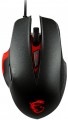 | 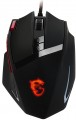 |
|---|---|---|
| MSI Interceptor DS300 | MSI Interceptor DS200 | |
| Compare prices 1 | Outdated Product | |
| TOP sellers | ||
Dimensions: 125x81x43 mm. Polling rate: 1000Hz | Polling rate: 1000 Hz. Dimensions: 121x81x41 mm | |
| Product type | mouse | mouse |
| Connection | wired | wired |
| Sensor | laser | laser |
| Type | for game | for game |
Sensor and control | ||
| Sensor resolution | 8200 DPI | 8200 DPI |
| Number of buttons | 5 | 8 |
| Double/triple click |  |  |
| Side buttons | | |
| DPI-button | | |
| Scroll wheels | 1 | 1 |
Additional features | ||
| DPI level indicator | | |
| Programmable buttons | | |
| Lighting | + | + |
Connection and power supply | ||
| Cable | USB-A | USB-A |
General | ||
| Weight | 150 g | |
| Weight adjustment | | |
| Color | ||
| Added to E-Catalog | july 2017 | july 2017 |


Compare MSI Interceptor DS300 and DS200
Price comparison
You may be interested in
My comparisons
Glossary
Number of buttons
The number of buttons provided in the design of the mouse. However, the term "buttons" can also refer to specific hardware solutions — for example, a solid touch area used in many Apple mice counts as two buttons, because. it is divided into two working areas. But the clickable wheels, as well as the power button, are not taken into account in this calculation.
The minimum number of buttons for modern mice and other similar manipulators is two : this is the number that is necessary for comfortable work in most modern operating systems. If there are more than two keys, this means that there are additional buttons responsible for specific actions. So, even relatively inexpensive devices can be equipped with 3 – 4 buttons ; in addition to the 2 main buttons, they can have, for example, 2 side thumb keys, or 1 double/triple click button (see below). Solutions for 5 – 6 buttons are extremely popular nowadays; among them are many gaming mice, where the mentioned thumb buttons are supplemented with a double / triple click, a sniper button and/or a DPI switch (see also below about these functions). And in the most multifunctional models, 7 – 8 buttons and even more can be installed. In some cases, this number exceeds a dozen and a half; such mice are usually gaming devices designed for RPGs and other simil...ar genres where it is important to have a wide range of actions at your fingertips.
The minimum number of buttons for modern mice and other similar manipulators is two : this is the number that is necessary for comfortable work in most modern operating systems. If there are more than two keys, this means that there are additional buttons responsible for specific actions. So, even relatively inexpensive devices can be equipped with 3 – 4 buttons ; in addition to the 2 main buttons, they can have, for example, 2 side thumb keys, or 1 double/triple click button (see below). Solutions for 5 – 6 buttons are extremely popular nowadays; among them are many gaming mice, where the mentioned thumb buttons are supplemented with a double / triple click, a sniper button and/or a DPI switch (see also below about these functions). And in the most multifunctional models, 7 – 8 buttons and even more can be installed. In some cases, this number exceeds a dozen and a half; such mice are usually gaming devices designed for RPGs and other simil...ar genres where it is important to have a wide range of actions at your fingertips.
Double/triple click
The mouse has a separate button for double or triple clicks.
Such a button is most often located between the main keys, closer to the left. Its specific purpose may be different; and in some mice, you can even switch between double-click and triple-click modes through software settings. Recall that double-clicking is the standard way to open files in Windows and many other computer operating systems, and in text editors and browsers, it is used mainly to select an entire word. Triple click, on the other hand, was originally designed for shooting games — for short bursts. However, it has found application in other areas: for example, in the same work with text, a whole sentence or paragraph can be highlighted in this way (depending on the programme).
Such a button is most often located between the main keys, closer to the left. Its specific purpose may be different; and in some mice, you can even switch between double-click and triple-click modes through software settings. Recall that double-clicking is the standard way to open files in Windows and many other computer operating systems, and in text editors and browsers, it is used mainly to select an entire word. Triple click, on the other hand, was originally designed for shooting games — for short bursts. However, it has found application in other areas: for example, in the same work with text, a whole sentence or paragraph can be highlighted in this way (depending on the programme).
Side buttons
The presence of the mouse side buttons — under the user's thumb.
The traditional, most popular option is two buttons, which by default are responsible for the “Back” and “Forward” commands in the browser, system file explorer, etc. There are more of these buttons in gaming mice; some of these models even have an interchangeable side panel that allows you to install a different number of side keys, as desired.
Anyway, the side mouse buttons provide additional convenience and expand the list of features available from the device. At the same time, the buttons are always at hand, in fact, in instant access. This is especially handy in games: some frequently used actions can be tied to the side keys, such as reloading or a special attack. However, even in everyday use, it is much easier to press a button on the mouse than to move the cursor to the Back or Forward icon every time in the same browser.
The traditional, most popular option is two buttons, which by default are responsible for the “Back” and “Forward” commands in the browser, system file explorer, etc. There are more of these buttons in gaming mice; some of these models even have an interchangeable side panel that allows you to install a different number of side keys, as desired.
Anyway, the side mouse buttons provide additional convenience and expand the list of features available from the device. At the same time, the buttons are always at hand, in fact, in instant access. This is especially handy in games: some frequently used actions can be tied to the side keys, such as reloading or a special attack. However, even in everyday use, it is much easier to press a button on the mouse than to move the cursor to the Back or Forward icon every time in the same browser.
DPI level indicator
An indicator showing the current resolution of the mouse sensor.
The DPI value indicator is found only in models that allow you to switch the sensor resolution and are equipped with the appropriate buttons (see above). The indicator allows you to easily monitor the set DPI settings. Note that it does not necessarily show specific numbers — conventions can be used, for example, different backlight colours.
The DPI value indicator is found only in models that allow you to switch the sensor resolution and are equipped with the appropriate buttons (see above). The indicator allows you to easily monitor the set DPI settings. Note that it does not necessarily show specific numbers — conventions can be used, for example, different backlight colours.
Weight
The total weight of the mouse. For models with a wired connection, usually, it is indicated without cable, and for devices with weight adjustment (see above) — without weights.
This parameter is important primarily for professional gaming applications, although it is often relevant for ordinary users. Theoretically, less weight promotes speed and reduces fatigue. At the same time, in fact, much depends on the personal habits and preferences of the user: a mouse that is too light may “not be felt in the hands” and not give familiar feedback. Therefore, although most mice have a lower weight limit of 60 – 80 g, however, even among professional gaming models there are much more massive devices — 120 – 140 g or more. The lightest variety of "rodents" is laptop (see "In the direction"), among them devices come across and less than 60 g.
Also note that the weight to some extent depends on the size and “tricked out” of the device, but there is no unambiguous dependence here: models similar in size and functionality can differ markedly in weight.
This parameter is important primarily for professional gaming applications, although it is often relevant for ordinary users. Theoretically, less weight promotes speed and reduces fatigue. At the same time, in fact, much depends on the personal habits and preferences of the user: a mouse that is too light may “not be felt in the hands” and not give familiar feedback. Therefore, although most mice have a lower weight limit of 60 – 80 g, however, even among professional gaming models there are much more massive devices — 120 – 140 g or more. The lightest variety of "rodents" is laptop (see "In the direction"), among them devices come across and less than 60 g.
Also note that the weight to some extent depends on the size and “tricked out” of the device, but there is no unambiguous dependence here: models similar in size and functionality can differ markedly in weight.