
Comparison BenQ W1700 vs BenQ MU641
Add to comparison | 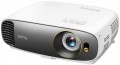 | 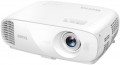 |
|---|---|---|
| BenQ W1700 | BenQ MU641 | |
| Outdated Product | Outdated Product | |
| TOP sellers | ||
Support for HDR technology. | ||
| Main function | home | universal |
Lamp and image | ||
| Service life | 4000 h | 4000 h |
| Service life (energy-saving) | 8000 h | 10000 h |
| Lamp power | 240 W | 240 W |
| Brightness ANSI Lumens | 2200 lm | 4000 lm |
| Dynamic contrast | 10 000:1 | 10 000:1 |
| Colour rendering | 1.07 billion colours | 1.07 billion colours |
| Horizontal frequency | 15 – 102 kHz | 15 – 102 kHz |
| Frame rate | 23 –120 Hz | 23 – 120 Hz |
Projection system | ||
| Technology | DLP | DLP |
| Size | 0.47" | |
| Real resolution | 3840x2160 px | 1920x1200 px |
| Image format support | 4:3, 14:9, 16:9, 16:10 | 4:3, 5:4, 16:9, 16:10 |
| HDR support | + | |
Projecting | ||
| Rear projection |  | |
| Throw distance, min | 0.9 m | |
| Throw distance, max | 9.7 m | |
| Image size | 30 – 300 " | 30 – 300 " |
| Throw ratio | 1.47:1 – 1.76:1 | 1.47:1 – 1.76:1 |
| Optical zoom | 1.2 x | 1.2 x |
| Zoom and focus | manual | manual |
| Lens shift | | |
| Keystone correction (vert), ± | 40 ° | 40 ° |
Features | ||
| Features | 3D support | MHL support 3D support |
Hardware | ||
| USB-A 2.0 | 1 pcs | 1 pcs |
| Number of speakers | 1 | 1 |
| Sound power | 5 W | 2 W |
| Video connectors | VGA | VGA S-Video composite AV-input |
| HDMI inputs | 2 | 2 |
| HDMI version | v 1.4 | v 1.4 |
| Audio connectors | 3.5 mm input (mini-Jack) 3.5 mm output (mini-Jack) | 3.5 mm input (mini-Jack) 3.5 mm output (mini-Jack) |
| Service connectors | COM port (RS-232) | COM port (RS-232) USB (slave) |
General | ||
| Noise level (nominal) | 33 dB | 33 dB |
| Noise level (energy-saving / quiet) | 29 dB | 29 dB |
| Power source | mains | mains |
| Power consumption | 330 W | |
| Size (HxWxD) | 135x353x272 mm | 135x353x272 mm |
| Weight | 4.2 kg | 3.7 kg |
| Color | ||
| Added to E-Catalog | march 2018 | march 2018 |


Compare BenQ W1700 and MU641
The BenQ W1700 and BenQ MU641 projectors have similar characteristics but differ in purpose and some technical parameters. The W1700 is designed for home theater use and offers 4K resolution (3840x2160 pixels), providing a more detailed image, while the MU641 has a resolution of 1920x1200 pixels and is a versatile projector. The brightness of the W1700 is 2200 ANSI lumens, which is lower than the MU641's 4000 ANSI lumens, making the latter more suitable for bright rooms. Both projectors support 3D and have similar dimensions and noise levels; however, the MU641 is lighter (3.7 kg compared to the W1700's 4.2 kg). Overall, the choice between them depends on your needs: the W1700 is better suited for movies and high-quality content, while the MU641 is better for versatile use.
You may be interested in
My comparisons
BenQ W1700 often compared


Glossary
Main function
The main function of the projector.
This parameter is rather conditional, it largely depends on how the device is positioned by the manufacturer; however, for the most comfortable use, it is best to follow exactly the stated purpose. The options here can be: multipurpose, for presentations, for home theater, professional, portable, gaming. Here is a more detailed description of each option:
— Multipurpose. The simplest kind of projectors, roughly speaking – all models that do not belong to any of the specializations described below. Most of them have non-interchangeable optics, a throw distance of 1-12 m, an image diagonal of about 1-7 m (see below), and a relatively low cost.
— For presentations. Projectors designed primarily for business use, such as presentations. Usually they have a small throw distance with a rather large diagonal, which allows them to be used in small rooms; capable of working with both widescreen and conventional image formats (see below), and also support resolutions typical for computer graphics cards — for example, 1280x800. In this case, the actual resolution itself (see below) can be quite low. In addition, an almost mandatory feature of this type of projectors (with a few exceptions) is the presence of a D-Sub...15 pin input (see "Connectors").
— For home theater. Projectors designed primarily for film viewing. The main criterion for classifying a particular model in this category is how the projector is positioned by the manufacturer itself (in other words, whether this purpose is indicated in the official documentation). However, there are some common features: cinematographic models usually support widescreen image formats, have a high real resolution (see below) that allows you to work with HD video, and are also equipped with the appropriate interfaces (see "Connectors").
— Professional. High-quality projectors with advanced parameters, an abundance of functions and, accordingly, a considerable price. They are characterized by high image contrast, support high-resolution video (including cinematic image formats), have optical zoom to scale the image without losing quality, provide the connection of multi-channel sound systems, and much more. The specific set of options in professional projectors may vary depending on the model, but in any case, these are the most charged devices with top-end characteristics.
— Portable projector. An ultra-compact variety of projectors: most models are pocket-sized. Such devices are intended primarily for improvised presentations. The format of work and power supply may be different. So, some models are made as separate devices with their own built-in storages and batteries (and sometimes even with a full-fledged mobile OS like Android on board). Others are similar in design to external cases or consoles and are put directly on the mobile phone during operation, using it as a source of signal and power. However, anyway, portable projectors, due to their small size, have rather low technical specifications — they have neither brightness nor high image contrast.. Battery life (in models with their own batteries) usually ranges from 40 minutes to one and a half hours. Also, this variety is characterized by cost-effective LED lamps (see below).
— Gaming. Specialized projectors designed for use in video games. Outwardly, they are often distinguished by a characteristic “aggressive” design, while the design can be done in the style of a certain line of gaming PCs or laptops. As for the specifications, they, in accordance with the name, are aimed primarily at providing a high-quality game "picture". To do this, projectors for this purpose provide, in particular, high real resolution (not lower than 1920x720, and more often 1920x1080 or more), colour reproduction at the level of 1 billion colours, support for frame rate (see below) up to 120 Hz, and also at least one HDMI input for receiving a digital signal from a computer graphics card. In addition, such models often provide support for 3D. The maximum image diagonal can reach 7.5 m or more; at the same time, ultra-wide-angle devices are also found in this category, capable of providing an image diagonal of about 3 m from a distance of about half a metre.
This parameter is rather conditional, it largely depends on how the device is positioned by the manufacturer; however, for the most comfortable use, it is best to follow exactly the stated purpose. The options here can be: multipurpose, for presentations, for home theater, professional, portable, gaming. Here is a more detailed description of each option:
— Multipurpose. The simplest kind of projectors, roughly speaking – all models that do not belong to any of the specializations described below. Most of them have non-interchangeable optics, a throw distance of 1-12 m, an image diagonal of about 1-7 m (see below), and a relatively low cost.
— For presentations. Projectors designed primarily for business use, such as presentations. Usually they have a small throw distance with a rather large diagonal, which allows them to be used in small rooms; capable of working with both widescreen and conventional image formats (see below), and also support resolutions typical for computer graphics cards — for example, 1280x800. In this case, the actual resolution itself (see below) can be quite low. In addition, an almost mandatory feature of this type of projectors (with a few exceptions) is the presence of a D-Sub...15 pin input (see "Connectors").
— For home theater. Projectors designed primarily for film viewing. The main criterion for classifying a particular model in this category is how the projector is positioned by the manufacturer itself (in other words, whether this purpose is indicated in the official documentation). However, there are some common features: cinematographic models usually support widescreen image formats, have a high real resolution (see below) that allows you to work with HD video, and are also equipped with the appropriate interfaces (see "Connectors").
— Professional. High-quality projectors with advanced parameters, an abundance of functions and, accordingly, a considerable price. They are characterized by high image contrast, support high-resolution video (including cinematic image formats), have optical zoom to scale the image without losing quality, provide the connection of multi-channel sound systems, and much more. The specific set of options in professional projectors may vary depending on the model, but in any case, these are the most charged devices with top-end characteristics.
— Portable projector. An ultra-compact variety of projectors: most models are pocket-sized. Such devices are intended primarily for improvised presentations. The format of work and power supply may be different. So, some models are made as separate devices with their own built-in storages and batteries (and sometimes even with a full-fledged mobile OS like Android on board). Others are similar in design to external cases or consoles and are put directly on the mobile phone during operation, using it as a source of signal and power. However, anyway, portable projectors, due to their small size, have rather low technical specifications — they have neither brightness nor high image contrast.. Battery life (in models with their own batteries) usually ranges from 40 minutes to one and a half hours. Also, this variety is characterized by cost-effective LED lamps (see below).
— Gaming. Specialized projectors designed for use in video games. Outwardly, they are often distinguished by a characteristic “aggressive” design, while the design can be done in the style of a certain line of gaming PCs or laptops. As for the specifications, they, in accordance with the name, are aimed primarily at providing a high-quality game "picture". To do this, projectors for this purpose provide, in particular, high real resolution (not lower than 1920x720, and more often 1920x1080 or more), colour reproduction at the level of 1 billion colours, support for frame rate (see below) up to 120 Hz, and also at least one HDMI input for receiving a digital signal from a computer graphics card. In addition, such models often provide support for 3D. The maximum image diagonal can reach 7.5 m or more; at the same time, ultra-wide-angle devices are also found in this category, capable of providing an image diagonal of about 3 m from a distance of about half a metre.
Service life (energy-saving)
When working in economy mode, the brightness of the backlight is noticeably reduced, on average by 30-50%. With a decrease in brightness, heat dissipation also decreases, which saves the working life of the illuminator, thereby increasing the lamp life. Thus, the ECO mode allows you to extend the lamp life by an average of 30%. If the typical projector lamp life is 4000 hours, regular use of the ECO mode will extend the backlight life to approximately 5500 hours.
Brightness ANSI Lumens
This parameter largely determines the ability of the projector to work in a well-lit room. For a dark room, 1000 lumens is enough to make the projection picture bright, rich, clear and understandable. But when working in a lit room, the projector will need at least 3500-4000 lumens. Do not confuse ANSI lumens with Peak lumens. These are two different brightness standards. To convert one type of brightness to another, you need to multiply Peak lumens by 10-12. The result will be an approximate value of ANSI Lumens.
However, experts do not recommend chasing high ANSI lumen brightness values. There are many professional projectors with brightness up to 3500 lm. The lower the brightness, the lower the power consumption, and at the same time, the life of the illuminator increases. Of course, if the projector will be installed in a work office or classroom where good lighting is required, it is recommended to purchase a model with ANSI Lumens brightness of 4000 lumens and more.
Frame rate
Frame rate, simply put, is the frame rate supported by the projector.
For normal playback, it is highly desirable that the frame rate of the projector match the original frame rate of the video signal. However, most modern models do not support a specific frame rate, but a whole range of frequencies, and quite an extensive one at that.
Note that for viewing most video materials, the range from 24 to 60 fps is quite enough. The exception is 3D content, which may require double the frame rate, up to 120Hz (see " 3D Support " for details).
For normal playback, it is highly desirable that the frame rate of the projector match the original frame rate of the video signal. However, most modern models do not support a specific frame rate, but a whole range of frequencies, and quite an extensive one at that.
Note that for viewing most video materials, the range from 24 to 60 fps is quite enough. The exception is 3D content, which may require double the frame rate, up to 120Hz (see " 3D Support " for details).
Size
The size of the panel/chip affects the depth and final quality of the image. The larger the panel/chip, the more light it is able to process, which means the picture will be clearer and more structured. The average projector has a sensor of 0.5-0.7″, advanced projectors use sensors of 1.2-1.5″ and more.
Real resolution
The native resolution of the image produced by the projector matrix.
The minimum for modern projectors is actually the VGA standard, which assumes a resolution of 800x600 or close to it. The most limited of modern high-definition standards is HD (720); the classic size of such a frame is 1280x720, but projectors also have other options (up to 1920x720). A more advanced HD format is Full HD (1080), which also has several variations (the most popular is 1920x1080). And among high-end projectors there are models of Quad HD, Ultra HD (4K) and even Ultra HD (8K) standards.
In general, the higher the resolution, the clearer and more detailed image the projector can produce. On the other hand, this indicator directly affects the cost, and all the benefits of high resolution can only be appreciated if the reproduced content also corresponds to it. Note that modern projectors can work with higher resolutions than the “native” ones – for more details, see “Maximum video resolution”.
The minimum for modern projectors is actually the VGA standard, which assumes a resolution of 800x600 or close to it. The most limited of modern high-definition standards is HD (720); the classic size of such a frame is 1280x720, but projectors also have other options (up to 1920x720). A more advanced HD format is Full HD (1080), which also has several variations (the most popular is 1920x1080). And among high-end projectors there are models of Quad HD, Ultra HD (4K) and even Ultra HD (8K) standards.
In general, the higher the resolution, the clearer and more detailed image the projector can produce. On the other hand, this indicator directly affects the cost, and all the benefits of high resolution can only be appreciated if the reproduced content also corresponds to it. Note that modern projectors can work with higher resolutions than the “native” ones – for more details, see “Maximum video resolution”.
Image format support
Image formats supported by the projector.
In this case, format means the aspect ratio of the image. The general rule in this case is that the projector must support the same format in which the original content is recorded. Otherwise, the image will either be stretched in height or width, or with black stripes on the sides or top-bottom. Specifically, the formats can be divided into three main categories:
— Traditional, or rectangular. Classic formats in which the height of the picture is not much less than the width. The most popular options are 4:3, widely used in analogue TV, and 5:4, common in computer technology. Traditional formats are well suited for presentations, working with documents and graphics, and other similar tasks.
— Widescreen — formats in which the frame width is significantly (more than 1.5 times) greater than the height. The most popular of these standards are 16:9 and 16:10. These aspect ratios are well suited for games and movies; in particular, most high-definition content (HD 720p and above) is recorded in widescreen format.
— Extra wide. The formats are even wider than the widescreen ones described above — for example, 21:9. Mainly used in cinematography.
It is worth noting that many modern projectors are able to work with several types of formats at once — for example, with classic 4:3 and...wide-angle 16:9.
In this case, format means the aspect ratio of the image. The general rule in this case is that the projector must support the same format in which the original content is recorded. Otherwise, the image will either be stretched in height or width, or with black stripes on the sides or top-bottom. Specifically, the formats can be divided into three main categories:
— Traditional, or rectangular. Classic formats in which the height of the picture is not much less than the width. The most popular options are 4:3, widely used in analogue TV, and 5:4, common in computer technology. Traditional formats are well suited for presentations, working with documents and graphics, and other similar tasks.
— Widescreen — formats in which the frame width is significantly (more than 1.5 times) greater than the height. The most popular of these standards are 16:9 and 16:10. These aspect ratios are well suited for games and movies; in particular, most high-definition content (HD 720p and above) is recorded in widescreen format.
— Extra wide. The formats are even wider than the widescreen ones described above — for example, 21:9. Mainly used in cinematography.
It is worth noting that many modern projectors are able to work with several types of formats at once — for example, with classic 4:3 and...wide-angle 16:9.
HDR support
Support for HDR technology — expanded dynamic range — by the projector.
This technology allows for extending the brightness range displayed within a single frame — in simpler terms, it enables displaying both very bright and very dark colors on screen simultaneously. This significantly improves color reproduction; furthermore, small details on very bright or very dark parts of the frame that would be invisible on a regular image remain visible. However, it's worth noting that all the advantages of HDR become noticeable only on a high-quality screen with maximum dimming. Additionally, this function significantly affects the cost of the projector, and the content being played back must initially be recorded in HDR — using exactly the technology supported by the projector (this detail can be clarified in the manual). In light of this, HDR support is mainly found among high-end models for home theaters. It should also be noted that there are several different HDR technologies that are not compatible with each other. Therefore, when purchasing a projector with this function, it's crucial to clarify which exact version of HDR it supports. The following are available:
— HDR10. Historically the first of the consumer HDR formats, less advanced than the options described below but extremely widespread. In particular, HDR10 is supported by virtually all streaming services that provide HDR content at all, and it's also standard for...Blu-ray discs. It allows for working with a color depth of 10 bits (hence the name). At the same time, devices with this format are compatible with HDR10+ content, although its quality will be limited by the capabilities of the original HDR10.
— HDR10+. An enhanced version of HDR10. With the same color depth (10 bits), it uses so-called dynamic metadata, which allows transmitting information about color depth not only for groups of several frames but also for individual frames. This leads to further improvement in color reproduction.
— Dolby Vision. An advanced standard used, for example, in professional filmmaking. It achieves a color depth of 12 bits, uses the aforementioned dynamic metadata, and also allows transmitting two image variants simultaneously in one video stream — HDR and regular (SDR). Dolby Vision is based on the same technology as HDR10, so in modern video equipment, this format is usually combined with HDR10 or HDR10+.
— HLG. An HDR format initially designed for TV broadcasting and live transmissions; hence, it is designed for "working without metadata" and is easier to transfer between different sources. Unlike HDR10, which uses static metadata, and particularly HDR10+ / Dolby Vision, which can dynamically adjust the picture frame by frame, HLG often provides a more universal and predictable HDR signal, although not as precisely tuned for a specific display. However, HLG has a strong point — excellent compatibility: the same stream can appear acceptable even on devices that are not fully HDR-capable, which is crucial for broadcast/satellite content. An example of use is viewing HDR broadcasts and TV content from a set-top box/tuner or streaming where HLG is encountered: the projector will correctly receive the signal and display the extended brightness range and more vibrant colors without manual tweaking of settings.
This technology allows for extending the brightness range displayed within a single frame — in simpler terms, it enables displaying both very bright and very dark colors on screen simultaneously. This significantly improves color reproduction; furthermore, small details on very bright or very dark parts of the frame that would be invisible on a regular image remain visible. However, it's worth noting that all the advantages of HDR become noticeable only on a high-quality screen with maximum dimming. Additionally, this function significantly affects the cost of the projector, and the content being played back must initially be recorded in HDR — using exactly the technology supported by the projector (this detail can be clarified in the manual). In light of this, HDR support is mainly found among high-end models for home theaters. It should also be noted that there are several different HDR technologies that are not compatible with each other. Therefore, when purchasing a projector with this function, it's crucial to clarify which exact version of HDR it supports. The following are available:
— HDR10. Historically the first of the consumer HDR formats, less advanced than the options described below but extremely widespread. In particular, HDR10 is supported by virtually all streaming services that provide HDR content at all, and it's also standard for...Blu-ray discs. It allows for working with a color depth of 10 bits (hence the name). At the same time, devices with this format are compatible with HDR10+ content, although its quality will be limited by the capabilities of the original HDR10.
— HDR10+. An enhanced version of HDR10. With the same color depth (10 bits), it uses so-called dynamic metadata, which allows transmitting information about color depth not only for groups of several frames but also for individual frames. This leads to further improvement in color reproduction.
— Dolby Vision. An advanced standard used, for example, in professional filmmaking. It achieves a color depth of 12 bits, uses the aforementioned dynamic metadata, and also allows transmitting two image variants simultaneously in one video stream — HDR and regular (SDR). Dolby Vision is based on the same technology as HDR10, so in modern video equipment, this format is usually combined with HDR10 or HDR10+.
— HLG. An HDR format initially designed for TV broadcasting and live transmissions; hence, it is designed for "working without metadata" and is easier to transfer between different sources. Unlike HDR10, which uses static metadata, and particularly HDR10+ / Dolby Vision, which can dynamically adjust the picture frame by frame, HLG often provides a more universal and predictable HDR signal, although not as precisely tuned for a specific display. However, HLG has a strong point — excellent compatibility: the same stream can appear acceptable even on devices that are not fully HDR-capable, which is crucial for broadcast/satellite content. An example of use is viewing HDR broadcasts and TV content from a set-top box/tuner or streaming where HLG is encountered: the projector will correctly receive the signal and display the extended brightness range and more vibrant colors without manual tweaking of settings.
Throw distance, min
The closest distance to the screen that the projector can be used on. Typically, this is the minimum distance at which the image from the projector remains in focus.
This parameter is especially important if the device is to be placed at a small distance from the screen (for example, in a cramped room). Some modern projectors are able to work normally at a distance of 10 – 20 cm. Also note that the throw distances are determined primarily by the lens, and if the initial range of these distances does not suit you, perhaps the situation can be solved by replacing the optics.
This parameter is especially important if the device is to be placed at a small distance from the screen (for example, in a cramped room). Some modern projectors are able to work normally at a distance of 10 – 20 cm. Also note that the throw distances are determined primarily by the lens, and if the initial range of these distances does not suit you, perhaps the situation can be solved by replacing the optics.