
Comparison Sven Aggressor vs ThrustMaster USB Joystick
Add to comparison | 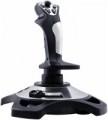 | 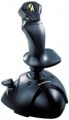 |
|---|---|---|
| Sven Aggressor | ThrustMaster USB Joystick | |
from $11.25 up to $15.40 | Compare prices 1 | |
| TOP sellers | ||
| Device type (configuration) | joystick | joystick |
| Platform compatibility | PC (Windows) | PC (Windows) |
Control | ||
| Total number of buttons | 12 pcs | 4 pcs |
| Feedback | vibration | vibration |
| Triggers | 1 pcs | 1 pcs |
General | ||
| Mounting | suction cups | suction cups |
| Cable length | 1.8 m | |
| Power source | USB port | USB port |
| Added to E-Catalog | july 2011 | february 2009 |



Compare Sven Aggressor and ThrustMaster USB Joystick
Price comparison
You may be interested in
My comparisons
Glossary
Total number of buttons
The number of buttons indicates how many individual commands can be assigned to a joystick or flight controller without using the keyboard. In flight simulators, this is especially important because control often includes deploying landing gear, flaps, trim, changing cameras, communication, armaments, and other actions.
The more buttons, the more convenient it is to assemble the main commands right on the handle, throttle, or panel. For example, a simple joystick with 8 - 12 buttons is suitable for basic flights, while a HOTAS system with dozens of buttons is better utilized in DCS or Microsoft Flight Simulator.
The more buttons, the more convenient it is to assemble the main commands right on the handle, throttle, or panel. For example, a simple joystick with 8 - 12 buttons is suitable for basic flights, while a HOTAS system with dozens of buttons is better utilized in DCS or Microsoft Flight Simulator.
Cable length
Cable length provided in the design or included in the package of a wired or combined controller (see "Connection").
Generally, the meaning of this parameter is clear: a longer cable provides more freedom of movement but can be inconvenient at shorter distances. In practice, cable length is mainly important when a wired connection is used for gaming on a large screen; for comfortable viewing, it is preferable to be at a considerable distance from such a screen. However, even in this case, a relatively short cable can be compensated for by the length of cables running from the console (or other gaming device) to the screen, or even by wireless connection of the console to the screen (many modern models have this capability). When the controller is used for a computer, this parameter can be largely ignored; the system unit or laptop is usually located in close proximity to the user, and even a fairly short cable is sufficient for connection.
Generally, the meaning of this parameter is clear: a longer cable provides more freedom of movement but can be inconvenient at shorter distances. In practice, cable length is mainly important when a wired connection is used for gaming on a large screen; for comfortable viewing, it is preferable to be at a considerable distance from such a screen. However, even in this case, a relatively short cable can be compensated for by the length of cables running from the console (or other gaming device) to the screen, or even by wireless connection of the console to the screen (many modern models have this capability). When the controller is used for a computer, this parameter can be largely ignored; the system unit or laptop is usually located in close proximity to the user, and even a fairly short cable is sufficient for connection.