
Comparison VR Shinecon G02ED vs VR Shinecon SC-G04BS
Add to comparison |  | 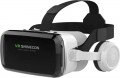 |
|---|---|---|
| VR Shinecon G02ED | VR Shinecon SC-G04BS | |
| Outdated Product | from $15.24 | |
| TOP sellers | ||
| Device type | VR glasses for phone | VR glasses for phone |
| Purpose (compatibility) | Android iOS (iPhone) | Android iOS (iPhone) |
Specs | ||
| Max. phone screen size | 6.53 " | 6.5 " |
| Field of view | 110 ° | 110 ° |
| Lens distance adjusting |  |  |
| Pupillary distance adjustment | | |
Multimedia | ||
| Bluetooth | v 4.2 | |
| Headphones | | |
| Headphone output | | |
General | ||
| Battery capacity | 350 mAh | |
| Operating time | 15 h | |
| Material | plastic | plastic |
| Dimensions (HxWxD) | 108x232x226 mm | |
| Weight | 300 g | |
| Added to E-Catalog | may 2025 | june 2022 |


Compare VR Shinecon G02ED and SC-G04BS
You may be interested in
My comparisons
VR Shinecon G02ED often compared

VR Shinecon SC-G04BS often compared


Glossary
Max. phone screen size
The largest diagonal of a smartphone compatible with the corresponding glasses (see "Intended use"). Note that this parameter can be specified both for universal models that do not have specialization for specific mobile phones, and for gadgets for specific devices (for more details, see "Compatible phone models"). The maximum diagonal is connected both with the features of the optics and with the physical dimensions of the "seat" for a mobile phone — a gadget that is too large simply does not fit there.
Note that even the smallest glasses for smartphones work quite correctly with devices with a diagonal of 5 – 5.5 ". So it makes sense to pay attention to this parameter if your device has a larger screen size. Nowadays, you can find glasses for gadgets 5.6 – 6 " and even 6" or more.
Note that even the smallest glasses for smartphones work quite correctly with devices with a diagonal of 5 – 5.5 ". So it makes sense to pay attention to this parameter if your device has a larger screen size. Nowadays, you can find glasses for gadgets 5.6 – 6 " and even 6" or more.
Lens distance adjusting
The ability to move the lenses of the glasses back and forth, thus changing their location relative to the screen and the user's eyes. The specific meaning of this function can be different: it can adjust the angle of view (so that the screen fits completely in the field of view and at the same time is not too small), play the role of diopter correction (which is important for users who wear glasses) or focus, change the setting interpupillary distance (see below), etc. These nuances should be clarified separately. However, anyway, this function will not be superfluous — it makes it easier to adjust the glasses to the personal characteristics of the user.
Pupillary distance adjustment
The ability to adjust the interpupillary distance of glasses — that is, the distance between the centers of two lenses. To do this, the lenses are mounted on movable mounts that allow them to be moved to the right / left. The meaning of this feature is that for normal viewing, the centers of the lenses must be opposite the user's pupils — and for different people, the distance between the pupils is also different. Accordingly, this setting will be useful anyway, but it is especially important for users of a large or petite physique, whose interpupillary distance is noticeably different from the average.
At the same time, there is a fairly significant number of glasses that do not have this function. They can be divided into three categories. The first is devices where the lack of adjustment for the interpupillary distance is compensated in one way or another (for example, by a special form of lenses that does not require adjustment). The second is models where this adjustment is not needed in principle (in particular, some augmented reality glasses). And the third — the simplest and cheapest solutions, where additional adjustments were abandoned to reduce the cost.
At the same time, there is a fairly significant number of glasses that do not have this function. They can be divided into three categories. The first is devices where the lack of adjustment for the interpupillary distance is compensated in one way or another (for example, by a special form of lenses that does not require adjustment). The second is models where this adjustment is not needed in principle (in particular, some augmented reality glasses). And the third — the simplest and cheapest solutions, where additional adjustments were abandoned to reduce the cost.
Bluetooth
The presence of a Bluetooth module in the glasses; The Bluetooth version to which this module corresponds can also be specified here.
Bluetooth is a technology created for direct wireless connection between various devices. This technology is found in all types of VR glasses (see “Purpose”), although most models with its support are independent devices. In any case, the most popular way to use Bluetooth in virtual reality glasses is to broadcast sound wirelessly. Moreover, the format of such a broadcast may be different, depending on the specifics of the glasses themselves. Thus, standalone devices broadcast the reproduced sound to external headphones. Models for PCs and smartphones may have built-in headphones, and here the sound is transmitted via Bluetooth to the glasses from an external device; Audio from the built-in microphone can be transmitted in the opposite direction.
In addition, there are other possible ways to use Bluetooth, such as directly exchanging files with another device or connecting game controllers. Such capabilities are found exclusively in stand-alone glasses; the specific functionality for each model should be clarified separately.
As for the versions, the oldest one used in VR glasses today is Bluetooth 3.0, the newest is Bluetooth 5.0. However, the differences between different versions for such devices are not fundamental; this information is provided mainly for reference purposes.
Bluetooth is a technology created for direct wireless connection between various devices. This technology is found in all types of VR glasses (see “Purpose”), although most models with its support are independent devices. In any case, the most popular way to use Bluetooth in virtual reality glasses is to broadcast sound wirelessly. Moreover, the format of such a broadcast may be different, depending on the specifics of the glasses themselves. Thus, standalone devices broadcast the reproduced sound to external headphones. Models for PCs and smartphones may have built-in headphones, and here the sound is transmitted via Bluetooth to the glasses from an external device; Audio from the built-in microphone can be transmitted in the opposite direction.
In addition, there are other possible ways to use Bluetooth, such as directly exchanging files with another device or connecting game controllers. Such capabilities are found exclusively in stand-alone glasses; the specific functionality for each model should be clarified separately.
As for the versions, the oldest one used in VR glasses today is Bluetooth 3.0, the newest is Bluetooth 5.0. However, the differences between different versions for such devices are not fundamental; this information is provided mainly for reference purposes.
Headphones
The presence of your own headphones in the design or delivery of virtual reality glasses.
A full-fledged "immersion" in the virtual world requires not only a picture on the screen, but also an appropriate sound accompaniment, for which headphones are the best option. However, glasses take up quite a lot of space on the head, and not all “ears” can be comfortably combined with them (this is especially noticeable on large over-ear headphones). In addition, when connecting headphones with a wire, there may be problems related to the length and/or location of the audio cable. Thus, some models provide this function. These models can have any purpose (see above); most of these are for PC/console glasses, but headphones are also popular in standalone devices. Also note that some glasses use speakers located in the ear area; such speakers are also considered headphones in this case.
An alternative to the bundled "ears" is a headphone output; however, there are models with both functions at once — either folding / removable cups or the simplest speakers mentioned above play the role of headphones in them.
A full-fledged "immersion" in the virtual world requires not only a picture on the screen, but also an appropriate sound accompaniment, for which headphones are the best option. However, glasses take up quite a lot of space on the head, and not all “ears” can be comfortably combined with them (this is especially noticeable on large over-ear headphones). In addition, when connecting headphones with a wire, there may be problems related to the length and/or location of the audio cable. Thus, some models provide this function. These models can have any purpose (see above); most of these are for PC/console glasses, but headphones are also popular in standalone devices. Also note that some glasses use speakers located in the ear area; such speakers are also considered headphones in this case.
An alternative to the bundled "ears" is a headphone output; however, there are models with both functions at once — either folding / removable cups or the simplest speakers mentioned above play the role of headphones in them.
Headphone output
Availability in points of an exit for connection of earphones. Most often, the role of such a connector is played by a standard 3.5 mm mini-jack socket.
A full-fledged "immersion" in the virtual world requires not only a picture on the screen, but also an appropriate sound accompaniment, for which headphones are the best option. Its own headphone output allows you to connect wired "ears" directly to the glasses — it is much more convenient and safer during use than connecting headphones to a computer or set-top box. However, independent devices can also have such a connector (see "Purpose").
Note that there are VR glasses with their own built-in headphones, but this option is more convenient: it allows you to select the “ears” separately, according to the user’s own preferences.
A full-fledged "immersion" in the virtual world requires not only a picture on the screen, but also an appropriate sound accompaniment, for which headphones are the best option. Its own headphone output allows you to connect wired "ears" directly to the glasses — it is much more convenient and safer during use than connecting headphones to a computer or set-top box. However, independent devices can also have such a connector (see "Purpose").
Note that there are VR glasses with their own built-in headphones, but this option is more convenient: it allows you to select the “ears” separately, according to the user’s own preferences.