
Comparison Skyzone SKY04X Pro vs Eachine EV800D
Add to comparison | 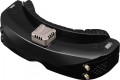 | 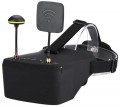 |
|---|---|---|
| Skyzone SKY04X Pro | Eachine EV800D | |
from $424.39 | Compare prices 1 | |
| TOP sellers | ||
Receiver - 5.8Ghz, 48 channels. Connectors HT OUT, A/V. | Built-in 5.8GHz 40-channel receiver with Raceband support. Removable antennas. Possibility of installation on a tripod. | |
| Device type | FPV goggles | FPV goggles |
| Purpose (compatibility) | quadcopter (drone) | quadcopter (drone) |
| Receiver (FPV) | 5.8 GHz, 48 channels | 5.8 GHz, 40 channels |
Specs | ||
| Screen resolution | 1920x1080 px | 800x480 px |
| Field of view | 52 ° | |
| Refresh rate | 60 fps | |
| Accelerometer |  |  |
| Gyroscope | | |
| Lens distance adjusting | | |
| Pupillary distance adjustment | | |
Multimedia | ||
| Card reader | | |
| USB-C | + | |
| HDMI | + | |
| Headphone output | | |
General | ||
| Control | button controls | button controls |
| Battery capacity | 2000 mAh | |
| Material | plastic | plastic |
| Dimensions (HxWxD) | 185x75x67 mm | 180x145x82 mm |
| Weight | 267 g | 362 g |
| Added to E-Catalog | december 2023 | november 2023 |



Compare Skyzone SKY04X Pro and Eachine EV800D
Price comparison
You may be interested in
My comparisons
Skyzone SKY04X Pro often compared


Eachine EV800D often compared


Glossary
Receiver (FPV)
In this section, the operating frequency range is usually specified (most commonly 5.8 GHz, less frequently other ranges), the number of supported channels and bands, and the type of system — whether the receiver is designed for an analog or digital video link. The more channels and ranges the FPV goggles receiver supports, the easier it is to select a "clean" frequency for your transmitter and fly in a group without interfering with other pilots. It's important for the frequency and protocol of the receiver to match the video transmitter on the drone: for example, racing quadcopters use popular channel sets, and goggles with a full-fledged receiver will allow you to quickly tune to the desired video feed or switch between multiple drones during training and competitions.
Screen resolution
Resolution of built-in displays in glasses equipped with such equipment — that is, models for PC / consoles, as well as standalone devices (see "Intended use").
The higher the resolution, the more smooth and detailed the “picture” is given out by glasses, all other things being equal. Thanks to the development of technology nowadays, models with Full HD (1920x1080) screens and even higher resolutions are not uncommon. On the other hand, this parameter significantly affects the cost of points. In addition, it is worth remembering that in order to fully work with high-resolution displays, you need powerful graphics capable of playing relevant content. In the case of glasses for PCs and set-top boxes, this puts forward corresponding requirements for external devices, and in standalone models you have to use advanced integrated video adapters (which affects the cost even more).
The higher the resolution, the more smooth and detailed the “picture” is given out by glasses, all other things being equal. Thanks to the development of technology nowadays, models with Full HD (1920x1080) screens and even higher resolutions are not uncommon. On the other hand, this parameter significantly affects the cost of points. In addition, it is worth remembering that in order to fully work with high-resolution displays, you need powerful graphics capable of playing relevant content. In the case of glasses for PCs and set-top boxes, this puts forward corresponding requirements for external devices, and in standalone models you have to use advanced integrated video adapters (which affects the cost even more).
Field of view
The viewing angle provided by virtual reality glasses is the angular size of the space that falls into the user's field of view. Usually, the characteristics indicate the size of this space horizontally; however, if you need the most accurate information, this point needs to be specified separately.
The wider the viewing angle — the more the game space the user can see without turning his head, the more powerful the immersion effect and the less likely that the image will be subject to the "tunnel vision" effect. On the other hand, making the field of view too wide also does not make sense, given the characteristics of the human eye. In general, a large viewing angle is considered to be an angle of 100° or more. On the other hand, there are models where this indicator is 30° or even less — these are, usually, specific devices (for example, drone piloting glasses and augmented reality glasses), where such characteristics are quite justified given the overall functionality.
The wider the viewing angle — the more the game space the user can see without turning his head, the more powerful the immersion effect and the less likely that the image will be subject to the "tunnel vision" effect. On the other hand, making the field of view too wide also does not make sense, given the characteristics of the human eye. In general, a large viewing angle is considered to be an angle of 100° or more. On the other hand, there are models where this indicator is 30° or even less — these are, usually, specific devices (for example, drone piloting glasses and augmented reality glasses), where such characteristics are quite justified given the overall functionality.
Refresh rate
The refresh rate supported by the glasses' built-in screens, in simple terms, is the maximum frame rate that the screens are capable of delivering.
Recall that screens are provided in models for PC / consoles and in stand-alone devices (see "Intended use"). And the quality of the picture directly depends on this indicator: other things being equal, a higher frame rate provides a smoother image, without jerks and with good detail in dynamic scenes. The flip side of these benefits is an increase in price.
It is also worth considering that in some cases the actual frame rate will not be limited by the capabilities of the glasses, but by the characteristics of the external device or the properties of the content being played. For example, a relatively weak PC graphics card may not be able to pull out a high frame rate signal, or a certain frame rate may be set in the game and not provide boosting. Therefore, you should not chase after large values and points with a frequency of 90 fps will be enough.
Recall that screens are provided in models for PC / consoles and in stand-alone devices (see "Intended use"). And the quality of the picture directly depends on this indicator: other things being equal, a higher frame rate provides a smoother image, without jerks and with good detail in dynamic scenes. The flip side of these benefits is an increase in price.
It is also worth considering that in some cases the actual frame rate will not be limited by the capabilities of the glasses, but by the characteristics of the external device or the properties of the content being played. For example, a relatively weak PC graphics card may not be able to pull out a high frame rate signal, or a certain frame rate may be set in the game and not provide boosting. Therefore, you should not chase after large values and points with a frequency of 90 fps will be enough.
Accelerometer
Presence in points of own built — in accelerometer.
The accelerometer is a sensor that records the accelerations that the device is subjected to. It performs two main functions: determines the position of the glasses relative to the horizon (in the direction of gravity) and monitors jerks and tremors (however, this function is secondary in VR glasses). Such a sensor is necessary for a full-fledged "immersion" in virtual reality, so it must be provided in glasses made in the form of independent devices (see "Intended use"). But models for PC / consoles may not be equipped with an accelerometer — this means that the glasses are not designed for classic VR, but for more specific tasks (for example, controlling a drone with a first-person view).
As for models for smartphones, most of them do not have this function, since all modern smartphones are equipped with accelerometers. However, there are exceptions — high-end models designed for specific devices: in them, the accelerometer can work in conjunction with a smartphone sensor, which ensures the most accurate image positioning.
The accelerometer is a sensor that records the accelerations that the device is subjected to. It performs two main functions: determines the position of the glasses relative to the horizon (in the direction of gravity) and monitors jerks and tremors (however, this function is secondary in VR glasses). Such a sensor is necessary for a full-fledged "immersion" in virtual reality, so it must be provided in glasses made in the form of independent devices (see "Intended use"). But models for PC / consoles may not be equipped with an accelerometer — this means that the glasses are not designed for classic VR, but for more specific tasks (for example, controlling a drone with a first-person view).
As for models for smartphones, most of them do not have this function, since all modern smartphones are equipped with accelerometers. However, there are exceptions — high-end models designed for specific devices: in them, the accelerometer can work in conjunction with a smartphone sensor, which ensures the most accurate image positioning.
Gyroscope
The presence in the glasses of its own built-in gyroscope.
The gyroscope captures the direction, speed, and angle of rotation of the device—usually along all three axes. Without such a sensor, it is impossible to achieve a full-fledged "immersion" in virtual reality, so it is available in all standalone glasses, as well as in most models for PC / consoles (see "Intended use"). In the second case, the only exceptions are individual models with a specific purpose — "personal cinemas", glasses for piloting drones, etc. In turn, glasses for smartphones do not initially require gyroscopes, since smartphones themselves have such sensors. However, there are exceptions here too — advanced models created for specific top-level devices: in them, the built-in gyroscope works in conjunction with the gyroscope of the connected smartphone, ensuring maximum positioning accuracy.
The gyroscope captures the direction, speed, and angle of rotation of the device—usually along all three axes. Without such a sensor, it is impossible to achieve a full-fledged "immersion" in virtual reality, so it is available in all standalone glasses, as well as in most models for PC / consoles (see "Intended use"). In the second case, the only exceptions are individual models with a specific purpose — "personal cinemas", glasses for piloting drones, etc. In turn, glasses for smartphones do not initially require gyroscopes, since smartphones themselves have such sensors. However, there are exceptions here too — advanced models created for specific top-level devices: in them, the built-in gyroscope works in conjunction with the gyroscope of the connected smartphone, ensuring maximum positioning accuracy.
Lens distance adjusting
The ability to move the lenses of the glasses back and forth, thus changing their location relative to the screen and the user's eyes. The specific meaning of this function can be different: it can adjust the angle of view (so that the screen fits completely in the field of view and at the same time is not too small), play the role of diopter correction (which is important for users who wear glasses) or focus, change the setting interpupillary distance (see below), etc. These nuances should be clarified separately. However, anyway, this function will not be superfluous — it makes it easier to adjust the glasses to the personal characteristics of the user.
Pupillary distance adjustment
The ability to adjust the interpupillary distance of glasses — that is, the distance between the centers of two lenses. To do this, the lenses are mounted on movable mounts that allow them to be moved to the right / left. The meaning of this feature is that for normal viewing, the centers of the lenses must be opposite the user's pupils — and for different people, the distance between the pupils is also different. Accordingly, this setting will be useful anyway, but it is especially important for users of a large or petite physique, whose interpupillary distance is noticeably different from the average.
At the same time, there is a fairly significant number of glasses that do not have this function. They can be divided into three categories. The first is devices where the lack of adjustment for the interpupillary distance is compensated in one way or another (for example, by a special form of lenses that does not require adjustment). The second is models where this adjustment is not needed in principle (in particular, some augmented reality glasses). And the third — the simplest and cheapest solutions, where additional adjustments were abandoned to reduce the cost.
At the same time, there is a fairly significant number of glasses that do not have this function. They can be divided into three categories. The first is devices where the lack of adjustment for the interpupillary distance is compensated in one way or another (for example, by a special form of lenses that does not require adjustment). The second is models where this adjustment is not needed in principle (in particular, some augmented reality glasses). And the third — the simplest and cheapest solutions, where additional adjustments were abandoned to reduce the cost.
USB-C
Presence of a USB-C port in glasses. This is a relatively new type of USB port, with miniature size (slightly larger than microUSB) and a convenient reversible design, allowing the plug to be connected either way. It can be found in glasses of different purposes and, accordingly, designed for various applications. For example, in models for PCs/consoles, this port is used similarly to traditional USB-A — for main connection, alongside HDMI or DisplayPort interfaces. In standalone devices, in turn, USB-C is mainly intended for battery charging and connection to a computer for direct file exchange, settings management, firmware updates, etc.
It should also be noted that this section might specify the USB version that the USB-C port corresponds to. Currently, two versions are relevant — 5Gbps and 10Gbps; for VR glasses, the difference between them is generally not significant.
It should also be noted that this section might specify the USB version that the USB-C port corresponds to. Currently, two versions are relevant — 5Gbps and 10Gbps; for VR glasses, the difference between them is generally not significant.