
Comparison BenQ GV50 vs JmGO N1S
Add to comparison |  | 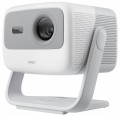 |
|---|---|---|
| BenQ GV50 | JmGO N1S | |
| Compare prices 7 | from $798.39 | |
| TOP sellers | ||
You can set a shutdown timer. | ||
| Main function | portable | portable |
| Operating system | Google TV | Google TV |
Lamp and image | ||
| Lamp type | Laser-LED | Laser-LED |
| Service life | 20000 h | 30000 h |
| Service life (energy-saving) | 30000 h | |
| Brightness ANSI Lumens | 500 lm | 900 lm |
| Static contrast | 1 600:1 | |
| Dynamic contrast | 100 000:1 | 100 000:1 |
| Colour rendering | 16.7 million colours | 1.07 billion colours |
| Horizontal frequency | 15 – 135 kHz | |
| Frame rate | 23 – 62 Hz | |
Projection system | ||
| Technology | DLP | DLP |
| Real resolution | 1920x1080 px | 1920x1080 px |
| Max. video resolution | 3840x2160 px | |
| Image format support | 16:9 | |
| HDR support | + | + |
Projecting | ||
| Rear projection |  |  |
| Image size | 60 – 120 " | 180 " |
| Throw ratio | 1.2 | |
| Zoom and focus | motorized (remote-controlled) | |
| Autofocus | | |
| Auto keystone correction | | |
| Keystone correction (vert), ± | 20 ° | |
| Keystone correction (horizontal), ± | 30 ° | |
Features | ||
| Features | voice control voice assistant | voice assistant |
| Bluetooth | v 5.0 | v 5.0 |
| Wi-Fi | Wi-Fi 5 (802.11ac) | Wi-Fi 6 (802.11ax) |
| AirPlay | + | |
| Google Cast (Chromecast) | | |
| Miracast | | |
Hardware | ||
| USB-A 2.0 | 1 pcs | 1 pcs |
| USB-C | 1 pcs | |
| Number of speakers | 2 | 2 |
| Subwoofer | | |
| Sound power | 18 W | 10 W |
| HDMI inputs | 1 | 1 |
| HDMI version | v 2.0 | |
| Audio connectors | 3.5 mm output (mini-Jack) | 3.5 mm output (mini-Jack) |
General | ||
| Noise level (nominal) | 28 dB | |
| Noise level (energy-saving / quiet) | 26 dB | |
| Power source | mains / battery | mains |
| Operating time | 2.5 h | |
| Power consumption | 85 W | 100 W |
| Size (HxWxD) | 211x130x191 mm | 191x187x165 mm |
| Weight | 2.1 kg | 2 kg |
| Color | ||
| Added to E-Catalog | november 2024 | november 2024 |





Compare BenQ GV50 and JmGO N1S
You may be interested in
My comparisons
BenQ GV50 often compared


JmGO N1S often compared


Glossary
Service life
Minimum projector lamp life as stated by the manufacturer. Specified by the total time of continuous operation. Note that if the projector was operated without violations, then upon reaching this time, the lamp will not necessarily fail — on the contrary, it can work for quite a long time. However, when evaluating durability, it is best to focus on the claimed service life.
Service life (energy-saving)
When working in economy mode, the brightness of the backlight is noticeably reduced, on average by 30-50%. With a decrease in brightness, heat dissipation also decreases, which saves the working life of the illuminator, thereby increasing the lamp life. Thus, the ECO mode allows you to extend the lamp life by an average of 30%. If the typical projector lamp life is 4000 hours, regular use of the ECO mode will extend the backlight life to approximately 5500 hours.
Brightness ANSI Lumens
This parameter largely determines the ability of the projector to work in a well-lit room. For a dark room, 1000 lumens is enough to make the projection picture bright, rich, clear and understandable. But when working in a lit room, the projector will need at least 3500-4000 lumens. Do not confuse ANSI lumens with Peak lumens. These are two different brightness standards. To convert one type of brightness to another, you need to multiply Peak lumens by 10-12. The result will be an approximate value of ANSI Lumens.
However, experts do not recommend chasing high ANSI lumen brightness values. There are many professional projectors with brightness up to 3500 lm. The lower the brightness, the lower the power consumption, and at the same time, the life of the illuminator increases. Of course, if the projector will be installed in a work office or classroom where good lighting is required, it is recommended to purchase a model with ANSI Lumens brightness of 4000 lumens and more.
Static contrast
The static contrast of the image provided by the projector.
Static contrast refers to the maximum difference between the brightest white light and the darkest black that a projector can provide within a single frame. Unlike dynamic contrast (see below), this parameter describes not conditional, but quite real capabilities of the device, achievable without the use of any additional tricks like auto-brightness. And since the quality of colour reproduction and detailing depend on contrast, the higher this indicator, the lower the likelihood that details will be indistinguishable in bright or dark areas.
Static contrast refers to the maximum difference between the brightest white light and the darkest black that a projector can provide within a single frame. Unlike dynamic contrast (see below), this parameter describes not conditional, but quite real capabilities of the device, achievable without the use of any additional tricks like auto-brightness. And since the quality of colour reproduction and detailing depend on contrast, the higher this indicator, the lower the likelihood that details will be indistinguishable in bright or dark areas.
Colour rendering
The number of individual colour shades that the projector is capable of displaying.
The minimum indicator for modern projection technology is actually 16 million colours (more precisely, 16.7 million is a standard number associated with the features of digital image processing). In the most advanced models, this value can exceed 1 billion. However, two nuances should be taken into account here: firstly, the human eye is able to recognize only about 10 million colour shades, and secondly, not a single modern image output device (projectors, monitors, etc.) cannot cover the entire spectrum of colours visible to the human eye. Therefore, impressive colour performance is more of a marketing ploy than a real indicator of image quality, and in fact it makes sense to pay attention to other characteristics — primarily brightness and contrast (see above), as well as specific data like a colour gamut chart.
The minimum indicator for modern projection technology is actually 16 million colours (more precisely, 16.7 million is a standard number associated with the features of digital image processing). In the most advanced models, this value can exceed 1 billion. However, two nuances should be taken into account here: firstly, the human eye is able to recognize only about 10 million colour shades, and secondly, not a single modern image output device (projectors, monitors, etc.) cannot cover the entire spectrum of colours visible to the human eye. Therefore, impressive colour performance is more of a marketing ploy than a real indicator of image quality, and in fact it makes sense to pay attention to other characteristics — primarily brightness and contrast (see above), as well as specific data like a colour gamut chart.
Horizontal frequency
Horizontal frequency supported by the projector.
This parameter is relevant when working with analogue video signal. In such a video, the image is formed line by line: each pixel in the line is highlighted in turn, then the next line is highlighted, and so on. The horizontal frequency describes how many times per second the backlight beam runs from edge to edge of the screen. For normal playback, the projector must support the same refresh rate as the input signal was recorded. However, most models support a fairly wide range of frequencies, and there are no problems with support. Also note that if you are not a professional, then when choosing a projector, it is quite possible to focus on the frame rate (see below) — this parameter is simpler and more intuitive, and support for a certain frame rate automatically means support for the corresponding line rate.
This parameter is relevant when working with analogue video signal. In such a video, the image is formed line by line: each pixel in the line is highlighted in turn, then the next line is highlighted, and so on. The horizontal frequency describes how many times per second the backlight beam runs from edge to edge of the screen. For normal playback, the projector must support the same refresh rate as the input signal was recorded. However, most models support a fairly wide range of frequencies, and there are no problems with support. Also note that if you are not a professional, then when choosing a projector, it is quite possible to focus on the frame rate (see below) — this parameter is simpler and more intuitive, and support for a certain frame rate automatically means support for the corresponding line rate.
Frame rate
Frame rate, simply put, is the frame rate supported by the projector.
For normal playback, it is highly desirable that the frame rate of the projector match the original frame rate of the video signal. However, most modern models do not support a specific frame rate, but a whole range of frequencies, and quite an extensive one at that.
Note that for viewing most video materials, the range from 24 to 60 fps is quite enough. The exception is 3D content, which may require double the frame rate, up to 120Hz (see " 3D Support " for details).
For normal playback, it is highly desirable that the frame rate of the projector match the original frame rate of the video signal. However, most modern models do not support a specific frame rate, but a whole range of frequencies, and quite an extensive one at that.
Note that for viewing most video materials, the range from 24 to 60 fps is quite enough. The exception is 3D content, which may require double the frame rate, up to 120Hz (see " 3D Support " for details).
Max. video resolution
The actual maximum frame resolution that the projector is capable of processing and displaying.
Many models allow project images at a higher resolution than the actual resolution of the projector matrix (see above). For example, a 1920x1080 video can be displayed on a device with a frame size of 1024x768. However, the quality of such an image will be noticeably lower than on a projector, which initially has a resolution of 1920x1080.
The maximum resolution is closely related to both the overall picture quality and the size of the projection screen. The higher the resolution, the sharper the image details become. Of course, the screen size itself should be taken into account. The fact is that on a 40-50″ projection surface there will not be much difference between the Quad HD and 4K formats. A high-resolution picture will be able to show itself on a truly large screen.
Many models allow project images at a higher resolution than the actual resolution of the projector matrix (see above). For example, a 1920x1080 video can be displayed on a device with a frame size of 1024x768. However, the quality of such an image will be noticeably lower than on a projector, which initially has a resolution of 1920x1080.
The maximum resolution is closely related to both the overall picture quality and the size of the projection screen. The higher the resolution, the sharper the image details become. Of course, the screen size itself should be taken into account. The fact is that on a 40-50″ projection surface there will not be much difference between the Quad HD and 4K formats. A high-resolution picture will be able to show itself on a truly large screen.
Image format support
Image formats supported by the projector.
In this case, format means the aspect ratio of the image. The general rule in this case is that the projector must support the same format in which the original content is recorded. Otherwise, the image will either be stretched in height or width, or with black stripes on the sides or top-bottom. Specifically, the formats can be divided into three main categories:
— Traditional, or rectangular. Classic formats in which the height of the picture is not much less than the width. The most popular options are 4:3, widely used in analogue TV, and 5:4, common in computer technology. Traditional formats are well suited for presentations, working with documents and graphics, and other similar tasks.
— Widescreen — formats in which the frame width is significantly (more than 1.5 times) greater than the height. The most popular of these standards are 16:9 and 16:10. These aspect ratios are well suited for games and movies; in particular, most high-definition content (HD 720p and above) is recorded in widescreen format.
— Extra wide. The formats are even wider than the widescreen ones described above — for example, 21:9. Mainly used in cinematography.
It is worth noting that many modern projectors are able to work with several types of formats at once — for example, with classic 4:3 and...wide-angle 16:9.
In this case, format means the aspect ratio of the image. The general rule in this case is that the projector must support the same format in which the original content is recorded. Otherwise, the image will either be stretched in height or width, or with black stripes on the sides or top-bottom. Specifically, the formats can be divided into three main categories:
— Traditional, or rectangular. Classic formats in which the height of the picture is not much less than the width. The most popular options are 4:3, widely used in analogue TV, and 5:4, common in computer technology. Traditional formats are well suited for presentations, working with documents and graphics, and other similar tasks.
— Widescreen — formats in which the frame width is significantly (more than 1.5 times) greater than the height. The most popular of these standards are 16:9 and 16:10. These aspect ratios are well suited for games and movies; in particular, most high-definition content (HD 720p and above) is recorded in widescreen format.
— Extra wide. The formats are even wider than the widescreen ones described above — for example, 21:9. Mainly used in cinematography.
It is worth noting that many modern projectors are able to work with several types of formats at once — for example, with classic 4:3 and...wide-angle 16:9.