
Comparison Jonsbo D32 STD black vs Jonsbo D32 Pro white
Add to comparison |  | 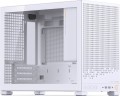 |
|---|---|---|
| Jonsbo D32 STD black | Jonsbo D32 Pro white | |
from $64.00 | Compare prices 1 | |
| User reviews | ||
| TOP sellers | ||
| Features | gaming | gaming |
| Form factor | Desktop | Desktop |
| Mount | vertical | vertical |
| Motherboard support | micro-ATX | micro-ATX |
| Board placement | vertical | vertical |
| Reverse layout motherboard support |  | |
| PSU form factor | SFX | ATX (regular) |
Computer case | ||
| Dimensions (HxWxD) | 314x207x395 mm | 314x207x396 mm |
| PSU max lenght | 140 mm | |
| Graphics card max lenght | 365 mm | 365 mm |
| Fan max height | 163 mm | 163 mm |
| Weight | 4.5 kg | 4.6 kg |
| Material | steel | steel |
| Sidewall thickness | 0.7 mm | 0.7 mm |
| Side panel | removable | removable |
Storage | ||
| PSU |  | |
| PSU mount | top | top |
| 3.5" bays | 1 | 2 |
| internal 2.5" compartments | 3 | 4 |
| Expansion slots | 4 | 4 |
Cooling | ||
| Fans (back) | 1x120mm | 1x120mm |
| Fans (top) | 2x140mm | 2x140mm |
| Fans (bottom) | 2x140mm | 2x140mm |
| Fan mounts total | 6 | 6 |
| Dust filter | bottom | front, top and bottom |
| Liquid cooling system support | | |
Liquid cooling system | ||
| Liquid cooling (side) | 240 mm | 240 mm |
| Liquid cooling mounts | 1 | 1 |
Connectors and functions | ||
| Placement | on the front | on the front |
| USB-A 5Gbps | 2 pcs | 2 pcs |
| USB-C 10Gbps | 1 pcs | 1 pcs |
| Audio (microphone/headphones) | | |
More features | ||
| Front panel | lattice | lattice |
| Side panel window | tempered glass | tempered glass |
| More features | graphics card holder CPU cooling mount window | graphics card holder CPU cooling mount window |
| Color | ||
| Added to E-Catalog | february 2025 | february 2025 |



Compare Jonsbo D32 STD and D32 Pro
Price comparison
You may be interested in
My comparisons
Jonsbo D32 STD often compared


Jonsbo D32 Pro often compared


Glossary
PSU form factor
The form factor of the power supply that the chassis is designed to support. The form factor of the PSU is indicated by the type of motherboards for which the block was originally “sharpened”; however, many form factors are mutually compatible.
— ATX(regular). Form factor designed for full-size cases, mainly Tower and Desktop types (see "Form Factor"). The motherboard is powered by a 24-pin (in older versions — 20-pin) connector; in addition, such power supplies usually provide an additional power plug for CPU (4-pin, 8-pin, and sometimes both at once).
— FlexATX. The FlexATX form factor provides a miniature size of the motherboard (in terms of size and location of the mounting holes, such boards are compatible with microATX). Accordingly, the power supplies for them are compact in size and have increased efficiency characteristics. They are compatible with many miniature motherboards, including the mentioned microATX and mini-ITX, and the main connectors are the same as in ATX (minus the 20-pin version).
— TFX. The abbreviation TFX comes from Thin Form Factor — i.e. "thin form factor". This is one of the varieties of compact power supplies used in miniature form factors systems; similar in compatibility to the microATX described above, and in terms of connectors — ATX.
— SFX. Another type of po...wer supply with reduced dimensions, used in compact systems (S — from "small", i.e. "small"). In terms of connectors, it is considered completely interchangeable with ATX, it fundamentally differs only in size.
— External. Cases that do not have space for an internal power supply at all and are designed to connect an external power supply unit. This design is found mainly among the smallest cases (in particular, for mini-ITX and thin mini-ITX motherboards). Note that in this case, not every case with an external power supply is meant, but only models that do not have built-in converters (see below) and are designed for motherboards with their own connector for an external power supply.
— External with converter. Enclosures designed for external power supplies (see above) and equipped with built-in converters. The converter outputs power from an external PSU to a number of "computer" connectors, in particular, a standard 24-pin motherboard power connector. Thus, in such a case, you can install a "motherboard" that has a traditional "ATX" power supply in 24-pin format.
— ATX(regular). Form factor designed for full-size cases, mainly Tower and Desktop types (see "Form Factor"). The motherboard is powered by a 24-pin (in older versions — 20-pin) connector; in addition, such power supplies usually provide an additional power plug for CPU (4-pin, 8-pin, and sometimes both at once).
— FlexATX. The FlexATX form factor provides a miniature size of the motherboard (in terms of size and location of the mounting holes, such boards are compatible with microATX). Accordingly, the power supplies for them are compact in size and have increased efficiency characteristics. They are compatible with many miniature motherboards, including the mentioned microATX and mini-ITX, and the main connectors are the same as in ATX (minus the 20-pin version).
— TFX. The abbreviation TFX comes from Thin Form Factor — i.e. "thin form factor". This is one of the varieties of compact power supplies used in miniature form factors systems; similar in compatibility to the microATX described above, and in terms of connectors — ATX.
— SFX. Another type of po...wer supply with reduced dimensions, used in compact systems (S — from "small", i.e. "small"). In terms of connectors, it is considered completely interchangeable with ATX, it fundamentally differs only in size.
— External. Cases that do not have space for an internal power supply at all and are designed to connect an external power supply unit. This design is found mainly among the smallest cases (in particular, for mini-ITX and thin mini-ITX motherboards). Note that in this case, not every case with an external power supply is meant, but only models that do not have built-in converters (see below) and are designed for motherboards with their own connector for an external power supply.
— External with converter. Enclosures designed for external power supplies (see above) and equipped with built-in converters. The converter outputs power from an external PSU to a number of "computer" connectors, in particular, a standard 24-pin motherboard power connector. Thus, in such a case, you can install a "motherboard" that has a traditional "ATX" power supply in 24-pin format.
PSU max lenght
Possible length of the PSU that can be installed in the case.
3.5" bays
The number of internal 3.5" form factor bays provided in the design of the case. Such bays, in accordance with the name, are intended for internal components, mainly hard drives and some SSD modules; to access them, the case must be disassembled.
Theoretically, the number of bays corresponds to the maximum number of drives that can be installed in the chassis. However, in fact, the best option is to install drives through a single slot to ensure efficient cooling. Accordingly, it is best to select a case in such a way that the number of internal 3.5" bays is twice the expected number of hard drives.
Theoretically, the number of bays corresponds to the maximum number of drives that can be installed in the chassis. However, in fact, the best option is to install drives through a single slot to ensure efficient cooling. Accordingly, it is best to select a case in such a way that the number of internal 3.5" bays is twice the expected number of hard drives.
internal 2.5" compartments
The number of internal 2.5" bays provided in the case design.
Such bays are mainly used for installing internal hard drives and SSD modules; The 2.5" form factor was originally created as "laptop" form factor, but recently it has been increasingly used in components for full-size PCs. At the same time, when evaluating the number of these bays, note that drives are recommended to be installed through a slot; so in Ideally, the number of bays should be twice the planned number of drives.
Also note that some cases use combined bays: initially they have a size of 3.5", but if desired, they can be converted to 2.5". These bays count towards both 3.5-inch and 2.5-inch slots. In fact, this means that the total number of available slots is not always equal to the sum of the number of both. For example, a case with 10 3.5" bays and 6 2.5" bays can have 4 combined bays, and the total number of slots in this case will not be 16, but only 12.
Such bays are mainly used for installing internal hard drives and SSD modules; The 2.5" form factor was originally created as "laptop" form factor, but recently it has been increasingly used in components for full-size PCs. At the same time, when evaluating the number of these bays, note that drives are recommended to be installed through a slot; so in Ideally, the number of bays should be twice the planned number of drives.
Also note that some cases use combined bays: initially they have a size of 3.5", but if desired, they can be converted to 2.5". These bays count towards both 3.5-inch and 2.5-inch slots. In fact, this means that the total number of available slots is not always equal to the sum of the number of both. For example, a case with 10 3.5" bays and 6 2.5" bays can have 4 combined bays, and the total number of slots in this case will not be 16, but only 12.
Dust filter
The presence of a special filter in the housing to prevent dust from entering. Without such a filter, dust settles on the system elements; Radiators are especially susceptible to this; they also lose their efficiency by becoming clogged with dust. If you have a dust filter, you have to clean not the “filling” of the PC, but the filter element itself, which is much simpler and more convenient.
Compartments for dust filters can be located on the front panel of the case, back, bottom, top, or in the side walls. There are also case models with several technological niches for installing dust filters - the combined version assumes the presence of such compartments on several sides of the case at once.
Compartments for dust filters can be located on the front panel of the case, back, bottom, top, or in the side walls. There are also case models with several technological niches for installing dust filters - the combined version assumes the presence of such compartments on several sides of the case at once.