
Comparison Huawei E5577 vs Huawei E5576-322
Add to comparison | 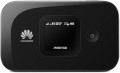 | 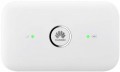 |
|---|---|---|
| Huawei E5577 | Huawei E5576-322 | |
from $99.00 | from $69.95 | |
| User reviews | ||
| TOP sellers | ||
Informative display. Mobile application with localization. Possibility to connect 2 additional antennas. Slot for a memory card. | 2 connectors for connecting a MIMO antenna. | |
| Device type | portable router | portable router |
| Wi-Fi | Wi-Fi 3 (802.11g) Wi-Fi 4 (802.11n) | Wi-Fi 3 (802.11g) Wi-Fi 4 (802.11n) |
| Connected devices, up to | 11 | 16 |
| Effective range | 10 m | 10 m |
Connection | ||
| Communication generation | 2G 3G 4G (LTE) | 2G 3G 4G (LTE) |
| 4G (LTE) | Cat.4 (150/50 Mbps) | Cat.4 (150/50 Mbps) |
| Transmission technology | GPRS EDGE W-CDMA HSUPA HSDPA HSPA+ LTE | GPRS EDGE W-CDMA HSUPA HSDPA HSPA+ LTE |
| Ports | microUSB | microUSB |
Features | ||
| External antenna connector |  | |
| MIMO antenna connection | | |
| Memory card slot | |  |
| SIM card slot | | |
| Display | | |
General | ||
| Built-in battery | | |
| Battery capacity | 1500 mAh | 1500 mAh |
| Operating time (internet browsing) | 6 h | |
| Operating time (standby) | 300 h | |
| Dimensions | 93.5x57x14.4 mm | |
| Weight | 82 g | 95 g |
| Added to E-Catalog | october 2016 | april 2016 |


Compare Huawei E5577 and E5576-322
When comparing portable routers Huawei E5577 and Huawei E5576-322, several key differences can be highlighted. The E5577 model supports connection to up to 11 devices simultaneously, whereas the E5576-322 can connect up to 16 devices. However, the E5577 features a display that shows network status and battery information, which is not available on the E5576-322, where only indicators are used. Both devices have a 1500 mAh battery, but the E5576-322 weighs slightly more—95 g compared to 82 g for the E5577. In reviews, users note that the E5577 provides a more stable connection, although the E5576-322 may be more practical for larger groups of users.
You may be interested in
Huawei E5577 often compared


Huawei E5576-322 often compared


Glossary
Connected devices, up to
The largest number of devices that can be simultaneously connected to the modem via Wi-Fi (see "Connection").
The presence of this limitation is due to the fact that processing network requests from several devices at once requires a fairly large amount of computing resources, and there are not so many of them in miniature electronics like wireless modems. However, even inexpensive models can support about 5 – 6 devices, which is more than enough for most cases; and in more advanced modems, this number can reach 10.
The presence of this limitation is due to the fact that processing network requests from several devices at once requires a fairly large amount of computing resources, and there are not so many of them in miniature electronics like wireless modems. However, even inexpensive models can support about 5 – 6 devices, which is more than enough for most cases; and in more advanced modems, this number can reach 10.
Memory card slot
The presence of a slot for memory card in the design of the modem. Memory cards are very popular in modern electronics as removable storage media; in wireless modems, there are two main options for working with them. The first one provides use as an external card reader, for exchanging information between the card and the device to which the modem is connected via USB (see below); Simply put, installing a card turns the modem into a "flash drive" with removable storage. And in models with Wi-Fi (see "Type"), it may also be possible to work as a server that provides access to the contents of the memory card to all wireless devices connected to the modem. As for the types of cards, the most common support for the microSD standard is that they are small enough to be easily combined with compact wireless modem cases. Note that even within the same standard of memory cards there are several varieties, and before buying it's worth to clarify which of them the device is compatible with.
Display
The presence of a display in the design of the modem. Even the simplest screens used in modern modems are very versatile and capable of displaying almost any service information about the operation of the device (and sometimes not only purely service information). Due to this, this feature provides much more opportunities to inform the user than various indicators. At the same time, we note that this feature is found only in Wi-Fi modems (see above) designed for stand-alone use. This is due to the fact that in models that are connected to another device via USB, the screen of the external device is used for displaying this information, and it simply does not make sense to equip the modem with its own display.
Operating time (internet browsing)
The maximum operating time of the modem with battery power (see "Power") on a single charge in Internet browsing mode. Such power is typical for Wi-Fi routers, therefore, usually, Internet browsing is supposed to provide access to the World Wide Web for an external Wi-Fi device.
This spec is the main indicator of battery life for any battery-powered modem, because it describes the time of using it for its main purpose without recharging. At the same time, you should know that this indicator is measured under certain "perfect" conditions; the actual operating time depends on a number of factors, including the intensity of browsing, the amount of data transferred, the number of connected devices and the distance to them, the cellular network signal strength, etc. Therefore, in fact, the battery life of the modem may be somewhat lower. Nevertheless, it is quite possible to compare different models with each other according to the operating time stated in the specs.
This spec is the main indicator of battery life for any battery-powered modem, because it describes the time of using it for its main purpose without recharging. At the same time, you should know that this indicator is measured under certain "perfect" conditions; the actual operating time depends on a number of factors, including the intensity of browsing, the amount of data transferred, the number of connected devices and the distance to them, the cellular network signal strength, etc. Therefore, in fact, the battery life of the modem may be somewhat lower. Nevertheless, it is quite possible to compare different models with each other according to the operating time stated in the specs.
Operating time (standby)
The maximum time the modem can operate on battery power (see "Power") in standby mode on a single battery charge.
This mode can be described as the standby mode. It assumes that the device is turned on, its operating circuits are powered and ready to respond to an incoming signal or user command at any time, but no data exchange occurs and no features work. This indicator is not as important as the Internet browsing time (see above), but it is also of practical importance and allows you to evaluate the battery life of the device — after all, during breaks between communication sessions, the modem is in standby mode.
This mode can be described as the standby mode. It assumes that the device is turned on, its operating circuits are powered and ready to respond to an incoming signal or user command at any time, but no data exchange occurs and no features work. This indicator is not as important as the Internet browsing time (see above), but it is also of practical importance and allows you to evaluate the battery life of the device — after all, during breaks between communication sessions, the modem is in standby mode.