
Comparison Edifier S550 Encore vs Edifier S760D
Add to comparison | 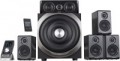 | 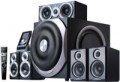 |
|---|---|---|
| Edifier S550 Encore | Edifier S760D | |
from $541.68 up to $580.44 | from $599.40 up to $715.00 | |
| TOP sellers | ||
Power 540 W. 3 optical inputs. Wall mounting. Dual speakers. coaxial input. Bass/treble setting. Removable cables. Headphone output. 2 remote controls: wired and wireless. | ||
| Speakers | kit 5.1 | kit 5.1 |
| Lines | 2 | 2 |
Specs | ||
| Signal-to-noise ratio | 85 dB | |
| Frequency range | 42 – 20000 Hz | 35 – 20000 Hz |
| Impedance | 8 Ohm | 8 Ohm |
| Speaker output | 540 W | 540 W |
| Front | 60 W/channel | 60 W/channel |
| Rear | 60 W/channel | 60 W/channel |
| Centre | 60 W/channel | 60 W/channel |
| Subwoofer | 240 W | 240 W |
| Passive emitter |  |  |
Features | ||
| Functions | treble control bass control | treble control bass control |
| Connection | RCA headphone output | RCA optical input coaxial input headphone output |
General | ||
| LCD screen | | |
| Remote control | wired and wireless | wired and wireless |
| Volume control | on the remote control | on the remote control |
| Wall mount | | |
| Speaker material | MDF | MDF |
| Subwoofer material | MDF | MDF |
| Front speaker size (WxHxD) | 116x203x160 mm | 116x203x160 mm |
| Centre channel size | 316x117x157 mm | 316x117x157 mm |
| Rear speaker size | 116x203x160 mm | 116x203x160 mm |
| Subwoofer size | 367x397x489 mm | 367x397x489 mm |
| Weight | 30 kg | 31 kg |
| Color | ||
| Added to E-Catalog | october 2015 | april 2014 |


Compare Edifier S550 Encore and S760D
You may be interested in
My comparisons
Edifier S760D often compared


Glossary
Signal-to-noise ratio
The ratio of the level of the useful signal (actually reproduced sound) to the level of extraneous noise provided by the speaker amplifier in normal mode.
Any amplifier inevitably creates its own noise; You can't get rid of them, but you can reduce their level. The higher the signal-to-noise ratio, the clearer the sound will be, the less noticeable extraneous interference will be. In modern computer speakers, this figure can vary from 52 – 55 dB (the minimum figure so that the noise does not cause much discomfort) to 90 – 95 dB (comparable to fairly advanced Hi-Fi equipment). However, note that the signal-to-noise ratio is far from the only parameter that affects the sound quality, and its high value does not guarantee a pleasant sound from the speakers.
Any amplifier inevitably creates its own noise; You can't get rid of them, but you can reduce their level. The higher the signal-to-noise ratio, the clearer the sound will be, the less noticeable extraneous interference will be. In modern computer speakers, this figure can vary from 52 – 55 dB (the minimum figure so that the noise does not cause much discomfort) to 90 – 95 dB (comparable to fairly advanced Hi-Fi equipment). However, note that the signal-to-noise ratio is far from the only parameter that affects the sound quality, and its high value does not guarantee a pleasant sound from the speakers.
Frequency range
The range of audio frequencies supported by acoustics. The wider this range — the fuller the reproduced sound, the lower the likelihood that some of these details at low or high frequencies will remain “behind the scenes”. At the same time, the human ear is able to hear frequencies of the order of 16 – 22,000 Hz, and with age, this range narrows even more. In modern audio equipment, especially at the top level, there may be more extensive ranges, but from a practical point of view, this does not make much sense. In addition, it is worth noting that a wide frequency range in itself does not guarantee high-quality sound — a lot also depends on the frequency response.
Passive emitter
The presence of a passive radiator in the design of the speakers.
Such a radiator is a diffuser (membrane) without a coil, installed in the column body. Outwardly, it looks like an ordinary speaker, but it does not emit sound, but only vibrates under the influence of the sound of other speakers. Due to this, the sound of low frequencies is noticeably improved; at the same time, the passive radiator is more compact than the phase inverter (see above) and is less prone to extraneous noise.
Such a radiator is a diffuser (membrane) without a coil, installed in the column body. Outwardly, it looks like an ordinary speaker, but it does not emit sound, but only vibrates under the influence of the sound of other speakers. Due to this, the sound of low frequencies is noticeably improved; at the same time, the passive radiator is more compact than the phase inverter (see above) and is less prone to extraneous noise.
Connection
— mini-Jack (3.5 mm). The 3.5 mm jack is used as a standard analog audio output on almost all modern PCs and laptops. Additionally, it's installed in most smartphones, tablets, and portable players, and is quite common in many other types of equipment. In light of this, the mini-jack plug is equipped on most contemporary computer speakers (except perhaps for Bluetooth models). It can be a plug on a non-removable or removable cable, or an adapter from another connector — for example, "2 RCA — mini-jack".
— RCA. The RCA connector, also colloquially known as "tulip," is used here as a line input for receiving an analog audio signal, similar to the 3.5 mm mini-jack. The differences lie in several important aspects. Firstly, RCA operates on the "one connector per channel" principle, and the number of such connectors will depend on the sound format. For instance, stereo acoustics will require a set of two such connectors, a 5.1 system — six, and so on. Secondly, RCA is quite popular in traditional audio equipment but is relatively uncommon among computers. Therefore, in computer acoustics, this input is relatively rare — mainly found in rather advanced models (including solutions with an external amplifier). Moreover, note that in sets with a subwoofer, an RCA connector may also be provided in the main satellite for connecting the "sub," playing the role of an output in this case.
— USB-A.... Sound transmission from a PC, laptop, monitor, or another device is carried out through a standard USB connector of the USB-A format. In this case, the sound is transmitted digitally, reducing the speakers' dependency on the computer's sound card quality.
— USB-C. Sound is transmitted via the USB-C port, through which the speakers receive a digital audio signal from a compatible device. This format is particularly well-suited for modern electronics, where USB-C has already become one of the main connection interfaces. In practice, this makes the speakers more convenient for new laptops, tablets, and other devices without a separate analog output.
— Optical input. A digital input for transmitting high-quality sound, including multichannel. This connection is notable for being completely immune to electrical interference; however, the fiber optic cable is not well-suited to bends and strong pressure.
— Coaxial input. An input for transmitting sound in digital form, allowing for multichannel sound transmission. It uses the RCA connector (known colloquially as "tulip"), though it is incompatible with the RCA interface described above. Unlike optical connections, coaxial connections are susceptible to electromagnetic interference, but they don't require special delicacy in handling the cable.
— Microphone input. An input for connecting an external microphone, located directly on the speakers' body. The purpose of this function is similar to the headphone output described above: connecting a microphone to a speaker placed on the table is often more convenient than connecting it directly to the system unit. Generally, speakers with this feature have an additional plug connected to the sound card's microphone input.
— Subwoofer output. The availability of a connector for connecting a subwoofer allows further enhancement of the system's lower frequency sound. Naturally, the subwoofer is purchased separately, and the output serves as an option to expand the acoustics as needed.
— Headphone output. An output for connecting headphones, located directly on the body of one of the speakers. This connector is particularly convenient when using headphones with a traditional desktop PC: attaching the headphones to a speaker body located on the table is noticeably more convenient than stretching the cord to the system unit. As a rule, the role of this output is played by a standard mini-Jack 3.5 mm socket, which is exactly what most modern headphones (both for computers and general use) are designed for.
— RCA. The RCA connector, also colloquially known as "tulip," is used here as a line input for receiving an analog audio signal, similar to the 3.5 mm mini-jack. The differences lie in several important aspects. Firstly, RCA operates on the "one connector per channel" principle, and the number of such connectors will depend on the sound format. For instance, stereo acoustics will require a set of two such connectors, a 5.1 system — six, and so on. Secondly, RCA is quite popular in traditional audio equipment but is relatively uncommon among computers. Therefore, in computer acoustics, this input is relatively rare — mainly found in rather advanced models (including solutions with an external amplifier). Moreover, note that in sets with a subwoofer, an RCA connector may also be provided in the main satellite for connecting the "sub," playing the role of an output in this case.
— USB-A.... Sound transmission from a PC, laptop, monitor, or another device is carried out through a standard USB connector of the USB-A format. In this case, the sound is transmitted digitally, reducing the speakers' dependency on the computer's sound card quality.
— USB-C. Sound is transmitted via the USB-C port, through which the speakers receive a digital audio signal from a compatible device. This format is particularly well-suited for modern electronics, where USB-C has already become one of the main connection interfaces. In practice, this makes the speakers more convenient for new laptops, tablets, and other devices without a separate analog output.
— Optical input. A digital input for transmitting high-quality sound, including multichannel. This connection is notable for being completely immune to electrical interference; however, the fiber optic cable is not well-suited to bends and strong pressure.
— Coaxial input. An input for transmitting sound in digital form, allowing for multichannel sound transmission. It uses the RCA connector (known colloquially as "tulip"), though it is incompatible with the RCA interface described above. Unlike optical connections, coaxial connections are susceptible to electromagnetic interference, but they don't require special delicacy in handling the cable.
— Microphone input. An input for connecting an external microphone, located directly on the speakers' body. The purpose of this function is similar to the headphone output described above: connecting a microphone to a speaker placed on the table is often more convenient than connecting it directly to the system unit. Generally, speakers with this feature have an additional plug connected to the sound card's microphone input.
— Subwoofer output. The availability of a connector for connecting a subwoofer allows further enhancement of the system's lower frequency sound. Naturally, the subwoofer is purchased separately, and the output serves as an option to expand the acoustics as needed.
— Headphone output. An output for connecting headphones, located directly on the body of one of the speakers. This connector is particularly convenient when using headphones with a traditional desktop PC: attaching the headphones to a speaker body located on the table is noticeably more convenient than stretching the cord to the system unit. As a rule, the role of this output is played by a standard mini-Jack 3.5 mm socket, which is exactly what most modern headphones (both for computers and general use) are designed for.
Wall mount
Possibility to mount the speakers on the wall. This feature can be very useful if there is no free space on the table or this space needs to be left unoccupied. On the other hand, hanging usually requires drilling walls and installing studs or other fasteners.
Note that with certain tricks, almost any speaker can be hung on the wall — however, it is not a fact that such acoustics will sound normal. Therefore, for wall mounting, it is worth choosing models for which this possibility is directly stated.
Note that with certain tricks, almost any speaker can be hung on the wall — however, it is not a fact that such acoustics will sound normal. Therefore, for wall mounting, it is worth choosing models for which this possibility is directly stated.