
Comparison Sven MS-2051 vs Sven MS-2050
Add to comparison | 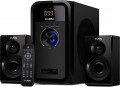 | 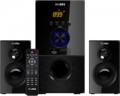 |
|---|---|---|
| Sven MS-2051 | Sven MS-2050 | |
| Outdated Product | from $67.00 up to $75.92 | |
| User reviews | ||
| TOP sellers | ||
Bluetooth. player mode. FM radio. Bass and treble adjustment. Wall mounts. | ||
| Speakers | kit 2.1 | kit 2.1 |
| Lines | 2 | 2 |
Specs | ||
| Frequency range | 45 – 20000 Hz | 45 – 20000 Hz |
| Speaker output | 55 W | 55 W |
| Front | 12.5 W/channel | 12.5 W/channel |
| Subwoofer | 30 W | 30 W |
| Speaker port tube |  | |
Features | ||
| Functions | Bluetooth USB-A port card reader FM receiver treble control bass control | Bluetooth USB-A port card reader FM receiver treble control bass control |
| Connection | mini-Jack (3.5 mm) RCA | RCA |
General | ||
| Detachable cable | sound | sound |
| LCD screen | | |
| Lighting effects | |  |
| Remote control | wireless | wireless |
| Volume control | front and remote | front and remote |
| Wall mount | | |
| Speaker material | MDF | MDF |
| Subwoofer material | MDF | MDF |
| Front speaker size (WxHxD) | 104x180x92 mm | 104x180x92 mm |
| Subwoofer size | 165x325x282 mm | 165x325x282 mm |
| Weight | 5.8 kg | 6.2 kg |
| Color | ||
| Added to E-Catalog | september 2017 | february 2016 |


Compare Sven MS-2051 and MS-2050
You may be interested in
My comparisons
Sven MS-2051 often compared


Sven MS-2050 often compared


Glossary
Connection
— mini-Jack (3.5 mm). The 3.5 mm jack is used as a standard analog audio output on almost all modern PCs and laptops. Additionally, it's installed in most smartphones, tablets, and portable players, and is quite common in many other types of equipment. In light of this, the mini-jack plug is equipped on most contemporary computer speakers (except perhaps for Bluetooth models). It can be a plug on a non-removable or removable cable, or an adapter from another connector — for example, "2 RCA — mini-jack".
— RCA. The RCA connector, also colloquially known as "tulip," is used here as a line input for receiving an analog audio signal, similar to the 3.5 mm mini-jack. The differences lie in several important aspects. Firstly, RCA operates on the "one connector per channel" principle, and the number of such connectors will depend on the sound format. For instance, stereo acoustics will require a set of two such connectors, a 5.1 system — six, and so on. Secondly, RCA is quite popular in traditional audio equipment but is relatively uncommon among computers. Therefore, in computer acoustics, this input is relatively rare — mainly found in rather advanced models (including solutions with an external amplifier). Moreover, note that in sets with a subwoofer, an RCA connector may also be provided in the main satellite for connecting the "sub," playing the role of an output in this case.
— USB-A.... Sound transmission from a PC, laptop, monitor, or another device is carried out through a standard USB connector of the USB-A format. In this case, the sound is transmitted digitally, reducing the speakers' dependency on the computer's sound card quality.
— USB-C. Sound is transmitted via the USB-C port, through which the speakers receive a digital audio signal from a compatible device. This format is particularly well-suited for modern electronics, where USB-C has already become one of the main connection interfaces. In practice, this makes the speakers more convenient for new laptops, tablets, and other devices without a separate analog output.
— Optical input. A digital input for transmitting high-quality sound, including multichannel. This connection is notable for being completely immune to electrical interference; however, the fiber optic cable is not well-suited to bends and strong pressure.
— Coaxial input. An input for transmitting sound in digital form, allowing for multichannel sound transmission. It uses the RCA connector (known colloquially as "tulip"), though it is incompatible with the RCA interface described above. Unlike optical connections, coaxial connections are susceptible to electromagnetic interference, but they don't require special delicacy in handling the cable.
— Microphone input. An input for connecting an external microphone, located directly on the speakers' body. The purpose of this function is similar to the headphone output described above: connecting a microphone to a speaker placed on the table is often more convenient than connecting it directly to the system unit. Generally, speakers with this feature have an additional plug connected to the sound card's microphone input.
— Subwoofer output. The availability of a connector for connecting a subwoofer allows further enhancement of the system's lower frequency sound. Naturally, the subwoofer is purchased separately, and the output serves as an option to expand the acoustics as needed.
— Headphone output. An output for connecting headphones, located directly on the body of one of the speakers. This connector is particularly convenient when using headphones with a traditional desktop PC: attaching the headphones to a speaker body located on the table is noticeably more convenient than stretching the cord to the system unit. As a rule, the role of this output is played by a standard mini-Jack 3.5 mm socket, which is exactly what most modern headphones (both for computers and general use) are designed for.
— RCA. The RCA connector, also colloquially known as "tulip," is used here as a line input for receiving an analog audio signal, similar to the 3.5 mm mini-jack. The differences lie in several important aspects. Firstly, RCA operates on the "one connector per channel" principle, and the number of such connectors will depend on the sound format. For instance, stereo acoustics will require a set of two such connectors, a 5.1 system — six, and so on. Secondly, RCA is quite popular in traditional audio equipment but is relatively uncommon among computers. Therefore, in computer acoustics, this input is relatively rare — mainly found in rather advanced models (including solutions with an external amplifier). Moreover, note that in sets with a subwoofer, an RCA connector may also be provided in the main satellite for connecting the "sub," playing the role of an output in this case.
— USB-A.... Sound transmission from a PC, laptop, monitor, or another device is carried out through a standard USB connector of the USB-A format. In this case, the sound is transmitted digitally, reducing the speakers' dependency on the computer's sound card quality.
— USB-C. Sound is transmitted via the USB-C port, through which the speakers receive a digital audio signal from a compatible device. This format is particularly well-suited for modern electronics, where USB-C has already become one of the main connection interfaces. In practice, this makes the speakers more convenient for new laptops, tablets, and other devices without a separate analog output.
— Optical input. A digital input for transmitting high-quality sound, including multichannel. This connection is notable for being completely immune to electrical interference; however, the fiber optic cable is not well-suited to bends and strong pressure.
— Coaxial input. An input for transmitting sound in digital form, allowing for multichannel sound transmission. It uses the RCA connector (known colloquially as "tulip"), though it is incompatible with the RCA interface described above. Unlike optical connections, coaxial connections are susceptible to electromagnetic interference, but they don't require special delicacy in handling the cable.
— Microphone input. An input for connecting an external microphone, located directly on the speakers' body. The purpose of this function is similar to the headphone output described above: connecting a microphone to a speaker placed on the table is often more convenient than connecting it directly to the system unit. Generally, speakers with this feature have an additional plug connected to the sound card's microphone input.
— Subwoofer output. The availability of a connector for connecting a subwoofer allows further enhancement of the system's lower frequency sound. Naturally, the subwoofer is purchased separately, and the output serves as an option to expand the acoustics as needed.
— Headphone output. An output for connecting headphones, located directly on the body of one of the speakers. This connector is particularly convenient when using headphones with a traditional desktop PC: attaching the headphones to a speaker body located on the table is noticeably more convenient than stretching the cord to the system unit. As a rule, the role of this output is played by a standard mini-Jack 3.5 mm socket, which is exactly what most modern headphones (both for computers and general use) are designed for.
Lighting effects
The presence of lighting effects in the design of the speakers. Usually, this is a backlight that can work as colour music — that is, blink and change colour to the beat of the music being played. The main and in fact the only purpose of lighting effects is decorative: colour music gives the speakers a bright and attractive appearance. On the other hand, it does not improve the sound, but it affects the cost.