
Comparison REAL-EL S-305 vs Sven SPS-702
Add to comparison | 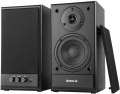 | 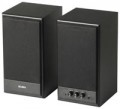 |
|---|---|---|
| REAL-EL S-305 | Sven SPS-702 | |
| Outdated Product | from $34.93 up to $46.60 | |
| User reviews | ||
| TOP sellers | ||
Power. Housing made of MDF. Wide frequency range. Low-frequency background in the absence of a signal. Sound blurring at high volume. | ||
| Speakers | kit 2.0 | kit 2.0 |
| Lines | 2 | 2 |
Specs | ||
| Sensitivity | 75 dB | |
| Signal-to-noise ratio | 70 dB | |
| Frequency range | 40 – 19000 Hz | 40 – 22000 Hz |
| Impedance | 6 Ohm | |
| Speaker output | 40 W | 40 W |
| Front | 20 W/channel | 20 W/channel |
| Speaker port tube |  | |
Features | ||
| Functions | treble control bass control | treble control bass control |
| Connection | RCA | mini-Jack (3.5 mm) RCA headphone output |
General | ||
| Detachable cable | sound | sound |
| Volume control | front | front |
| Speaker material | MDF | MDF |
| Front speaker size (WxHxD) | 150x265x143 mm | 143x265x150 mm |
| Weight | 4.2 kg | 4 kg |
| Color | ||
| Added to E-Catalog | december 2023 | december 2009 |


Compare REAL-EL S-305 and Sven SPS-702
You may be interested in
My comparisons
REAL-EL S-305 often compared


Sven SPS-702 often compared


Glossary
Sensitivity
Sensitivity characterizes the loudness of the speakers when a signal of a certain power is applied to them. The higher this indicator, the higher the volume will be with the same characteristics of the signal source; simply put, on the same computer and the same volume settings, more sensitive speakers will play louder.
In general, an indicator of 85 dB is considered good, 90 dB and above is excellent. On the other hand, computer speakers rarely need a very high volume — they are usually located close to the user and are designed only for him. So in general, this parameter can be ignored.
In general, an indicator of 85 dB is considered good, 90 dB and above is excellent. On the other hand, computer speakers rarely need a very high volume — they are usually located close to the user and are designed only for him. So in general, this parameter can be ignored.
Signal-to-noise ratio
The ratio of the level of the useful signal (actually reproduced sound) to the level of extraneous noise provided by the speaker amplifier in normal mode.
Any amplifier inevitably creates its own noise; You can't get rid of them, but you can reduce their level. The higher the signal-to-noise ratio, the clearer the sound will be, the less noticeable extraneous interference will be. In modern computer speakers, this figure can vary from 52 – 55 dB (the minimum figure so that the noise does not cause much discomfort) to 90 – 95 dB (comparable to fairly advanced Hi-Fi equipment). However, note that the signal-to-noise ratio is far from the only parameter that affects the sound quality, and its high value does not guarantee a pleasant sound from the speakers.
Any amplifier inevitably creates its own noise; You can't get rid of them, but you can reduce their level. The higher the signal-to-noise ratio, the clearer the sound will be, the less noticeable extraneous interference will be. In modern computer speakers, this figure can vary from 52 – 55 dB (the minimum figure so that the noise does not cause much discomfort) to 90 – 95 dB (comparable to fairly advanced Hi-Fi equipment). However, note that the signal-to-noise ratio is far from the only parameter that affects the sound quality, and its high value does not guarantee a pleasant sound from the speakers.
Frequency range
The range of audio frequencies supported by acoustics. The wider this range — the fuller the reproduced sound, the lower the likelihood that some of these details at low or high frequencies will remain “behind the scenes”. At the same time, the human ear is able to hear frequencies of the order of 16 – 22,000 Hz, and with age, this range narrows even more. In modern audio equipment, especially at the top level, there may be more extensive ranges, but from a practical point of view, this does not make much sense. In addition, it is worth noting that a wide frequency range in itself does not guarantee high-quality sound — a lot also depends on the frequency response.
Impedance
The electrical resistance of the speakers to alternating current. This parameter is important primarily for normal compatibility with the amplifier: too low speaker impedance can lead to distortion, overload, and even damage to the speakers, and too high impedance can reduce the sound volume. At the same time, the vast majority of modern computer acoustics have their own amplifiers and are connected via a line input. Therefore, the impedance data is more of a reference value; in fact, this indicator may be needed only when connecting speakers to a “non-native” power amplifier, bypassing the standard one.
Connection
— mini-Jack (3.5 mm). The 3.5 mm jack is used as a standard analog audio output on almost all modern PCs and laptops. Additionally, it's installed in most smartphones, tablets, and portable players, and is quite common in many other types of equipment. In light of this, the mini-jack plug is equipped on most contemporary computer speakers (except perhaps for Bluetooth models). It can be a plug on a non-removable or removable cable, or an adapter from another connector — for example, "2 RCA — mini-jack".
— RCA. The RCA connector, also colloquially known as "tulip," is used here as a line input for receiving an analog audio signal, similar to the 3.5 mm mini-jack. The differences lie in several important aspects. Firstly, RCA operates on the "one connector per channel" principle, and the number of such connectors will depend on the sound format. For instance, stereo acoustics will require a set of two such connectors, a 5.1 system — six, and so on. Secondly, RCA is quite popular in traditional audio equipment but is relatively uncommon among computers. Therefore, in computer acoustics, this input is relatively rare — mainly found in rather advanced models (including solutions with an external amplifier). Moreover, note that in sets with a subwoofer, an RCA connector may also be provided in the main satellite for connecting the "sub," playing the role of an output in this case.
— USB-A.... Sound transmission from a PC, laptop, monitor, or another device is carried out through a standard USB connector of the USB-A format. In this case, the sound is transmitted digitally, reducing the speakers' dependency on the computer's sound card quality.
— USB-C. Sound is transmitted via the USB-C port, through which the speakers receive a digital audio signal from a compatible device. This format is particularly well-suited for modern electronics, where USB-C has already become one of the main connection interfaces. In practice, this makes the speakers more convenient for new laptops, tablets, and other devices without a separate analog output.
— Optical input. A digital input for transmitting high-quality sound, including multichannel. This connection is notable for being completely immune to electrical interference; however, the fiber optic cable is not well-suited to bends and strong pressure.
— Coaxial input. An input for transmitting sound in digital form, allowing for multichannel sound transmission. It uses the RCA connector (known colloquially as "tulip"), though it is incompatible with the RCA interface described above. Unlike optical connections, coaxial connections are susceptible to electromagnetic interference, but they don't require special delicacy in handling the cable.
— Microphone input. An input for connecting an external microphone, located directly on the speakers' body. The purpose of this function is similar to the headphone output described above: connecting a microphone to a speaker placed on the table is often more convenient than connecting it directly to the system unit. Generally, speakers with this feature have an additional plug connected to the sound card's microphone input.
— Subwoofer output. The availability of a connector for connecting a subwoofer allows further enhancement of the system's lower frequency sound. Naturally, the subwoofer is purchased separately, and the output serves as an option to expand the acoustics as needed.
— Headphone output. An output for connecting headphones, located directly on the body of one of the speakers. This connector is particularly convenient when using headphones with a traditional desktop PC: attaching the headphones to a speaker body located on the table is noticeably more convenient than stretching the cord to the system unit. As a rule, the role of this output is played by a standard mini-Jack 3.5 mm socket, which is exactly what most modern headphones (both for computers and general use) are designed for.
— RCA. The RCA connector, also colloquially known as "tulip," is used here as a line input for receiving an analog audio signal, similar to the 3.5 mm mini-jack. The differences lie in several important aspects. Firstly, RCA operates on the "one connector per channel" principle, and the number of such connectors will depend on the sound format. For instance, stereo acoustics will require a set of two such connectors, a 5.1 system — six, and so on. Secondly, RCA is quite popular in traditional audio equipment but is relatively uncommon among computers. Therefore, in computer acoustics, this input is relatively rare — mainly found in rather advanced models (including solutions with an external amplifier). Moreover, note that in sets with a subwoofer, an RCA connector may also be provided in the main satellite for connecting the "sub," playing the role of an output in this case.
— USB-A.... Sound transmission from a PC, laptop, monitor, or another device is carried out through a standard USB connector of the USB-A format. In this case, the sound is transmitted digitally, reducing the speakers' dependency on the computer's sound card quality.
— USB-C. Sound is transmitted via the USB-C port, through which the speakers receive a digital audio signal from a compatible device. This format is particularly well-suited for modern electronics, where USB-C has already become one of the main connection interfaces. In practice, this makes the speakers more convenient for new laptops, tablets, and other devices without a separate analog output.
— Optical input. A digital input for transmitting high-quality sound, including multichannel. This connection is notable for being completely immune to electrical interference; however, the fiber optic cable is not well-suited to bends and strong pressure.
— Coaxial input. An input for transmitting sound in digital form, allowing for multichannel sound transmission. It uses the RCA connector (known colloquially as "tulip"), though it is incompatible with the RCA interface described above. Unlike optical connections, coaxial connections are susceptible to electromagnetic interference, but they don't require special delicacy in handling the cable.
— Microphone input. An input for connecting an external microphone, located directly on the speakers' body. The purpose of this function is similar to the headphone output described above: connecting a microphone to a speaker placed on the table is often more convenient than connecting it directly to the system unit. Generally, speakers with this feature have an additional plug connected to the sound card's microphone input.
— Subwoofer output. The availability of a connector for connecting a subwoofer allows further enhancement of the system's lower frequency sound. Naturally, the subwoofer is purchased separately, and the output serves as an option to expand the acoustics as needed.
— Headphone output. An output for connecting headphones, located directly on the body of one of the speakers. This connector is particularly convenient when using headphones with a traditional desktop PC: attaching the headphones to a speaker body located on the table is noticeably more convenient than stretching the cord to the system unit. As a rule, the role of this output is played by a standard mini-Jack 3.5 mm socket, which is exactly what most modern headphones (both for computers and general use) are designed for.