
Comparison HTC Vive Focus Vision vs HTC Vive Pro Eye KIT
Add to comparison | 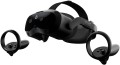 | 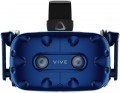 |
|---|---|---|
| HTC Vive Focus Vision | HTC Vive Pro Eye KIT | |
| Compare prices 4 | Compare prices 1 | |
| User reviews | ||
| TOP sellers | ||
User gaze tracking function. Headphones have a built-in amplifier. Dual front camera. Increased resolution of AMOLED matrices. Comfortable fit. Huge library of PC games. Requires a relatively powerful PC and a lot of free space in the room. | ||
| Device type | MR glasses | VR glasses |
| Purpose (compatibility) | autonomous device Windows | Windows |
Specs | ||
| Screen resolution | 2448x2448 px | 2880x1600 px |
| Field of view | 120 ° | 110 ° |
| Built-in memory | 128 GB | |
| RAM | 12 GB | |
| Refresh rate | 90 fps | 90 fps |
| 6DoF motion tracking |  | |
| Accelerometer | | |
| Gyroscope | | |
| Proximity sensor | |  |
| Lens distance adjusting | | |
| Pupillary distance adjustment | | |
Multimedia | ||
| Card reader | | |
| USB-C | 10Gbps | 5Gbps |
| DisplayPort | v1.2 | |
| Bluetooth | v 5.2 | + |
| Wi-Fi | Wi-Fi 6 (802.11ax) | |
| Microphone | | |
| Headphones | | |
| Headphone output | | |
General | ||
| Control | button controls | |
| Controller | | |
| External sensors | | |
| Track camera | | |
| Operating time | 15 h | |
| Material | plastic | plastic |
| Added to E-Catalog | november 2024 | july 2021 |

Compare HTC Vive Focus Vision and Vive Pro Eye KIT
Price comparison
You may be interested in
My comparisons
HTC Vive Focus Vision often compared


HTC Vive Pro Eye KIT often compared


Glossary
Device type
— VR glasses. Headsets or goggles that display images directly in front of your eyes and block out the real world, creating the sensation that you are inside a virtual space. Through VR glasses, you don't see the room around you but rather a digital world: games, simulators, virtual cinemas. VR glasses completely block your real view and create a feeling of being "inside" the scene, so comfortable fit, good resolution, and refresh rate are important to reduce motion sickness and eye strain. Such devices are used by gamers, fans of car and flight simulators, and are also applied in training and 3D presentations of technology or real estate.
— MR glasses. Mixed reality devices that combine VR elements with display hints and allow virtual objects to "live" in the real space, considering the floor, walls, and furniture. In MR glasses, a 3D model can stand on a real table, and the user can walk around it, view it from different angles, and interact with gestures or controllers. MR glasses are suitable for engineering, interior design, medicine, and staff training.
— FPV goggles. Specialized goggles for first-person view flights that display real-time images from a drone camera or other remote-controlled devices. Unlike VR glasses, FPV goggles are almost always "geared" towards one task — providing the pilot with the most direct and minimally delayed image...for precise drone control, especially in racing or freestyle. Here, low signal latency, comfortable fit, transmitter compatibility, and support for the required video format are important.
— 3D video glasses. Compact glasses or mini headsets that create the effect of immersive images and a large screen before your eyes but without typical "gamer" VR functionality. They can connect to a laptop, media player, console and display movies, series, 3D content, or regular video, making viewing more private. Unlike FPV goggles, which show live footage from a drone, 3D video glasses are optimized for media content: the quality of the matrix, contrast, and comfort for long-term use are important. They are chosen by movie enthusiasts, frequently traveling users, and those who don't want to allocate space for a large TV.
— MR glasses. Mixed reality devices that combine VR elements with display hints and allow virtual objects to "live" in the real space, considering the floor, walls, and furniture. In MR glasses, a 3D model can stand on a real table, and the user can walk around it, view it from different angles, and interact with gestures or controllers. MR glasses are suitable for engineering, interior design, medicine, and staff training.
— FPV goggles. Specialized goggles for first-person view flights that display real-time images from a drone camera or other remote-controlled devices. Unlike VR glasses, FPV goggles are almost always "geared" towards one task — providing the pilot with the most direct and minimally delayed image...for precise drone control, especially in racing or freestyle. Here, low signal latency, comfortable fit, transmitter compatibility, and support for the required video format are important.
— 3D video glasses. Compact glasses or mini headsets that create the effect of immersive images and a large screen before your eyes but without typical "gamer" VR functionality. They can connect to a laptop, media player, console and display movies, series, 3D content, or regular video, making viewing more private. Unlike FPV goggles, which show live footage from a drone, 3D video glasses are optimized for media content: the quality of the matrix, contrast, and comfort for long-term use are important. They are chosen by movie enthusiasts, frequently traveling users, and those who don't want to allocate space for a large TV.
Purpose (compatibility)
The signal source in VR headsets reveals where exactly the image comes from and who performs the main "heavy" graphic processing. In one case, the image is generated by a powerful PC or console, in another — a mobile phone, and for FPV goggles, the signal comes directly from the drone via a radio channel. Stand-alone devices that do not require connection to external gadgets deserve special mention. The chosen signal source affects the image quality, latency, the range of available games and applications, as well as how the VR headset is connected — via cable, Wi-Fi, Bluetooth, or through a specialized transmitter.
— Stand-alone Device. VR headsets where the headset itself acts as the signal source: it has a mobile processor, video chip, memory, and its own operating system inside, so the image is generated directly in the headset, not on a computer or phone. The user wears the headset, connects to Wi-Fi, and launches games and apps from the built-in store — no wires, no PC, and no mandatory smartphone at hand. Such solutions are closer in power to a good Android smartphone and fall short of a Windows PC setup, but are noticeably more convenient than mobile headsets, where everything is tied to the phone: no need to insert the device into the casing, monitor heating, or charge two devices at once. Stand-alone VR headsets are especially suitable for everyday games, fitness, and education, where freedom of movement and ease of launc...h are more important than maximum graphic settings.
— Android. VR headsets are tied to Google's mobile platform and work either in tandem with a smartphone or independently as an Android stand-alone device. In the first case, the phone is inserted into the headset casing or connected to it wirelessly, forming the image and transmitting it to the headset's screens, in the second case, the headset contains a built-in chipset, memory, and app store, and the phone is used only for setup and streaming. This signal source makes VR mobile: a smartphone and headset are enough to run simple games, 360 videos, and educational apps without a powerful PC, but in terms of graphics, these solutions fall short of full-fledged PC and console systems.
— iOS (iPhone). Similar in concept to Android, but tailored to the Apple ecosystem and iPhone smartphones. In this case, the VR headset receives an image either from the phone itself, installed in the headset casing, or through a special streaming/mirroring mode from the iPhone via Wi-Fi or Lightning/USB-C cable. iOS support means that the user can access a large number of applications, 360 videos, and educational content from the App Store, while the system is generally simpler and more reliable in setup, but the choice of "real" VR games is smaller than in the Android or Windows world.
— Windows. VR headsets work in conjunction with a PC running Windows, which is fully responsible for 3D graphics output. Typically, the headset connects via USB-C / DisplayPort or via Wi-Fi in streaming mode, and the headset acts as a "display with sensors." This signal source provides the most advanced VR gaming: major gaming platforms, simulators, mods are supported, and the quality and stability depend on the computer's graphics card and processor.
— MacOS. VR headsets can receive images from Apple computers — iMac, MacBook, and other models with macOS. Here, VR is more often used for demonstrations, design, 3D viewing, and professional applications than hardcore gaming, so stable integration and proper driver operation are more important than maximum performance. Connection is usually through USB-C / Thunderbolt and specialized software, and the choice of native VR content for macOS is noticeably more modest than for Windows.
— PlayStation. VR headsets are designed to work with PS4 or PS5 consoles, which render all graphics. Proprietary HDMI/USB connections and Sony's own protocols are used here, and the headset itself is optimized for the console's ecosystem. This option provides a predictable experience: PS VR games are carefully adapted to the specific model of headset, latency is minimal, and the user does not need to think about drivers or hardware configuration.
— Xbox. The Xbox signal source implies compatibility with the console in display mode or via an intermediate PC. In the traditional sense, Xbox lacks complete VR support, so the headset is more often used as an external display rather than a comprehensive VR solution with game space tracking. If the manufacturer still declares Xbox as a signal source, it is worth carefully studying the description: most often these are specific scenarios like a "cinema" or streaming output, rather than full VR projects.
— Drone (quadcopter). A separate class of VR headsets where the image comes directly from the drone's camera in real-time via radio channel. Such goggles have a receiver operating on specific frequencies and protocols inside, so compatibility is usually strictly tied to a specific system: the headset "understands" only those video transmitters and modules for which it was originally designed. The main task here is to ensure minimal latency so the pilot can safely and accurately control the drone "first-person" rather than launching ordinary games, and it is crucial to check in advance whether the goggles will work correctly with your FPV set or if it will require changing the camera/transmitter to the required standard.
— Stand-alone Device. VR headsets where the headset itself acts as the signal source: it has a mobile processor, video chip, memory, and its own operating system inside, so the image is generated directly in the headset, not on a computer or phone. The user wears the headset, connects to Wi-Fi, and launches games and apps from the built-in store — no wires, no PC, and no mandatory smartphone at hand. Such solutions are closer in power to a good Android smartphone and fall short of a Windows PC setup, but are noticeably more convenient than mobile headsets, where everything is tied to the phone: no need to insert the device into the casing, monitor heating, or charge two devices at once. Stand-alone VR headsets are especially suitable for everyday games, fitness, and education, where freedom of movement and ease of launc...h are more important than maximum graphic settings.
— Android. VR headsets are tied to Google's mobile platform and work either in tandem with a smartphone or independently as an Android stand-alone device. In the first case, the phone is inserted into the headset casing or connected to it wirelessly, forming the image and transmitting it to the headset's screens, in the second case, the headset contains a built-in chipset, memory, and app store, and the phone is used only for setup and streaming. This signal source makes VR mobile: a smartphone and headset are enough to run simple games, 360 videos, and educational apps without a powerful PC, but in terms of graphics, these solutions fall short of full-fledged PC and console systems.
— iOS (iPhone). Similar in concept to Android, but tailored to the Apple ecosystem and iPhone smartphones. In this case, the VR headset receives an image either from the phone itself, installed in the headset casing, or through a special streaming/mirroring mode from the iPhone via Wi-Fi or Lightning/USB-C cable. iOS support means that the user can access a large number of applications, 360 videos, and educational content from the App Store, while the system is generally simpler and more reliable in setup, but the choice of "real" VR games is smaller than in the Android or Windows world.
— Windows. VR headsets work in conjunction with a PC running Windows, which is fully responsible for 3D graphics output. Typically, the headset connects via USB-C / DisplayPort or via Wi-Fi in streaming mode, and the headset acts as a "display with sensors." This signal source provides the most advanced VR gaming: major gaming platforms, simulators, mods are supported, and the quality and stability depend on the computer's graphics card and processor.
— MacOS. VR headsets can receive images from Apple computers — iMac, MacBook, and other models with macOS. Here, VR is more often used for demonstrations, design, 3D viewing, and professional applications than hardcore gaming, so stable integration and proper driver operation are more important than maximum performance. Connection is usually through USB-C / Thunderbolt and specialized software, and the choice of native VR content for macOS is noticeably more modest than for Windows.
— PlayStation. VR headsets are designed to work with PS4 or PS5 consoles, which render all graphics. Proprietary HDMI/USB connections and Sony's own protocols are used here, and the headset itself is optimized for the console's ecosystem. This option provides a predictable experience: PS VR games are carefully adapted to the specific model of headset, latency is minimal, and the user does not need to think about drivers or hardware configuration.
— Xbox. The Xbox signal source implies compatibility with the console in display mode or via an intermediate PC. In the traditional sense, Xbox lacks complete VR support, so the headset is more often used as an external display rather than a comprehensive VR solution with game space tracking. If the manufacturer still declares Xbox as a signal source, it is worth carefully studying the description: most often these are specific scenarios like a "cinema" or streaming output, rather than full VR projects.
— Drone (quadcopter). A separate class of VR headsets where the image comes directly from the drone's camera in real-time via radio channel. Such goggles have a receiver operating on specific frequencies and protocols inside, so compatibility is usually strictly tied to a specific system: the headset "understands" only those video transmitters and modules for which it was originally designed. The main task here is to ensure minimal latency so the pilot can safely and accurately control the drone "first-person" rather than launching ordinary games, and it is crucial to check in advance whether the goggles will work correctly with your FPV set or if it will require changing the camera/transmitter to the required standard.
Screen resolution
Resolution of built-in displays in glasses equipped with such equipment — that is, models for PC / consoles, as well as standalone devices (see "Intended use").
The higher the resolution, the more smooth and detailed the “picture” is given out by glasses, all other things being equal. Thanks to the development of technology nowadays, models with Full HD (1920x1080) screens and even higher resolutions are not uncommon. On the other hand, this parameter significantly affects the cost of points. In addition, it is worth remembering that in order to fully work with high-resolution displays, you need powerful graphics capable of playing relevant content. In the case of glasses for PCs and set-top boxes, this puts forward corresponding requirements for external devices, and in standalone models you have to use advanced integrated video adapters (which affects the cost even more).
The higher the resolution, the more smooth and detailed the “picture” is given out by glasses, all other things being equal. Thanks to the development of technology nowadays, models with Full HD (1920x1080) screens and even higher resolutions are not uncommon. On the other hand, this parameter significantly affects the cost of points. In addition, it is worth remembering that in order to fully work with high-resolution displays, you need powerful graphics capable of playing relevant content. In the case of glasses for PCs and set-top boxes, this puts forward corresponding requirements for external devices, and in standalone models you have to use advanced integrated video adapters (which affects the cost even more).
Field of view
The viewing angle provided by virtual reality glasses is the angular size of the space that falls into the user's field of view. Usually, the characteristics indicate the size of this space horizontally; however, if you need the most accurate information, this point needs to be specified separately.
The wider the viewing angle — the more the game space the user can see without turning his head, the more powerful the immersion effect and the less likely that the image will be subject to the "tunnel vision" effect. On the other hand, making the field of view too wide also does not make sense, given the characteristics of the human eye. In general, a large viewing angle is considered to be an angle of 100° or more. On the other hand, there are models where this indicator is 30° or even less — these are, usually, specific devices (for example, drone piloting glasses and augmented reality glasses), where such characteristics are quite justified given the overall functionality.
The wider the viewing angle — the more the game space the user can see without turning his head, the more powerful the immersion effect and the less likely that the image will be subject to the "tunnel vision" effect. On the other hand, making the field of view too wide also does not make sense, given the characteristics of the human eye. In general, a large viewing angle is considered to be an angle of 100° or more. On the other hand, there are models where this indicator is 30° or even less — these are, usually, specific devices (for example, drone piloting glasses and augmented reality glasses), where such characteristics are quite justified given the overall functionality.
Built-in memory
The size of the built-in storage installed in the glasses.
Such storage is only found in standalone devices (see "Purpose")—it's used for storing firmware and various additional content (applications, panoramic movies, etc.). The larger the storage size, the more content can be stored on the device; on the other hand, this characteristic directly impacts the price. It's also worth considering that some models allow the built-in storage to be expanded with a memory card (see "Card Reader" for more details).
For modern virtual reality glasses, the minimum storage size is 16 GB—installing smaller storage is technically impractical. In advanced models, this capacity can reach 128 GB.
Such storage is only found in standalone devices (see "Purpose")—it's used for storing firmware and various additional content (applications, panoramic movies, etc.). The larger the storage size, the more content can be stored on the device; on the other hand, this characteristic directly impacts the price. It's also worth considering that some models allow the built-in storage to be expanded with a memory card (see "Card Reader" for more details).
For modern virtual reality glasses, the minimum storage size is 16 GB—installing smaller storage is technically impractical. In advanced models, this capacity can reach 128 GB.
RAM
The amount of random access memory (RAM) installed in glasses.
This parameter is relevant only for independent devices (see "Intended use"). Theoretically, the more RAM in the gadget, the higher its power, the faster it is able to work and the better it handles with “heavy” tasks. However, in fact, this characteristic has more reference than practical value. Firstly, the capabilities of standalone glasses are also highly dependent on the processor and video adapter used. Secondly, the amount of memory is selected in such a way that the glasses are guaranteed to be able to cope with the tasks for which they were originally intended. Actually, problems can only arise with the launch of very demanding applications or resource-intensive video (for example, 4K panoramic videos); so paying attention to the amount of RAM makes sense only if you plan to use glasses for such purposes.
As for specific volumes, they in modern devices range from 2 to 4 GB.
This parameter is relevant only for independent devices (see "Intended use"). Theoretically, the more RAM in the gadget, the higher its power, the faster it is able to work and the better it handles with “heavy” tasks. However, in fact, this characteristic has more reference than practical value. Firstly, the capabilities of standalone glasses are also highly dependent on the processor and video adapter used. Secondly, the amount of memory is selected in such a way that the glasses are guaranteed to be able to cope with the tasks for which they were originally intended. Actually, problems can only arise with the launch of very demanding applications or resource-intensive video (for example, 4K panoramic videos); so paying attention to the amount of RAM makes sense only if you plan to use glasses for such purposes.
As for specific volumes, they in modern devices range from 2 to 4 GB.
Proximity sensor
The presence of a sensor in the glasses that reacts to approaching the user's face.
A similar sensor is used to automatically switch between operating and standby modes: for example, when the user takes off the glasses, the sensor turns off the built-in screens (or the phone, if it is connected to the glasses via a connector), saving battery power and equipment life, and when put on, it turns on points for full functionality.
A similar sensor is used to automatically switch between operating and standby modes: for example, when the user takes off the glasses, the sensor turns off the built-in screens (or the phone, if it is connected to the glasses via a connector), saving battery power and equipment life, and when put on, it turns on points for full functionality.
Card reader
The presence of a card reader in the glasses — a device for reading removable memory cards.
Such equipment is found only in independent devices (see "Intended use"). The card reader allows you to install an additional amount of memory to store various data — in addition to your own points drive. At the same time, removable cards have a number of advantages: they are much cheaper than built-in storage (in terms of gigabytes of volume), and the volume of such a card can be chosen at your discretion. So a model with a small capacity, but with a card reader, can be a good alternative to glasses with a large amount of internal memory. Also note that you can purchase several memory cards and change them as needed. And card readers are available in many modern devices (laptops, smartphones, tablets, etc.), so that removable cards make it easier to store information with such devices (for example, you can record a movie on a card for viewing). On the other hand, removable memory is slower than the built-in memory, and some software functions may be limited for it — in particular, not every model of glasses allows you to install applications on the card.
Such equipment is found only in independent devices (see "Intended use"). The card reader allows you to install an additional amount of memory to store various data — in addition to your own points drive. At the same time, removable cards have a number of advantages: they are much cheaper than built-in storage (in terms of gigabytes of volume), and the volume of such a card can be chosen at your discretion. So a model with a small capacity, but with a card reader, can be a good alternative to glasses with a large amount of internal memory. Also note that you can purchase several memory cards and change them as needed. And card readers are available in many modern devices (laptops, smartphones, tablets, etc.), so that removable cards make it easier to store information with such devices (for example, you can record a movie on a card for viewing). On the other hand, removable memory is slower than the built-in memory, and some software functions may be limited for it — in particular, not every model of glasses allows you to install applications on the card.
USB-C
Presence of a USB-C port in glasses. This is a relatively new type of USB port, with miniature size (slightly larger than microUSB) and a convenient reversible design, allowing the plug to be connected either way. It can be found in glasses of different purposes and, accordingly, designed for various applications. For example, in models for PCs/consoles, this port is used similarly to traditional USB-A — for main connection, alongside HDMI or DisplayPort interfaces. In standalone devices, in turn, USB-C is mainly intended for battery charging and connection to a computer for direct file exchange, settings management, firmware updates, etc.
It should also be noted that this section might specify the USB version that the USB-C port corresponds to. Currently, two versions are relevant — 5Gbps and 10Gbps; for VR glasses, the difference between them is generally not significant.
It should also be noted that this section might specify the USB version that the USB-C port corresponds to. Currently, two versions are relevant — 5Gbps and 10Gbps; for VR glasses, the difference between them is generally not significant.