
Comparison Dynamode DM-CAD-S8 vs Maiwo K3082
Add to comparison |  | 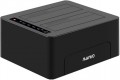 |
|---|---|---|
| Dynamode DM-CAD-S8 | Maiwo K3082 | |
| Outdated Product | Compare prices 2 | |
| TOP sellers | ||
The docking station has two additional USB slots for storage devices and three slots for TF/M2/SD memory cards. | ||
| Type | docking station | docking station |
| Features | stationary | |
| Drive form factor | 2.5"/3.5" | 2.5"/3.5" |
| Drive interface | SATA / IDE | SATA 3 |
| Connectivity | USB-A 5Gbps | USB-A 5Gbps |
| Material | plastic | plastic |
| Storage slots | 2 | 2 |
| Max. drive size | 16 TB | |
| Power source | pSU | |
| Size | 140x112x55 mm | 153x112x62 mm |
| Color | ||
| Added to E-Catalog | may 2025 | july 2022 |



Compare Dynamode DM-CAD-S8 and Maiwo K3082
Price comparison
You may be interested in
Maiwo K3082 often compared


Glossary
Features
General purpose of the pocket.
Note that different types of such accessories (see above) are divided according to their purpose. External pockets are categorized as portable and stationary, while internal ones are divided into models for laptops, for PC chassis, and solutions for servers. This parameter is generally not specified for docking stations and cases: the former are originally intended for stationary use, while the latter, by definition, are portable.
Here's a more detailed description of the options relevant for external pockets:
— Portable. Models designed for frequent movement from place to place and even for use on the go (for example, connecting to a laptop while traveling). Most modern external pockets fall into this category, as external storage devices, which these pockets are an alternative to, are mainly made portable. The specific features of such accessories can vary, but they are all compact enough and designed for only one internal drive, receiving power from the same USB port they connect to (see "Power").
— Stationary. External pockets intended to remain in one place and not meant for frequent relocations or use on the go. These models are significantly less common than portable ones; most of them are fairly large constructions designed to...hold two or more drives and often represent a kind of "NAS servers without network functions." However, there are single-slot models that differ from portable counterparts by having a stand to position the pocket vertically (saving space on a desk), and powered by a PSU.
In turn, internal pockets for different purposes have the following specifics:
— For laptops. This variety is usually designed for installing drives of the 2.5" or M.2 form factor into the optical drive bay (CD/DVD) — due to the compact size of laptops, this is often the only possible way to install an additional drive.
— Chassis. Pockets intended for standard desktop PCs. Note that the term "chassis" traditionally refers to a specific variety of such pockets — known as Mobile Rack, or "sleds". The main purpose of these accessories is to allow quick transfer of drives from one enclosure to another. Their construction includes two parts: a base that mounts in a 5.25" slot on the case, and a removable cartridge where the drive is installed. To prevent theft or unauthorized physical access, "sleds" can be equipped with a lock that blocks the removal of the drive. Such devices are quite rare today, mostly used with disk arrays and in certain specific circumstances — for example, to take a drive containing materials with you at the end of the workday or to lock it in a safe for confidentiality. Another type of pockets for PCs is adapters for installing drives in non-standard slots. A classic case is using a 2.5" "laptop-sized" drive in a 3.5" bay of a desktop case, but nowadays a more specific variant can be found — using an M.2 SSD as a PCI-E expansion card (see "Form factor" for more details).
— For server. Server systems often deal with large volumes of information that require high reliability and/or access speed. In light of this, most pockets for this purpose are designed for multiple drives (from two to six), allowing for necessary volumes and RAID arrays of different levels if needed. Built-in RAID support (see below) is not found in such devices — it's simpler and more sensible to organize it through the server itself. It's also worth noting that these pockets, by the way to install disks, are usually "sleds" (see "Chassis" above), providing added convenience, allowing, for example, quick swapping of a failed drive in a RAID array. Server pockets may use specialized interfaces like SAS, although traditional SATA is more popular.
Note that different types of such accessories (see above) are divided according to their purpose. External pockets are categorized as portable and stationary, while internal ones are divided into models for laptops, for PC chassis, and solutions for servers. This parameter is generally not specified for docking stations and cases: the former are originally intended for stationary use, while the latter, by definition, are portable.
Here's a more detailed description of the options relevant for external pockets:
— Portable. Models designed for frequent movement from place to place and even for use on the go (for example, connecting to a laptop while traveling). Most modern external pockets fall into this category, as external storage devices, which these pockets are an alternative to, are mainly made portable. The specific features of such accessories can vary, but they are all compact enough and designed for only one internal drive, receiving power from the same USB port they connect to (see "Power").
— Stationary. External pockets intended to remain in one place and not meant for frequent relocations or use on the go. These models are significantly less common than portable ones; most of them are fairly large constructions designed to...hold two or more drives and often represent a kind of "NAS servers without network functions." However, there are single-slot models that differ from portable counterparts by having a stand to position the pocket vertically (saving space on a desk), and powered by a PSU.
In turn, internal pockets for different purposes have the following specifics:
— For laptops. This variety is usually designed for installing drives of the 2.5" or M.2 form factor into the optical drive bay (CD/DVD) — due to the compact size of laptops, this is often the only possible way to install an additional drive.
— Chassis. Pockets intended for standard desktop PCs. Note that the term "chassis" traditionally refers to a specific variety of such pockets — known as Mobile Rack, or "sleds". The main purpose of these accessories is to allow quick transfer of drives from one enclosure to another. Their construction includes two parts: a base that mounts in a 5.25" slot on the case, and a removable cartridge where the drive is installed. To prevent theft or unauthorized physical access, "sleds" can be equipped with a lock that blocks the removal of the drive. Such devices are quite rare today, mostly used with disk arrays and in certain specific circumstances — for example, to take a drive containing materials with you at the end of the workday or to lock it in a safe for confidentiality. Another type of pockets for PCs is adapters for installing drives in non-standard slots. A classic case is using a 2.5" "laptop-sized" drive in a 3.5" bay of a desktop case, but nowadays a more specific variant can be found — using an M.2 SSD as a PCI-E expansion card (see "Form factor" for more details).
— For server. Server systems often deal with large volumes of information that require high reliability and/or access speed. In light of this, most pockets for this purpose are designed for multiple drives (from two to six), allowing for necessary volumes and RAID arrays of different levels if needed. Built-in RAID support (see below) is not found in such devices — it's simpler and more sensible to organize it through the server itself. It's also worth noting that these pockets, by the way to install disks, are usually "sleds" (see "Chassis" above), providing added convenience, allowing, for example, quick swapping of a failed drive in a RAID array. Server pockets may use specialized interfaces like SAS, although traditional SATA is more popular.
Drive interface
The drive interface provided in the pocket's design, in other words, the method of connecting the drive.
Pockets make sense to use for internal drives, so the connection interfaces used are appropriate. It's also worth mentioning that in internal models (see "Type"), the drive interface is often not specified because it matches the interface of the pocket's connection to the computer. As for specific options, the most relevant today are SATA 3 and PCIe 4x. More about them:
— SATA 3. The newest and most advanced, and in drive pockets, also the most widespread version of the SATA interface. This interface is designed for internal drives, primarily hard drives; for SSDs, it is comparatively less suitable because it doesn't allow the full potential of solid-state memory to be realized. Specifically, SATA 3 provides a data transfer rate of up to 600 MB/s, and earlier SATA version drives can also be connected to such ports — albeit with connection speed limited by the slower interface.
It should be noted that in addition to traditional 2.5" and 3.5" SATA drives (see "Form Factor"), connected through the eponymous port, nowadays you can also find SSD modules in M.2 form factor, also using SATA format connection. Such models are noticeably inferior in speed to M.2 PCIe solutions but are also cheaper. They connect to an M.2 slot, which must support SATA.
— SATA 2. The predeces...sor of the above-described SATA 3; this version allows data transfer at speeds up to 300 Mbps. It is found much less frequently in pockets, mainly among outdated models — for example, external solutions using USB 2.0 (see "Connection").
— PCIe. An option found exclusively in models for M.2 drives (see "Drive Form Factor"). Such modules use the M.2 port, where the connection is usually implemented in PCIe format. In this case, the version and number of PCIe lanes are usually specified in the specifications — the supported speeds depend directly on this. For example, the label "PCIe 3.0 2x" means 2 PCIe version 3.0 lanes; this version provides 984 MB/s per lane, so the total speed is approximately 1.97 GB/s. However, nowadays more advanced options are more common — for example, PCIe 3.0 4x, where the speed is around 3.9 GB/s. At the same time, drives and pockets with different versions and numbers of PCIe lanes in this case are usually compatible with each other, except that the speed will be limited by the capabilities of the slower interface.
— SATA/SAS. Models supporting connection via two interfaces — SATA or SAS. The latter is a specialized standard used mainly in server systems; such a feature reflects the intended purpose of pockets with this capability. This versatility is achieved because SAS controllers are compatible with SATA drives, so both types of ports can be provided in the pocket. Meanwhile, SAS significantly exceeds SATA in performance — offering up to 22.5 Gbps, depending on the version (against a maximum of 6 Gbps in SATA). However, it's important to note that the SAS interface does not have a strictly defined type of connector — several types of plugs can be used for such connections; it might be useful to clarify this separately.
Pockets make sense to use for internal drives, so the connection interfaces used are appropriate. It's also worth mentioning that in internal models (see "Type"), the drive interface is often not specified because it matches the interface of the pocket's connection to the computer. As for specific options, the most relevant today are SATA 3 and PCIe 4x. More about them:
— SATA 3. The newest and most advanced, and in drive pockets, also the most widespread version of the SATA interface. This interface is designed for internal drives, primarily hard drives; for SSDs, it is comparatively less suitable because it doesn't allow the full potential of solid-state memory to be realized. Specifically, SATA 3 provides a data transfer rate of up to 600 MB/s, and earlier SATA version drives can also be connected to such ports — albeit with connection speed limited by the slower interface.
It should be noted that in addition to traditional 2.5" and 3.5" SATA drives (see "Form Factor"), connected through the eponymous port, nowadays you can also find SSD modules in M.2 form factor, also using SATA format connection. Such models are noticeably inferior in speed to M.2 PCIe solutions but are also cheaper. They connect to an M.2 slot, which must support SATA.
— SATA 2. The predeces...sor of the above-described SATA 3; this version allows data transfer at speeds up to 300 Mbps. It is found much less frequently in pockets, mainly among outdated models — for example, external solutions using USB 2.0 (see "Connection").
— PCIe. An option found exclusively in models for M.2 drives (see "Drive Form Factor"). Such modules use the M.2 port, where the connection is usually implemented in PCIe format. In this case, the version and number of PCIe lanes are usually specified in the specifications — the supported speeds depend directly on this. For example, the label "PCIe 3.0 2x" means 2 PCIe version 3.0 lanes; this version provides 984 MB/s per lane, so the total speed is approximately 1.97 GB/s. However, nowadays more advanced options are more common — for example, PCIe 3.0 4x, where the speed is around 3.9 GB/s. At the same time, drives and pockets with different versions and numbers of PCIe lanes in this case are usually compatible with each other, except that the speed will be limited by the capabilities of the slower interface.
— SATA/SAS. Models supporting connection via two interfaces — SATA or SAS. The latter is a specialized standard used mainly in server systems; such a feature reflects the intended purpose of pockets with this capability. This versatility is achieved because SAS controllers are compatible with SATA drives, so both types of ports can be provided in the pocket. Meanwhile, SAS significantly exceeds SATA in performance — offering up to 22.5 Gbps, depending on the version (against a maximum of 6 Gbps in SATA). However, it's important to note that the SAS interface does not have a strictly defined type of connector — several types of plugs can be used for such connections; it might be useful to clarify this separately.
Max. drive size
The maximum storage capacity supported by the pocket. In models with multiple disks/SSDs (see "Drive Slots"), this item indicates the largest total volume supported by the device; by dividing this capacity by the number of slots, you can determine the maximum allowable capacity of each individual drive.
The limitation on the maximum volume is relevant mainly for external models, including docking stations (see "Type"). This is due to the fact that fundamentally different interfaces are used for the drive and for connecting the pocket itself in such models (most often SATA and USB, respectively, see above for details). For the normal interaction of such interfaces, an electronic controller is required; and the larger the volume of the installed drive (s) — the higher the requirements for the performance of such a controller.
Note that, other things being equal, supporting large volumes is more expensive, and capacious drives themselves are not cheap. Therefore, when choosing according to this indicator, it is worth considering real needs, and not chasing the maximum numbers.
The limitation on the maximum volume is relevant mainly for external models, including docking stations (see "Type"). This is due to the fact that fundamentally different interfaces are used for the drive and for connecting the pocket itself in such models (most often SATA and USB, respectively, see above for details). For the normal interaction of such interfaces, an electronic controller is required; and the larger the volume of the installed drive (s) — the higher the requirements for the performance of such a controller.
Note that, other things being equal, supporting large volumes is more expensive, and capacious drives themselves are not cheap. Therefore, when choosing according to this indicator, it is worth considering real needs, and not chasing the maximum numbers.
Power source
The type of power provided in the design of the pocket.
This parameter is relevant only for external models (in internal solutions, power is determined solely by the connection interface). The options could be:
— USB. Powered by the same USB port used for the main connection. The advantage of this option is obvious: it allows you to do without unnecessary wires and use the pocket regardless of the presence of sockets (which is important, for example, when working with a laptop on the road). At the same time, the power of USB power is generally low, and besides, it directly depends on the version of the connector (see "Connection"). So for pockets with several disks, this option is not suitable in principle. In other cases, you should pay attention to compatibility when connecting to a USB connector of an older version than is supported by the pocket. For example, a model with USB 3.2 gen1 can be physically connected to a USB 2.0 port without any problems, but it may not have enough power for normal operation. However, more modern versions (USB 3.2 gen1 and gen2) practically do not have such compatibility problems.
- Power Supply. Powered by a separate PSU, usually plugged into a power outlet. These pockets are bulkier and less mobile than USB-powered models, they can't work without power outlets nearby, and the extra wire is a bit of a hassle. On the other hand, the power supply is capable of delivering mor...e power than USB, and this power is constant and does not depend on the version of the port to which the drive is connected. So many stationary models use just such a power supply; and for external pockets for two or more drives, this is generally the only available option.
This parameter is relevant only for external models (in internal solutions, power is determined solely by the connection interface). The options could be:
— USB. Powered by the same USB port used for the main connection. The advantage of this option is obvious: it allows you to do without unnecessary wires and use the pocket regardless of the presence of sockets (which is important, for example, when working with a laptop on the road). At the same time, the power of USB power is generally low, and besides, it directly depends on the version of the connector (see "Connection"). So for pockets with several disks, this option is not suitable in principle. In other cases, you should pay attention to compatibility when connecting to a USB connector of an older version than is supported by the pocket. For example, a model with USB 3.2 gen1 can be physically connected to a USB 2.0 port without any problems, but it may not have enough power for normal operation. However, more modern versions (USB 3.2 gen1 and gen2) practically do not have such compatibility problems.
- Power Supply. Powered by a separate PSU, usually plugged into a power outlet. These pockets are bulkier and less mobile than USB-powered models, they can't work without power outlets nearby, and the extra wire is a bit of a hassle. On the other hand, the power supply is capable of delivering mor...e power than USB, and this power is constant and does not depend on the version of the port to which the drive is connected. So many stationary models use just such a power supply; and for external pockets for two or more drives, this is generally the only available option.