
Comparison Ugreen CM400 vs Asus ROG Strix Arion
Add to comparison | 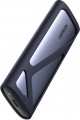 | 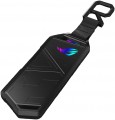 |
|---|---|---|
| Ugreen CM400 | Asus ROG Strix Arion | |
from $29.99 | Compare prices 6 | |
| User reviews | ||
| TOP sellers | ||
Exclusive protective case included. Aluminium housing with thermal pads. Built-in Aura lighting. No tools are required to install an SSD into the ROG Strix Arion Lite container and secure the drive. In the ROG Strix Arion Lite container, you can install drives with an M.2 interface (NVM, PCI-Express) form factors 2230/2242/2260/2280 with an M or B + M key. The maximum storage capacity is 2 TB. | ||
| Type | external | external |
| Features | portable | portable |
| Drive form factor | M.2 | M.2 |
| Drive interface | SATA/PCIe 3.0 4x | PCIe 3.0 4x |
| Connectivity | USB-C 10Gbps | USB-C 10Gbps |
| Material | metal | metal |
| Storage slots | 1 | 1 |
| Max. drive size | 2 TB | |
| Power source | USB port | USB port |
| Size | 119x37x12 mm | 124x48x11 mm |
| Color | ||
| Added to E-Catalog | april 2023 | february 2020 |





Compare Ugreen CM400 and Asus ROG Strix Arion
Price comparison
You may be interested in
My comparisons
Ugreen CM400 often compared


Asus ROG Strix Arion often compared


Glossary
Drive interface
The drive interface provided in the pocket's design, in other words, the method of connecting the drive.
Pockets make sense to use for internal drives, so the connection interfaces used are appropriate. It's also worth mentioning that in internal models (see "Type"), the drive interface is often not specified because it matches the interface of the pocket's connection to the computer. As for specific options, the most relevant today are SATA 3 and PCIe 4x. More about them:
— SATA 3. The newest and most advanced, and in drive pockets, also the most widespread version of the SATA interface. This interface is designed for internal drives, primarily hard drives; for SSDs, it is comparatively less suitable because it doesn't allow the full potential of solid-state memory to be realized. Specifically, SATA 3 provides a data transfer rate of up to 600 MB/s, and earlier SATA version drives can also be connected to such ports — albeit with connection speed limited by the slower interface.
It should be noted that in addition to traditional 2.5" and 3.5" SATA drives (see "Form Factor"), connected through the eponymous port, nowadays you can also find SSD modules in M.2 form factor, also using SATA format connection. Such models are noticeably inferior in speed to M.2 PCIe solutions but are also cheaper. They connect to an M.2 slot, which must support SATA.
— SATA 2. The predeces...sor of the above-described SATA 3; this version allows data transfer at speeds up to 300 Mbps. It is found much less frequently in pockets, mainly among outdated models — for example, external solutions using USB 2.0 (see "Connection").
— PCIe. An option found exclusively in models for M.2 drives (see "Drive Form Factor"). Such modules use the M.2 port, where the connection is usually implemented in PCIe format. In this case, the version and number of PCIe lanes are usually specified in the specifications — the supported speeds depend directly on this. For example, the label "PCIe 3.0 2x" means 2 PCIe version 3.0 lanes; this version provides 984 MB/s per lane, so the total speed is approximately 1.97 GB/s. However, nowadays more advanced options are more common — for example, PCIe 3.0 4x, where the speed is around 3.9 GB/s. At the same time, drives and pockets with different versions and numbers of PCIe lanes in this case are usually compatible with each other, except that the speed will be limited by the capabilities of the slower interface.
— SATA/SAS. Models supporting connection via two interfaces — SATA or SAS. The latter is a specialized standard used mainly in server systems; such a feature reflects the intended purpose of pockets with this capability. This versatility is achieved because SAS controllers are compatible with SATA drives, so both types of ports can be provided in the pocket. Meanwhile, SAS significantly exceeds SATA in performance — offering up to 22.5 Gbps, depending on the version (against a maximum of 6 Gbps in SATA). However, it's important to note that the SAS interface does not have a strictly defined type of connector — several types of plugs can be used for such connections; it might be useful to clarify this separately.
Pockets make sense to use for internal drives, so the connection interfaces used are appropriate. It's also worth mentioning that in internal models (see "Type"), the drive interface is often not specified because it matches the interface of the pocket's connection to the computer. As for specific options, the most relevant today are SATA 3 and PCIe 4x. More about them:
— SATA 3. The newest and most advanced, and in drive pockets, also the most widespread version of the SATA interface. This interface is designed for internal drives, primarily hard drives; for SSDs, it is comparatively less suitable because it doesn't allow the full potential of solid-state memory to be realized. Specifically, SATA 3 provides a data transfer rate of up to 600 MB/s, and earlier SATA version drives can also be connected to such ports — albeit with connection speed limited by the slower interface.
It should be noted that in addition to traditional 2.5" and 3.5" SATA drives (see "Form Factor"), connected through the eponymous port, nowadays you can also find SSD modules in M.2 form factor, also using SATA format connection. Such models are noticeably inferior in speed to M.2 PCIe solutions but are also cheaper. They connect to an M.2 slot, which must support SATA.
— SATA 2. The predeces...sor of the above-described SATA 3; this version allows data transfer at speeds up to 300 Mbps. It is found much less frequently in pockets, mainly among outdated models — for example, external solutions using USB 2.0 (see "Connection").
— PCIe. An option found exclusively in models for M.2 drives (see "Drive Form Factor"). Such modules use the M.2 port, where the connection is usually implemented in PCIe format. In this case, the version and number of PCIe lanes are usually specified in the specifications — the supported speeds depend directly on this. For example, the label "PCIe 3.0 2x" means 2 PCIe version 3.0 lanes; this version provides 984 MB/s per lane, so the total speed is approximately 1.97 GB/s. However, nowadays more advanced options are more common — for example, PCIe 3.0 4x, where the speed is around 3.9 GB/s. At the same time, drives and pockets with different versions and numbers of PCIe lanes in this case are usually compatible with each other, except that the speed will be limited by the capabilities of the slower interface.
— SATA/SAS. Models supporting connection via two interfaces — SATA or SAS. The latter is a specialized standard used mainly in server systems; such a feature reflects the intended purpose of pockets with this capability. This versatility is achieved because SAS controllers are compatible with SATA drives, so both types of ports can be provided in the pocket. Meanwhile, SAS significantly exceeds SATA in performance — offering up to 22.5 Gbps, depending on the version (against a maximum of 6 Gbps in SATA). However, it's important to note that the SAS interface does not have a strictly defined type of connector — several types of plugs can be used for such connections; it might be useful to clarify this separately.
Max. drive size
The maximum storage capacity supported by the pocket. In models with multiple disks/SSDs (see "Drive Slots"), this item indicates the largest total volume supported by the device; by dividing this capacity by the number of slots, you can determine the maximum allowable capacity of each individual drive.
The limitation on the maximum volume is relevant mainly for external models, including docking stations (see "Type"). This is due to the fact that fundamentally different interfaces are used for the drive and for connecting the pocket itself in such models (most often SATA and USB, respectively, see above for details). For the normal interaction of such interfaces, an electronic controller is required; and the larger the volume of the installed drive (s) — the higher the requirements for the performance of such a controller.
Note that, other things being equal, supporting large volumes is more expensive, and capacious drives themselves are not cheap. Therefore, when choosing according to this indicator, it is worth considering real needs, and not chasing the maximum numbers.
The limitation on the maximum volume is relevant mainly for external models, including docking stations (see "Type"). This is due to the fact that fundamentally different interfaces are used for the drive and for connecting the pocket itself in such models (most often SATA and USB, respectively, see above for details). For the normal interaction of such interfaces, an electronic controller is required; and the larger the volume of the installed drive (s) — the higher the requirements for the performance of such a controller.
Note that, other things being equal, supporting large volumes is more expensive, and capacious drives themselves are not cheap. Therefore, when choosing according to this indicator, it is worth considering real needs, and not chasing the maximum numbers.