
Comparison GamePro GD214 vs GamePro GD112
Add to comparison | 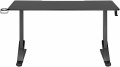 | 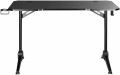 |
|---|---|---|
| GamePro GD214 | GamePro GD112 | |
| Outdated Product | Outdated Product | |
| TOP sellers | ||
| Form factor | gaming | gaming |
Design | ||
| Dimensions | 1360x600x710 mm | 1200x600x750 mm |
| Max. height | 810 mm | |
| Height adjustment | manual | in absent |
| Table top shape | rectangular | rectangular with recess |
| Leg design | T-shaped | T-shaped |
| Cable hole |  | |
Features | ||
| Cup holder | | |
| Headphone holder | | |
| Max. load | 100 kg | 100 kg |
| Color | ||
| Added to E-Catalog | september 2023 | september 2023 |


Compare GamePro GD214 and GD112
You may be interested in
My comparisons
GamePro GD214 often compared


Glossary
Dimensions
The size of an office desk directly affects how comfortable it is to work: a depth of 60–80 cm is considered optimal so there’s enough space for a laptop, a monitor, and stationery, while the width is chosen between 100 and 160 cm depending on how much equipment and how many accessories you have. For gaming desks, the standard is wider—70–80 cm and 120–180 cm respectively—since you need to fit multiple monitors, a PC tower, peripherals, and still have free space to move. Unlike compact office models, gaming versions often have a rounded front edge or a corner design, which boosts ergonomics. In reality, office options are more common in minimalist interiors for working with documents or a laptop, whereas gaming ones are used in setups with more devices, LED lighting, and accessories.
Max. height
The maximum desk height in height-adjustable models indicates the upper limit to which the desktop can be raised, typically ranging from 110 to 130 cm. This height lets you use the desk not only while seated but also standing, which reduces back strain and improves posture during long work sessions. Unlike fixed-height models, which are 72–75 cm tall, adjustable desks offer flexibility to fine-tune the setup to the user’s height or to change positions throughout the day. For example, when working at a computer you can alternate between sitting and standing, and in a gaming setup you can adjust it to match the height of your chair or accessories.
Height adjustment
A feature that allows adjusting the position of the work surface to suit individual user needs. It is especially important in office and gaming models, where proper ergonomics reduce spine strain and enhance comfort during long work or gaming sessions. Unlike conventional fixed desks, adjustable options allow for quick transitions from sitting to standing, positively impacting posture and overall productivity. These solutions are actively used in modern open-space offices, home work areas, and gaming setups, providing flexibility and versatility. Both manual adjustment and mechanized adjustment are available:
— Manual. The height is adjusted by repositioning the fastening elements or clips in the legs, where the user loosens the clamps, sets a mark, and re-secures the tabletop. This approach is valued for its simple construction, high rigidity, and affordable price: it requires almost no maintenance, can easily support heavy monitors and mounts, and is resistant to vibrations. Compared to an electric drive, the manual option is convenient where height changes are infrequent and stability is more important, for example, with constant seating and a fixed setup configuration. Examples include "adjusting for height once," aligning with a bucket seat, or lowering the level for a low-profile keyboard.
— Electric Motor. The ele...ctric drive allows the tabletop to be raised and lowered at the push of a button with smooth motion, preset memory, and precise adjustment for height or different scenarios—from working to standing gaming. Compared to the manual option, it is faster, quieter, and more convenient for frequent switches or when multiple people use the desk; plus, there's no need to clear the surface of monitors and brackets. Drawbacks include a higher cost, dependency on the power supply, and the need for proper assembly and weight distribution. Typical examples are a quick "sit/stand" transition during long sessions, a shared family desk, or a hybrid setup for "work by day, stream by night."
— Manual. The height is adjusted by repositioning the fastening elements or clips in the legs, where the user loosens the clamps, sets a mark, and re-secures the tabletop. This approach is valued for its simple construction, high rigidity, and affordable price: it requires almost no maintenance, can easily support heavy monitors and mounts, and is resistant to vibrations. Compared to an electric drive, the manual option is convenient where height changes are infrequent and stability is more important, for example, with constant seating and a fixed setup configuration. Examples include "adjusting for height once," aligning with a bucket seat, or lowering the level for a low-profile keyboard.
— Electric Motor. The ele...ctric drive allows the tabletop to be raised and lowered at the push of a button with smooth motion, preset memory, and precise adjustment for height or different scenarios—from working to standing gaming. Compared to the manual option, it is faster, quieter, and more convenient for frequent switches or when multiple people use the desk; plus, there's no need to clear the surface of monitors and brackets. Drawbacks include a higher cost, dependency on the power supply, and the need for proper assembly and weight distribution. Typical examples are a quick "sit/stand" transition during long sessions, a shared family desk, or a hybrid setup for "work by day, stream by night."
Table top shape
— Rectangular. The most traditional and versatile format, suitable for office and home workspaces. A rectangular desktop is easy to install, fits harmoniously into any space, and is optimal for users who need a standard work surface without unnecessary elements. This option is convenient for writing, working on a laptop, or setting up a minimal set of equipment.
— Rectangular with cutout. This desktop is ergonomic and creates a more comfortable workspace: due to the recess, the user is positioned closer to the center of the table, providing quick access to the keyboard, mouse, and monitor. This is especially relevant for gamers and professionals who work long hours at a PC, as it reduces strain on the hands and back.
— Corner. Represents an L-shaped solution, allowing for efficient use of the room's corner and significantly increasing usable space. This format is ideal for those who work with multiple monitors, large equipment, or appreciate the organization of the workspace while maintaining easy access to all areas of the table.
— Rectangular with cutout. This desktop is ergonomic and creates a more comfortable workspace: due to the recess, the user is positioned closer to the center of the table, providing quick access to the keyboard, mouse, and monitor. This is especially relevant for gamers and professionals who work long hours at a PC, as it reduces strain on the hands and back.
— Corner. Represents an L-shaped solution, allowing for efficient use of the room's corner and significantly increasing usable space. This format is ideal for those who work with multiple monitors, large equipment, or appreciate the organization of the workspace while maintaining easy access to all areas of the table.