
Comparison Garmin Instinct 2 Solar vs Garmin Instinct
Add to comparison | 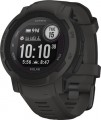 | 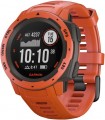 |
|---|---|---|
| Garmin Instinct 2 Solar | Garmin Instinct | |
| Compare prices 17 | Compare prices 3 | |
| User reviews | ||
| TOP sellers | ||
Support blood oxygen measurement. Forecast of race results. Advanced sports tracking features. Indication of acclimatization to temperature and altitude. Increased battery life. New Garmin Elevate Gen4 heart rate sensor. Contactless payments are only available in solar and Dezl versions. Unlimited operation is possible with a daily charge of 50,000 lux of light rays. There is NFC. | Determines the level of stress. Garmin TracBack - leaves waypoints at the coordinates you have passed and allows you to return back to the original location using the same waypoints. Diving up to 100 m. Rugged housing. Military security standard MIL-STD-810. Accurate GPS. NFC is missing. | |
| Type | smartwatch | smartwatch |
| Interface | Bluetooth v4.2 | Bluetooth v4.0 |
| ANT+ |  | |
Telephony | ||
| Calls and alerts | notifications vibration | notifications sound signal vibration |
Sports and tourism | ||
| Possible measurements | heart rate monitor blood oxygen level ambient temperature number of steps distance traveled movement speed calories burned activity time sleep tracking stress level women's calendar | heart rate monitor blood oxygen level ambient temperature number of steps distance traveled movement speed calories burned activity time sleep tracking stress level women's calendar |
| Swimming mode | | |
| Navigation | GPS module GLONASS Galileo GPS track guidance compass altimeter (altitude) barometer (pressure) | GPS module GLONASS Galileo GPS track guidance compass altimeter (altitude) barometer (pressure) |
Display | ||
| Type | monochrome | monochrome |
| Display type | transflective | transflective |
| Size | 0.9 " | 0.9 " |
| Screen resolution | 176x176 px | 128x128 px |
| PPI | 277 ppi | 201 ppi |
| Watch face protection | glass | glass |
Hardware | ||
| Memory storage | 32 MB | 16 MB |
| Extra features | NFC Garmin Pay contactless payment accelerometer | accelerometer |
Power source | ||
| Device charging | proprietary connector | proprietary connector |
| Source of power | Li-Ion | Li-Ion |
| Operating time (normal mode) | 28 days | 14 days |
| Operating time (active mode) | 40 h | |
| Battery life (GPS) | 30 h | 16 h |
| Solar battery | |  |
Case and strap | ||
| Material | plastic | plastic |
| Bezel | plastic | plastic |
| Strap | quick release | quick release |
| Strap Options | rubber/silicone | rubber/silicone |
| Clasp options | classic buckle | classic buckle |
| Band Width | 22 mm | 22 mm |
| Wrist strap | 135 – 230 mm | 132 – 224 mm |
General | ||
| Protection rating | 100 WR (10 ATM) | 100 WR (10 ATM) |
| MIL-STD-810 | | |
| Dimensions (without strap) | 45x45x14.5 mm | 45x45x12 mm |
| Weight | 53 g | 42 g |
| Color | ||
| Added to E-Catalog | february 2022 | october 2018 |




Compare Garmin Instinct 2 and Instinct
Price comparison
You may be interested in
My comparisons
Garmin Instinct 2 often compared


Garmin Instinct often compared


Glossary
Interface
The primary way to connect a wrist gadget with external devices. For smartwatches and fitness bands (see "Type"), it is assumed to be connected to a smartphone or tablet, while in the case of watch-phones, it's usually about headsets.
— Bluetooth. A wireless technology for direct communication between various devices. There are different versions that indicate the device's capabilities.
— Bluetooth. A wireless technology for direct communication between various devices. There are different versions that indicate the device's capabilities.
- — 5.0. The fifth generation of Bluetooth was released in 2016. The key innovation in version 5.0 was expanding the capabilities related to the "Internet of Things." For example, the Bluetooth Low Energy protocol introduced the ability to double data transfer speed (up to 2 Mbps) at the cost of reducing range, as well as quadruple the range at the cost of reducing speed; additionally, several improvements were introduced concerning simultaneous operation with a large number of connected devices.
- — v 5.1. An update of the version v 5.0 described above. In addition to general improvements in connection quality and reliability, this update implemented an interesting feature such as determining the direction from which the Bluetooth signal comes. This makes it possible to determine the location of connected devices with centimeter accuracy.
- — v 5.2. The update following 5.1 of the fifth-generation Bluetooth. The main innovations in this version included several security improvements, additional optimization of power consumption in LE mode, and a new audio signal format for synchronizing parallel playback on multiple devices.
- — v 5.3.... The Bluetooth v 5.3 wireless communication protocol was introduced in early 2022. Innovations included speeding up the process of coordinating the communication channel between the controller and the device, implementing a feature for rapid switching between low-duty cycle and high-speed modes, improved bandwidth and connection stability by reducing susceptibility to interference. In the event of unexpected interference in Low Energy mode, the procedure for selecting a communication channel for switching is sped up. There were no fundamental innovations in protocol 5.3; however, it is evident that there are several qualitative improvements.
- — v 5.4. The standard generation approved in 2023, which became an intermediate step before Bluetooth 6. The main innovation was the introduction of the PAwR (Periodic Advertising with Responses) mode, allowing watches and other devices to exchange data in large sensor networks with minimal power consumption. Also added was the Encrypted Advertising Data mechanism, enhancing protection against eavesdropping and packet forgery, which is important when using watches for contactless keys or payments. Compared to earlier versions 5.2 and 5.3, Bluetooth 5.4 focuses on security, energy efficiency, and operation in a "noisy" radio environment. In real-world use, this is manifested in more stable data transmission from sensors (heart rate, steps, sleep), battery savings with constant phone connection, and the reliability of functions like notifications or fitness tracking even with many connected devices around.
- — v 6.0. Bluetooth 6 has been officially approved by Bluetooth SIG and offers a number of significant benefits in smartwatches compared to version 5.4. Thanks to the improved Channel Sounding system and LE Audio optimization, such devices maintain connections faster and more stably, determine the distance to the smartphone more accurately (to centimeters), lose frames less frequently during calls or Auracast broadcasts, and provide longer battery life. In practice, this manifests in functions like unlocking a laptop upon approach, precise indoor watch search, reliable operation of heart rate sensors and sports sensors, as well as stable calls even in crowded gyms.
Naturally, to utilize all the capabilities of a particular Bluetooth version, it must be supported not only by the gadget itself but also by the smartphone/tablet to which it is connected.
Calls and alerts
Types of notifications, as well as basic voice communication features supported by the gadget.
- Notifications. In classic smart watches and fitness trackers, the specific functionality of such notifications can be different – from a regular sound or vibration signal to the ability to display on the screen and even respond. But in any case, such notifications are often more noticeable to the user than the own signal from a smartphone located deep in a pocket or bag.
— Voice control. The ability to control the device through voice commands. In order for a smartwatch or fitness tracker to perform some simple feature, it is enough to say its name aloud.
— Voice assistant. In watches with voice assistant support, the level of user interaction with the device is displayed in a new qualitative way. The most popular virtual assistants are Google Assistant and Amazon Alexa. In Apple devices, the role of an assistant is performed by Apple Siri, in Samsung wearable gadgets — a virtual assistant Bixby. Unlike the voice control function, the assistant does not just turn on this or that feature, but allows you to perform certain operations in applications that require feedback.
— Sound signal. The ability to give sound signals using the built-in speaker. This feature will be useful primarily in situations where the gadget is not on hand — for example, if it is used as an ala...rm clock and is removed at night.
— Vibration. Vibration signal similar to that used in mobile phones. In wearable gadgets, such a signal is especially convenient due to the fact that the device is constantly in contact with the wearer's skin, so that the vibration is perfectly felt — and regardless of the level of noise around. In addition, vibration mode is also useful in quiet environments where a loud sound signal is undesirable.
— Built-in microphone. Own microphone built into the body of the device. Such equipment can be used for different purposes, depending on the type and features of the gadget. First of all, voice communication is impossible without a microphone. Another feature for which a microphone is required is the voice assistant (see above). And in children's smartwatches, it may be possible to remotely turn on the microphone from the parent gadget and listen to what is happening around the child; see the relevant paragraph below for details.
— Speakerphone(speaker). The ability to work the gadget in hands-free mode, using the built-in speaker and microphone for conversation. In a conventional smartwatch (see "Type"), this feature allows you to talk through the watch without removing the smartphone from your pocket; in watch-phones, speakerphone allows you to do so without headphones and headsets, and for children's smartwatches, this feature is almost mandatory. However the volume of the built-in speaker is usually low, so in a noisy environment its power may not be enough.
- Notifications. In classic smart watches and fitness trackers, the specific functionality of such notifications can be different – from a regular sound or vibration signal to the ability to display on the screen and even respond. But in any case, such notifications are often more noticeable to the user than the own signal from a smartphone located deep in a pocket or bag.
— Voice control. The ability to control the device through voice commands. In order for a smartwatch or fitness tracker to perform some simple feature, it is enough to say its name aloud.
— Voice assistant. In watches with voice assistant support, the level of user interaction with the device is displayed in a new qualitative way. The most popular virtual assistants are Google Assistant and Amazon Alexa. In Apple devices, the role of an assistant is performed by Apple Siri, in Samsung wearable gadgets — a virtual assistant Bixby. Unlike the voice control function, the assistant does not just turn on this or that feature, but allows you to perform certain operations in applications that require feedback.
— Sound signal. The ability to give sound signals using the built-in speaker. This feature will be useful primarily in situations where the gadget is not on hand — for example, if it is used as an ala...rm clock and is removed at night.
— Vibration. Vibration signal similar to that used in mobile phones. In wearable gadgets, such a signal is especially convenient due to the fact that the device is constantly in contact with the wearer's skin, so that the vibration is perfectly felt — and regardless of the level of noise around. In addition, vibration mode is also useful in quiet environments where a loud sound signal is undesirable.
— Built-in microphone. Own microphone built into the body of the device. Such equipment can be used for different purposes, depending on the type and features of the gadget. First of all, voice communication is impossible without a microphone. Another feature for which a microphone is required is the voice assistant (see above). And in children's smartwatches, it may be possible to remotely turn on the microphone from the parent gadget and listen to what is happening around the child; see the relevant paragraph below for details.
— Speakerphone(speaker). The ability to work the gadget in hands-free mode, using the built-in speaker and microphone for conversation. In a conventional smartwatch (see "Type"), this feature allows you to talk through the watch without removing the smartphone from your pocket; in watch-phones, speakerphone allows you to do so without headphones and headsets, and for children's smartwatches, this feature is almost mandatory. However the volume of the built-in speaker is usually low, so in a noisy environment its power may not be enough.
Screen resolution
Screen size in dots (pixels) horizontally and vertically. In general, this is one of the indicators that determine the image quality: the higher the resolution, the clearer and smoother the picture on the screen (with the same size), the less noticeable are the individual dots. On the other hand, an increase in the number of pixels affects the cost of displays, their power consumption and requirements for a hardware platform (more powerful hardware is required, which itself will cost more). In addition, the specifics of using smartwatches is such that there is simply no need to install high-resolution screens in them. Therefore, modern wrist accessories use displays with a relatively low resolution: for example, 320x320 with a size of about 1.6" is considered quite sufficient even for premium watches.
PPI
The density of dots on the screen of the gadget, namely, the number of pixels that are on each inch of the panel vertically or horizontally.
The higher the PPI, the higher the detail of the screen, the clearer and smoother the image is. On the other hand, this indicator affects the price accordingly. Therefore, the higher the density of points, the more advanced, usually, this gadget is in terms of general capabilities. However, when choosing a screen, manufacturers take into account the general purpose and functionality of the device; so that even a small number of PPIs usually does not interfere with comfortable use.
The higher the PPI, the higher the detail of the screen, the clearer and smoother the image is. On the other hand, this indicator affects the price accordingly. Therefore, the higher the density of points, the more advanced, usually, this gadget is in terms of general capabilities. However, when choosing a screen, manufacturers take into account the general purpose and functionality of the device; so that even a small number of PPIs usually does not interfere with comfortable use.
Memory storage
The amount of own storage provided in the design of the watch/bracelet. This memory is used for permanent storage of various information: call log, received SMS and other messages, additional applications, data on physical activity for a certain time, etc. The larger its volume, the more data can be stored in the device without the need to clean it to free up space. On the other hand, in the operation of smartwatches, large volumes ( 64 GB, 32 GB, 16 GB, even 8 GB and 4 GB) are not always required, capacious drives are quite expensive, and replaceable cards installed in corresponding slot (see below).
Extra features
— Built-in player. The presence of a player in the smartwatch allows you to use the gadget to listen to music. There is no need to connect to the phone for this. The songs will play directly from the watch. Therefore, these devices must necessarily have an impressive (as for a watch) amount of storage and be able to connect to headphones (for connection with headphones).
— WiFi. A technology originally used to access the Internet via wireless access points, but more recently also used for direct communication between two devices (such a connection has several advantages over traditional Bluetooth). In wearable gadgets, the first option is most often provided, although the second is also found. However, the specific uses of Wi-Fi may be different depending on the device: accessing websites and various Internet services, remote communication with smart home systems, remote control of digital cameras and other electronics, transmission of the GPS- coordinates via Internet (in children's beacons), etc.
— NFC. Wireless communication technology over short distances (up to 10 cm). The methods of its application, including in wearable devices, may be different. One of the more popular options is using contactless payment (see below); however, the presence of such a function does not hurt to verify separately. Another common fe...ature is the simplification of Bluetooth connection with a smartphone or tablet that also has NFC: instead of manual configuration, it is enough to bring one device to another — and they will automatically establish a connection, all that remains is to confirm it. Other ways of interaction may also be possible, for example, launching a “sports” application on a smartphone when bringing a fitness tracker to it. And theoretically, more specific options for using NFC are also allowed — for example, as a travel pass, ID, etc. Actually, in many models of wearable gadgets, the set of these methods is limited only by installed applications.
— Contactless payment. The possibility of using a wearable gadget for contactless payment. This feature is found only in models with NFC (see above); it actually turns the device into an analogue of a credit card with a chip and allows you to pay without taking the card out of your wallet — just bring your hand with the gadget to the terminal reader. This provides not only additional convenience, but also security. So, bringing the watch to the terminal is definitely easier than reaching into your pocket or purse for a credit card — especially if your hands are busy shopping. And instead of a traditional card, from which an attacker can copy basic details such as a number, CVV code and expiration date (for example, by “peeping” them with the built-in camera), a gadget is used that transmits this data in encrypted form and does not display it explicitly anywhere.
To use contactless payment, usually, you need to synchronize your gadget with your smartphone and set up such payment in the Google Pay or Apple Pay system. But to make payments, a smartphone is no longer required — many wearable devices are able to perform this feature completely autonomously (although this possibility still needs to be specified separately).
— Accelerometer. A sensor that determines the direction of gravity, as well as the accelerations acting on the device. This allows you to track two parameters at once: the current position in space and various physical influences (like tapping or shaking). Most often, the accelerometer is responsible for two main features: automatic rotation of the image on the screen, as well as the operation of the pedometer (in fact, the presence of such a sensor is almost guaranteed to mean the presence of a pedometer, see "Possible measurements"). However, there are other ways to use this sensor — for example, rejecting an incoming call when shaking the watch, turning on the screen when tapping on it, etc.
— Gyroscope. A device that allows you to track the turns of the gadget in one direction or another. Typically used in conjunction with an accelerometer. The gyroscope improves the accuracy of positioning in space (which has a positive effect on the quality of the pedometer and other similar functions), and also provides additional options for managing gestures. However, the specific applications of this sensor are highly dependent on the model.
— Camera. The watch/bracelet has its own built-in camera; its location and purpose differs from model to model. In some devices, the lens is located on the front panel, above the screen, and the matter is limited only to video communication and taking selfies, while others allow you to shoot “classic” photos or videos. At the same time, it is worth noting that anyway, the specs of such cameras are usually very limited — for example, the resolution rarely exceeds 2 megapixels, and autofocus is provided only in the most advanced models.
— Flashlight. Built-in flashlight — usually in the form of a small LED mounted directly in the case. Usually, it has a relatively modest brightness, but it can still be useful for simple tasks like lighting your path at night, lighting in a garage or basement, etc.
— WiFi. A technology originally used to access the Internet via wireless access points, but more recently also used for direct communication between two devices (such a connection has several advantages over traditional Bluetooth). In wearable gadgets, the first option is most often provided, although the second is also found. However, the specific uses of Wi-Fi may be different depending on the device: accessing websites and various Internet services, remote communication with smart home systems, remote control of digital cameras and other electronics, transmission of the GPS- coordinates via Internet (in children's beacons), etc.
— NFC. Wireless communication technology over short distances (up to 10 cm). The methods of its application, including in wearable devices, may be different. One of the more popular options is using contactless payment (see below); however, the presence of such a function does not hurt to verify separately. Another common fe...ature is the simplification of Bluetooth connection with a smartphone or tablet that also has NFC: instead of manual configuration, it is enough to bring one device to another — and they will automatically establish a connection, all that remains is to confirm it. Other ways of interaction may also be possible, for example, launching a “sports” application on a smartphone when bringing a fitness tracker to it. And theoretically, more specific options for using NFC are also allowed — for example, as a travel pass, ID, etc. Actually, in many models of wearable gadgets, the set of these methods is limited only by installed applications.
— Contactless payment. The possibility of using a wearable gadget for contactless payment. This feature is found only in models with NFC (see above); it actually turns the device into an analogue of a credit card with a chip and allows you to pay without taking the card out of your wallet — just bring your hand with the gadget to the terminal reader. This provides not only additional convenience, but also security. So, bringing the watch to the terminal is definitely easier than reaching into your pocket or purse for a credit card — especially if your hands are busy shopping. And instead of a traditional card, from which an attacker can copy basic details such as a number, CVV code and expiration date (for example, by “peeping” them with the built-in camera), a gadget is used that transmits this data in encrypted form and does not display it explicitly anywhere.
To use contactless payment, usually, you need to synchronize your gadget with your smartphone and set up such payment in the Google Pay or Apple Pay system. But to make payments, a smartphone is no longer required — many wearable devices are able to perform this feature completely autonomously (although this possibility still needs to be specified separately).
— Accelerometer. A sensor that determines the direction of gravity, as well as the accelerations acting on the device. This allows you to track two parameters at once: the current position in space and various physical influences (like tapping or shaking). Most often, the accelerometer is responsible for two main features: automatic rotation of the image on the screen, as well as the operation of the pedometer (in fact, the presence of such a sensor is almost guaranteed to mean the presence of a pedometer, see "Possible measurements"). However, there are other ways to use this sensor — for example, rejecting an incoming call when shaking the watch, turning on the screen when tapping on it, etc.
— Gyroscope. A device that allows you to track the turns of the gadget in one direction or another. Typically used in conjunction with an accelerometer. The gyroscope improves the accuracy of positioning in space (which has a positive effect on the quality of the pedometer and other similar functions), and also provides additional options for managing gestures. However, the specific applications of this sensor are highly dependent on the model.
— Camera. The watch/bracelet has its own built-in camera; its location and purpose differs from model to model. In some devices, the lens is located on the front panel, above the screen, and the matter is limited only to video communication and taking selfies, while others allow you to shoot “classic” photos or videos. At the same time, it is worth noting that anyway, the specs of such cameras are usually very limited — for example, the resolution rarely exceeds 2 megapixels, and autofocus is provided only in the most advanced models.
— Flashlight. Built-in flashlight — usually in the form of a small LED mounted directly in the case. Usually, it has a relatively modest brightness, but it can still be useful for simple tasks like lighting your path at night, lighting in a garage or basement, etc.
Payment system
The watch supports a certain system of contactless payment for purchases and services through the built-in NFC. See contactless payment for details.
— Apple Pay. "Apple" system of contactless payments, available to owners of the Apple Watch. To use it, you bind a bank card to the device and touch the terminal with your Apple Watch at the stage of paying for purchases or services. The Apple Pay electronic wallet only works with Apple wearable technology.
— Google Wallet. Google Wallet (formerly Google Pay) allows you to pay for purchases using NFC-chip smartwatches based on the Wear OS operating system. The device must have the Google Wallet application installed, and the user will first need to have a supported card of the issuing bank.
— Garmin Pay. A payment service for one-touch payments for purchases using Garmin smartwatches. To pay for goods, you must activate the e-wallet menu on your watch and enter your password from the Garmin Connect Mobile app. After that, it is enough to touch the terminal with your watch at the checkout. In the future, you can make payments without additional entering a password within 24 hours. If you remove your watch from your wrist or turn off the heart rate monitor, you will need to re-enter your password before making a payment.
...>
— Samsung Pay. Contactless payment service for purchases and services for smartwatches of the Samsung Gear Watch and Galaxy Watch families. The system is notable for the fact that the Magnetic Secure Transmission (MST) technology introduced by Samsung specialists makes it possible to pay even in terminals without support for contactless payments. Some watches of the South Korean brand can create a magnetic field that imitates a strip of a bank card and transmit information to outdated payment terminals.
— Apple Pay. "Apple" system of contactless payments, available to owners of the Apple Watch. To use it, you bind a bank card to the device and touch the terminal with your Apple Watch at the stage of paying for purchases or services. The Apple Pay electronic wallet only works with Apple wearable technology.
— Google Wallet. Google Wallet (formerly Google Pay) allows you to pay for purchases using NFC-chip smartwatches based on the Wear OS operating system. The device must have the Google Wallet application installed, and the user will first need to have a supported card of the issuing bank.
— Garmin Pay. A payment service for one-touch payments for purchases using Garmin smartwatches. To pay for goods, you must activate the e-wallet menu on your watch and enter your password from the Garmin Connect Mobile app. After that, it is enough to touch the terminal with your watch at the checkout. In the future, you can make payments without additional entering a password within 24 hours. If you remove your watch from your wrist or turn off the heart rate monitor, you will need to re-enter your password before making a payment.
Operating time (normal mode)
The time that the gadget can work on one battery charge (or the supplied battery) in normal use.
Normal mode, as a rule, means working with a relatively low load. At this time, the display can display some data, and basic functions can also work (counting steps, periodically checking heart rate, etc.), but in any case, power consumption is low. Therefore, the operating time in normal mode can be quite impressive, up to several weeks, or even months. However, when choosing, it doesn’t hurt to also pay attention to the stated time in active mode (see below) — especially if a long operating time is critical, or you plan to use the gadget intensively. The actual autonomy of the device will most likely be somewhere in between these two values, depending on the actual load. If only the time in normal mode is indicated for the gadget, you should choose with a certain reserve.
Normal mode, as a rule, means working with a relatively low load. At this time, the display can display some data, and basic functions can also work (counting steps, periodically checking heart rate, etc.), but in any case, power consumption is low. Therefore, the operating time in normal mode can be quite impressive, up to several weeks, or even months. However, when choosing, it doesn’t hurt to also pay attention to the stated time in active mode (see below) — especially if a long operating time is critical, or you plan to use the gadget intensively. The actual autonomy of the device will most likely be somewhere in between these two values, depending on the actual load. If only the time in normal mode is indicated for the gadget, you should choose with a certain reserve.
Operating time (active mode)
The time that the gadget is able to work on one charge of the battery in the active mode of use.
For watch-phones (see “Type”), this usually means a talk mode, for other gadgets, an intensive work mode when numerous features and sensors are used and there is a constant exchange of data with a smartphone/tablet. However, the specific understanding of the "active mode" for different manufacturers may vary: some indicate the time at maximum performance (that is, in fact, guaranteed battery life), others — in some kind of "average mode". However, anyway, this is a fairly clear parameter that describes the battery life of a particular model quite well (and is much closer to real indicators than the time in normal mode mentioned above).
Note that for models with a GPS sensor (see "Navigation"), the specifications may additionally specify the time of active operation using such a sensor. See "Operating time (GPS)" for details.
For watch-phones (see “Type”), this usually means a talk mode, for other gadgets, an intensive work mode when numerous features and sensors are used and there is a constant exchange of data with a smartphone/tablet. However, the specific understanding of the "active mode" for different manufacturers may vary: some indicate the time at maximum performance (that is, in fact, guaranteed battery life), others — in some kind of "average mode". However, anyway, this is a fairly clear parameter that describes the battery life of a particular model quite well (and is much closer to real indicators than the time in normal mode mentioned above).
Note that for models with a GPS sensor (see "Navigation"), the specifications may additionally specify the time of active operation using such a sensor. See "Operating time (GPS)" for details.