
Comparison MSI Vector 16 HX AI A2XWHG [A2XWHG-094PL] vs Asus ROG Strix G18 2025 G815LR [G815LR-U9321W]
Add to comparison |  | 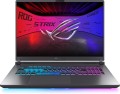 |
|---|---|---|
| MSI Vector 16 HX AI A2XWHG [A2XWHG-094PL] | Asus ROG Strix G18 2025 G815LR [G815LR-U9321W] | |
| Outdated Product | Outdated Product | |
| User reviews | ||
| TOP sellers | ||
| Type | laptop | laptop |
Screen | ||
| Screen size | 16 " | 18 " |
| Screen type | IPS | IPS |
| Surface treatment | matte | anti-glare |
| Screen resolution | 2560x1600 (16:10) | 2560x1600 (16:10) |
| Response time | 3 ms | 3 ms |
| Refresh rate | 240 Hz | 240 Hz |
| Brightness | 500 nt | |
| Contrast | 1000 :1 | |
| Colour gamut (DCI-P3) | 100 % | 100 % |
| Pantone certification |  |  |
| TÜV Rheinland certificate | | |
| HDR | HDR10, Dolby Vision | |
| NVIDIA G-Sync | | |
CPU | ||
| Series | Core Ultra 9 | Core Ultra 9 |
| Model | 275HX | 275HX |
| Processor code name | Arrow Lake (Series 2) | Arrow Lake (Series 2) |
| Processor cores | 24 (8P+16E) | 24 (8P+16E) |
| Total threads | 24 | 24 |
| CPU speed | 2.1 GHz | 2.1 GHz |
| TurboBoost / TurboCore frequency | 5.4 GHz | 5.4 GHz |
| CPU TDP | 55 W | 55 W |
| Test Passmark CPU Mark | 56196 points | 56196 points |
RAM | ||
| RAM | 32 GB | 32 GB |
| Maximum installed RAM capacity | 96 GB | 64 GB |
| RAM type | DDR5 | DDR5 |
| RAM memory frequency | 5600 MHz | 5600 MHz |
| Amount of RAM slots | 2 | 2 |
Graphics card | ||
| Graphics card type | dedicated | dedicated |
| Graphics card series | NVIDIA GeForce | NVIDIA GeForce |
| Graphics card model | RTX 5070 Ti | RTX 5070 Ti |
| Video memory | 12 GB | 12 GB |
| Video card memory type | GDDR7 | GDDR7 |
| GPU TDP | 140 W | 140 W |
| Advanced Optimus | | |
| VR | | |
Storage | ||
| Drive type | SSD M.2 NVMe | SSD M.2 NVMe |
| Drive capacity | 1 TB | 1 TB |
| M.2 drive interface | PCIe 4.0 4x | PCIe 4.0 4x |
| M.2 drive size | 22x80 mm | |
| Additional M.2 connector | 1 | 1 |
| Addittional M.2 connectors interface | PCI-E 5.0 | PCI-E 4.0 4x |
| Additional M.2 drive size | 22x80 mm | |
Connections | ||
| Connection ports | HDMI v2.1 | HDMI v2.1 |
| Card reader | | |
| USB-A 10Gbps | 2 pcs | 3 pcs |
| USB-C 80G (USB4) | 2 pcs | 2 pcs |
| Thunderbolt interface | v5 2 pcs | v5 2 pcs |
| Alternate Mode | | |
| Monitors connection | 3 | 3 |
| LAN (RJ-45) | 2.5 Gbps | 2.5 Gbps |
| Wi-Fi | Wi-Fi 6E (802.11ax) | Wi-Fi 7 (802.11be) |
| Bluetooth | v5.3 | v5.4 |
Multimedia | ||
| Webcam | 1920x1080 (Full HD) | 1920x1080 (Full HD) |
| Camera shutter | | |
| Speakers | 2 pcs | 2 pcs |
| Audio decoders | Dolby Atmos | |
| Security | 3D face scanner kensington / Noble lock | 3D face scanner |
Keyboard | ||
| Backlight | RGB 24 zone | RGB per key |
| Lighthing sync | Asus Aura Sync | |
| Key design | island type | island type |
| Num block | | |
| Additional keys | 6 | |
| Input device | touchpad | touchpad |
Battery | ||
| Battery capacity | 5845 mAh | |
| Battery capacity | 90 W*h | 90 W*h |
| Battery voltage | 15.4 В | |
| Power Delivery via USB-C | | |
| Power Delivery | 100 W | |
| Fast charge | | |
| Power supply Included | 330 W | 280 W |
General | ||
| Preinstalled OS | Win 11 Home | Win 11 Home |
| Body illumination | | |
| Material | aluminium / plastic | matte plastic |
| Dimensions (WxDxT) | 357x284x29 mm | 399x298x32 mm |
| Weight | 2.7 kg | 3.2 kg |
| Color | ||
| Added to E-Catalog | april 2025 | march 2025 |


Compare MSI A2XWHG-094PL and Asus G815LR-U9321W MSI Vector 16 HX AI A2XWHG и Asus ROG Strix G18 (2025) G815LR?
You may be interested in
My comparisons
MSI Vector 16 HX AI A2XWHG often compared

Glossary
Screen size
Diagonal size of laptop display.
The larger the screen, the more convenient the laptop for watching high-definition movies, modern games, working with large-format graphic materials, etc. Large screens are especially important for multimedia and gaming models. On the other hand, the diagonal of the display directly affects the size and cost of the entire device. So if portability is key, it makes sense to pay attention to relatively small solutions; especially since most modern laptops have video outputs like HDMI or DisplayPort and allow connection of large-format external monitors.
In light of all this, the actual maximum for laptops these days is 17"(17.3"); however larger devices (18") reappeared at the beginning of 2023. The standard option for general purpose laptops is 15"(15.6"), less often 16", a diagonal of 13"(13.3") or 14" is considered small by the standards of such And smaller screens can be found mainly in specific compact varieties of laptops — ultrabooks, 2 in 1, transformers, netbooks; among such devices there are solutions for 12 ", 11" and even 10" or less.
The larger the screen, the more convenient the laptop for watching high-definition movies, modern games, working with large-format graphic materials, etc. Large screens are especially important for multimedia and gaming models. On the other hand, the diagonal of the display directly affects the size and cost of the entire device. So if portability is key, it makes sense to pay attention to relatively small solutions; especially since most modern laptops have video outputs like HDMI or DisplayPort and allow connection of large-format external monitors.
In light of all this, the actual maximum for laptops these days is 17"(17.3"); however larger devices (18") reappeared at the beginning of 2023. The standard option for general purpose laptops is 15"(15.6"), less often 16", a diagonal of 13"(13.3") or 14" is considered small by the standards of such And smaller screens can be found mainly in specific compact varieties of laptops — ultrabooks, 2 in 1, transformers, netbooks; among such devices there are solutions for 12 ", 11" and even 10" or less.
Surface treatment
— Glossy. A glossy surface improves the overall picture quality: other things being equal, the picture on such a screen looks brighter and more colorful than on a matte one. On the other hand, pollution is very noticeable on such a surface, and in bright external lighting, a lot of glare appears on it, which can greatly interfere with viewing. Therefore, instead of the classic gloss, laptops are increasingly using an anti-reflective version of such a coating (see below). Nevertheless, this option still does not lose popularity: it is somewhat cheaper than the “anti-glare”, and in soft, relatively dim lighting, it can even provide a more pleasing image to the eye.
— Matte. Matte finish is inexpensive and does not form glare even from fairly bright lighting. On the other hand, the picture on such a screen is noticeably dimmer than on a similar glossy display. However, this moment can be compensated by various design solutions (primarily a good margin of brightness); so this option can be found in all categories of modern laptops — from low-cost models for working with documents to top gaming configurations.
— Glossy (anti-glare). A variation on the glossy finish described above, designed to reduce glare from external light sources. Such screens really glare noticeably less than traditional glossy ones (or even do not give glare at all); at the same time, in...terms of image quality, they are at least superior to matte ones. So it is this type of coating that is most popular nowadays.
— Matte. Matte finish is inexpensive and does not form glare even from fairly bright lighting. On the other hand, the picture on such a screen is noticeably dimmer than on a similar glossy display. However, this moment can be compensated by various design solutions (primarily a good margin of brightness); so this option can be found in all categories of modern laptops — from low-cost models for working with documents to top gaming configurations.
— Glossy (anti-glare). A variation on the glossy finish described above, designed to reduce glare from external light sources. Such screens really glare noticeably less than traditional glossy ones (or even do not give glare at all); at the same time, in...terms of image quality, they are at least superior to matte ones. So it is this type of coating that is most popular nowadays.
Brightness
The maximum brightness that a laptop screen can provide.
The brighter the ambient light, the brighter the laptop screen should be, otherwise the image on it may be difficult to read. And vice versa: in dim ambient light, high brightness is unnecessary — it greatly burdens the eyes (however, in this case, modern laptops provide brightness control). Thus, the higher this indicator, the more versatile the screen is, the wider the range of conditions in which it can be effectively used. The downside of these benefits is an increase in price and energy consumption.
As for specific values, many modern laptops have a brightness of 250 – 300 nt and even lower. This is quite enough for working under artificial lighting of medium intensity, but in bright natural light, visibility may already be a problem. For use in sunny weather (especially outdoors), it is desirable to have a brightness margin of at least 300 – 350 nt. And in the most advanced models, this parameter can be 350 – 400 nt and even more.
The brighter the ambient light, the brighter the laptop screen should be, otherwise the image on it may be difficult to read. And vice versa: in dim ambient light, high brightness is unnecessary — it greatly burdens the eyes (however, in this case, modern laptops provide brightness control). Thus, the higher this indicator, the more versatile the screen is, the wider the range of conditions in which it can be effectively used. The downside of these benefits is an increase in price and energy consumption.
As for specific values, many modern laptops have a brightness of 250 – 300 nt and even lower. This is quite enough for working under artificial lighting of medium intensity, but in bright natural light, visibility may already be a problem. For use in sunny weather (especially outdoors), it is desirable to have a brightness margin of at least 300 – 350 nt. And in the most advanced models, this parameter can be 350 – 400 nt and even more.
Contrast
The contrast of the screen installed in the laptop.
Contrast is the largest difference in brightness between the lightest white and darkest black that can be achieved on a single screen. It is written as a fraction, for example, 560:1; while the larger the first number, the higher the contrast, the more advanced the screen is and the better the image quality can be achieved on it. This is especially noticeable with large differences in brightness within a single frame: with low contrast, individual details located in the darkest or brightest parts of the picture may be lost, increasing the contrast allows you to eliminate this phenomenon to a certain extent. The flip side of these benefits is an increase in cost.
Separately, we emphasize that in this case only static contrast is indicated — the difference provided within one frame in normal operation, at constant brightness and without the use of special technologies. For advertising purposes, some manufacturers may also provide data on the so-called dynamic contrast — it can be measured in very impressive numbers (seven-digit or more). However, you should focus primarily on static contrast — this is the basic characteristic of any display.
As for specific values, even in the most advanced screens, this indicator does not exceed 2000: 1. But in general, modern laptops have a rather low contrast ratio — it is assumed that for tasks that require more advanced image characteristics, it is more...reasonable to use an external screen (monitor or TV).
Contrast is the largest difference in brightness between the lightest white and darkest black that can be achieved on a single screen. It is written as a fraction, for example, 560:1; while the larger the first number, the higher the contrast, the more advanced the screen is and the better the image quality can be achieved on it. This is especially noticeable with large differences in brightness within a single frame: with low contrast, individual details located in the darkest or brightest parts of the picture may be lost, increasing the contrast allows you to eliminate this phenomenon to a certain extent. The flip side of these benefits is an increase in cost.
Separately, we emphasize that in this case only static contrast is indicated — the difference provided within one frame in normal operation, at constant brightness and without the use of special technologies. For advertising purposes, some manufacturers may also provide data on the so-called dynamic contrast — it can be measured in very impressive numbers (seven-digit or more). However, you should focus primarily on static contrast — this is the basic characteristic of any display.
As for specific values, even in the most advanced screens, this indicator does not exceed 2000: 1. But in general, modern laptops have a rather low contrast ratio — it is assumed that for tasks that require more advanced image characteristics, it is more...reasonable to use an external screen (monitor or TV).
Pantone certification
This feature means that the laptop screen has received the Pantone Validated certification.
Pantone is a professional colour system created by the company of the same name and widely used in design and printing. One of Pantone's basic ideas is that each colour should remain the same at all stages of work — from agreeing on a general idea to printing / releasing the final product; To do this, all shades covered by the system are assigned code names, which are used in the work. In the case of laptops, Pantone certification means that when working with materials and software tools that use a given colour scheme, the colours on the screen will match the actual Pantone hues as closely as possible.
We emphasize that there is no question of perfect correspondence (LCD matrices are not physically capable of adequately displaying some shades); in addition, screens with such certification may have different colour gamuts — both in percentages and in the systems used for designation (sRGB, Adobe RGB, DCI P3 — see above). However, even if the colour is beyond the capabilities of the screen, it will be displayed as accurately as possible. Therefore, for professional tasks associated with intensive use of Pantone, it is worth choosing monitors with official certification; An example of such tasks is the printing of image printing.
Pantone is a professional colour system created by the company of the same name and widely used in design and printing. One of Pantone's basic ideas is that each colour should remain the same at all stages of work — from agreeing on a general idea to printing / releasing the final product; To do this, all shades covered by the system are assigned code names, which are used in the work. In the case of laptops, Pantone certification means that when working with materials and software tools that use a given colour scheme, the colours on the screen will match the actual Pantone hues as closely as possible.
We emphasize that there is no question of perfect correspondence (LCD matrices are not physically capable of adequately displaying some shades); in addition, screens with such certification may have different colour gamuts — both in percentages and in the systems used for designation (sRGB, Adobe RGB, DCI P3 — see above). However, even if the colour is beyond the capabilities of the screen, it will be displayed as accurately as possible. Therefore, for professional tasks associated with intensive use of Pantone, it is worth choosing monitors with official certification; An example of such tasks is the printing of image printing.
TÜV Rheinland certificate
Laptop display certification for safe blue light emission levels and panel flicker rates. The presence of a TÜV Rheinland certificate confirms that the screen is comfortable for the eyes.
TÜV Rheinland is a large international concern headquartered in Cologne, Germany, providing a wide range of audit services. The company's specialists have developed and approved a number of tests for the compliance of the screens of mobile devices, monitors and TVs with the required level of eye protection from the harmful effects of display radiation on the user's vision on the other side of the screen. The authoritative opinion of TÜV Rheinland is respected in the tech community. Certificates from this body are issued to successfully tested electronics for the implementation of blue light filtering and screen flicker suppression technologies.
TÜV Rheinland is a large international concern headquartered in Cologne, Germany, providing a wide range of audit services. The company's specialists have developed and approved a number of tests for the compliance of the screens of mobile devices, monitors and TVs with the required level of eye protection from the harmful effects of display radiation on the user's vision on the other side of the screen. The authoritative opinion of TÜV Rheinland is respected in the tech community. Certificates from this body are issued to successfully tested electronics for the implementation of blue light filtering and screen flicker suppression technologies.
HDR
HDR technology format supported by the laptop.
This technology is designed to expand the range of brightness reproduced by the laptop screen; Simply put, an HDR screen will display brighter whites and darker blacks than a regular matrix. In fact, this can significantly improve image quality. First, the expansion of the dynamic range contributes to the brightness and fidelity of colours on the screen; secondly, the visibility of individual details in very bright or very dark areas of the frame is preserved (whereas on a normal screen such details often “sink” in solid white or black).
Note that in order to fully use this function, you need not only a laptop with HDR, but also the corresponding content (video files recorded in HDR, games where this technology is implemented, etc.). In addition, the laptop must support the HDR format used by the content being played. Nowadays, you can find such options:
— HDR10. Historically the first of the consumer HDR formats, less advanced than those described below, but extremely widespread. In particular, HDR10 is supported by almost all streaming services that provide HDR content at all, and it is also common for Blu-ray discs. Allows you to work with a colour depth of 10 bits (hence the name). At the same time, devices of this format are also compatible with content in HDR10 +, although its quality will be limited by the capabilities of the original HDR10.
...— HDR10+. An improved version of HDR10. With the same colour depth (10 bits), it uses the so-called dynamic metadata, which allows transmitting information about the colour depth not only for groups of several frames, but also for individual frames. This results in an additional improvement in colour reproduction.
Dolby Vision. An advanced standard used particularly in professional cinematography. Allows you to achieve a colour depth of 12 bits, uses the dynamic metadata described above, and also makes it possible to transmit two image options at once in one video stream — HDR and normal (SDR). At the same time, Dolby Vision is based on the same technology as HDR10, so in laptops it is almost guaranteed to be combined with at least HDR10, and even with HDR10 +.
This technology is designed to expand the range of brightness reproduced by the laptop screen; Simply put, an HDR screen will display brighter whites and darker blacks than a regular matrix. In fact, this can significantly improve image quality. First, the expansion of the dynamic range contributes to the brightness and fidelity of colours on the screen; secondly, the visibility of individual details in very bright or very dark areas of the frame is preserved (whereas on a normal screen such details often “sink” in solid white or black).
Note that in order to fully use this function, you need not only a laptop with HDR, but also the corresponding content (video files recorded in HDR, games where this technology is implemented, etc.). In addition, the laptop must support the HDR format used by the content being played. Nowadays, you can find such options:
— HDR10. Historically the first of the consumer HDR formats, less advanced than those described below, but extremely widespread. In particular, HDR10 is supported by almost all streaming services that provide HDR content at all, and it is also common for Blu-ray discs. Allows you to work with a colour depth of 10 bits (hence the name). At the same time, devices of this format are also compatible with content in HDR10 +, although its quality will be limited by the capabilities of the original HDR10.
...— HDR10+. An improved version of HDR10. With the same colour depth (10 bits), it uses the so-called dynamic metadata, which allows transmitting information about the colour depth not only for groups of several frames, but also for individual frames. This results in an additional improvement in colour reproduction.
Dolby Vision. An advanced standard used particularly in professional cinematography. Allows you to achieve a colour depth of 12 bits, uses the dynamic metadata described above, and also makes it possible to transmit two image options at once in one video stream — HDR and normal (SDR). At the same time, Dolby Vision is based on the same technology as HDR10, so in laptops it is almost guaranteed to be combined with at least HDR10, and even with HDR10 +.
NVIDIA G-Sync
Laptop support for NVIDIA G-Sync technology.
This feature is only found on models equipped with discrete NVIDIA graphics cards. It is used to match the frame rate of the screen and the frame rate of the signal arriving at it — so that these frequencies match. This avoids flickering, twitching, and other image artifacts that can occur due to out-of-sync. This feature is especially useful for games where the frame rate of the video signal can "float" depending on the load on the graphics core; in fact, most laptops with G-Sync are specifically for gaming.
A similar solution for AMD video cards is called FreeSync.
This feature is only found on models equipped with discrete NVIDIA graphics cards. It is used to match the frame rate of the screen and the frame rate of the signal arriving at it — so that these frequencies match. This avoids flickering, twitching, and other image artifacts that can occur due to out-of-sync. This feature is especially useful for games where the frame rate of the video signal can "float" depending on the load on the graphics core; in fact, most laptops with G-Sync are specifically for gaming.
A similar solution for AMD video cards is called FreeSync.
Maximum installed RAM capacity
The maximum amount of RAM that can be installed on a laptop. It depends, in particular, on the type of memory modules used, as well as on the number of slots for them. Paying attention to this parameter makes sense, first of all, if the laptop is bought with the expectation of and the amount of actually installed memory in it is noticeably less than the maximum available. So laptops can be upgraded in RAM to 16 GB, 24 GB a>, 32 GB, 48 GB, 64 GB and even more - 128 GB.