
Comparison Canon i-SENSYS MF651CW vs HP Color Laser 178NW
Add to comparison | 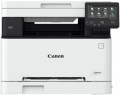 | 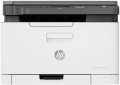 |
|---|---|---|
| Canon i-SENSYS MF651CW | HP Color Laser 178NW | |
from $964.00 | Compare prices 1 | |
| User reviews | ||
| TOP sellers | ||
Integration with cloud services. Printing over Wi-Fi. | ||
| Paper size | A4 | A4 |
| Print Type | laser | laser |
| Output Type | colour | colour |
| Number of colors | 4 | 4 |
Printing and copying | ||
| Max resolution | 1200х1200 dpi | 600х600 dpi |
| First page print | 10.4 с | 12.6 с |
| B/W copy | 18 ppm | 18 ppm |
| Colour copy | 18 ppm | 4 ppm |
| B/W printing | 18 ppm | 18 ppm |
| Colour printing | 18 ppm | 4 ppm |
Printing Supplies | ||
| Monthly Duty Cycle | 30 ths pages | 20 ths pages |
| Black Ink Page Yield | 1350 pages | 1000 pages |
| Colour Ink Page Yield | 1250 pages | 700 pages |
| Number of cartridges | 4 | 4 |
| Cartridge model | 5102C002, 5101C002, 5100C002, 5099C002 | W2070A, W2071A, W2072A, W2073A |
| Higher capacity cartridge |  |  |
Features | ||
| Data transfer | PC connection (USB) network connection (LAN) Wi-Fi 4 (802.11n) USB (for flash drives) Wi-Fi Direct AirPrint | PC connection (USB) network connection (LAN) Wi-Fi 4 (802.11n) Wi-Fi Direct AirPrint |
| Cloud printing | Mopria, Canon PRINT Business | Mopria, HP Smart |
| Display | touch color | monochrome |
| Diagonal | 5 " | |
Hardware | ||
| Grammage (min) | 60 g/m² | 60 g/m² |
| Grammage (max) | 200 g/m² | 220 g/m² |
| RAM | 1024 MB | 128 MB |
| CPU frequency | 800 MHz | 800 MHz |
| Scan resolution | 600х600 dpi | 600х600 dpi |
| Scanner Colour Depth | 24 bits | |
General | ||
| Feed tray | 250 sheets | 150 sheets |
| Output Tray | 100 sheets | 50 sheets |
| Noise level | 49 dB | |
| Power consumption | 850 W | 300 W |
| Dimensions (WxDxH) | 451x460x360 mm | 406x363x289 mm |
| Weight | 18.9 kg | 12.94 kg |
| Color | ||
| Added to E-Catalog | february 2023 | august 2019 |



Compare Canon i-SENSYS MF651CW and HP Color Laser 178NW
Price comparison
You may be interested in
My comparisons
Canon i-SENSYS MF651CW often compared


HP Color Laser 178NW often compared


Glossary
Max resolution
The maximum resolution of the image to be printed. It is usually indicated by two numbers indicating the number of dots per inch (dpi) horizontally and vertically, for example 1200x600. The detail of the image depends on this parameter – the higher the resolution, the more fine details the printer is able to convey and the better their image will be. High print resolution is important, foremost, operating with graphic material; low resolution is sufficient for high-quality text display. So there are the following options: 600x600, 1200x600, 1200x1200, 1800x600, 2400x600, 2400x1200, 2400x2400, 4800x600, 4800x1200, 4800x2400, 5760, and higher print resolutions.
First page print
The time passed from pressing the Copy button to the completion of the first copy in MFPs. Typically specified for low quality black and white printing on A4 paper. The time for the first copy to be released is the longest (because of the time to prepare for work and scan the document); subsequent copies of the same document are printed much faster. Fast first copy time is important if you have to copy documents frequently.
Colour copy
Colour copy speed – the number of full-colour copies of one page that the MFP can produce in 1 minute. Generally slower than black and white copy speed.
Colour printing
The number of pages the printer can proceed per minute in colour mode. As like b/w printing, the print speed is usually indicated in the worst quality (at maximum speed), in higher quality the print speed is lower. This setting is worth paying attention to if you need to print colour graphic materials frequently.
Monthly Duty Cycle
The maximum number of pages that the MFP can print in a month while remaining fully operational.
Black Ink Page Yield
Approximate number of pages that the MFP can print in black and white mode without replacing the cartridge. In fact, this greatly depends on the specs of the images to print, so the actual resource may greatly differ from the claimed one in one way or another. Nevertheless, according to this indicator, it is quite possible to evaluate the capabilities of the MFP and compare it with other models.
Colour Ink Page Yield
Approximate number of pages that the MFP can print in colour mode without replacing the cartridge. In fact, this greatly depends on the specs of the images to print, so the actual resource may greatly differ from the claimed one in one way or another. Nevertheless, according to this indicator, it is quite possible to evaluate the capabilities of the MFP and compare it with other models.
Cartridge model
Types of cartridges (both black&white and colour) used in the MFP. Some models of the MFP are able to work with third-party cartridges, but this feature usually refers to undocumented, and the manufacturer's warranty applies only to specific types of cartridges. So, use third-party compatible cartridge models with caution.
Higher capacity cartridge
The MFP cartridge is designed for a certain duty cycle. However, the device compatibility with different cartridges sometimes allows you to install a cartridge with higher capacity, which can result in more pages being printed. These models with the option to expand the print cycle that are included in this paragraph.