
Comparison Dell KB-216 vs Dell KB-813
Add to comparison |  | 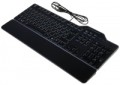 |
|---|---|---|
| Dell KB-216 | Dell KB-813 | |
| Compare prices 220 | Compare prices 38 | |
| User reviews | ||
| TOP sellers | ||
| Connection | wired | wired |
| Form factor | 100% (full size) | 100% (full size) |
| Layout | ANSI / ISO | ISO |
Keyboard | ||
| Key profile | low | high |
| Key type | island type | classic type |
| Switch technology | membrane | membrane |
| Additional keys | 3 | |
| Fn key |  |  |
Features | ||
| Cyrillic colour | white | |
| Volume control | add. keys | |
| Palm rest | removable | |
Connection and power supply | ||
| Cable | USB-A | USB-A |
General | ||
| Waterproof | | |
| Size | 442x127x25 mm | 447x150x41 mm |
| Weight | 500 g | 550 g |
| Color | ||
| Added to E-Catalog | june 2016 | july 2015 |





Compare Dell KB-216 and KB-813
Keyboards Dell KB-216 and Dell KB-813 each have unique features that may influence a user's choice. KB-216 features low-profile keys and an island-style key layout, making it more compact and suitable for fast typing. It also includes additional keys for volume control and is available in black and white colors. Meanwhile, KB-813 offers high-profile keys and a classic key layout, which may be preferred by those who appreciate tactile feedback while typing. This model also includes a removable wrist rest and spill resistance, making it more versatile for extended use. Both devices connect via USB, but the KB-813 is slightly heavier and larger in size. Users note that KB-813 provides greater comfort for prolonged use, while KB-216 is more portable and convenient for use in confined spaces.
Price comparison
You may be interested in
Dell KB-216 often compared

Glossary
Layout
The layout describes the physical geometry of the keys and their standard arrangement: the shape of Enter and Shift, the presence of additional keys, the width of the space bar, and consequently, compatibility with keycap sets and typing familiarity. The standards hardly affect productivity in software and gaming — comfort and how easy it is to find suitable keycaps/cases are more important. The following types are found:
— ANSI (American). A distinctive feature of the American layout is the single-row Enter key; it is the only popular layout where this key occupies one row, not two. Additionally, unlike the European ISO, the Shift keys on ANSI keyboards have the same width, and the Alt key has the same function. The backslash “\” is usually placed above the Enter and can be longer.
— ISO (European). One characteristic feature of the European layout is the Enter key, which occupies two rows and is slightly wider at the top. Also, the modifier keys are asymmetrical: the Shift keys differ in size (the left one is shorter than the right), and the Alts differ in function (the right Alt is marked as “Alt Gr” and is used for typing special characters of European languages). From the similar in many ways "Japanese" JIS layout, the ISO layout differs by the placement of the backslash “\” — it is standardly located near the left Shift (in some models, it is duplicated near the Enter). As a result,...the left Shift is shorter than usual; this can be inconvenient, especially for new users.
— KS (Korean). The “Korean” layout can be distinguished by the characteristic shape of the Enter key: it occupies two rows and is longer at the bottom than at the top. Another feature is the backslash “\”, which is located to the left of the Backspace, resulting in a shorter Backspace than in other layouts.
— JIS (Japanese). A layout much like the European ISO: it has the same two-row Enter with an increased length of the upper half. In many models, the right Alt is labeled “Alt Gr” and is designed for typing special symbols. The main differences lie in two aspects: the length of the left Shift (it is standard in JIS, not shortened) and the placement of the backslash “\” (it is standardly installed to the left of the lower half of the Enter, where some ISO keyboards have a second, additional backslash).
— ANSI (American). A distinctive feature of the American layout is the single-row Enter key; it is the only popular layout where this key occupies one row, not two. Additionally, unlike the European ISO, the Shift keys on ANSI keyboards have the same width, and the Alt key has the same function. The backslash “\” is usually placed above the Enter and can be longer.
— ISO (European). One characteristic feature of the European layout is the Enter key, which occupies two rows and is slightly wider at the top. Also, the modifier keys are asymmetrical: the Shift keys differ in size (the left one is shorter than the right), and the Alts differ in function (the right Alt is marked as “Alt Gr” and is used for typing special characters of European languages). From the similar in many ways "Japanese" JIS layout, the ISO layout differs by the placement of the backslash “\” — it is standardly located near the left Shift (in some models, it is duplicated near the Enter). As a result,...the left Shift is shorter than usual; this can be inconvenient, especially for new users.
— KS (Korean). The “Korean” layout can be distinguished by the characteristic shape of the Enter key: it occupies two rows and is longer at the bottom than at the top. Another feature is the backslash “\”, which is located to the left of the Backspace, resulting in a shorter Backspace than in other layouts.
— JIS (Japanese). A layout much like the European ISO: it has the same two-row Enter with an increased length of the upper half. In many models, the right Alt is labeled “Alt Gr” and is designed for typing special symbols. The main differences lie in two aspects: the length of the left Shift (it is standard in JIS, not shortened) and the placement of the backslash “\” (it is standardly installed to the left of the lower half of the Enter, where some ISO keyboards have a second, additional backslash).
Key profile
The distance that the key travels when pressed — from the initial position to touching the contacts and sending the "command". Indicated as high or low. Keyboards with low key travel(3 mm or less) are considered to be more comfortable for fast input (such as fast typing). However, the best option largely depends on the habits and preferences of a particular user.
Key type
— Classic type. Keyboard with keys of the usual square and rectangular shape, with a small distance between them. Such keys usually expand downwards so that the gaps between them are as small as possible.
— Island type. Also known as "soaring" or chiclet. This is a keyboard in which each key is installed in a separate hole at a small distance from the others. Island models are more convenient than classical ones in that they are less likely to accidentally press the adjacent key. On the other hand, they are more difficult to clean: debris that has clogged into the gap between the key and the “board” itself is quite difficult to clean out, while contamination can create problems in operation.
On the practical side, the choice of a particular type of keys depends primarily on the personal preferences of the user.
— Island type. Also known as "soaring" or chiclet. This is a keyboard in which each key is installed in a separate hole at a small distance from the others. Island models are more convenient than classical ones in that they are less likely to accidentally press the adjacent key. On the other hand, they are more difficult to clean: debris that has clogged into the gap between the key and the “board” itself is quite difficult to clean out, while contamination can create problems in operation.
On the practical side, the choice of a particular type of keys depends primarily on the personal preferences of the user.
Additional keys
The number of additional keys provided in the design of the keyboard.
Such keys do not belong to the standard layout and are intended for quick access to specific functions or individual applications — for example, to control the media player or open mail with one click. This function is convenient because commands from additional keys are usually recognized by the system regardless of what is on the screen — thanks to this, for example, you do not have to close the text editor to switch tracks in the player.
Note that in this case we are talking about individual keys that have a strictly defined purpose and corresponding markings. Programmable buttons, the Fn key (see below) and the functions of the main keys implemented through Fn are not taken into account in this paragraph.
Such keys do not belong to the standard layout and are intended for quick access to specific functions or individual applications — for example, to control the media player or open mail with one click. This function is convenient because commands from additional keys are usually recognized by the system regardless of what is on the screen — thanks to this, for example, you do not have to close the text editor to switch tracks in the player.
Note that in this case we are talking about individual keys that have a strictly defined purpose and corresponding markings. Programmable buttons, the Fn key (see below) and the functions of the main keys implemented through Fn are not taken into account in this paragraph.
Fn key
The presence on the keyboard of the Fn key(short for function). It belongs to modifiers, similar to Shift or Ctrl: by itself it does not perform any action, but when pressed simultaneously with another key, it changes its original purpose. Fn is often found in compact keyboards (see "Format"), but can also be set in full-sized ones. The features it provides include quickly changing the screen brightness or sound volume directly from the keyboard, using the centre keys as a Numpad, launching individual applications, and so on. Specific features of using the Fn key depend on the keyboard model.
Cyrillic colour
The colour of the Cyrillic letters printed on the keyboard.
This colour is usually chosen so that the letters are clearly visible. This point does not affect the functionality of the keyboard, and the choice in this case depends mainly on personal preferences. However, there is also a practical point: for inexperienced users who have not mastered touch typing, it is desirable that the letters stand out as much as possible against the background of the keys.
Transparent letters are a separate case — they are used in keyboards equipped with a backlight (see below), due to which such characters, when the backlight is on, are visible even in the dark.
This colour is usually chosen so that the letters are clearly visible. This point does not affect the functionality of the keyboard, and the choice in this case depends mainly on personal preferences. However, there is also a practical point: for inexperienced users who have not mastered touch typing, it is desirable that the letters stand out as much as possible against the background of the keys.
Transparent letters are a separate case — they are used in keyboards equipped with a backlight (see below), due to which such characters, when the backlight is on, are visible even in the dark.
Volume control
Volume control methodprovided in the keyboard (if such a possibility is provided at all).
— Through Fn. Adjustment using the Fn key (see above): increasing and decreasing the volume is carried out by simultaneously pressing Fn and one of the main keys of the keyboard (usually from the F1 — F12 row), The main advantage of this control is that it allows you not to overload the keyboard with additional controls — this, in turn, has a positive effect on the dimensions and cost. The disadvantage is the need to simultaneously press two keys, which is not always convenient.
— Additional keys. Control with additional keys specially designed for working with volume. A very convenient and practical option: additional keys are usually clearly labeled, while they take up less space and are cheaper than a wheel or a touch slider (see below).
— Wheel. Control by means of a mechanical wheel, the rotation of which up and down or left and right provides a change in volume. A fairly user-friendly option — visual, intuitive and accessible even blindly. At the same time, the wheel can take up quite a lot of space, and it significantly affects the cost of the keyboard.
— Touch slider. Management using a touch surface, the movement of a finger in one direction or another. The sensor takes up minimal space, looks neat...and generally fits well with the overall design of the keyboard, but it is not cheap. Therefore, this option is extremely rare, mainly in high-end gaming or multimedia keyboards.
— Through Fn. Adjustment using the Fn key (see above): increasing and decreasing the volume is carried out by simultaneously pressing Fn and one of the main keys of the keyboard (usually from the F1 — F12 row), The main advantage of this control is that it allows you not to overload the keyboard with additional controls — this, in turn, has a positive effect on the dimensions and cost. The disadvantage is the need to simultaneously press two keys, which is not always convenient.
— Additional keys. Control with additional keys specially designed for working with volume. A very convenient and practical option: additional keys are usually clearly labeled, while they take up less space and are cheaper than a wheel or a touch slider (see below).
— Wheel. Control by means of a mechanical wheel, the rotation of which up and down or left and right provides a change in volume. A fairly user-friendly option — visual, intuitive and accessible even blindly. At the same time, the wheel can take up quite a lot of space, and it significantly affects the cost of the keyboard.
— Touch slider. Management using a touch surface, the movement of a finger in one direction or another. The sensor takes up minimal space, looks neat...and generally fits well with the overall design of the keyboard, but it is not cheap. Therefore, this option is extremely rare, mainly in high-end gaming or multimedia keyboards.
Palm rest
The presence of an additional palm rest in the design of the keyboard. Such a stand is located in the lower (closest to the user) part of the device and is a kind of continuation of the “board”, providing additional support and increasing the comfort of use. However, comfort is largely a matter of personal preference, and not all users like stands; therefore, most often they are made removable.
Waterproof
Protecting the keyboard from spilling liquid on it. Most waterproof keyboards do not have a full-fledged sealed case and are designed to remain operational in the event of accidental contact with a relatively small amount of liquid (up to 200 mL) — for example, in the classic case of spilling coffee on the keyboard.