
Comparison Jackery Explorer 500 vs BLUETTI PowerOak EB55
Add to comparison | 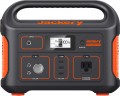 | 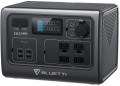 |
|---|---|---|
| Jackery Explorer 500 | BLUETTI PowerOak EB55 | |
from $449.99 | from $928.00 | |
| User reviews | ||
| TOP sellers | ||
3 USB A ports. Car cigarette lighter port DC5521. Flashlight. Jumps up to 1000 watts are allowed. No USB type C port. | 4 USB A ports, 1 USB-C port. Car cigarette lighter, DC5521 port. Jumps up to 1400 watts are allowed. Touchscreen. LiPo4 battery. 15W wireless charging power. Flashlight. | |
| In box | charging station | charging station |
| Rated power | 500 W | 700 W |
| Peak power | 1000 W | 1400 W |
| Output waveform | sinusoid (PSW) | sinusoid (PSW) |
Outputs | ||
| Sockets (230 V) | 1 | 2 |
| USB-A | 3 pcs 5В/2.4А 12 W | 4 pcs 5В/3A |
| USB-C | 1 pcs 5 A 100 W | |
| Wireless charging | 1 zone 15 W | |
| Car cigarette lighter |  | |
| DC output | 2x (12 V / 7 A) | |
Inputs (station charging) | ||
| From solar panels | | |
| DC input | 1x (12 – 30 V) | |
| Input port XT60 |  | |
Battery and charging time | ||
| Battery type | Li-Ion NMC | LiFePO4 |
| Battery capacity | 518 Wh | 537 Wh |
| Charging cycles | 500 | 2500 |
| Charging time (socket) ≈ | 450 min | 210 min |
| Charging time (socket + solar panel) ≈ | 138 min | |
| Charging time (solar panel) ≈ | 570 min | 210 min |
| Charging time (cigarette lighter) ≈ | 480 min | |
| Charging power (socket) | 200 W | |
| Charging power (solar panel) | 100 W | 200 W |
| Charging power (cigarette lighter) | 196 W | |
| Charging power (socket + solar panel) | 400 W | |
General | ||
| PSU | external | external |
| Display | | |
| Backlight | | |
| Carrying handle | | |
| Operating temperature | -10 °C ~ +40 °C | -20 °C ~ +40 °C |
| Dimensions (LxWxH) | 300x193x242 mm | 278x198x200 mm |
| Weight | 6.4 kg | 7.5 kg |
| Warranty | 2 years | |
| Added to E-Catalog | october 2022 | september 2022 |


Compare Jackery Explorer 500 and BLUETTI PowerOak EB55
When comparing the Jackery Explorer 500 and BLUETTI PowerOak EB55 charging stations, several key points can be noted. The Jackery Explorer 500 has a rated power of 500 W and a peak power of 1000 W, while the BLUETTI PowerOak EB55 offers higher specifications: 700 W rated and 1400 W peak power. In terms of outputs, Jackery provides one 230 V outlet and three USB-A ports, whereas BLUETTI offers two 230 V outlets and four USB-A ports, along with wireless charging. Users note that Jackery has a good build quality and an informative display, but a noisy fan, while BLUETTI is praised for its fast charging and multiple ports but criticized for the lack of screen information and noise during charging. The Jackery charging time from the network is about 450 minutes, while BLUETTI charges faster—about 210 minutes. In conclusion, if you need a more powerful and faster charging station with more outputs, it's worth considering the BLUETTI PowerOak EB55, whereas the Jackery Explorer 500 is suitable for less demanding tasks.
You may be interested in
My comparisons
Jackery Explorer 500 often compared


BLUETTI PowerOak EB55 often compared


Glossary
Rated power
Power that a device can consistently produce for an indefinitely long time without any unpleasant consequences. For normal operation of the charging station, the rated power must be at least 15 - 20% higher than the total power of all devices simultaneously connected to it.
Peak power
Some electrical appliances (in particular, units with electric motors - refrigerators, air conditioners, etc.) consume significantly more energy at startup than after reaching the operating mode. For such a load, the peak power of the charging station must be taken into account - its indicator must be higher than the starting power of the load.
Sockets (230 V)
Total number of outlets with output voltage. This is, in fact, the number of devices that can be simultaneously connected to the charging station without the use of splitters, extension cords and carriers. Accordingly, weaker charging stations have one or two sockets in their submission. Powerful charging stations already have three or more sockets “on board”.
USB-A
Full-size USB-A connectors are popular in computer technology, commonly used in charging adapters for 230 V household networks and 12 V car sockets. These outputs have become widespread in charging stations for charging gadgets.
— The total number of such ports can be quite varied (1 USB, 2 connectors, 3 ports, and even 4), as they allow for charging and, in some cases, powering various low-power devices — smartphones, tablets, power banks, lamps, and more.
— Current Strength. The maximum current delivered through the USB-A connector to the charging device. Note that different ports of the charging station may output different currents (for example, 1.5 A and 2.1 A). In such cases, the highest current strength is usually specified.
— Power. The maximum output power in watts (W) that the charging station is capable of delivering through the USB-A connector to a single charging gadget.
— The total number of such ports can be quite varied (1 USB, 2 connectors, 3 ports, and even 4), as they allow for charging and, in some cases, powering various low-power devices — smartphones, tablets, power banks, lamps, and more.
— Current Strength. The maximum current delivered through the USB-A connector to the charging device. Note that different ports of the charging station may output different currents (for example, 1.5 A and 2.1 A). In such cases, the highest current strength is usually specified.
— Power. The maximum output power in watts (W) that the charging station is capable of delivering through the USB-A connector to a single charging gadget.
USB-C
USB type C ports are smaller compared to classic USB ports and have a convenient reversible design that allows connecting the plug either way. USB type C was initially created to implement various advanced features: increased power, fast charging technologies, etc.
Since the port is relatively new and quite powerful (you can find USB type C with 60W, even 100W and 140W), the total number of such connectors is often limited to one port, or sometimes two).
— Current. The maximum current delivered through the USB type C port to the device being charged. Note that different ports of a charging station may deliver different currents (for example, 1.5A and 2.1A). In such cases, the highest current is usually specified.
— Power. The maximum power in watts (W) that the charging station can deliver to one charging gadget. The high output power of the USB type C port allows for faster charging. However, the device being charged must support the corresponding power; otherwise, the speed of the process will be limited by the gadget's specifications.
Since the port is relatively new and quite powerful (you can find USB type C with 60W, even 100W and 140W), the total number of such connectors is often limited to one port, or sometimes two).
— Current. The maximum current delivered through the USB type C port to the device being charged. Note that different ports of a charging station may deliver different currents (for example, 1.5A and 2.1A). In such cases, the highest current is usually specified.
— Power. The maximum power in watts (W) that the charging station can deliver to one charging gadget. The high output power of the USB type C port allows for faster charging. However, the device being charged must support the corresponding power; otherwise, the speed of the process will be limited by the gadget's specifications.
Wireless charging
In wireless charging mode, energy is transferred to the gadget being charged through an inductive surface, which is usually built into the upper plane of the charging station case. There can be one slot for wireless charging or several of them are provided. The range of this technology does not exceed a few centimeters. However, this method of charging eliminates the fuss with wires and reduces wear on the connectors. One of the key disadvantages of this format is considered to be low power and, accordingly, slow charging speed.
DC output
The presence of a DC connector (or several such outputs) in the device to power external gadgets with direct current. The standard DC jack is round and has a pin in the center. However, its dimensions may differ in depth and diameter. The voltage output to the DC output may be different. The most popular options are 18 - 20 V for powering laptops, 12 V for various specialized devices and automotive electrical accessories.
DC input
DC connector for a distinctive round plug (like those used in many laptops) used to recharge the battery of the device. Note that DC- in plugs may have different sizes, and chargers with such plugs may have different operating voltages. In practice, this leads to the fact that finding a suitable charger for a portable station is not easy, you need to be especially careful when searching.
Input port XT60
Power connector with two round connectors, used to replenish energy reserves in the battery cells of the charging station. For the most part, the input port of the XT60 is for charging the device from solar panels using the appropriate cable.