
Comparison Cougar Armor Pro vs Cougar Armor One
Add to comparison | 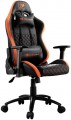 | 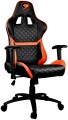 |
|---|---|---|
| Cougar Armor Pro | Cougar Armor One | |
| Compare prices 1 | from $247.56 | |
| User reviews | ||
| TOP sellers | ||
Comfortable fit. 180° reclining backrest. Upholstery in breathable eco-leather. | ||
| Features | gaming | gaming |
| Max. user weight | 120 kg | 120 kg |
Size and weight | ||
| Back height | 83 cm | 83 cm |
| Shoulder back width | 58 cm | 55 cm |
| Seat size (WxD) | 58x52 cm | 53x57 cm |
| Seat height | 38 - 45 cm | 39 - 48 cm |
| Weight | 21 kg | 21 kg |
Design | ||
| Base | cross with rollers | cross with rollers |
| Mechanism | Tilt (swing) | Tilt (swing) |
| Headrest |  |  |
| Armrests | | |
| Waist support | | |
| Removable cushions | | |
Adjustments | ||
| Backrest tilt | 170° | 180° |
| Rocking stiffness level | | |
| Seat height | | |
Armrests | ||
| Height from the seat | 32 cm | 25 cm |
| Adjustment | 3D height (up / down) turn (right / left) length (forward / backward) | 2D height (up / down) turn (right / left) |
Material | ||
| Seat material | leatherette | leatherette |
| Back material | leatherette | leatherette |
| Base material | metal | metal |
| Color | ||
| Added to E-Catalog | february 2020 | august 2018 |



Compare Cougar Armor Pro and Armor One
Chairs "Cougar Armor Pro" and "Cougar Armor One" have similar features, but there are several key differences. Both chairs are designed for gamers and support a maximum user weight of up to 120 kg. The "Armor Pro" offers a wider backrest (58 cm) and a larger seat width (58 cm) compared to the "Armor One" (55 cm and 53 cm respectively). The seat height on the "Pro" ranges from 38 to 45 cm, whereas on the "One" it ranges from 39 to 48 cm. Additionally, the "Armor Pro" has a backrest tilt of up to 170°, while the "Armor One" tilts up to 180°. The armrests on the "Pro" are higher (32 cm) and offer more adjustment options than those on the "One" (25 cm). Both chairs are made from leatherette and have a similar construction, but the "Armor Pro" provides slightly more comfort due to its size and adjustments.
Price comparison
You may be interested in
Cougar Armor Pro often compared


Cougar Armor One often compared


Glossary
Shoulder back width
The width of the back at the shoulders of the intended wearer.
In order to recline as much as possible on the back, this width should be no less than the actual width of the user's shoulders. At the same time, for more or less comfortable use, a smaller back size is also sufficient — approximately corresponding to the width of the back in the area of \u200b\u200bthe shoulders (between the outer edges of the shoulder blades). Well, anyway, this parameter is, on the one hand, secondary, and on the other, very subjective. This means that in most cases you can not pay much attention to it, however, if you have already decided to choose the furniture that is the most suitable in size, it is better not to measure your own back, but to test several chairs and determine the most convenient value by experience.
In order to recline as much as possible on the back, this width should be no less than the actual width of the user's shoulders. At the same time, for more or less comfortable use, a smaller back size is also sufficient — approximately corresponding to the width of the back in the area of \u200b\u200bthe shoulders (between the outer edges of the shoulder blades). Well, anyway, this parameter is, on the one hand, secondary, and on the other, very subjective. This means that in most cases you can not pay much attention to it, however, if you have already decided to choose the furniture that is the most suitable in size, it is better not to measure your own back, but to test several chairs and determine the most convenient value by experience.
Seat size (WxD)
Dimensions of the seat installed in the chair in width and depth (from the back to the front edge). For models with variable depth (see "Adjustments"), the maximum value is taken into account when the seat is pushed forward to the stop.
Most modern chairs are designed for the average adult, so paying attention to size is primarily for people of a large, or, conversely, miniature physique. In width, the average is considered to be 45 – 55 cm, the narrowest models are up to 40 cm wide, in the widest it can exceed 60 cm. Similarly, a depth of less than 40 cm is considered small, up to 60 cm — medium, more than 60 cm — large.
Most modern chairs are designed for the average adult, so paying attention to size is primarily for people of a large, or, conversely, miniature physique. In width, the average is considered to be 45 – 55 cm, the narrowest models are up to 40 cm wide, in the widest it can exceed 60 cm. Similarly, a depth of less than 40 cm is considered small, up to 60 cm — medium, more than 60 cm — large.
Seat height
Seat height from the floor. The optimal height for an average person is considered to be 40 – 50 cm, however, this is largely subjective, and the comfort of the chair for a specific user greatly depends on their preferences and physical characteristics. In light of this, many models offer the ability to adjust the height within a certain range (see "Adjustments"). For the best choice, it's best to "try out" in person to determine at what height you feel comfortable sitting and find a model with the corresponding features.
Headrest
The presence of a headrest in the design of the chair.
The role of the headrest can be played as a stand, made separately from the backrest, and the upper part of the backrest — if it has a pronounced characteristic shape or a pillow is supplied in the kit, which can be installed at the request of the user. The simplest high backs that do not have a characteristic upper part are not considered head restraints.
Anyway, this feature provides additional comfort — especially when reclining back. On the other hand, if you have to sit mostly straight in the chair and the back plays a symbolic role, perhaps the best choice would be a model without a headrest(especially since such chairs are cheaper).
The role of the headrest can be played as a stand, made separately from the backrest, and the upper part of the backrest — if it has a pronounced characteristic shape or a pillow is supplied in the kit, which can be installed at the request of the user. The simplest high backs that do not have a characteristic upper part are not considered head restraints.
Anyway, this feature provides additional comfort — especially when reclining back. On the other hand, if you have to sit mostly straight in the chair and the back plays a symbolic role, perhaps the best choice would be a model without a headrest(especially since such chairs are cheaper).
Backrest tilt
The ability to change the backrest tilt back and forth. Allows users to adjust the chair depending on how they prefer to sit: straight or slightly leaning back.
Height from the seat
The height of the armrests installed in the chair relative to the seat. In models that have the ability to adjust the armrests in height (see "Adjustments"), the range of such adjustment is usually indicated.
The overall comfort of using the chair depends on the height of the armrests, but this parameter is largely subjective: even people of the same height can differ in physique and personal preferences. So if comfort is of fundamental importance to you, it is best to check live what armrest height is optimal and choose a chair with the appropriate specifications.
The overall comfort of using the chair depends on the height of the armrests, but this parameter is largely subjective: even people of the same height can differ in physique and personal preferences. So if comfort is of fundamental importance to you, it is best to check live what armrest height is optimal and choose a chair with the appropriate specifications.
Adjustment
Armrest settings can be quite extensive. In everyday life, there is even a marking 1D, 2D, 3D, 4D, depending on the number of adjustments. The following adjustment options are available: height, length(forward / backward), width(right / left), tilt and swivel(right / left). More about them:
- Height. The ability to adjust the height of the armrests relative to the level of the seat. This feature allows you to adjust the arm rests for maximum comfort and minimize shoulder and neck fatigue.
- Turn (right / left). In this case, the possibility of turning the armrests to the right or left is implied, so that they are not parallel, but “look” in different directions.
— By length (forward / backward). Length adjustment refers to the ability to move the armrests back and forth for the convenience of placing hands under a certain physique of the user of a computer chair.
- By width (right / left). Adjusting the position of the armrests to the right or left in a horizontal plane. The stem adjustment contributes to a comfortable fit and allows you to adjust the chair to a certain arm span.
- By tilt. This adjustment assumes the presence of armrests mounted on swivel mounts. It can work as a height adjustment: turning the armrest in the mount changes not only i...ts inclination, but also the height of the point of contact with the arm. However, the matter is not limited to this: in many models, the handles can be placed vertically (raised or lowered) and, in fact, the armrests can be removed in this way.
If it is assumed that the position of the armrests can only be adjusted in height, they are marked with the designation 1D. For 2D armrests, in addition to the height adjustment, the ability to rotate the palm rests to the right / left (around the axis) is added. 3D armrests are adjustable in height, rotate around the axis and move back and forth. Finally, 4D armrests are considered the most functional - they additionally have the ability to shift the surface of the armrest to the side.
- Height. The ability to adjust the height of the armrests relative to the level of the seat. This feature allows you to adjust the arm rests for maximum comfort and minimize shoulder and neck fatigue.
- Turn (right / left). In this case, the possibility of turning the armrests to the right or left is implied, so that they are not parallel, but “look” in different directions.
— By length (forward / backward). Length adjustment refers to the ability to move the armrests back and forth for the convenience of placing hands under a certain physique of the user of a computer chair.
- By width (right / left). Adjusting the position of the armrests to the right or left in a horizontal plane. The stem adjustment contributes to a comfortable fit and allows you to adjust the chair to a certain arm span.
- By tilt. This adjustment assumes the presence of armrests mounted on swivel mounts. It can work as a height adjustment: turning the armrest in the mount changes not only i...ts inclination, but also the height of the point of contact with the arm. However, the matter is not limited to this: in many models, the handles can be placed vertically (raised or lowered) and, in fact, the armrests can be removed in this way.
If it is assumed that the position of the armrests can only be adjusted in height, they are marked with the designation 1D. For 2D armrests, in addition to the height adjustment, the ability to rotate the palm rests to the right / left (around the axis) is added. 3D armrests are adjustable in height, rotate around the axis and move back and forth. Finally, 4D armrests are considered the most functional - they additionally have the ability to shift the surface of the armrest to the side.