
Comparison chargers
Save List
Add to comparison | 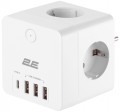 |
|---|---|
| 2E AD431WH | |
from $15.76 up to $26.29 | |
| TOP sellers | |
4 sockets with surge protection. | |
| Type | AC charger + pass-through AC adapter |
| USB-A ports | 3 pcs |
| USB-C ports | 1 pcs |
| Max. power (USB) | 17 W |
| Features | work indicator |
| Material | plastic |
| Color | |
| Added to E-Catalog | march 2024 |


You may be interested in
My comparisons
Glossary
Type
Among modern household chargers (for home and office) there are both classic network models and wireless devices (in the form factor of stands or pads), as well as pass-through sockets, docking stations for Android and Apple. Devices for cars, in turn, are divided into traditional wired car chargers(including cigarette lighter splitters — see “Cigarette Lighter Splitter” for them) and wireless. Here is a more detailed description of these options:
— Network charger. Classic wired chargers plugged into sockets. Somewhat less convenient and functional than docking stations, but much more compact and for the most part quite suitable for travel, since they take up minimal space in luggage. And compared to wireless chargers, wired models are noticeably cheaper, compatible with more devices, and often also work much faster. In addition, it is easier to implement special powerful fast charging technologies in such devices. And in conjunction with the new GaN production technology, they can also be reduced in size.
— GaN chargers. Chargers with GaN circuitry that can hold "multiple charges" in one compact housing. Instead of traditional silicon, their semiconductors use gallium nitride with increased voltage...conductivity. GaN chargers “refuel” gadgets at an accelerated pace through all available ports. Another significant advantage over traditional chargers is the reduction in the size of the charging unit without loss of power.
— Car charger. Devices designed for wired charging of gadgets from car on-board network. Usually, they use a standard cigarette lighter socket and are designed for cars and other similar equipment with 12 V networks, however, there are also models that are compatible with 24-volt networks of heavy trucks, buses, etc.; these nuances should be clarified separately.
— Wireless charger. Devices for charging gadgets wirelessly — usually, using Qi technology. Of course, the charger itself must be connected to the outlet using a cable, but the energy is transferred to the device being charged without any plugs and cables. The effective range of such a transmission is small, so this type of charger is traditionally made in the form of platforms or stands, where you need to directly place the charged gadgets. However, the wireless way of working is as user-friendly as possible, besides, it does not wear out the connectors; and some compact gadgets (for example, smartwatches) generally charge only in this way. The main disadvantages of this format are the high cost of chargers and limited compatibility (a relatively small number of gadgets, mostly quite expensive ones, support wireless charging). In addition, wireless chargers are less efficient than wired chargers, which increases procedure time and device power consumption. Thus, some models are equipped with ports for wired charging.
As for the differences between platforms and stands, the first form factor is more versatile and, together with the device being charged, takes up less space — the gadget lies flat on the platform. A platform is a good option for a portable device. The stand, in turn, assumes an inclined, almost vertical arrangement of the gadget — this allows you to see the display even while charging. On the other hand, such charger devices are more bulky than platforms and are more likely to be designed for stationary use.
— Wireless car charger. A rather specific variety: wireless charging devices powered by the vehicle's on-board network. Most often they are designed for a standard cigarette lighter plug with a voltage of 12 V, although it is technically quite possible to provide compatibility with 24-volt networks of trucks, buses and other heavy vehicles. The features of wireless charging are described in detail above, but here we note that driving in a car is associated with various shocks and tremors; therefore, such devices are made in the form of holders, and not stands/platforms. Such a holder may provide fastening on the dashboard and the ability to use the phone directly in the charging process (for example, as a navigator).
— Only for smartwatches. Chargers designed to be used exclusively with smartwatches and other wearable gadgets (such as fitness trackers). To be more precise, we are talking about gadgets that support an exclusively wireless format of work. Accordingly, the capabilities of a charger from this category are limited to the smartwatch charging area (usually only one), and there are no wired charging connectors in the design. Also note that chargers of this type are most often produced for a specific model or line of wearable gadgets, and compatibility with third-party devices in such cases is not guaranteed.
— Pass-through socket. Chargers with one or more sockets. In addition, they provide USB ports or specialized connectors for charging gadgets, while maintaining the availability of an outlet for standard household use. Most often, through sockets are combined with network chargers or GaN type chargers (see the corresponding paragraphs).
— Android dock stations. Docking stations designed to charge gadgets running Android OS. The docking station itself can be described as a stand with a wired charging feature. The gadget with such a design is installed vertically or almost vertically, with the plug down; and on the stand itself there is a power plug, which not only charges the installed device, but also plays the role of a latch. This plug can be in microUSB or USB-C format — both of these connectors are used in modern Android gadgets. It is also worth noting that some "docks" from this category have a narrow specialization and are made for specific device models (or devices from one manufacturer). However, there are also universal solutions where compatibility is limited by the type of connector and the screen size (moreover, the diagonal limitation can be quite solid — for example, up to 10.1").
In general, the docks are designed for permanent installation in one place. They are noticeably inferior to classic chargers in terms of ease of transportation, but they simplify the storage of gadgets and can be useful in some cases of their practical use — for example, when watching a movie from a tablet.
— Apple Lightning Dock. Docking stations designed for charging Apple gadgets and equipped with a Lightning connector (used in Apple portable technology since 2012). For more information about docking stations in general, see above, all this is true in this case too — with the adjustment for the fact that in the case of Apple technology, dock compatibility is usually limited only to the size of the device.
— Network charger. Classic wired chargers plugged into sockets. Somewhat less convenient and functional than docking stations, but much more compact and for the most part quite suitable for travel, since they take up minimal space in luggage. And compared to wireless chargers, wired models are noticeably cheaper, compatible with more devices, and often also work much faster. In addition, it is easier to implement special powerful fast charging technologies in such devices. And in conjunction with the new GaN production technology, they can also be reduced in size.
— GaN chargers. Chargers with GaN circuitry that can hold "multiple charges" in one compact housing. Instead of traditional silicon, their semiconductors use gallium nitride with increased voltage...conductivity. GaN chargers “refuel” gadgets at an accelerated pace through all available ports. Another significant advantage over traditional chargers is the reduction in the size of the charging unit without loss of power.
— Car charger. Devices designed for wired charging of gadgets from car on-board network. Usually, they use a standard cigarette lighter socket and are designed for cars and other similar equipment with 12 V networks, however, there are also models that are compatible with 24-volt networks of heavy trucks, buses, etc.; these nuances should be clarified separately.
— Wireless charger. Devices for charging gadgets wirelessly — usually, using Qi technology. Of course, the charger itself must be connected to the outlet using a cable, but the energy is transferred to the device being charged without any plugs and cables. The effective range of such a transmission is small, so this type of charger is traditionally made in the form of platforms or stands, where you need to directly place the charged gadgets. However, the wireless way of working is as user-friendly as possible, besides, it does not wear out the connectors; and some compact gadgets (for example, smartwatches) generally charge only in this way. The main disadvantages of this format are the high cost of chargers and limited compatibility (a relatively small number of gadgets, mostly quite expensive ones, support wireless charging). In addition, wireless chargers are less efficient than wired chargers, which increases procedure time and device power consumption. Thus, some models are equipped with ports for wired charging.
As for the differences between platforms and stands, the first form factor is more versatile and, together with the device being charged, takes up less space — the gadget lies flat on the platform. A platform is a good option for a portable device. The stand, in turn, assumes an inclined, almost vertical arrangement of the gadget — this allows you to see the display even while charging. On the other hand, such charger devices are more bulky than platforms and are more likely to be designed for stationary use.
— Wireless car charger. A rather specific variety: wireless charging devices powered by the vehicle's on-board network. Most often they are designed for a standard cigarette lighter plug with a voltage of 12 V, although it is technically quite possible to provide compatibility with 24-volt networks of trucks, buses and other heavy vehicles. The features of wireless charging are described in detail above, but here we note that driving in a car is associated with various shocks and tremors; therefore, such devices are made in the form of holders, and not stands/platforms. Such a holder may provide fastening on the dashboard and the ability to use the phone directly in the charging process (for example, as a navigator).
— Only for smartwatches. Chargers designed to be used exclusively with smartwatches and other wearable gadgets (such as fitness trackers). To be more precise, we are talking about gadgets that support an exclusively wireless format of work. Accordingly, the capabilities of a charger from this category are limited to the smartwatch charging area (usually only one), and there are no wired charging connectors in the design. Also note that chargers of this type are most often produced for a specific model or line of wearable gadgets, and compatibility with third-party devices in such cases is not guaranteed.
— Pass-through socket. Chargers with one or more sockets. In addition, they provide USB ports or specialized connectors for charging gadgets, while maintaining the availability of an outlet for standard household use. Most often, through sockets are combined with network chargers or GaN type chargers (see the corresponding paragraphs).
— Android dock stations. Docking stations designed to charge gadgets running Android OS. The docking station itself can be described as a stand with a wired charging feature. The gadget with such a design is installed vertically or almost vertically, with the plug down; and on the stand itself there is a power plug, which not only charges the installed device, but also plays the role of a latch. This plug can be in microUSB or USB-C format — both of these connectors are used in modern Android gadgets. It is also worth noting that some "docks" from this category have a narrow specialization and are made for specific device models (or devices from one manufacturer). However, there are also universal solutions where compatibility is limited by the type of connector and the screen size (moreover, the diagonal limitation can be quite solid — for example, up to 10.1").
In general, the docks are designed for permanent installation in one place. They are noticeably inferior to classic chargers in terms of ease of transportation, but they simplify the storage of gadgets and can be useful in some cases of their practical use — for example, when watching a movie from a tablet.
— Apple Lightning Dock. Docking stations designed for charging Apple gadgets and equipped with a Lightning connector (used in Apple portable technology since 2012). For more information about docking stations in general, see above, all this is true in this case too — with the adjustment for the fact that in the case of Apple technology, dock compatibility is usually limited only to the size of the device.
USB-A ports
The number of USB ports in the device design. Note that this refers only to classical, full-sized ports — the so-called USB-A; the number of USB-C ports, if available, is specified separately (see below).
The number of USB ports (of any type) corresponds to the number of gadgets that can be simultaneously connected to the charger using adapter cables or plugs for the corresponding port. At the same time, it should be noted that not all chargers are capable of providing full power to all charging outputs at once; for more details, see "Charging Current". As for the specific number of ports (USB-A and/or USB-C), nowadays relatively simple chargers with 1 port or 2 ports are the most popular. This is because individual chargers are usually purchased for one or two specific gadgets, and a larger number of charging outputs is comparatively rarely required. Nevertheless, you can easily find models with 3 ports and even more in the market.
The number of USB ports (of any type) corresponds to the number of gadgets that can be simultaneously connected to the charger using adapter cables or plugs for the corresponding port. At the same time, it should be noted that not all chargers are capable of providing full power to all charging outputs at once; for more details, see "Charging Current". As for the specific number of ports (USB-A and/or USB-C), nowadays relatively simple chargers with 1 port or 2 ports are the most popular. This is because individual chargers are usually purchased for one or two specific gadgets, and a larger number of charging outputs is comparatively rarely required. Nevertheless, you can easily find models with 3 ports and even more in the market.
USB-C ports
The number of USB-C ports provided in the design of the charger.
USB-C is a relatively new type of connector; it is slightly larger than microUSB and features a reversible design that allows you to insert the plug either way. Despite its compact size, these charging ports can offer quite advanced capabilities — particularly high power delivery and various quick charging technologies. On the other hand, in gadget chargers, this type of port is noticeably less common than full-sized USB (USB-A) ports and comes in smaller quantities — one, rarely two, and as a rarity three USB-C ports. This is because detachable cables typically rely on standard USB ports, which are easier to use with removable cables, and installing such ports in a charger (even a compact one) is not difficult. Therefore, in practice, it only makes sense to specifically look for a device with USB-C if you already have a compatible cable (or a gadget with a suitable plug).
USB-C is a relatively new type of connector; it is slightly larger than microUSB and features a reversible design that allows you to insert the plug either way. Despite its compact size, these charging ports can offer quite advanced capabilities — particularly high power delivery and various quick charging technologies. On the other hand, in gadget chargers, this type of port is noticeably less common than full-sized USB (USB-A) ports and comes in smaller quantities — one, rarely two, and as a rarity three USB-C ports. This is because detachable cables typically rely on standard USB ports, which are easier to use with removable cables, and installing such ports in a charger (even a compact one) is not difficult. Therefore, in practice, it only makes sense to specifically look for a device with USB-C if you already have a compatible cable (or a gadget with a suitable plug).
Max. power (USB)
The maximum energy level that the charger can deliver to a specific port. This parameter determines the charging speed of the gadget and the ability to power high-demand devices, such as laptops.
It's important to note that when using multiple ports simultaneously, the total power of the unit is often distributed among them, reducing the speed for each individual port. For example, a 65W adapter can deliver full power to a single laptop, but when a second smartphone is connected, it will share the resources, limiting the main port to, say, 45W. To achieve the stated maximum, it's necessary to use a quality cable, and the device being charged must support the corresponding charging power.
It's important to note that when using multiple ports simultaneously, the total power of the unit is often distributed among them, reducing the speed for each individual port. For example, a 65W adapter can deliver full power to a single laptop, but when a second smartphone is connected, it will share the resources, limiting the main port to, say, 45W. To achieve the stated maximum, it's necessary to use a quality cable, and the device being charged must support the corresponding charging power.
Features
— Operation indicator. In some models it also provides additional information about operating modes, malfunctions, etc. Most often, such a light indicator is in the form of a separate light or a clearly visible backlight system. And additional information can be provided by changing the colour of the backlight, by blinking, etc. However, even without these features, the operation indicator provides additional convenience in use. In particular, it allows you to determine whether the charger is receiving power and working normally — this can be useful when diagnosing various problems. It is also possible to use non-standard backlighting — for example, as a night light that makes it easier to navigate in an unlit room (especially since gadgets are often put on charge just at night).
— Display. Own display on the charger case. This is usually the simplest screen with a few characters, but it is enough to display various additional information that makes life easier for the user: current voltage and current values, fast charging status, error codes, etc. On the other hand, this complicates the design, but in fact such information is required less often; Therefore, very few chargers with displays are produced.
— Detachable charger power cable. Cable for connecting the charger to the power source, which has a removable design. By itself, connecting to a power outlet using a separate wire (both re...movable and non-removable) is rarely used in charger devices — mainly in devices for which the “plug on the case” type design is not suitable (this is primarily wireless models, as well as wired charger devices with an abundance of connectors and corresponding dimensions). Specifically, the removable design is convenient in two ways: firstly, the wire can be removed and compactly folded for storage and transportation, and secondly, if the cable is damaged, it can simply be replaced, no need to bother with repairs. The disadvantages include an increased probability of losing the cable, as well as a slightly lower reliability than with a non-removable design (the latter, however, becomes noticeable only with frequent connections/disconnections that wear out the connector).
— Non-detachable charger power cable. Cable for connecting the charger to the power source, rigidly fixed to the device and not intended to be disconnected. It occurs much less frequently than the removable one described above, since it is less convenient if necessary to compactly fold the device; and if the wire is damaged, most likely, you will have to carry the charger to a service centre. On the other hand, you can lose such a wire only together with the charger itself.
— Display. Own display on the charger case. This is usually the simplest screen with a few characters, but it is enough to display various additional information that makes life easier for the user: current voltage and current values, fast charging status, error codes, etc. On the other hand, this complicates the design, but in fact such information is required less often; Therefore, very few chargers with displays are produced.
— Detachable charger power cable. Cable for connecting the charger to the power source, which has a removable design. By itself, connecting to a power outlet using a separate wire (both re...movable and non-removable) is rarely used in charger devices — mainly in devices for which the “plug on the case” type design is not suitable (this is primarily wireless models, as well as wired charger devices with an abundance of connectors and corresponding dimensions). Specifically, the removable design is convenient in two ways: firstly, the wire can be removed and compactly folded for storage and transportation, and secondly, if the cable is damaged, it can simply be replaced, no need to bother with repairs. The disadvantages include an increased probability of losing the cable, as well as a slightly lower reliability than with a non-removable design (the latter, however, becomes noticeable only with frequent connections/disconnections that wear out the connector).
— Non-detachable charger power cable. Cable for connecting the charger to the power source, rigidly fixed to the device and not intended to be disconnected. It occurs much less frequently than the removable one described above, since it is less convenient if necessary to compactly fold the device; and if the wire is damaged, most likely, you will have to carry the charger to a service centre. On the other hand, you can lose such a wire only together with the charger itself.