
Comparison Wanbo T6 Max vs Samsung The Freestyle
Add to comparison | 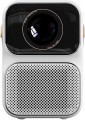 | 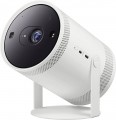 |
|---|---|---|
| Wanbo T6 Max | Samsung The Freestyle | |
from $428.72 | Compare prices 1 | |
| TOP sellers | ||
Stand that rotates 180 degrees. Microphone mute switch. The ability to connect external batteries in the form of a stand. The ability to connect the device instead of a conventional light bulb. | ||
| Main function | portable | portable |
| Operating system | Android TV 9.0 | Smart TV (proprietary system) |
Lamp and image | ||
| Lamp type | LED | LED |
| Service life | 20000 h | |
| Service life (energy-saving) | 20000 h | |
| Brightness | 550 lm | |
| Brightness ANSI Lumens | 650 lm | |
| Static contrast | 3 000:1 | 300:1 |
Projection system | ||
| Technology | LCD | DLP |
| Real resolution | 1920x1080 px | 1920x1080 px |
| Max. video resolution | 3840x2160 px | |
| Image format support | 4:3, 16:9, 16:10 | 4:3, 16:9, 16:10 |
| HDR support | + | |
| Brightness/contrast enhancement |  |  |
| Colour enhancement | | |
Projecting | ||
| Throw distance, min | 1.02 m | 0.79 m |
| Throw distance, max | 3.05 m | 2.68 m |
| Image size | 39.5 – 157.5 " | 30 – 100 " |
| Throw ratio | 1.35:1 | |
| Zoom and focus | motorized (remote-controlled) | motorized (remote-controlled) |
| Autofocus | | |
| Auto keystone correction | | |
Features | ||
| Features | DLNA support voice control | DLNA support voice control voice assistant |
| Bluetooth | v 5.0 | v 5.2 |
| Wi-Fi | Wi-Fi 5 (802.11ac) | Wi-Fi 5 (802.11ac) |
| AirPlay | + | v 2 |
| Miracast | | |
Hardware | ||
| CPU | AmIogic T972 | |
| RAM | 2 GB | 1.5 GB |
| Built-in memory | 16 GB | |
| USB-A 2.0 | 2 pcs | |
| USB-C | 1 pcs | |
| Number of speakers | 1 | |
| Sound power | 5 W | |
| Video connectors | composite AV-input | |
| HDMI inputs | 1 | 1 |
| Audio connectors | 3.5 mm output (mini-Jack) | |
General | ||
| Power source | mains | USB-C |
| Size (HxWxD) | 201x137x195 mm | 173x112x94 mm |
| Weight | 1.95 kg | 0.83 kg |
| Color | ||
| Added to E-Catalog | september 2023 | january 2022 |



Compare Wanbo T6 Max and Samsung The Freestyle
Wanbo T6 Max and Samsung The Freestyle projectors are both portable devices with LED lamps and a lifespan of up to 20,000 hours. However, the Wanbo T6 Max offers greater brightness (650 lm) compared to Samsung's 550 lm, as well as higher static contrast (3000:1 versus 300:1). Wanbo supports resolutions up to 4K, while both projectors have a native resolution of 1920x1080 pixels. The Freestyle stands out for its HDR support and enhancement of brightness and color, which might be important for users seeking high-quality images. In terms of functionality, both devices support Wi-Fi and Bluetooth, but The Freestyle features the more modern Bluetooth 5.2. Additionally, The Freestyle is lighter and more compact (0.83 kg versus 1.95 kg for Wanbo), making it more convenient to carry. Ultimately, the choice between them depends on preferences: Wanbo T6 Max offers better brightness and contrast, while Samsung The Freestyle provides more advanced image features and greater mobility.
Price comparison
You may be interested in
My comparisons
Wanbo T6 Max often compared


Samsung The Freestyle often compared


Glossary
Operating system
— Smart TV (proprietary system). The operating system of the projector is represented by the proprietary software shell of the manufacturer. Usually such operating systems have an attractive and convenient menu, similar to a traditional Smart TV. A proprietary operating system is developed by the manufacturer for the hardware resources of a particular projector model or a whole line. But, as practice shows, compared to the classic Smart TV, the functionality of proprietary system often has significant limitations, and the system itself, in fact, is a stripped-down version of a full-fledged Smart TV.
— Smart TV (Android AOSP). This type of operating system is a modification of the popular Android OS, mainly notable for being open source. It is a versatile operating system that gives the user much more freedom to create changes and customizations within the system. At the same time, the installation and work stability of certain applications on this platform are not guaranteed, and the overall system management was not specially “tailored” for large screens, which may cause some inconvenience. First of all, such solutions will will generate interest among users who understand the features of the Android OS, like to customize and control everything, and have time for this.
— Android TV. This type of projector has full-fledged Android TV software, spec...ially adapted to work on large screens. In accordance with the name, it is a type of Android OS, specially designed for projectors/TVs, etc. In addition to the common features of all “Androids” (such as the ability to install additional applications, including even games), it has a number of special features: optimized interface, integration with smartphones (including the ability to use them as a remote control), voice search, etc. Thanks to this, TVs with this feature are significantly superior in functionality to models with a Smart TV. Of course, a dedicated processor, graphics subsystem and memory are provided for the operation of a multifunctional OS, and the presence of such hardware resources is reflected in the total cost of the projector. Given the same optical design, models with Android TV will cost more than classic projectors with a simple multi-line menu.
Service life
Minimum projector lamp life as stated by the manufacturer. Specified by the total time of continuous operation. Note that if the projector was operated without violations, then upon reaching this time, the lamp will not necessarily fail — on the contrary, it can work for quite a long time. However, when evaluating durability, it is best to focus on the claimed service life.
Service life (energy-saving)
When working in economy mode, the brightness of the backlight is noticeably reduced, on average by 30-50%. With a decrease in brightness, heat dissipation also decreases, which saves the working life of the illuminator, thereby increasing the lamp life. Thus, the ECO mode allows you to extend the lamp life by an average of 30%. If the typical projector lamp life is 4000 hours, regular use of the ECO mode will extend the backlight life to approximately 5500 hours.
Brightness
The brightness of the image produced by the projector at maximum backlight brightness. Usually, the average brightness of the screen, derived from a special formula, is indicated. The higher it is, the less the image depends on ambient light: a bright projector can provide a clearly visible image even in daylight, but a dim one will require dimming. On the other hand, increasing brightness reduces contrast and accuracy of colour reproduction.
Accordingly, when choosing this parameter, you need to consider the conditions in which you plan to use the projector. So, for office or school/university use, a brightness of at least 3000 lm is desirable — this allows you to get normal visibility without obscuring the room. In turn, among the top models a very low brightness can be found, because. such projectors are usually installed in rooms specially designed for them with good darkness level. And in ultra-compact devices it is impossible to achieve high brightness for technical reasons.
Detailed recommendations on the optimal brightness for certain conditions can be found in special sources. Here we note that anyway, it is worth choosing according to this indicator with some margin. As mentioned above, as brightness increases, contrast and colour quality decrease, and you may need to use the projector at a reduced brightness to achieve the desired picture quality.
Accordingly, when choosing this parameter, you need to consider the conditions in which you plan to use the projector. So, for office or school/university use, a brightness of at least 3000 lm is desirable — this allows you to get normal visibility without obscuring the room. In turn, among the top models a very low brightness can be found, because. such projectors are usually installed in rooms specially designed for them with good darkness level. And in ultra-compact devices it is impossible to achieve high brightness for technical reasons.
Detailed recommendations on the optimal brightness for certain conditions can be found in special sources. Here we note that anyway, it is worth choosing according to this indicator with some margin. As mentioned above, as brightness increases, contrast and colour quality decrease, and you may need to use the projector at a reduced brightness to achieve the desired picture quality.
Brightness ANSI Lumens
This parameter largely determines the ability of the projector to work in a well-lit room. For a dark room, 1000 lumens is enough to make the projection picture bright, rich, clear and understandable. But when working in a lit room, the projector will need at least 3500-4000 lumens. Do not confuse ANSI lumens with Peak lumens. These are two different brightness standards. To convert one type of brightness to another, you need to multiply Peak lumens by 10-12. The result will be an approximate value of ANSI Lumens.
However, experts do not recommend chasing high ANSI lumen brightness values. There are many professional projectors with brightness up to 3500 lm. The lower the brightness, the lower the power consumption, and at the same time, the life of the illuminator increases. Of course, if the projector will be installed in a work office or classroom where good lighting is required, it is recommended to purchase a model with ANSI Lumens brightness of 4000 lumens and more.
Static contrast
The static contrast of the image provided by the projector.
Static contrast refers to the maximum difference between the brightest white light and the darkest black that a projector can provide within a single frame. Unlike dynamic contrast (see below), this parameter describes not conditional, but quite real capabilities of the device, achievable without the use of any additional tricks like auto-brightness. And since the quality of colour reproduction and detailing depend on contrast, the higher this indicator, the lower the likelihood that details will be indistinguishable in bright or dark areas.
Static contrast refers to the maximum difference between the brightest white light and the darkest black that a projector can provide within a single frame. Unlike dynamic contrast (see below), this parameter describes not conditional, but quite real capabilities of the device, achievable without the use of any additional tricks like auto-brightness. And since the quality of colour reproduction and detailing depend on contrast, the higher this indicator, the lower the likelihood that details will be indistinguishable in bright or dark areas.
Technology
The technology by which the projector sensor is built.
— DLP. This technology is based on a chip with thousands of rotary micromirrors. Each such mirror corresponds to one pixel and has two fixed positions — “lit” and “darkened”. In most DLP projectors, there is only one sensor, and the output of a colour image is provided by the colour wheel, thanks to which the projector alternately displays the red, green and blue image; they are replaced so quickly that the viewer perceives not individual frames, but a whole colour picture. Compared to LCD models (see related section), these single-sensor projectors are more compact and offer better image contrast with deep black levels (which improves black and white image quality). However, the brightness of the colour image in DLP devices is relatively low, in addition, they are subject to the "rainbow effect": in dynamic scenes, colour artifacts may be noticeable due to the mismatch of red, green and blue image components. Three-sensor DLP projectors don`t have these shortcomings; however, such a design is very expensive, so it is found rarely, mainly among premium devices.
— 3LCD. Technology based on the use of translucent LCD sensors. There are three such sensors, each of them is translucent with its base colour (red, green or blue), and the final colour “picture” is formed from three images simultaneously superimposed on each other. Thanks to...this format of operation, you can achieve brighter, more saturated colours than in single-sensor DLP projectors (see the relevant paragraph); in addition, this technology is completely devoid of the "rainbow effect". Among its shortcomings are the relatively low contrast ratio (in particular, due to the low black depth) and the larger size of the projectors.
— LCD(Liquid Crystal Display) — a colour rendering technology based on the modulation of light by liquid crystals. Do not confuse LCD and 3LCD sensors. 3LCD technology forms an image from three separate light streams, and in an LCD sensor, the image follows immediately from a single light beam. Sensors of this type provide a stable, contrasting and colour-rich image. Among the shortcomings of the technology, one can note the glimpse of the light grating, if you look at the picture from a close distance. Additionally, the substrate of LCD sensors is prone to fading, due to which the blue colour may begin to turn yellow over time (note that this can happen after a long time of active operation). LCD sensors require periodic maintenance, the service comes down to cleaning the air filter. LCD-sensor projectors are usually compact in size and light in weight, such models are prone to heat, and the noise threshold is above average.
— LCoS. A technology that combines the properties of DLP and LCD. Like LCD, it provides three separate sensors for the three primary colours (red, green, blue), and the final colour image is formed by the simultaneous superposition of these three components. The difference lies in the fact that in LCoS projectors the sensors are not translucent, but reflective. Thanks to this, you can achieve excellent contrast (as in DLP) combined with bright, high-quality colours without the "rainbow effect" (as in LCD). The main drawback of this technology is the impressive cost, which is why it is used mainly in premium projectors.
— DLP. This technology is based on a chip with thousands of rotary micromirrors. Each such mirror corresponds to one pixel and has two fixed positions — “lit” and “darkened”. In most DLP projectors, there is only one sensor, and the output of a colour image is provided by the colour wheel, thanks to which the projector alternately displays the red, green and blue image; they are replaced so quickly that the viewer perceives not individual frames, but a whole colour picture. Compared to LCD models (see related section), these single-sensor projectors are more compact and offer better image contrast with deep black levels (which improves black and white image quality). However, the brightness of the colour image in DLP devices is relatively low, in addition, they are subject to the "rainbow effect": in dynamic scenes, colour artifacts may be noticeable due to the mismatch of red, green and blue image components. Three-sensor DLP projectors don`t have these shortcomings; however, such a design is very expensive, so it is found rarely, mainly among premium devices.
— 3LCD. Technology based on the use of translucent LCD sensors. There are three such sensors, each of them is translucent with its base colour (red, green or blue), and the final colour “picture” is formed from three images simultaneously superimposed on each other. Thanks to...this format of operation, you can achieve brighter, more saturated colours than in single-sensor DLP projectors (see the relevant paragraph); in addition, this technology is completely devoid of the "rainbow effect". Among its shortcomings are the relatively low contrast ratio (in particular, due to the low black depth) and the larger size of the projectors.
— LCD(Liquid Crystal Display) — a colour rendering technology based on the modulation of light by liquid crystals. Do not confuse LCD and 3LCD sensors. 3LCD technology forms an image from three separate light streams, and in an LCD sensor, the image follows immediately from a single light beam. Sensors of this type provide a stable, contrasting and colour-rich image. Among the shortcomings of the technology, one can note the glimpse of the light grating, if you look at the picture from a close distance. Additionally, the substrate of LCD sensors is prone to fading, due to which the blue colour may begin to turn yellow over time (note that this can happen after a long time of active operation). LCD sensors require periodic maintenance, the service comes down to cleaning the air filter. LCD-sensor projectors are usually compact in size and light in weight, such models are prone to heat, and the noise threshold is above average.
— LCoS. A technology that combines the properties of DLP and LCD. Like LCD, it provides three separate sensors for the three primary colours (red, green, blue), and the final colour image is formed by the simultaneous superposition of these three components. The difference lies in the fact that in LCoS projectors the sensors are not translucent, but reflective. Thanks to this, you can achieve excellent contrast (as in DLP) combined with bright, high-quality colours without the "rainbow effect" (as in LCD). The main drawback of this technology is the impressive cost, which is why it is used mainly in premium projectors.
Max. video resolution
The actual maximum frame resolution that the projector is capable of processing and displaying.
Many models allow project images at a higher resolution than the actual resolution of the projector matrix (see above). For example, a 1920x1080 video can be displayed on a device with a frame size of 1024x768. However, the quality of such an image will be noticeably lower than on a projector, which initially has a resolution of 1920x1080.
The maximum resolution is closely related to both the overall picture quality and the size of the projection screen. The higher the resolution, the sharper the image details become. Of course, the screen size itself should be taken into account. The fact is that on a 40-50″ projection surface there will not be much difference between the Quad HD and 4K formats. A high-resolution picture will be able to show itself on a truly large screen.
Many models allow project images at a higher resolution than the actual resolution of the projector matrix (see above). For example, a 1920x1080 video can be displayed on a device with a frame size of 1024x768. However, the quality of such an image will be noticeably lower than on a projector, which initially has a resolution of 1920x1080.
The maximum resolution is closely related to both the overall picture quality and the size of the projection screen. The higher the resolution, the sharper the image details become. Of course, the screen size itself should be taken into account. The fact is that on a 40-50″ projection surface there will not be much difference between the Quad HD and 4K formats. A high-resolution picture will be able to show itself on a truly large screen.
HDR support
Support for HDR technology — expanded dynamic range — by the projector.
This technology allows for extending the brightness range displayed within a single frame — in simpler terms, it enables displaying both very bright and very dark colors on screen simultaneously. This significantly improves color reproduction; furthermore, small details on very bright or very dark parts of the frame that would be invisible on a regular image remain visible. However, it's worth noting that all the advantages of HDR become noticeable only on a high-quality screen with maximum dimming. Additionally, this function significantly affects the cost of the projector, and the content being played back must initially be recorded in HDR — using exactly the technology supported by the projector (this detail can be clarified in the manual). In light of this, HDR support is mainly found among high-end models for home theaters. It should also be noted that there are several different HDR technologies that are not compatible with each other. Therefore, when purchasing a projector with this function, it's crucial to clarify which exact version of HDR it supports. The following are available:
— HDR10. Historically the first of the consumer HDR formats, less advanced than the options described below but extremely widespread. In particular, HDR10 is supported by virtually all streaming services that provide HDR content at all, and it's also standard for...Blu-ray discs. It allows for working with a color depth of 10 bits (hence the name). At the same time, devices with this format are compatible with HDR10+ content, although its quality will be limited by the capabilities of the original HDR10.
— HDR10+. An enhanced version of HDR10. With the same color depth (10 bits), it uses so-called dynamic metadata, which allows transmitting information about color depth not only for groups of several frames but also for individual frames. This leads to further improvement in color reproduction.
— Dolby Vision. An advanced standard used, for example, in professional filmmaking. It achieves a color depth of 12 bits, uses the aforementioned dynamic metadata, and also allows transmitting two image variants simultaneously in one video stream — HDR and regular (SDR). Dolby Vision is based on the same technology as HDR10, so in modern video equipment, this format is usually combined with HDR10 or HDR10+.
— HLG. An HDR format initially designed for TV broadcasting and live transmissions; hence, it is designed for "working without metadata" and is easier to transfer between different sources. Unlike HDR10, which uses static metadata, and particularly HDR10+ / Dolby Vision, which can dynamically adjust the picture frame by frame, HLG often provides a more universal and predictable HDR signal, although not as precisely tuned for a specific display. However, HLG has a strong point — excellent compatibility: the same stream can appear acceptable even on devices that are not fully HDR-capable, which is crucial for broadcast/satellite content. An example of use is viewing HDR broadcasts and TV content from a set-top box/tuner or streaming where HLG is encountered: the projector will correctly receive the signal and display the extended brightness range and more vibrant colors without manual tweaking of settings.
This technology allows for extending the brightness range displayed within a single frame — in simpler terms, it enables displaying both very bright and very dark colors on screen simultaneously. This significantly improves color reproduction; furthermore, small details on very bright or very dark parts of the frame that would be invisible on a regular image remain visible. However, it's worth noting that all the advantages of HDR become noticeable only on a high-quality screen with maximum dimming. Additionally, this function significantly affects the cost of the projector, and the content being played back must initially be recorded in HDR — using exactly the technology supported by the projector (this detail can be clarified in the manual). In light of this, HDR support is mainly found among high-end models for home theaters. It should also be noted that there are several different HDR technologies that are not compatible with each other. Therefore, when purchasing a projector with this function, it's crucial to clarify which exact version of HDR it supports. The following are available:
— HDR10. Historically the first of the consumer HDR formats, less advanced than the options described below but extremely widespread. In particular, HDR10 is supported by virtually all streaming services that provide HDR content at all, and it's also standard for...Blu-ray discs. It allows for working with a color depth of 10 bits (hence the name). At the same time, devices with this format are compatible with HDR10+ content, although its quality will be limited by the capabilities of the original HDR10.
— HDR10+. An enhanced version of HDR10. With the same color depth (10 bits), it uses so-called dynamic metadata, which allows transmitting information about color depth not only for groups of several frames but also for individual frames. This leads to further improvement in color reproduction.
— Dolby Vision. An advanced standard used, for example, in professional filmmaking. It achieves a color depth of 12 bits, uses the aforementioned dynamic metadata, and also allows transmitting two image variants simultaneously in one video stream — HDR and regular (SDR). Dolby Vision is based on the same technology as HDR10, so in modern video equipment, this format is usually combined with HDR10 or HDR10+.
— HLG. An HDR format initially designed for TV broadcasting and live transmissions; hence, it is designed for "working without metadata" and is easier to transfer between different sources. Unlike HDR10, which uses static metadata, and particularly HDR10+ / Dolby Vision, which can dynamically adjust the picture frame by frame, HLG often provides a more universal and predictable HDR signal, although not as precisely tuned for a specific display. However, HLG has a strong point — excellent compatibility: the same stream can appear acceptable even on devices that are not fully HDR-capable, which is crucial for broadcast/satellite content. An example of use is viewing HDR broadcasts and TV content from a set-top box/tuner or streaming where HLG is encountered: the projector will correctly receive the signal and display the extended brightness range and more vibrant colors without manual tweaking of settings.