
Comparison Canyon CND-GP02 vs Canyon CND-GPW3
Add to comparison | 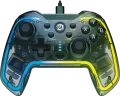 | 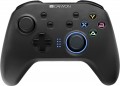 |
|---|---|---|
| Canyon CND-GP02 | Canyon CND-GPW3 | |
| Outdated Product | Outdated Product | |
| User reviews | ||
| TOP sellers | ||
Key backlight. Tactile feedback. Motion Sensor. Multiplatform. | ||
| Product type | gamepad | gamepad |
Connection | ||
| Platform | PC (Windows) Android Switch PlayStation 3 | PC (Windows) Android Switch PlayStation 3 |
| Interface | wired | radio |
| Wired interface | USB-A | |
| Max. polling rate | 125 Hz (8 ms) | |
| Cable length | 2 m | |
| Range | 10 m | |
| Receiver (Dongle) | USB A | |
Control | ||
| Number of buttons | 14 pcs | 12 pcs |
| Switch type | membrane | membrane |
| Feedback | vibration | vibration |
| D-pad | 4 position | 4 position |
| Sticks | 2 asymmetrical | 2 asymmetrical |
| Bumpers (shifts) | 2 pcs | 2 pcs |
| Triggers | 2 pcs | 2 pcs |
| Rear buttons | 4 pcs | |
Features | ||
| Turbo Function |  | |
| Backlight | RGB | multicolor |
| Button backlight |  | |
| Detachable cable | | |
Power supply | ||
| Power source | USB port | battery |
| Battery capacity | 600 mAh | |
| Operating time | 8 h | |
| Port on the device | USB-C | USB-C |
General | ||
| Material | plastic | plastic |
| Weight | 215 g | 200 g |
| Color | ||
| Added to E-Catalog | october 2023 | april 2020 |


Compare Canyon CND-GP02 and GPW3
You may be interested in
My comparisons
Canyon CND-GP02 often compared


Canyon CND-GPW3 often compared


Glossary
Interface
The way to connect the manipulator to the gaming device.
In general, such methods are divided into wired(in a conventional or serial format), wireless(radio, Bluetooth, or even both at once) or combined(a combination of wired and wireless formats in one model). Here is a more detailed description of the different options:
— Wired. The classic wired connection is a very popular option, especially among PC/Mac controllers and desktop consoles (see "Platform Compatibility"). But for portable gadgets, it is practically not used (and for AppleTV it is not used in principle). A wired connection is usually carried out via a USB connector, but other options are possible (again, depending on the supported platforms). The main disadvantage of controllers of this format is the limited freedom of movement; this is especially true when playing on a large screen, when you need a considerable distance from such a screen for comfortable viewing. On the other hand, wired accessories are noticeably lighter and cheaper than wireless ones, and the vast majority of such models receive energy from a USB port or a network (see "Power"), so the operating time is unlimited (although there are some exceptions). And the length of the cable is not so often critical: for example, a steering wheel or joystick mounted on a table right in front of the computer usually does not need a lon...g cable, and accessories for desktop consoles usually make the cable quite long.
— Wired serial. A variation of the wired connection described above, in which the controllers are connected in a “chain” through one port: one manipulator is connected to the gaming device, and the second to the first manipulator. In general, this is a rather rare option, used only in some paired sets of gamepads (see "Device type"). However, in some cases, such a connection turns out to be more convenient than the traditional one: it allows you to reduce the number of wires stretching to the set-top box.
— Wireless. The main advantage of all types of wireless connection is obvious: the absence of a cable, which limits mobility and can create inconvenience. And for motion controllers (see "Device type"), this option is, in fact, the only possible one at all (otherwise it would be at least problematic to use such a manipulator). In addition, it is wireless communication (for a number of reasons) that is most convenient for working with portable gadgets — smartphones and tablets. At the same time, the range of such a connection is usually sufficient to work at least within a large living room, and more often at greater distances. On the other hand, wireless controllers are noticeably more expensive than their wired counterparts. In addition, most of them use autonomous power (batteries or accumulator), which limits the time of continuous operation. And although this time can be quite significant, and batteries (and some batteries) can be quickly changed, you still cannot do without interruptions in work, and the charge may end at the most inopportune moment. The exception is some models with mains power, but they have a wire, in turn, “binds” the device to the outlet. As for specific methods of wireless communication, nowadays there are such options:
In general, such methods are divided into wired(in a conventional or serial format), wireless(radio, Bluetooth, or even both at once) or combined(a combination of wired and wireless formats in one model). Here is a more detailed description of the different options:
— Wired. The classic wired connection is a very popular option, especially among PC/Mac controllers and desktop consoles (see "Platform Compatibility"). But for portable gadgets, it is practically not used (and for AppleTV it is not used in principle). A wired connection is usually carried out via a USB connector, but other options are possible (again, depending on the supported platforms). The main disadvantage of controllers of this format is the limited freedom of movement; this is especially true when playing on a large screen, when you need a considerable distance from such a screen for comfortable viewing. On the other hand, wired accessories are noticeably lighter and cheaper than wireless ones, and the vast majority of such models receive energy from a USB port or a network (see "Power"), so the operating time is unlimited (although there are some exceptions). And the length of the cable is not so often critical: for example, a steering wheel or joystick mounted on a table right in front of the computer usually does not need a lon...g cable, and accessories for desktop consoles usually make the cable quite long.
— Wired serial. A variation of the wired connection described above, in which the controllers are connected in a “chain” through one port: one manipulator is connected to the gaming device, and the second to the first manipulator. In general, this is a rather rare option, used only in some paired sets of gamepads (see "Device type"). However, in some cases, such a connection turns out to be more convenient than the traditional one: it allows you to reduce the number of wires stretching to the set-top box.
— Wireless. The main advantage of all types of wireless connection is obvious: the absence of a cable, which limits mobility and can create inconvenience. And for motion controllers (see "Device type"), this option is, in fact, the only possible one at all (otherwise it would be at least problematic to use such a manipulator). In addition, it is wireless communication (for a number of reasons) that is most convenient for working with portable gadgets — smartphones and tablets. At the same time, the range of such a connection is usually sufficient to work at least within a large living room, and more often at greater distances. On the other hand, wireless controllers are noticeably more expensive than their wired counterparts. In addition, most of them use autonomous power (batteries or accumulator), which limits the time of continuous operation. And although this time can be quite significant, and batteries (and some batteries) can be quickly changed, you still cannot do without interruptions in work, and the charge may end at the most inopportune moment. The exception is some models with mains power, but they have a wire, in turn, “binds” the device to the outlet. As for specific methods of wireless communication, nowadays there are such options:
- bluetooth. Connecting via Bluetooth is convenient primarily because many modern gaming devices initially have built-in modules for such a connection. The list of such devices includes, in particular, almost all desktop consoles, smartphones, tablets and laptops, as well as many advanced PCs (including all Mac computers). Thus, the controller can be made compatible with numerous different devices, and most often no additional adapters are needed for the connection itself. However, if necessary — for example, for a desktop computer without Bluetooth — such an adapter can be purchased separately. With all this, the connection is carried out in the radio range and does not require direct visibility, and its range in open space is standardly at least 10 m (and often much more).
- Radio. Non-Bluetooth radio connection (see above). The specific features of such a connection largely depend on compatibility with gaming platforms (see above). For example, native radio standards are used by many desktop consoles, and connections to such devices are often made directly, without additional equipment. In turn, controllers with the ability to work on a PC (Mac) are equipped with special adapters, usually connected via USB (in this case, such models can also support a direct connection to the game console). But for mobile gadgets, this method of communication is not used — in this case, the Bluetooth described above is more justified.
- Bluetooth / radio. Ability to work in any of the options described above. All such controllers are made immediately for several platforms — consoles (of a particular series), mobile devices and computers; the specific combination of these options can be any, but there is always more than one. However such versatility significantly affects the cost, so in general there are very few models with such a connection. However, if we take not variety, but the total number, then this method is not as rare as one might think — for example, it is provided in the “native” gamepad for Xbox Series S / X consoles of the 2020 model.
Wired interface
— USB-A. A classic interface for connecting to a full-size USB port, which is still very common on PCs, consoles, TVs, and docking stations. This interface is particularly convenient for stationary use, when a gamepad or other controller connects directly without adapters or additional settings. Compared to USB-C, it is less modern in format but often wins in compatibility with older and universal devices.
— USB-C. A modern wired interface that is better suited for newer laptops, tablets, smartphones, and compact PCs. Its main advantage is that this port is more convenient for current technology and is more often used in mobile gaming accessories and new controllers. Compared to USB-A, it looks more modern and fits better into devices where full-size ports are few or nonexistent.
— MicroUSB. A compact wired interface that was more commonly found on older mobile devices, and in gaming controllers is mainly characteristic of controllers from previous generations.
— Lightning. A connection primarily designed for older Apple devices with the proprietary Lightning port. This option is especially useful for mobile controllers for the iPhone, when a direct connection to the smartphone is needed without switching to USB-C. Compared to USB-C, this interface is significantly narrower in application range, but it fits better for compatibility with older iPhones and some iPads.
— Proprietary. A brand-specific connection for a pa...rticular manufacturer. This option is usually designed for a specific device model or its own ecosystem of accessories, making it less universal compared to USB-A and USB-C. Its advantage is that the manufacturer can better tailor the shape, mounting, or power for their device, but the downside is less compatibility and more challenging cable replacement.
— USB-C. A modern wired interface that is better suited for newer laptops, tablets, smartphones, and compact PCs. Its main advantage is that this port is more convenient for current technology and is more often used in mobile gaming accessories and new controllers. Compared to USB-A, it looks more modern and fits better into devices where full-size ports are few or nonexistent.
— MicroUSB. A compact wired interface that was more commonly found on older mobile devices, and in gaming controllers is mainly characteristic of controllers from previous generations.
— Lightning. A connection primarily designed for older Apple devices with the proprietary Lightning port. This option is especially useful for mobile controllers for the iPhone, when a direct connection to the smartphone is needed without switching to USB-C. Compared to USB-C, this interface is significantly narrower in application range, but it fits better for compatibility with older iPhones and some iPads.
— Proprietary. A brand-specific connection for a pa...rticular manufacturer. This option is usually designed for a specific device model or its own ecosystem of accessories, making it less universal compared to USB-A and USB-C. Its advantage is that the manufacturer can better tailor the shape, mounting, or power for their device, but the downside is less compatibility and more challenging cable replacement.
Max. polling rate
The polling rate indicates how often the controller sends data about presses and movements to the system, usually measured in Hz, and it directly affects the sense of responsiveness. The higher the polling rate, the smaller the "time window" between your action and when it appears in the game, making control feel more precise, especially in shooters, fighting games, and rhythm games. However, the actual effect also depends on the type of connection: wired high frequency often provides more stable performance, while Bluetooth can be limited by protocol or power saving, so two identical game controllers may feel different in wired and wireless modes. Thus, if you play a competitive shooter, a higher polling rate helps "catch" micro-movements of the stick more accurately; for calm games, the difference might be barely noticeable.
Cable length
The length of the cable provided in the design or delivery set of the wired or combined controller (see "Connection").
In general, the meaning of this parameter is obvious: a longer cable gives more freedom of movement, but can create inconvenience at short distances. In fact, the length of the wire is important mainly in cases where a wired connection is used to play on a large screen: for comfortable viewing, it is desirable to be at a fairly large distance from such a screen. However, even in this case, a relatively short cable can be compensated for by the length of the wires going from the console (or other gaming device) to the screen, or even by connecting the set-top box to the screen wirelessly (many modern models have this capability). If the controller is used for a computer, this parameter can be ignored: the system unit or laptop is usually located in close proximity to the user, and even a fairly short wire is enough to connect.
In general, the meaning of this parameter is obvious: a longer cable gives more freedom of movement, but can create inconvenience at short distances. In fact, the length of the wire is important mainly in cases where a wired connection is used to play on a large screen: for comfortable viewing, it is desirable to be at a fairly large distance from such a screen. However, even in this case, a relatively short cable can be compensated for by the length of the wires going from the console (or other gaming device) to the screen, or even by connecting the set-top box to the screen wirelessly (many modern models have this capability). If the controller is used for a computer, this parameter can be ignored: the system unit or laptop is usually located in close proximity to the user, and even a fairly short wire is enough to connect.
Range
The range of the wireless connection provided by the gamepad.
Almost all modern wireless models work confidently at a distance of at least 2 – 3 metres. So you need to pay attention to this parameter mainly when the device is planned to be used at a greater distance from the computer. At the same time, when evaluating the range, note that it is indicated for perfect conditions: the absence of interference and obstacles in the signal path, the battery is fully charged, etc. In fact, the communication range may be somewhat less, so when choosing, it is worth taking a certain margin. Nevertheless, according to the claimed range, it is quite possible to evaluate the practical capabilities of different models and compare them with each other.
Almost all modern wireless models work confidently at a distance of at least 2 – 3 metres. So you need to pay attention to this parameter mainly when the device is planned to be used at a greater distance from the computer. At the same time, when evaluating the range, note that it is indicated for perfect conditions: the absence of interference and obstacles in the signal path, the battery is fully charged, etc. In fact, the communication range may be somewhat less, so when choosing, it is worth taking a certain margin. Nevertheless, according to the claimed range, it is quite possible to evaluate the practical capabilities of different models and compare them with each other.
Receiver (Dongle)
A small USB "flash drive" for connecting a gamepad to a device: you insert it into the port, and the controller works through a proprietary radio channel (usually more stable and with less latency than Bluetooth), so in shooters and racing games, the response feels more "wired." The dongle is convenient because it usually doesn't require manually searching for the device in settings — you plug it into a PC or TV and start playing, and the connection holds better over distance and through interference. It is important to consider the port type: the most common dongle is USB-A, which easily fits most PCs and TVs, but if a laptop only has USB-C, a USB-C to USB-A adapter will be necessary; a less common option is a USB-C dongle, which directly fits into modern laptops, the Steam Deck/similar consoles, and even smartphones with OTG.
Number of buttons
The total number of buttons provided in the design of the manipulator.
The more buttons — the more additional features you can "tie" to the manipulator, the lower the likelihood that during the game you will have to turn to other controls (for example, a PC keyboard). However, many game consoles (see "Platform Compatibility") provide a certain minimum number of buttons for a compatible gamepad — a smaller number simply would not allow full use of all the functions of the console. For example, the original PlayStation 4 controller has 11 buttons.
Note that the D-Pad (see below) is not included in this calculation: it is considered a specific control, although it is based on buttons.
The more buttons — the more additional features you can "tie" to the manipulator, the lower the likelihood that during the game you will have to turn to other controls (for example, a PC keyboard). However, many game consoles (see "Platform Compatibility") provide a certain minimum number of buttons for a compatible gamepad — a smaller number simply would not allow full use of all the functions of the console. For example, the original PlayStation 4 controller has 11 buttons.
Note that the D-Pad (see below) is not included in this calculation: it is considered a specific control, although it is based on buttons.
Rear buttons
Additional buttons located on the back panel of the gaming controller.
This feature is found exclusively among gamepads (see "Type"). As a rule, rear buttons are customizable and can be assigned to specific functions at the player's discretion or depending on the demands of a particular game. They are designed so that you can control the game without having to take your fingers off the main buttons or sticks. Rear panel additional buttons are particularly useful in first-person shooters and fighting games, where quick reactions and precise control play a crucial role in achieving success in the game.
This feature is found exclusively among gamepads (see "Type"). As a rule, rear buttons are customizable and can be assigned to specific functions at the player's discretion or depending on the demands of a particular game. They are designed so that you can control the game without having to take your fingers off the main buttons or sticks. Rear panel additional buttons are particularly useful in first-person shooters and fighting games, where quick reactions and precise control play a crucial role in achieving success in the game.
Backlight
Backlight gives the controller a unique and stylish appearance, highlighting its belonging to the gaming device segment. The simplest variations are single-color options. Specific colors can vary: red, turquoise, green, etc. The most advanced options are multicolor and RGB lighting. Multicolor systems are those that offer more than three color options, sometimes with intermediate shades. RGB lighting allows the user to choose virtually any shade based on preference and mood.