
Comparison Gamemax Aero black vs Gamemax Brufen C1 black
Add to comparison | 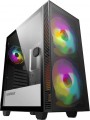 | 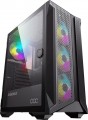 |
|---|---|---|
| Gamemax Aero black | Gamemax Brufen C1 black | |
from $46.70 | Outdated Product | |
| User reviews | ||
| TOP sellers | ||
Includes V3.0 PWM+ARGB (Rainbow) Hub (hub can only connect five fans + 2 ARGB strips) and remote control. Connecting 3-pin + ARGB 3-pin (+5V) fans. | ||
| Features | gaming | gaming |
| Form factor | Midi Tower | Midi Tower |
| Mount | vertical | vertical |
| Motherboard support | ATX | ATX |
| Board placement | vertical | vertical |
| PSU form factor | ATX (regular) | ATX (regular) |
Computer case | ||
| Dimensions (HxWxD) | 460x210x421 mm | 461x210x436 mm |
| Graphics card max lenght | 340 mm | 340 mm |
| Fan max height | 170 mm | 170 mm |
| Weight | 5.5 kg | 5.85 kg |
| Material | steel | steel |
| Sidewall thickness | 0.5 mm | 0.5 mm |
| Rubber feet |  | |
| Lighting type | backlit fan | backlit fan |
| Lighting colour | ARGB | ARGB |
| Lighting sync | multi compatibility | multi compatibility |
| Side panel | door | door |
Storage | ||
| PSU |  | |
| PSU mount | bottom | bottom |
| 3.5" bays | 2 | 2 |
| internal 2.5" compartments | 2 | 2 |
| Expansion slots | 7 | 7 |
Cooling | ||
| Installed fans | 3 шт | 4 шт |
| Fans (back) | 1x120mm | 1x120mm |
| Fans (front) | 2x200mm | 3x120mm |
| Fans (top) | 2x140mm | 2x140mm |
| Fans (bottom) | 2x120mm | 2x120mm |
| Fan mounts total | 7 | 8 |
| Dust filter | + | top and bottom |
| Integrated hub | | |
| Liquid cooling system support | | |
Liquid cooling system | ||
| Liquid cooling (rear) | 120 mm | 120 mm |
| Liquid cooling (front) | 280 mm | 280 mm |
| Liquid cooling (top) | 240mm | 240mm |
| Liquid cooling mounts | 3 | 3 |
Connectors and functions | ||
| Placement | on top of the case | on top of the case |
| Fan controler | | |
| USB-A 2.0 | 1 pcs | 1 pcs |
| USB-A 5Gbps | 1 pcs | 2 pcs |
| Audio (microphone/headphones) | | |
More features | ||
| Front panel | lattice | lattice |
| Side panel window | + | tempered glass |
| More features | hidden wiring CPU cooling mount window | hidden wiring CPU cooling mount window |
| Color | ||
| Added to E-Catalog | september 2021 | march 2021 |


Compare Gamemax Aero and Brufen C1
You may be interested in
My comparisons
Gamemax Aero often compared


Gamemax Brufen C1 often compared

Glossary
Installed fans
The more fans are included in the design, all else being equal — the more intense the cooling will be and the more powerful (and, consequently, "hotter") components can be placed in the case without the risk of overheating. For everyday tasks, a case with one, two, three, or four factory fans is quite sufficient. At the same time, when comparing, it is worth considering not only the number but also the operating characteristics of the fans (diameter, speed). It should also be noted that cases are available for purchase without fans but with open slots for fans, allowing you to supplement the cooling system and improve its performance if necessary.
Fans (front)
The number of fan slots on the front of the case, and the size of the fans these slots are designed for. The presence of the fans themselves in the kit should be specified separately.
The larger the fan, the more advanced it is considered: a large diameter allows you to work efficiently at relatively low speeds, which reduces the noise level and energy consumption. Case fans are available in several standard diameters; specifically for the front panel, the size up to 92 mm is considered relatively small, 120 mm — medium, 140 mm — large, and in the most advanced solutions, fans of 180 mm or even more can be installed.
Also note that most often the holes for installing fans are designed for one specific size, however, there are also “multi-size” seats, for 2-3 options. Moreover, these options may differ both in diameter and in quantity: for example, it may be possible to install two 140 mm fans or three 120 mm fans.
The larger the fan, the more advanced it is considered: a large diameter allows you to work efficiently at relatively low speeds, which reduces the noise level and energy consumption. Case fans are available in several standard diameters; specifically for the front panel, the size up to 92 mm is considered relatively small, 120 mm — medium, 140 mm — large, and in the most advanced solutions, fans of 180 mm or even more can be installed.
Also note that most often the holes for installing fans are designed for one specific size, however, there are also “multi-size” seats, for 2-3 options. Moreover, these options may differ both in diameter and in quantity: for example, it may be possible to install two 140 mm fans or three 120 mm fans.
Fan mounts total
The total number of places for installing fans provided in the chassis design.
The more performant the system, the more components it includes — the more powerful cooling it will need; therefore, the number of places for fans, usually, is directly related to the size and purpose of the case. It is also worth considering that with the same number, the installation location of individual fans may be different — behind, on the side, on top, etc.
The more performant the system, the more components it includes — the more powerful cooling it will need; therefore, the number of places for fans, usually, is directly related to the size and purpose of the case. It is also worth considering that with the same number, the installation location of individual fans may be different — behind, on the side, on top, etc.
Dust filter
The presence of a special filter in the housing to prevent dust from entering. Without such a filter, dust settles on the system elements; Radiators are especially susceptible to this; they also lose their efficiency by becoming clogged with dust. If you have a dust filter, you have to clean not the “filling” of the PC, but the filter element itself, which is much simpler and more convenient.
Compartments for dust filters can be located on the front panel of the case, back, bottom, top, or in the side walls. There are also case models with several technological niches for installing dust filters - the combined version assumes the presence of such compartments on several sides of the case at once.
Compartments for dust filters can be located on the front panel of the case, back, bottom, top, or in the side walls. There are also case models with several technological niches for installing dust filters - the combined version assumes the presence of such compartments on several sides of the case at once.
Integrated hub
A hub in a computer case for connecting fan and backlight control systems. Depending on the implementation, the complete hub can be installed inside the case or placed on its outer panel. Often, a remote control with an infrared transmitter is attached to the hub to control the "turntables" and decorative lighting of the "insides" of the case.
Fan controler
The ability to manually control the rotation speed of the fans installed in the case.
This function allows you to adjust the operation of the fans to the specific situation. For example, in cool weather with a light load, you can reduce the speed (or even turn off the fan altogether), reducing power consumption and noise level, and increase it when starting a demanding game. Also note that there are software tools that allow you to automatically adjust the speed of the fans; so that instead of manual control, this function can be entrusted to automation.
The fan control system is usually equipped with the most advanced case models.
This function allows you to adjust the operation of the fans to the specific situation. For example, in cool weather with a light load, you can reduce the speed (or even turn off the fan altogether), reducing power consumption and noise level, and increase it when starting a demanding game. Also note that there are software tools that allow you to automatically adjust the speed of the fans; so that instead of manual control, this function can be entrusted to automation.
The fan control system is usually equipped with the most advanced case models.
USB-A 5Gbps
Number of own USB-A 5Gbps ports (previously labeled as USB 3.2 gen1 and USB 3.0) provided in the case.
These ports are usually located at the front (see "Placement" for more details). They are most convenient for peripherals that need to be frequently connected and disconnected, like flash drives (for permanently connected devices, it is more convenient to use motherboard ports routed to the rear panel). Specifically, the 5Gbps standard replaced the above-mentioned USB 2.0, offering 10 times faster data transfer speeds (up to 4.8 Gbps) and higher power output, while USB 2.0 standard peripherals can also be connected to these ports.
It should be remembered that for proper port functioning, their quantity and versions must match the capabilities of the motherboard.
These ports are usually located at the front (see "Placement" for more details). They are most convenient for peripherals that need to be frequently connected and disconnected, like flash drives (for permanently connected devices, it is more convenient to use motherboard ports routed to the rear panel). Specifically, the 5Gbps standard replaced the above-mentioned USB 2.0, offering 10 times faster data transfer speeds (up to 4.8 Gbps) and higher power output, while USB 2.0 standard peripherals can also be connected to these ports.
It should be remembered that for proper port functioning, their quantity and versions must match the capabilities of the motherboard.
Side panel window
The presence of a viewing window on the side panel of the case, allowing you to see the “filling” without opening the case. It gives the case a stylish appearance; in addition, it allows you to install a lighting system inside, which is appreciated by gamers compared to case models without a window.
The materials for manufacturing the windows on the side panel are:
- Acrylic. Acrylic or plexiglass is an inexpensive material of relatively light weight, which, however, actively collects scratches and can be deformed when exposed to high temperatures.
- Strained glass. Tempered glass panels have excellent transparency, are resistant to scratches and are easy to clean from dirt. At the same time, they weigh a lot and can break to pieces if not handled carefully.
- Metal grid. Wire mesh is a simple type of window material used on the side panel of a cabinet. It allows air to pass through and provides additional heat removal from the internal components of the system unit; dust can leak through the mesh overnight.
The materials for manufacturing the windows on the side panel are:
- Acrylic. Acrylic or plexiglass is an inexpensive material of relatively light weight, which, however, actively collects scratches and can be deformed when exposed to high temperatures.
- Strained glass. Tempered glass panels have excellent transparency, are resistant to scratches and are easy to clean from dirt. At the same time, they weigh a lot and can break to pieces if not handled carefully.
- Metal grid. Wire mesh is a simple type of window material used on the side panel of a cabinet. It allows air to pass through and provides additional heat removal from the internal components of the system unit; dust can leak through the mesh overnight.