
Comparison Xerox C310 vs Xerox VersaLink B400
Add to comparison | 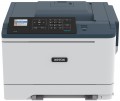 | 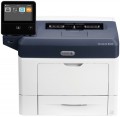 |
|---|---|---|
| Xerox C310 | Xerox VersaLink B400 | |
| Compare prices 3 | Compare prices 1 | |
| TOP sellers | ||
| Print formats | A4 | A4 |
| Print type | laser | laser |
| Output type | colour | monochrome |
| Number of colors | 4 | |
Print | ||
| Max. resolution | 1200x1200 dpi | 1200x1200 dpi |
| First page print time | 7 с | 8 с |
| Mono print | 33 ppm | 45 ppm |
| Colour print | 33 ppm | |
| Duplex printing |  | |
Printing supplies | ||
| Monthly resource | 80 K pages | 110 K pages |
| Mono cartridge resource | 3000 page | 5900 page |
| Colour cartridge resource | 2000 page | |
| Cartridges | 4 | 1 |
| Cartridge model | 006R04360, 006R04361, 006R04362, 006R04363 | 106R03581, 106R03583, 106R03585 |
| High-capacity cartridge support | | |
Features | ||
| Data transfer | PC connection (USB-B) network connection (LAN) Wi-Fi 4 (802.11n) USB-A (for flash drives) Wi-Fi Direct AirPrint | PC connection (USB-B) network connection (LAN) Wi-Fi 4 (802.11n) USB-A (for flash drives) NFC Wi-Fi Direct AirPrint |
| Cloud print | Mopria | Mopria |
| Screen | colour | touch color |
| Screen size | 2.4 " | 5 " |
Hardware | ||
| Grammage (min) | 60 g/m² | 60 g/m² |
| Grammage (max) | 200 g/m² | 220 g/m² |
| RAM | 1024 MB | 2048 MB |
| Clock Speed | 1000 MHz | 1050 MHz |
General | ||
| Feed tray | 250 sheets | 700 sheets |
| Output tray | 125 sheets | 250 sheets |
| Noise level | 56 dB | |
| Power consumption | 530 W | 565 W |
| Dimensions (WxDxH) | 442x421x308 mm | 459x426x339 mm |
| Weight | 21 kg | 14 kg |
| Color | ||
| Added to E-Catalog | january 2022 | april 2017 |



Compare Xerox C310 and VersaLink B400
Price comparison
You may be interested in
My comparisons
Xerox C310 often compared


Glossary
Output type
The number of colours the printer produces when printing. To date, there are monochrome(black and white) and colour(providing full-colour printing) printers. The former are considered optimal for documents and other official materials that do not require colour; the latter allow you to create a full-fledged image, but such printing is much more expensive, so you should pay attention to them only if the colour format is critical.
Number of colors
The color palette that the printer can print. A large number of colors is required for high-quality photo printing and obtaining color prints with many shades. The standard is 4 colors.
First page print time
The time from the receipt of a print command to the exit from the printer of the first page printed in black and white, in other words, how long after pressing the "Print" button, the user will receive the first page. Most often indicated for draft (fastest) print mode, higher quality will take longer. You should pay attention to this parameter if you often need to print small documents (on one or several pages) on the printer.
Mono print
The black and white print speed provided by the printer. It should be noted that this parameter is often indicated for low quality when the device is running at maximum performance; at a higher quality (even at standard), the actual speed can be noticeably lower, so you should choose with a certain margin. Also note that high speed significantly affects the price, power consumption and noise level. Therefore, it does not always make sense to chase maximum performance — for simple applications (for example, at home or in a small office), a relatively slow and inexpensive device may be the best choice.
As for specific values, speeds up to 20 ppm are considered relatively low, 20 – 30 ppm — average, 31 – 40 ppm — decent, and the fastest models are capable of delivering more than 40 pages per minute.
As for specific values, speeds up to 20 ppm are considered relatively low, 20 – 30 ppm — average, 31 – 40 ppm — decent, and the fastest models are capable of delivering more than 40 pages per minute.
Colour print
Colour print speed provided by the printer. Usually, the specifications give speed at low quality, when performance is highest; on standard and especially high settings, the print speed can be noticeably lower, so it’s worth choosing with a certain margin. It is also worth considering that high speed significantly affects the price, power consumption and noise level. Therefore, it does not always make sense to chase maximum performance — for simple applications and small print volumes, a relatively slow and inexpensive device may be the best choice.
The "slowest" colour printers today are capable of delivering less than 10 pages per minute. A more decent value is considered 10 – 20 ppm, a speed of more than 20 ppm can already be called quite good, and in the fastest models this figure exceeds 30 ppm.
The "slowest" colour printers today are capable of delivering less than 10 pages per minute. A more decent value is considered 10 – 20 ppm, a speed of more than 20 ppm can already be called quite good, and in the fastest models this figure exceeds 30 ppm.
Monthly resource
The maximum number of pages the printer can print in a month while still operating at full capacity.
Mono cartridge resource
The maximum number of pages that the printer's ink (toner) can print. The value is rather conditional, in reality the deviations from the norm are very large (up or down). In inkjet printers, the cartridge life is relatively small and amounts to several hundred prints. In laser and LED devices, the bill is already in the thousands.
Colour cartridge resource
The maximum number of pages that the printer's ink (toner) can print. The value is rather conditional, in reality the deviations from the norm are very large (up or down). In inkjet printers, the cartridge life is relatively small and amounts to several hundred prints. In laser and LED devices, the bill is already in the thousands.
Cartridges
The number of ink cartridges required for the full operation of the printer. In black and white devices, usually, one cartridge is installed. For colour printing, at least 4 colours are required (CMYK colour scheme), however, cartridges in such devices can be installed as 4 (one for each colour), or only 2 — black and "colour". The latter is essentially three multi-coloured cartridges in one case; This design somewhat reduces the cost, but creates certain inconveniences: when the supply of ink of one colour is exhausted, the entire colour cartridge becomes inoperative. However, this disadvantage is not critical if the possibility of refueling is provided.
Printers designed for more than 4 cartridges are also available. This design means that this model uses one of the extended colour schemes; this, on the one hand, contributes to high-quality colour reproduction, on the other hand, it significantly affects the price. In the most advanced photo printers, the number of cartridges can reach 9.
Printers designed for more than 4 cartridges are also available. This design means that this model uses one of the extended colour schemes; this, on the one hand, contributes to high-quality colour reproduction, on the other hand, it significantly affects the price. In the most advanced photo printers, the number of cartridges can reach 9.